What is RabbitMQ? A Beginner's Guide to Reliable Message Queuing
Learn RabbitMQ from scratch with this comprehensive beginner's guide. Explore message queues, exchanges, AMQP, microservices, RabbitMQ vs Kafka, real-world use cases, and best practices for building reliable, scalable applications.
Introduction
Modern applications are expected to be fast, reliable, and capable of handling thousands - or even millions - of user requests every day. Whether you're building an e-commerce platform, a banking application, a food delivery service, or a social media platform, your application often needs to perform multiple tasks behind the scenes after a user takes an action.
For example, imagine a customer places an order on an online shopping website. The application must process the payment, update inventory, generate an invoice, send an email confirmation, notify the shipping team, and perhaps even update analytics dashboards. If all these tasks are performed one after another while the user waits, the application becomes slower and less responsive.
This is where RabbitMQ becomes valuable.
RabbitMQ is a message broker that acts as an intermediary between different parts of an application. Instead of requiring one service to wait for another to complete its work, RabbitMQ allows services to exchange messages asynchronously. Messages are stored safely in queues until the receiving service is ready to process them.
By introducing a messaging layer, applications become more scalable, fault-tolerant, and easier to maintain. RabbitMQ is widely used in cloud-native applications, distributed systems, and microservices architectures because it simplifies communication between independent services while improving overall system performance.
In this guide, you'll learn what RabbitMQ is, why message brokers are important, and how RabbitMQ enables reliable communication between applications.
What is RabbitMQ?
RabbitMQ is an open-source message broker that helps applications communicate by sending, receiving, and storing messages. It acts as a bridge between different services, ensuring that information reaches the correct destination even if the receiving service is temporarily unavailable.
Rather than allowing services to communicate directly with each other, RabbitMQ introduces a queue-based messaging system. One application sends a message, RabbitMQ stores it securely, and another application retrieves it when it is ready.
Think of RabbitMQ as a postal service.
A sender writes and posts a letter.
The post office receives and sorts the letter.
The letter waits until it can be delivered.
The recipient collects and reads it.
The sender does not need to know exactly when the recipient receives the letter, and the recipient does not need to be available the moment the letter is sent. RabbitMQ works in a similar way by handling message delivery between applications.
For example, when a customer uploads an image to a website, the application can immediately confirm that the upload was successful. At the same time, RabbitMQ places tasks such as image resizing, thumbnail generation, virus scanning, and cloud storage into separate queues. Background workers process these tasks independently without slowing down the user experience.
This asynchronous communication allows applications to remain responsive while long-running operations are handled efficiently in the background.
RabbitMQ supports multiple programming languages, including Java, Python, C#, JavaScript (Node.js), Go, PHP, and Ruby, making it a popular choice for organizations using different technology stacks.
Why Are Message Brokers Needed?
As applications grow in size and complexity, direct communication between services becomes increasingly difficult to manage.
Imagine an online shopping platform where the Order Service directly calls the Payment Service, Inventory Service, Email Service, Shipping Service, and Notification Service. If any one of these services becomes slow or unavailable, the entire order process may be delayed or fail.
This creates several challenges:
Services become tightly connected, making updates difficult.
A temporary failure in one service can affect the entire application.
Heavy traffic may overload critical services.
Long-running tasks increase response times for users.
A message broker solves these problems by introducing an intermediate layer between services.
Instead of calling every service directly, the Order Service sends a message to RabbitMQ. RabbitMQ stores the message in a queue, and each service retrieves and processes it independently. If one service is temporarily offline, the message remains safely in the queue until the service becomes available again.
Using a message broker provides several important benefits:
Faster User Experience
Applications can respond to users immediately while background tasks continue independently.
Better Scalability
If message volume increases, additional consumer instances can be added to process messages in parallel without changing the producer.
Improved Reliability
RabbitMQ can retain messages until they are successfully processed, reducing the risk of losing important data during temporary outages.
Loose Coupling
Services communicate through messages rather than direct API calls. This allows developers to modify, replace, or scale services without affecting the rest of the system.
Fault Tolerance
When a consumer fails unexpectedly, RabbitMQ can keep the message in the queue so another consumer can process it later.
These advantages make RabbitMQ an essential component in modern distributed systems and microservices.
How RabbitMQ Works
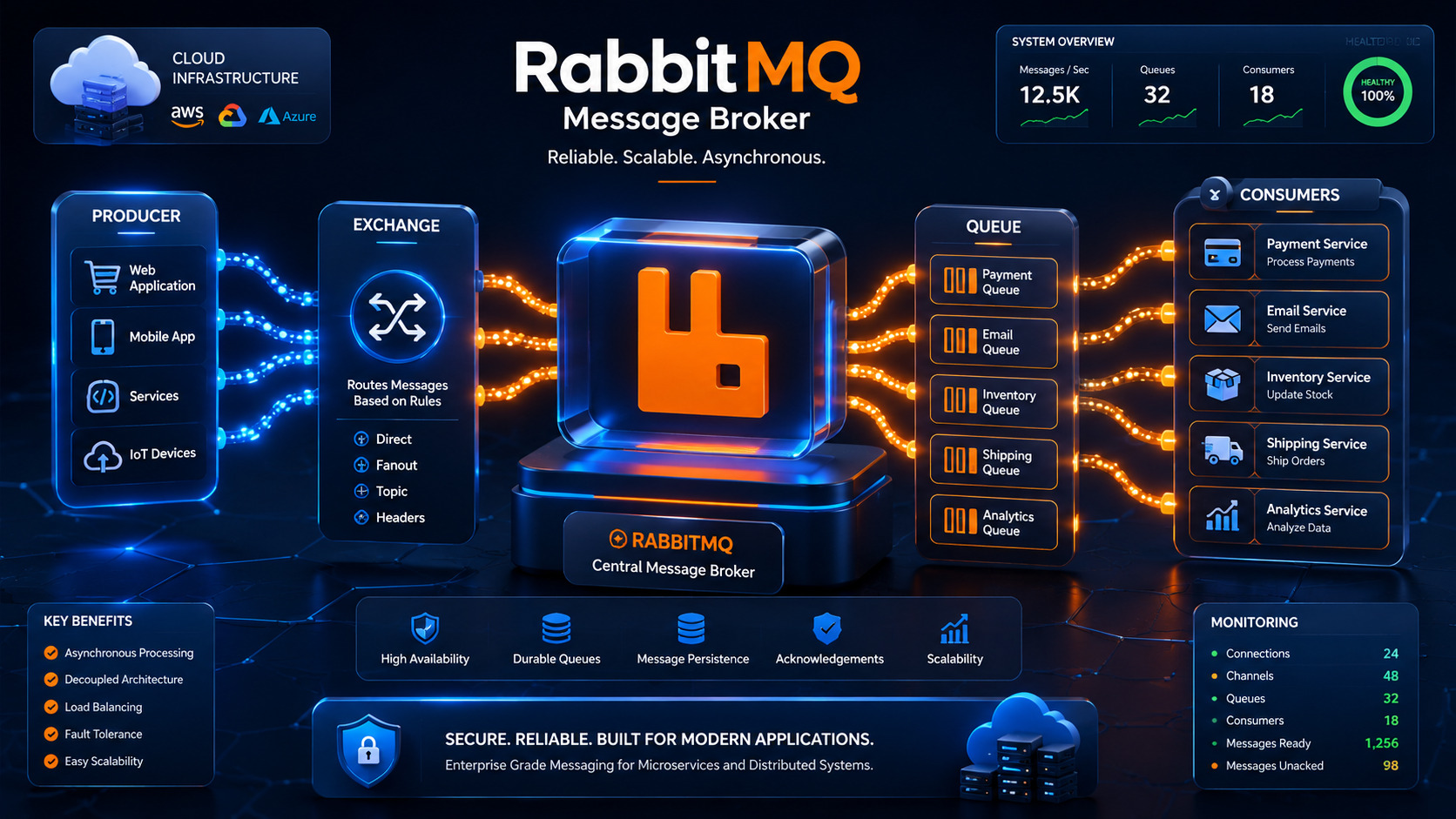
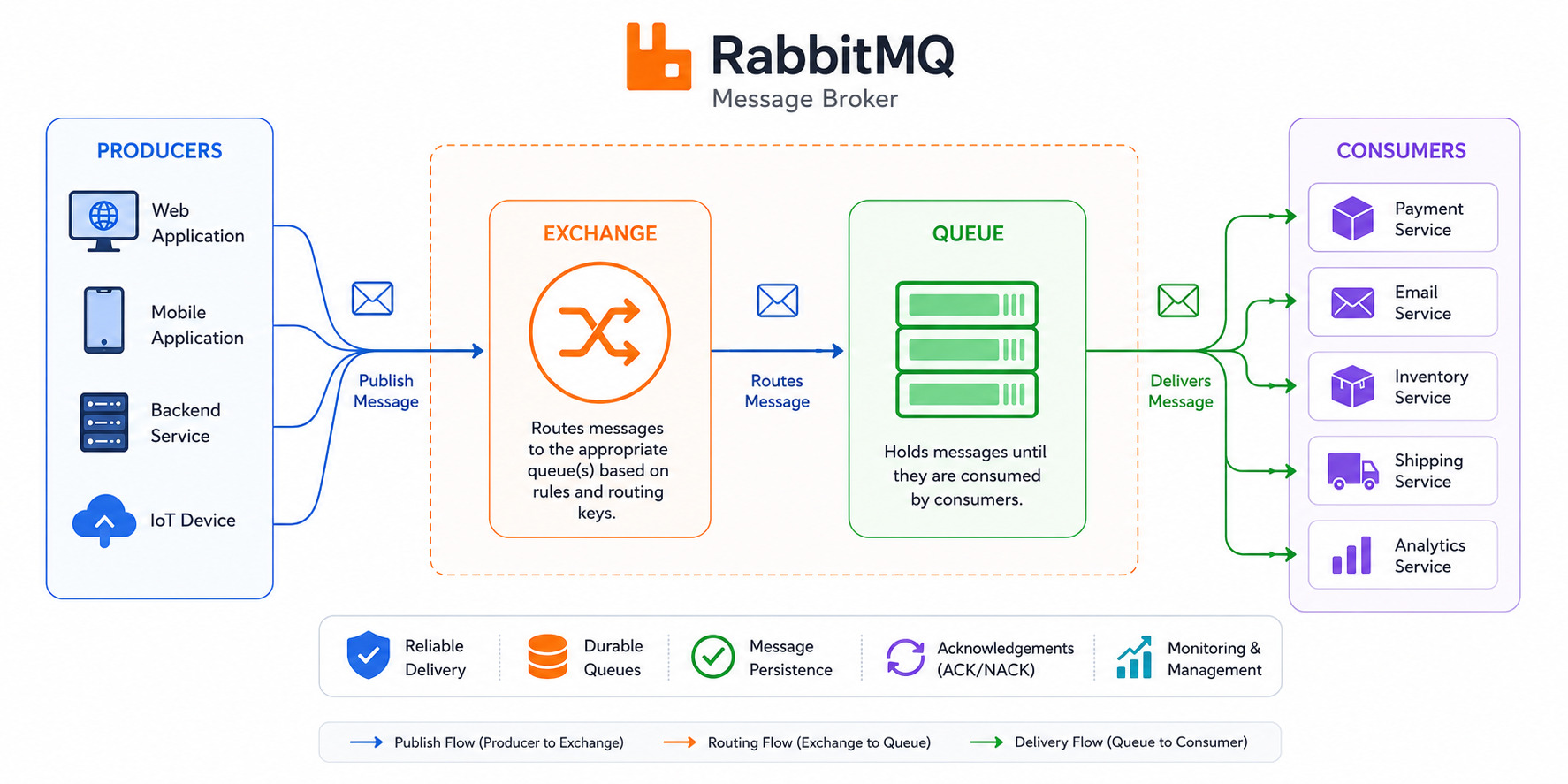
RabbitMQ follows a straightforward but powerful message flow. Instead of one application communicating directly with another, RabbitMQ manages message routing and delivery.
The process typically works as follows:
Step 1: The Producer Creates a Message
A producer is any application or service that generates information. For example, when a customer places an order, the Order Service creates a message containing details such as the order ID, customer information, and order status.
Step 2: The Message Is Sent to RabbitMQ
Rather than sending the message directly to another service, the producer sends it to RabbitMQ. RabbitMQ receives the message and determines where it should go based on its routing configuration.
Step 3: RabbitMQ Routes the Message
RabbitMQ uses components called exchanges to decide which queue or queues should receive the message. The routing decision depends on exchange type, bindings, and routing keys, allowing messages to be delivered to the appropriate destination.
Step 4: The Message Waits in a Queue
After routing, the message is placed into a queue. It remains there until a consumer is ready to process it. This buffering capability allows producers and consumers to work independently and at different speeds.
Step 5: The Consumer Processes the Message
A consumer continuously listens for new messages. When one becomes available, the consumer retrieves it and performs the required task, such as sending an email, processing a payment, updating inventory, or generating a report.
Once the task is completed successfully, the consumer acknowledges the message, informing RabbitMQ that it has been processed. RabbitMQ can then safely remove the message from the queue.
This workflow ensures reliable communication while allowing each application component to operate independently.
A Simple Real-World Example
Consider a food delivery application.
When a customer places an order:
The mobile app sends the order request.
The Order Service stores the order.
RabbitMQ receives messages for multiple background tasks.
The Payment Service processes the payment.
The Restaurant Service receives the new order.
The Notification Service sends a confirmation message.
The Delivery Service assigns a driver.
Because each service processes its own messages independently, the customer receives an instant confirmation instead of waiting for every task to finish.
RabbitMQ Architecture: Understanding Its Core Components
In the previous part, we learned what RabbitMQ is, why message brokers are important, and how RabbitMQ enables asynchronous communication between applications. Now, let's explore the building blocks that make RabbitMQ work efficiently.
Understanding these core components will help you design reliable and scalable messaging systems.
Producer
A Producer is any application or service that sends messages to RabbitMQ. It is the starting point of the messaging process.
A producer does not send messages directly to another application. Instead, it publishes messages to an Exchange, which then decides where the message should be delivered.
Example
Imagine an online shopping website.
When a customer clicks the "Place Order" button:
The Order Service creates an order.
It sends a message such as:
Order ID: 10025
Customer: John
Status: New Order
RabbitMQ receives the message and routes it to the appropriate queue.
The producer doesn't need to know who will process the message. Its only responsibility is to publish it.
Consumer
A Consumer is an application or service that receives messages from a queue and processes them.
Consumers continuously listen for new messages. As soon as RabbitMQ delivers a message, the consumer performs the required task.
A system can have multiple consumers working together to process messages faster.
Example
Continuing the e-commerce example:
Different consumers may handle different responsibilities:
Payment Service → Processes payments
Inventory Service → Updates stock
Email Service → Sends confirmation emails
Shipping Service → Creates shipment requests
Each consumer works independently, making the overall system faster and more scalable.
Queue
A Queue is one of the most important components in RabbitMQ.
It temporarily stores messages until they are processed by consumers.
Think of a queue as a waiting line.
Just as customers wait in line at a ticket counter, messages wait in a queue until a consumer is available.
Why Queues Matter
Queues help balance workloads between producers and consumers.
For example:
A producer may generate 10,000 messages in one minute.
Consumers may only process 2,000 messages during that time.
Instead of losing messages, RabbitMQ safely stores the remaining messages in the queue until consumers catch up.
This ensures reliable message delivery even during periods of heavy traffic.
Exchange
An Exchange is responsible for receiving messages from producers and deciding which queue (or queues) should receive them.
One important point to remember is:
Producers never send messages directly to queues.
Instead, every message first reaches an exchange.
The exchange examines routing information and forwards the message to the appropriate destination.
This routing mechanism makes RabbitMQ extremely flexible.
Binding
A Binding is the connection between an exchange and a queue.
It tells RabbitMQ:
"Messages matching these conditions should be delivered to this queue."
Without bindings, exchanges wouldn't know where to send messages.
You can think of a binding as a road connecting an exchange to one or more queues.
Multiple queues can be connected to the same exchange using different bindings.
Routing Key
A Routing Key is a text value attached to a message.
RabbitMQ uses it to determine where the message should go.
For example:
order.created
order.cancelled
payment.completed
payment.failed
When a producer sends a message with the routing key:
order.createdRabbitMQ checks the bindings and delivers the message to queues configured to receive order creation events.
Routing keys provide precise control over message delivery.
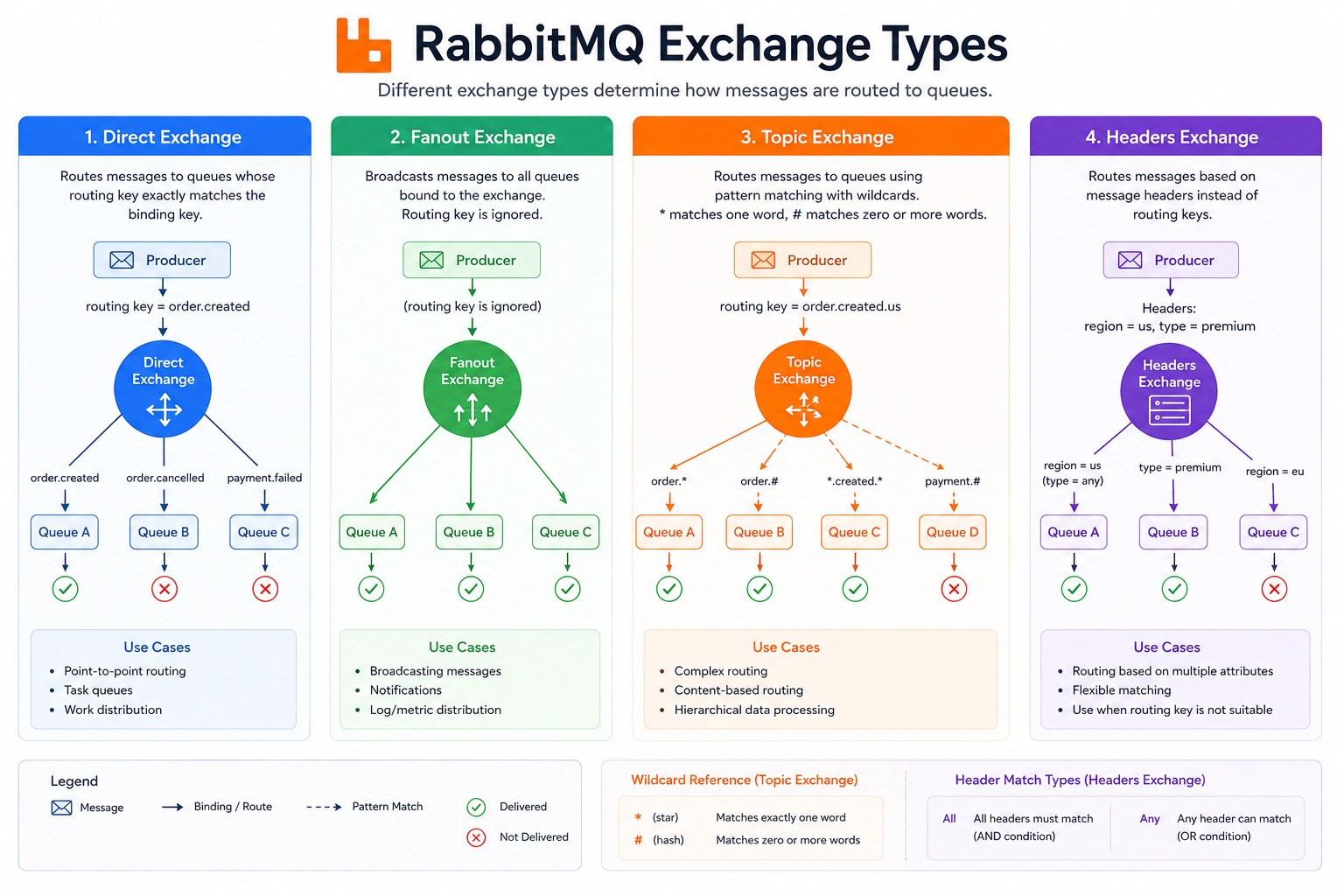
Exchange Types
RabbitMQ supports several exchange types, each designed for different routing scenarios.
1. Direct Exchange
A Direct Exchange delivers a message only to the queue whose binding key exactly matches the message's routing key.
Example
Routing Key:
payment.successOnly the queue bound with:
payment.successreceives the message.
Best for:
Order processing
Payment systems
User notifications
Task queues
2. Fanout Exchange
A Fanout Exchange ignores routing keys completely.
Instead, it broadcasts every message to all connected queues.
Example
When a new product is launched:
Email Service receives it.
SMS Service receives it.
Analytics Service receives it.
Logging Service receives it.
Everyone gets the same message.
Best for:
Notifications
Broadcasting events
Cache refresh
Logging
3. Topic Exchange
A Topic Exchange uses wildcard patterns to route messages.
Common wildcards include:
*Matches exactly one word.
#Matches zero or more words.
Example
Routing Key:
order.created.indiaBinding Pattern:
order.*Matches:
order.created
order.cancelled
Another binding:
order.#Matches:
order.created
order.created.india
order.updated.delhi
Topic exchanges are ideal for applications requiring flexible routing.
4. Headers Exchange
A Headers Exchange routes messages based on message headers rather than routing keys.
Example headers:
Region = Asia

Priority = High

Department = Finance
RabbitMQ compares message headers with queue binding rules before delivering the message.
Although less commonly used, Headers Exchanges are useful when routing depends on multiple message attributes.
Message Lifecycle
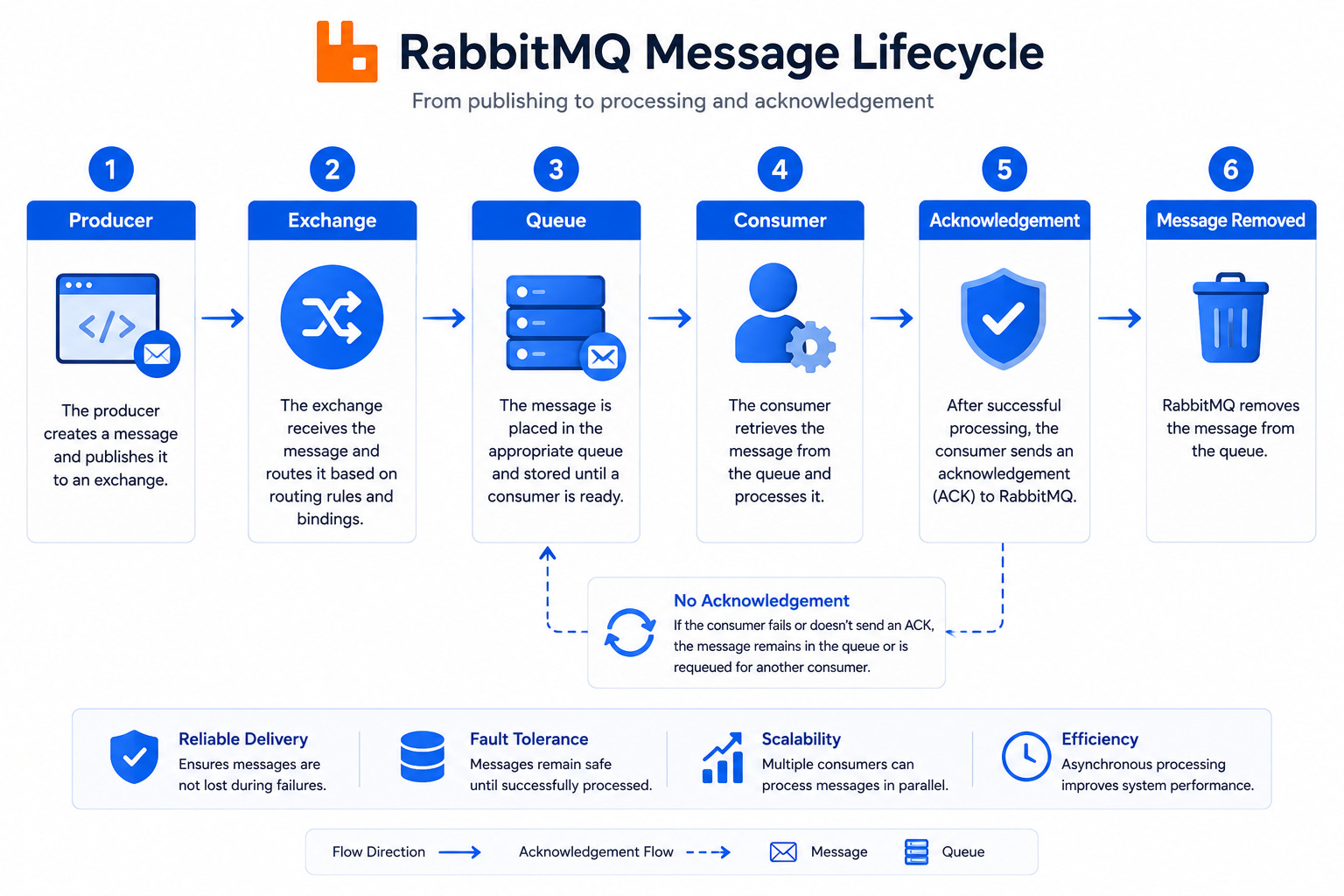
Every message in RabbitMQ follows a predictable lifecycle.
Step 1
A producer creates a message.
↓
Step 2
The message is published to an exchange.
↓
Step 3
The exchange examines routing information.
↓
Step 4
The message is forwarded to one or more queues.
↓
Step 5
The queue stores the message safely.
↓
Step 6
A consumer retrieves the message.
↓
Step 7
The consumer processes the task.
↓
Step 8
RabbitMQ receives an acknowledgment confirming successful processing.
↓
Step 9
The message is removed from the queue.
This lifecycle ensures messages are processed in a reliable and organized manner.
What Is AMQP?
RabbitMQ is built around the Advanced Message Queuing Protocol (AMQP), an open standard protocol for exchanging messages between applications.
AMQP defines the rules for:
Creating connections
Publishing messages
Routing messages
Delivering messages
Receiving acknowledgements
Ensuring reliable communication
Because AMQP is a standardized protocol, applications written in different programming languages can communicate seamlessly through RabbitMQ.
For example:
A Java application can publish a message.
A Python service can process it.
A Node.js application can generate notifications.
A Go service can update analytics.
As long as each application follows the AMQP protocol, they can exchange messages without compatibility issues.
Advanced RabbitMQ Concepts: Reliability, Persistence, DLQ, Microservices, and Kafka Comparison
By now, you've learned how RabbitMQ routes messages between producers and consumers using exchanges and queues. While these core components are essential, RabbitMQ also provides advanced features that ensure messages are delivered reliably, even when applications experience failures or heavy traffic.
In this section, we'll explore message acknowledgements, durability, persistence, Dead Letter Queues (DLQs), RabbitMQ's role in microservices, and how it compares with Apache Kafka.
Message Acknowledgements
One of RabbitMQ's biggest strengths is its ability to ensure that messages are processed successfully before removing them from a queue. This is achieved through message acknowledgements.
When a consumer receives a message, RabbitMQ waits for confirmation that the message has been processed. This confirmation is known as an acknowledgement (ACK).
How Acknowledgements Work
The typical workflow looks like this:
A producer sends a message to RabbitMQ.
RabbitMQ stores the message in a queue.
A consumer receives the message.
The consumer processes the task.
The consumer sends an ACK back to RabbitMQ.
RabbitMQ removes the message from the queue.
This process ensures that messages are not lost if a consumer crashes while processing them.
What Happens If a Consumer Fails?
Imagine an Email Service receives a message to send an order confirmation email. Before the email is sent, the service unexpectedly crashes.
If acknowledgements are enabled:
RabbitMQ does not delete the message.
The message remains in the queue or is requeued.
Another available consumer can process it later.
Without acknowledgements, RabbitMQ would assume the message had already been handled, potentially causing data loss.
Types of Acknowledgements
RabbitMQ supports several acknowledgement strategies:
Automatic Acknowledgement (Auto ACK): RabbitMQ considers the message delivered as soon as it is sent to the consumer. This is faster but carries a higher risk of message loss if the consumer fails.
Manual Acknowledgement: The consumer explicitly confirms successful processing by sending an ACK. This approach is recommended for production environments because it provides greater reliability.
Negative Acknowledgement (NACK): If processing fails, the consumer can reject the message. RabbitMQ can either requeue it for another attempt or discard it based on configuration.
For most business-critical applications, manual acknowledgements are the preferred choice.
Durability & Persistence
Applications often need to survive unexpected failures such as server crashes, power outages, or system restarts. RabbitMQ addresses these challenges through durability and message persistence.
Although these concepts are related, they serve different purposes.
Queue Durability
A durable queue continues to exist even after the RabbitMQ server restarts.
If a queue is not durable:
It exists only in memory.
It disappears when RabbitMQ restarts.
Durable queues are commonly used for critical business operations such as payment processing, order management, and financial transactions.
Message Persistence
Making a queue durable does not automatically make its messages durable.
To ensure messages survive a server restart, they must also be marked as persistent.
Persistent messages are written to disk instead of existing only in memory.
For maximum reliability:
Create durable queues.
Publish persistent messages.
This combination greatly reduces the risk of losing important business data during unexpected failures.
Example
Consider an online banking application.
A customer transfers money between two accounts.
If the RabbitMQ server crashes before the transaction is processed:
A durable queue still exists after restart.
A persistent message remains available.
The transaction can continue once the system is restored.
Without durability and persistence, the transaction request could be permanently lost.
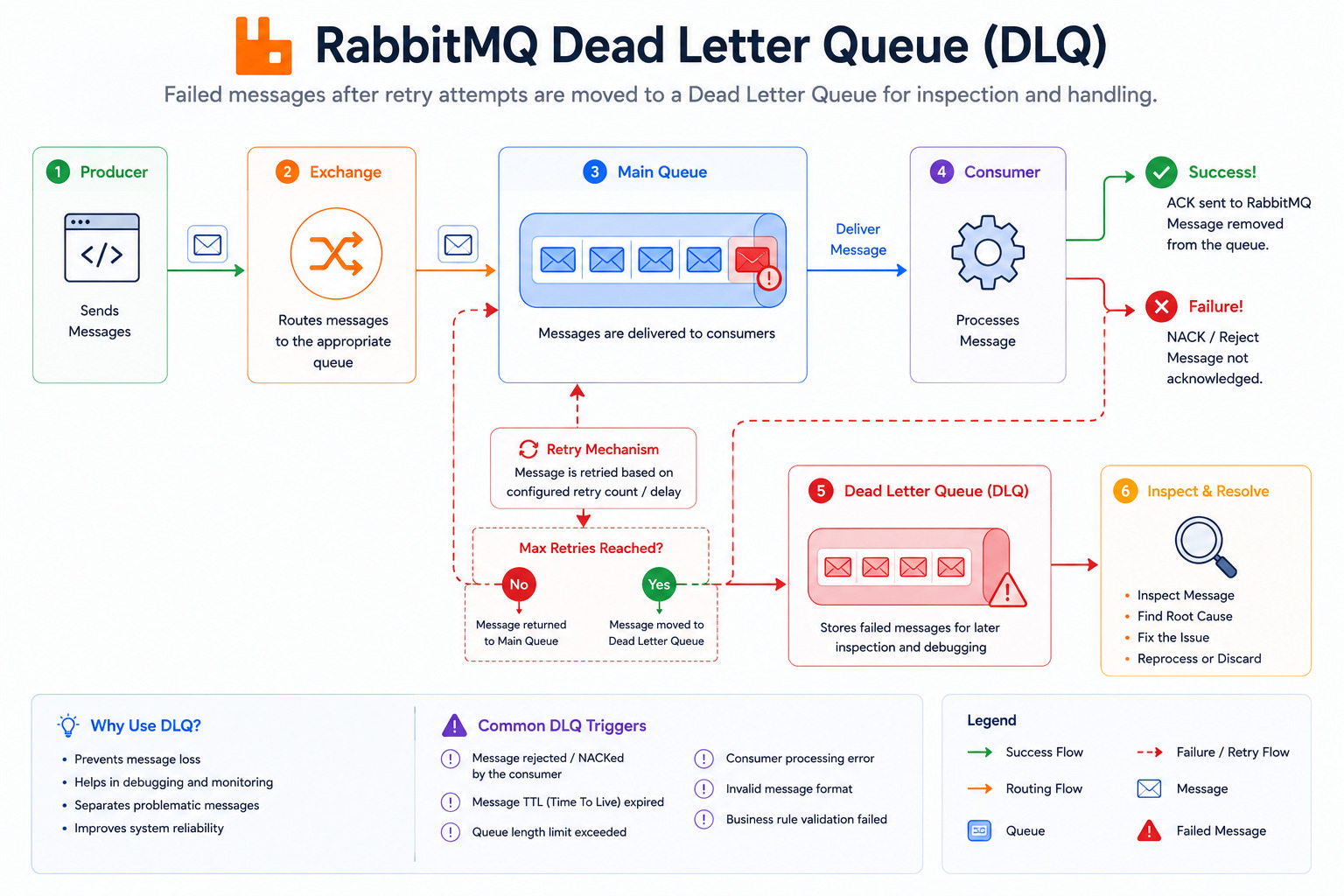
Dead Letter Queue (DLQ)
Not every message can be processed successfully.
Some messages may repeatedly fail because:
The data is invalid.
A required service is unavailable.
The message format is incorrect.
Processing exceeds retry limits.
Instead of endlessly retrying these messages, RabbitMQ allows them to be moved to a Dead Letter Queue (DLQ).
A DLQ is a special queue that stores failed or undeliverable messages for later inspection.
Why Use a Dead Letter Queue?
Dead Letter Queues help developers:
Identify problematic messages.
Prevent infinite processing loops.
Analyze application errors.
Retry messages after fixing the root cause.
Example
Imagine an Order Service sends a message with missing customer details.
The Payment Service attempts to process it but fails.
RabbitMQ retries the message several times.
After reaching the configured retry limit, RabbitMQ transfers the message to the Dead Letter Queue.
Developers can then examine the failed message, identify the issue, correct the data if necessary, and reprocess it.
Using a DLQ improves system reliability while making troubleshooting much easier.
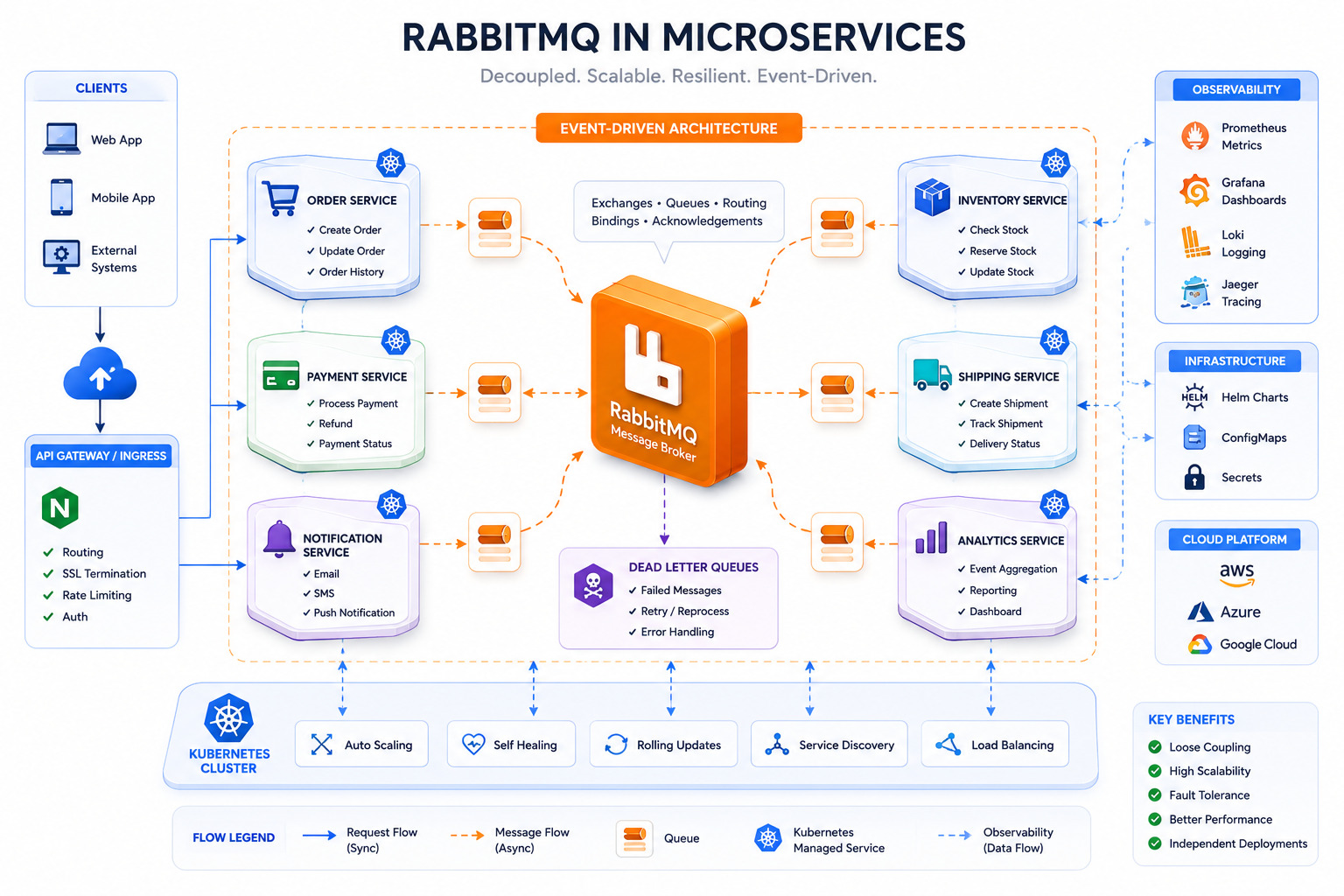
RabbitMQ in Microservices
Modern software is increasingly built using a microservices architecture, where an application is divided into small, independent services. Each service is responsible for a specific business function and communicates with other services when necessary.
RabbitMQ plays a key role in enabling efficient communication between these services.
Example: E-Commerce Platform
Consider an online shopping application with the following services:
Order Service
Payment Service
Inventory Service
Notification Service
Shipping Service
When a customer places an order:
The Order Service stores the order information.
It publishes an Order Created message to RabbitMQ.
RabbitMQ routes the message to the appropriate queues.
Each service processes the message independently:
Payment Service charges the customer.
Inventory Service updates stock.
Notification Service sends an email or SMS.
Shipping Service prepares the delivery.
The Order Service does not need to wait for every task to finish before responding to the customer.
Benefits in Microservices
Using RabbitMQ in a microservices architecture offers several advantages:
Loose coupling: Services communicate through messages rather than direct API calls.
Independent scaling: Busy services can be scaled without affecting others.
Fault isolation: A temporary failure in one service doesn't stop the entire application.
Asynchronous processing: Time-consuming tasks run in the background, improving response times.
Improved resilience: Messages remain in queues until they are successfully processed.
These benefits make RabbitMQ a popular choice for cloud-native and distributed applications.
RabbitMQ vs Kafka
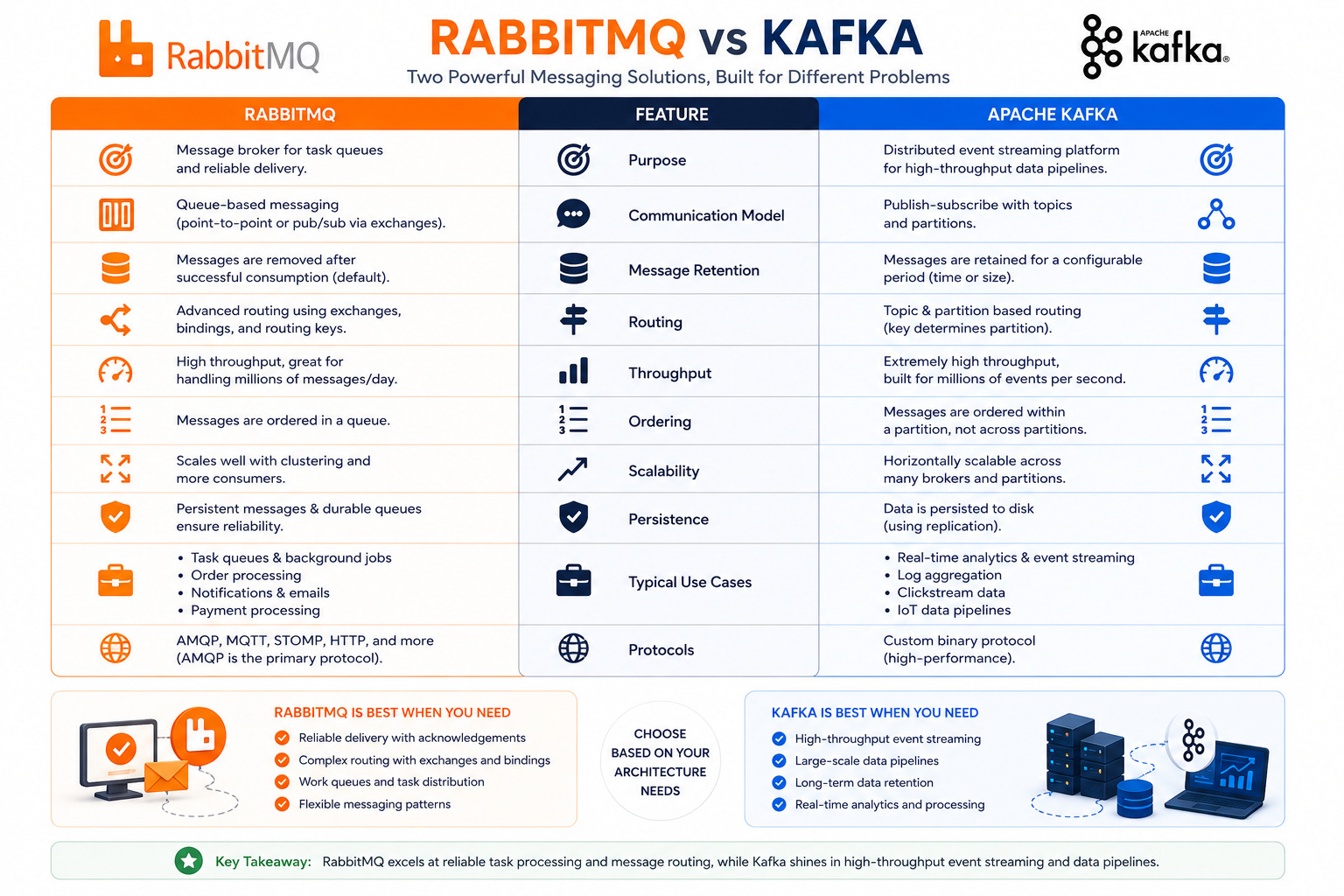
RabbitMQ and Apache Kafka are both messaging technologies, but they are designed to solve different types of problems.
The following comparison highlights their key differences:
Feature | RabbitMQ | Apache Kafka |
|---|---|---|
Primary Purpose | Message broker for task processing | Distributed event streaming platform |
Communication Model | Queue-based messaging | Publish-subscribe with partitioned topics |
Message Retention | Messages are usually removed after successful consumption | Messages are retained for a configurable period |
Routing | Advanced routing using exchanges and routing keys | Topic-based routing with partitions |
Performance | Excellent for low-latency task processing | Optimized for extremely high throughput |
Ordering | Queue-level ordering | Partition-level ordering |
Scalability | Scales well with multiple consumers | Designed for massive horizontal scaling |
Typical Use Cases | Background jobs, email queues, payment workflows, microservices | Event streaming, analytics, log aggregation, real-time data pipelines |
When Should You Choose RabbitMQ?
RabbitMQ is an excellent choice when you need:
Reliable task queues
Request-response workflows
Background job processing
Email and notification systems
Payment processing
Order management
Microservices communication
When Should You Choose Kafka?
Kafka is better suited for:
Real-time analytics
Big data pipelines
Event sourcing
Log aggregation
High-volume event streaming
IoT platforms
Financial market data processing
Rather than competing directly, RabbitMQ and Kafka often complement each other. Some organizations use RabbitMQ for operational workflows and Kafka for large-scale event streaming and analytics.
Real-World RabbitMQ Use Cases
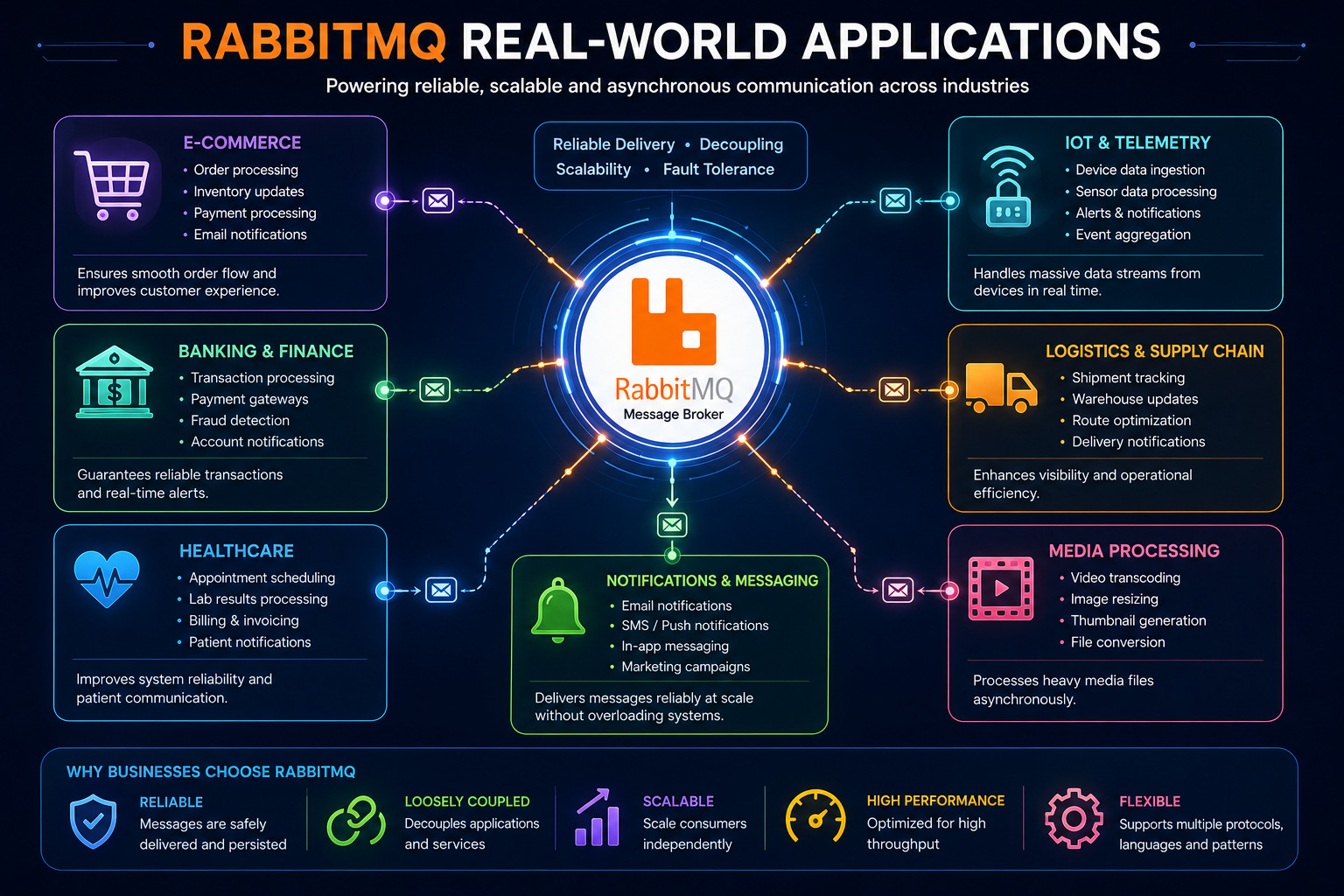
RabbitMQ is trusted by organizations of all sizes because it simplifies communication between applications while improving reliability and scalability. From startups to enterprise systems, RabbitMQ powers many background processes that users rarely notice but rely on every day.
1. E-Commerce Order Processing
Online shopping platforms often perform several tasks after a customer places an order. Instead of executing everything synchronously, RabbitMQ distributes the work across multiple services.
Example Workflow:
Customer places an order.
Order Service stores the order.
RabbitMQ publishes an Order Created event.
Payment Service processes payment.
Inventory Service updates stock.
Email Service sends confirmation.
Shipping Service prepares delivery.
This approach keeps the website responsive while background services complete their work independently.
2. Email and Notification Systems
Sending emails or SMS messages can take time, especially when thousands of users must be notified.
RabbitMQ queues these requests so dedicated notification services can process them in the background.
Examples:
Welcome emails
Password reset emails
OTP verification
Promotional campaigns
Push notifications
3. Image and Video Processing
Media-heavy applications often need to resize images, generate thumbnails, or convert video formats.
Instead of making users wait, RabbitMQ queues these jobs for background workers.
Example:
User uploads an image.
RabbitMQ creates processing tasks.
Workers resize images.
Generate thumbnails.
Compress files.
Store them in cloud storage.
4. Financial and Banking Applications
Financial systems require reliable transaction processing.
RabbitMQ ensures transaction requests are processed even during temporary service interruptions.
Typical use cases include:
Payment processing
Transaction verification
Fraud detection
Invoice generation
Audit logging
5. Healthcare Systems
Hospitals and healthcare platforms use messaging systems to coordinate data between departments.
Examples include:
Appointment booking
Laboratory reports
Prescription updates
Medical billing
Patient notifications
Reliable message delivery helps prevent data loss in critical workflows.
6. IoT Applications
Internet of Things (IoT) devices continuously generate data.
RabbitMQ collects sensor information and routes it to processing services.
Examples:
Smart homes
Industrial automation
Environmental monitoring
Vehicle tracking
Smart agriculture
RabbitMQ Best Practices
Using RabbitMQ effectively requires more than simply sending messages. Following these best practices helps build reliable and scalable systems.
Use Durable Queues
Always create durable queues for important business data so they survive broker restarts.
Publish Persistent Messages
Critical messages should be marked as persistent to reduce the risk of data loss.
Enable Manual Acknowledgements
Manual acknowledgements ensure messages are removed only after successful processing.
Keep Messages Small
Avoid sending large files directly through RabbitMQ.
Instead:
Store files in cloud storage.
Send only the file reference or URL.
This improves performance and reduces memory usage.
Design Consumers to Be Idempotent
Sometimes a message may be delivered more than once.
Consumers should safely process duplicate messages without causing incorrect results.
For example:
Avoid charging a customer twice.
Avoid sending duplicate invoices.
Monitor Queue Lengths
Growing queues often indicate slow consumers or application bottlenecks.
Monitor:
Queue size
Consumer count
Processing rate
Error rate
Monitoring helps identify performance issues before they affect users.
Use Dead Letter Queues
Configure DLQs for failed messages instead of discarding them.
This makes troubleshooting easier and prevents important data from being lost.
Scale Consumers
When message traffic increases, add more consumers instead of increasing server resources alone.
RabbitMQ naturally distributes work among available consumers.
Secure Your RabbitMQ Server
Production environments should always use:
User authentication
Role-based permissions
TLS/SSL encryption
Secure virtual hosts (vHosts)
Network firewalls
Proper security protects sensitive business data during message transmission.
Conclusion
RabbitMQ has become one of the most popular message brokers because it enables reliable, asynchronous communication between applications.
By introducing queues between services, RabbitMQ improves application responsiveness, simplifies distributed system design, and increases fault tolerance. Features such as exchanges, routing keys, acknowledgements, durable queues, persistent messages, and Dead Letter Queues make it well suited for modern cloud-native applications and microservices.
Whether you're building an e-commerce platform, banking application, healthcare system, or IoT solution, RabbitMQ helps ensure that messages are delivered safely and processed efficiently.
Although technologies like Apache Kafka excel at large-scale event streaming, RabbitMQ remains an outstanding choice for task queues, background job processing, and reliable inter-service communication.
As your applications grow in complexity, understanding RabbitMQ will help you build systems that are scalable, maintainable, and resilient.
Frequently Asked Questions (FAQs)
1. What is RabbitMQ?
RabbitMQ is an open-source message broker that enables applications to communicate by sending and receiving messages asynchronously through queues.
2. What is a message broker?
A message broker is software that receives messages from one application and safely delivers them to another application.
3. Is RabbitMQ free to use?
Yes. RabbitMQ is open-source and available under the Mozilla Public License (MPL), making it free for both personal and commercial use.
4. Which protocol does RabbitMQ use?
RabbitMQ primarily uses the Advanced Message Queuing Protocol (AMQP) but also supports MQTT, STOMP, and other messaging protocols through plugins.
5. What is the difference between a queue and an exchange?
A queue stores messages until they are processed, while an exchange receives messages from producers and routes them to the appropriate queues.
6. What is a routing key?
A routing key is a string attached to a message that helps an exchange determine which queue should receive it.
7. What is a Dead Letter Queue (DLQ)?
A DLQ stores messages that cannot be processed successfully after retries, allowing developers to inspect and troubleshoot failures.
8. Can RabbitMQ work with microservices?
Yes. RabbitMQ is widely used in microservices architectures because it enables asynchronous, loosely coupled communication between independent services.
9. RabbitMQ or Kafka - which should I choose?
Choose RabbitMQ for reliable task processing, background jobs, and request-based messaging. Choose Kafka for high-throughput event streaming, analytics, and large-scale data pipelines.
10. Which programming languages support RabbitMQ?
RabbitMQ provides client libraries for Java, Python, JavaScript (Node.js), C#, Go, PHP, Ruby, and many other programming languages.
11. Does RabbitMQ guarantee message delivery?
RabbitMQ supports reliable delivery through acknowledgements, durable queues, persistent messages, and publisher confirms. Proper configuration greatly reduces the risk of message loss.
12. Is RabbitMQ suitable for cloud applications?
Yes. RabbitMQ integrates well with cloud platforms, containers, Kubernetes, and microservices, making it a popular choice for modern distributed systems.
Ready to go deeper?
Professional Training
Hands-on, mentor-led training aligned with industry certifications.
About the Author
Sharper every day
Daily tutorials, analysis, and career playbooks across all 12 Xcademia disciplines, straight to your inbox. No spam.