Redis Explained: A Complete Beginner's Guide
Learn Redis from scratch with this complete beginner's guide. Understand Redis architecture, installation, data structures, commands, caching, Pub/Sub, persistence, transactions, and real-world use cases with practical examples to build fast, scalable, and high-performance applications.
Introduction
Modern applications demand speed. Whether it's loading a user's profile, processing an online payment, serving personalized recommendations, or handling millions of API requests, users expect near-instant responses. Relying solely on traditional databases for every request can lead to increased latency and higher server load as traffic grows.
This is where Redis comes in.
Redis is an open-source, in-memory data store designed to deliver exceptional performance with microsecond response times. By storing data primarily in memory, Redis enables applications to retrieve and update information significantly faster than disk-based databases. Beyond simple key-value storage, Redis supports powerful data structures such as strings, hashes, lists, sets, sorted sets, and streams, making it a versatile solution for a wide range of use cases.
Today, Redis is widely used for caching, session management, real-time analytics, messaging, leaderboards, rate limiting, and many other high-performance workloads. Organizations ranging from startups to global enterprises rely on Redis to improve application responsiveness, reduce database load, and build scalable systems capable of handling millions of operations per second.
In this three-part guide, you'll learn Redis from the ground up. We'll start with the fundamentals and installation, explore Redis data structures through practical command-line examples, and finally dive into production concepts such as Pub/Sub messaging, persistence, transactions, replication, and best practices. Whether you're a beginner, a backend developer, or a DevOps engineer, this guide will help you build a strong foundation in one of the most widely used technologies in modern software development.
What is Redis?
Modern applications require data to be accessed almost instantly. Whether you're loading a user profile, checking shopping cart items, managing user sessions, or displaying a live leaderboard, waiting for a traditional database query every time can slow down your application.
This is where Redis comes in.
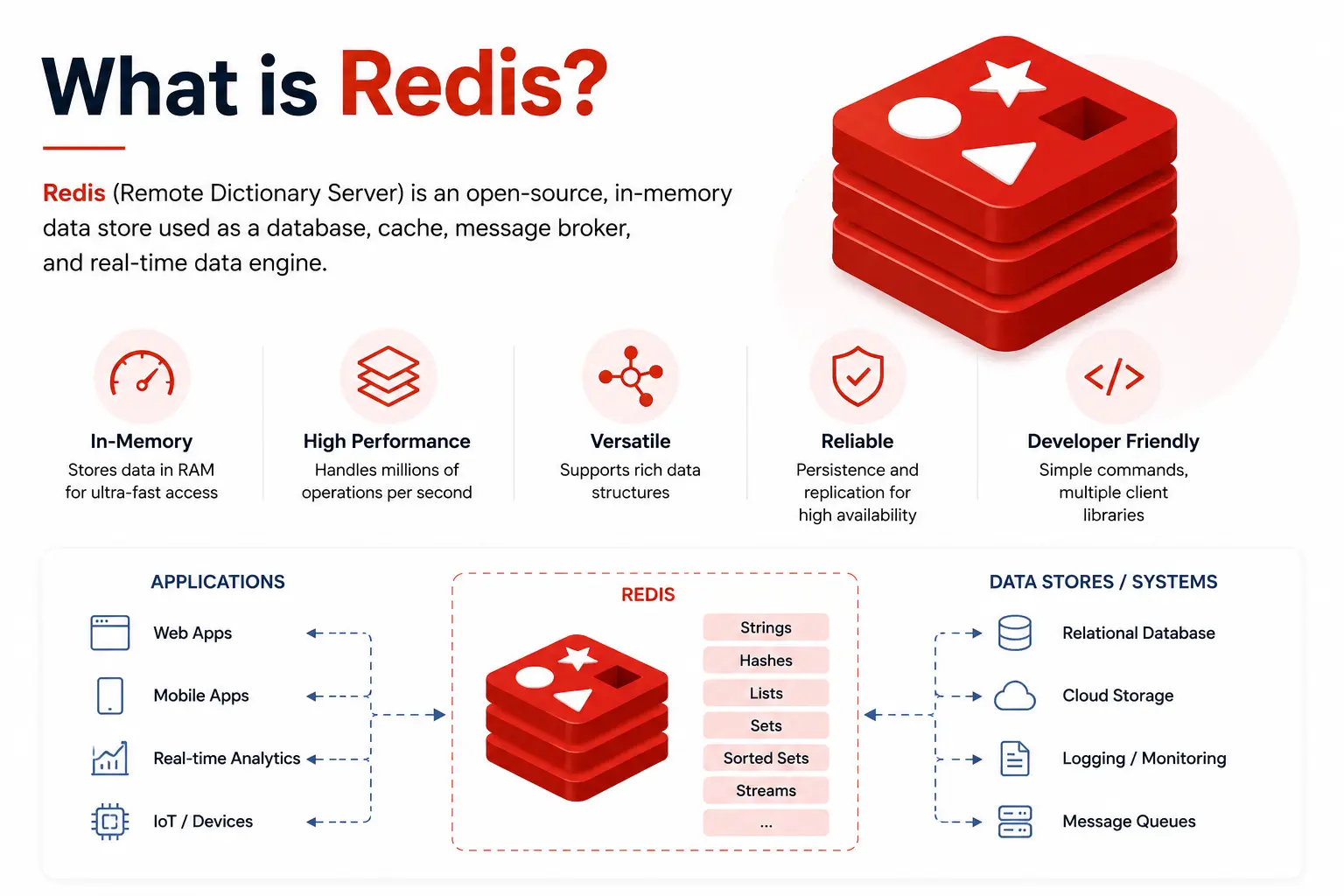
Redis (Remote Dictionary Server) is a high-performance, open-source in-memory data store that stores data primarily in RAM instead of on disk. Because memory access is significantly faster than disk access, Redis can process millions of operations per second with extremely low latency.
Unlike traditional relational databases that mainly store data in tables, Redis stores data using key-value pairs and supports multiple powerful data structures such as strings, hashes, lists, sets, sorted sets, streams, bitmaps, and geospatial indexes.
Redis is commonly used as:
Cache
Session Store
Real-time Database
Message Broker
Queue
Leaderboard Engine
Rate Limiter
Today, companies like GitHub, Stack Overflow, Snapchat, Pinterest, and many other high-scale applications use Redis to improve performance and reduce database load.
Why Use Redis?
Suppose your application receives thousands of users every second.
Without Redis, every request would directly query the database.
User
   ⇩
Application
   ⇩
Database
Thousands of database queries increase response time and server load.
Now add Redis.
User
   ⇩
Application
   ⇩
Redis Cache
   ⇩
Database
The application first checks Redis.
Data found → Return immediately.
Data not found → Query the database, then store the result in Redis for future requests.
This approach dramatically improves application performance and reduces database traffic.
Benefits
Extremely fast data access
Reduced database load
Better user experience
Improved scalability
Lower infrastructure costs
Supports millions of requests
Key Features of Redis
Redis offers much more than simple key-value storage.
1. In-Memory Storage
Data is stored in RAM, making Redis one of the fastest databases available.
Average response time is measured in microseconds rather than milliseconds.
2. Multiple Data Structures
Redis supports several built-in data structures.
Data Type | Use Case |
|---|---|
String | Caching, counters |
Hash | User profiles |
List | Queues |
Set | Unique values |
Sorted Set | Leaderboards |
Stream | Event processing |
Bitmap | Analytics |
HyperLogLog | Approximate counting |
Geospatial | Location-based applications |
We'll explore each of these in Part 2.
3. Data Persistence
Although Redis is primarily an in-memory database, it can also save data to disk using persistence mechanisms.
This allows applications to recover data after a restart.
We'll cover persistence in Part 3.
4. Built-in Expiration
Redis can automatically remove data after a specified time.
Example:
OTP expires after 5 minutes.

Verification Token expires after 15 minutes.

Cache expires after 30 minutes.
This eliminates the need for manual cleanup.
5. High Performance
Redis can handle millions of operations per second while maintaining very low latency.
This makes it suitable for:
Gaming
Financial applications
Chat systems
Live analytics
E-commerce platforms
6. Replication & High Availability
Redis supports replication, allowing multiple servers to maintain copies of the same data.
If one server fails, another can take over, improving reliability and uptime.
Redis Architecture
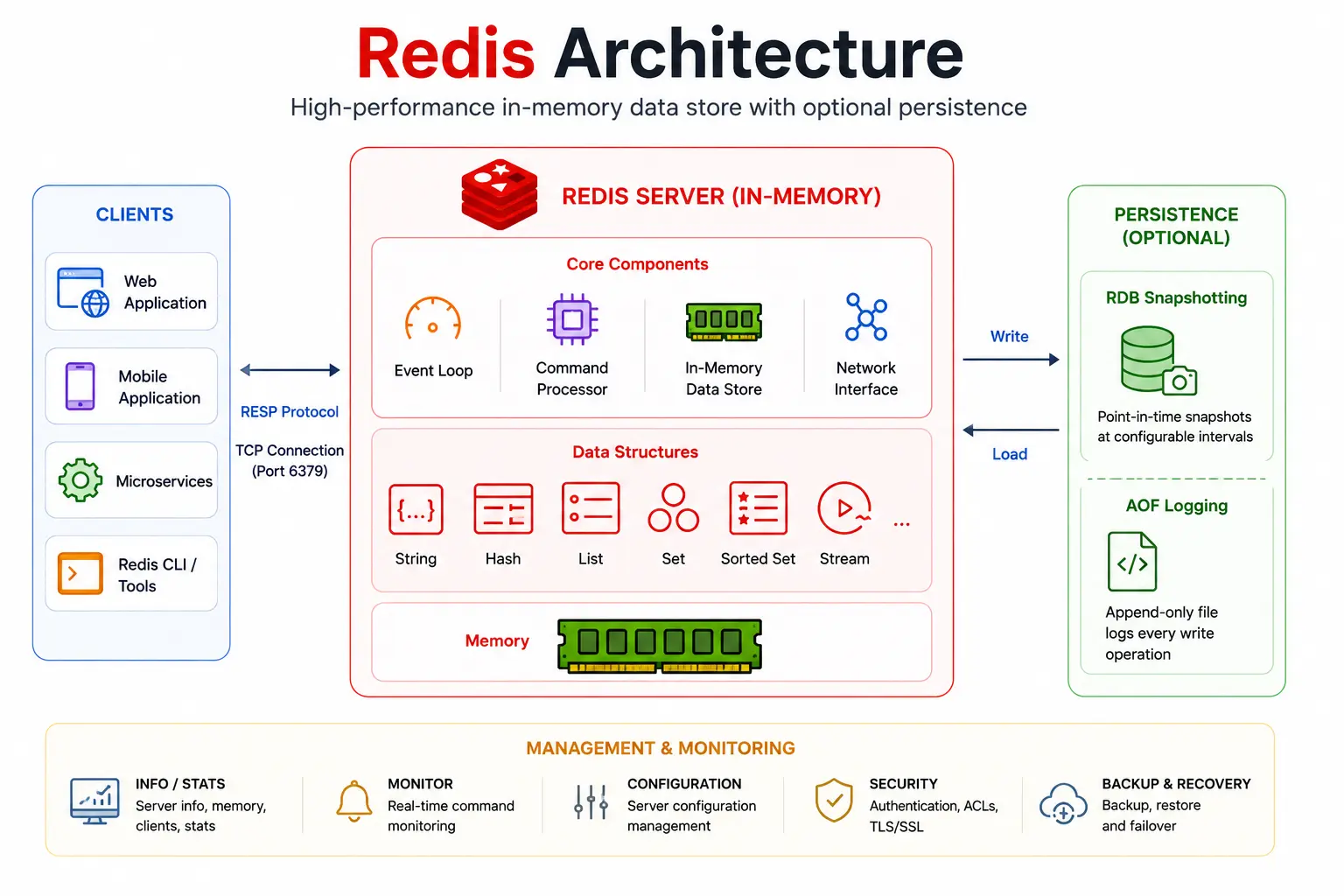
Redis follows a simple client-server architecture.
           Client
             ⇩
      +---------------+
      | Redis Server  |
      |   (Memory)    |
      +---------------+
             ⇩
        Persistence
        (Optional)
How It Works
A client sends a command.
Redis processes the request in memory.
The response is returned immediately.
If persistence is enabled, Redis periodically writes data to disk.
Since Redis performs operations directly in RAM, it avoids the slower disk I/O that traditional databases rely on.
Installing Redis
Redis can be installed on Linux, macOS, and Windows (using WSL or Docker).
Ubuntu
sudo apt update
sudo apt install redis-server
Verify the installation:
redis-server --versionExample output:
Redis server v=8.xmacOS (Homebrew)
brew install redisWindows
Redis is not officially supported as a native Windows service.
The recommended options are:
Windows Subsystem for Linux (WSL)
Docker Desktop
Using Docker:
docker run -d \
  --name redis \
  -p 6379:6379 \
  redis
Running Redis
Start the Redis server:
redis-serverExpected output:
Ready to accept connectionsOpen another terminal and connect using the Redis CLI:
redis-cliTest the connection:
PINGOutput:
PONGIf you receive PONG, your Redis server is running correctly.
Your First Redis Commands
Store a Value
SET name "John"Output:
OKRetrieve a Value
GET nameOutput:
"John"Update a Value
SET name "Alice"Retrieve it again:
GET nameOutput:
"Alice"Delete a Key
DEL nameOutput:
(integer) 1Check if a Key Exists
EXISTS nameOutput:
(integer) 0List All Keys (Development Only)
KEYS *Example output:
1) "user:1"
2) "cart:5"
3) "session:abc123"
Note: Avoid using
KEYS *in production environments because it scans the entire keyspace and can impact performance.
Set a Key with Expiration
SET login_token "abc123" EX 60This stores the key for 60 seconds before Redis automatically removes it.
Check the remaining time:
TTL login_tokenExample output:
(integer) 42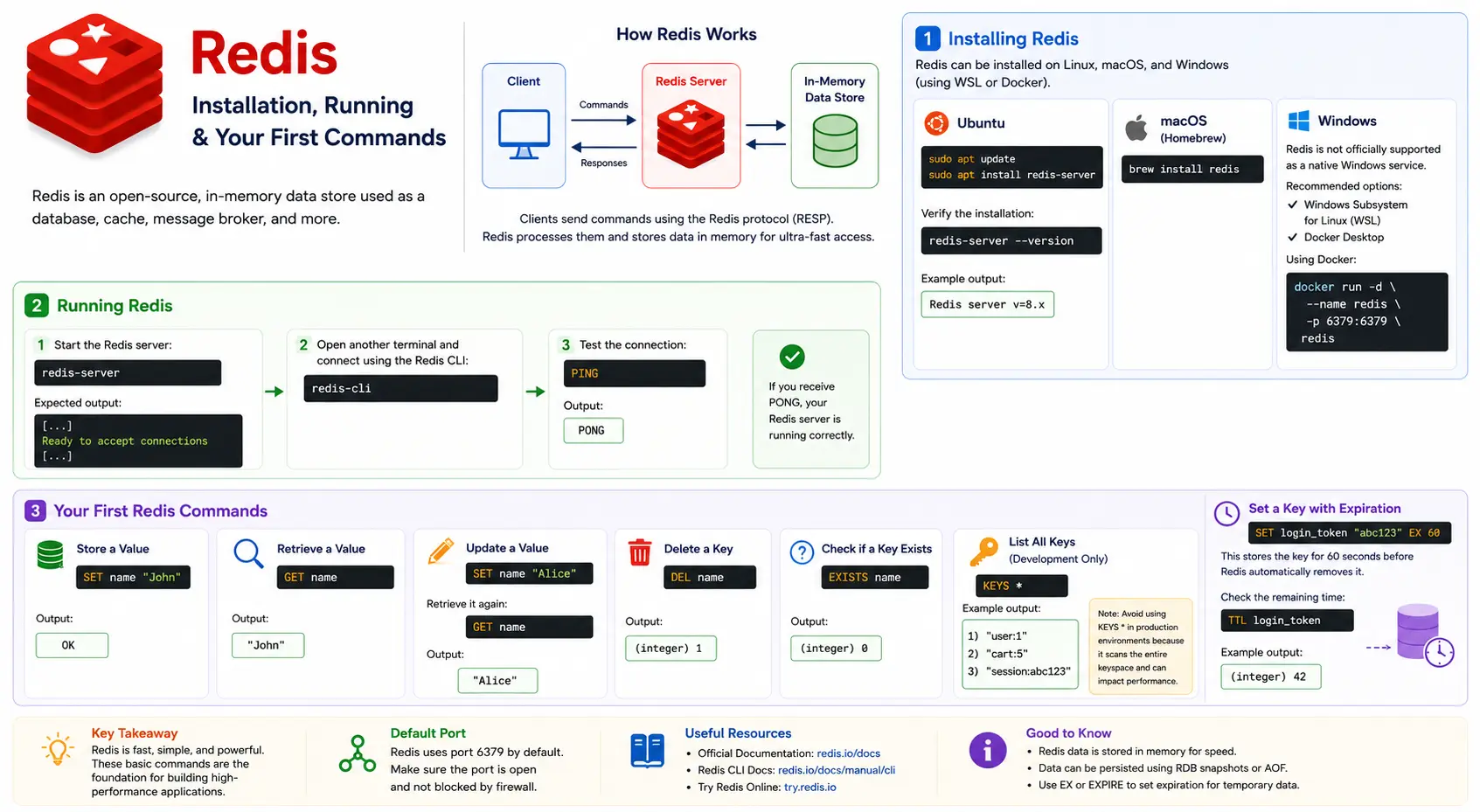
Practical Example: Using Redis as a Cache
Imagine your application frequently retrieves a user's profile from a database. Instead of querying the database every time, you can cache the result in Redis.
SET user:1001 '{"name":"John","role":"Admin"}' EX 300Retrieve the cached profile:
GET user:1001Output:
"{\"name\":\"John\",\"role\":\"Admin\"}"After 300 seconds (5 minutes), Redis automatically deletes the cached data, ensuring your application serves fresh information while reducing database load.
Redis Data Types
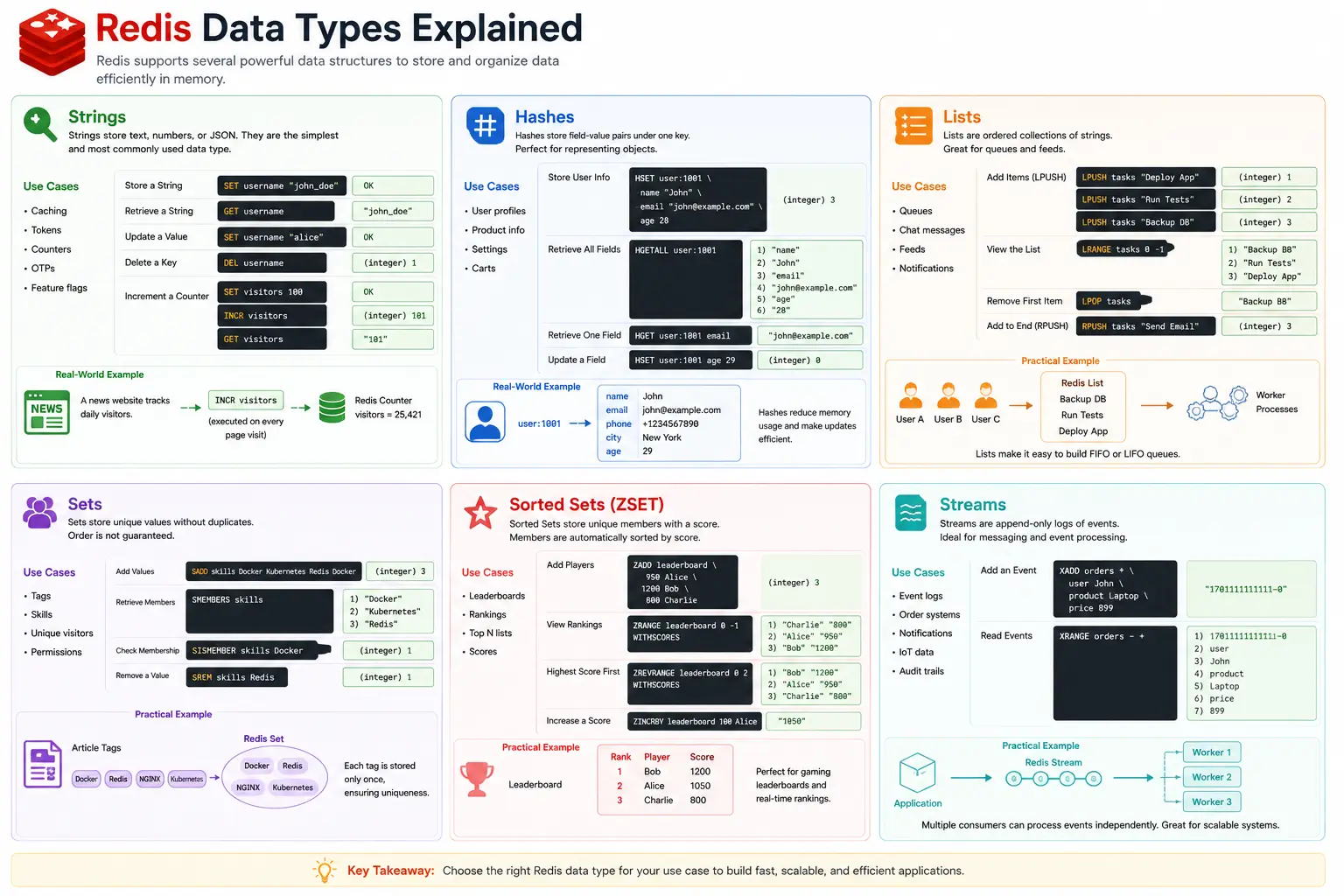
Unlike traditional databases that mainly store data in tables, Redis stores data as key-value pairs and supports multiple built-in data structures. Each data type is optimized for different use cases, allowing developers to model data efficiently without additional complexity.
Data Type | Best Used For |
|---|---|
String | Caching, counters, tokens |
Hash | User profiles, objects |
List | Queues, timelines |
Set | Unique values, tags |
Sorted Set | Rankings, leaderboards |
Stream | Event streaming, messaging |
Choosing the right data structure improves both performance and simplicity.
1. Strings
Strings are the simplest and most commonly used Redis data type. A string can hold text, numbers, or serialized JSON.
Typical use cases include:
Caching API responses
Authentication tokens
Page view counters
OTP storage
Feature flags
Store a String
SET username "john_doe"Output
OKRetrieve a String
GET usernameOutput
"john_doe"Update a Value
SET username "alice"Delete a Key
DEL usernameIncrement a Counter
Redis can automatically increment numeric values.
SET visitors 100
INCR visitors
GET visitors
Output
"101"Real-World Example
A news website tracks daily visitors.
Homepage
    ⇩
Redis Counter
visitors = 25,421
Every page visit executes:
INCR visitorsNo database update is required for each request, making counting highly efficient.
2. Hashes
Hashes store multiple field-value pairs under a single key, making them ideal for representing objects.
Instead of storing each property separately, related fields are grouped together.
Store User Information
HSET user:1001 \
name "John" \
email "john@example.com" \
age 28
Retrieve All Fields
HGETALL user:1001Output
name
John
email
john@example.com
age
28
Retrieve One Field
HGET user:1001 emailUpdate a Field
HSET user:1001 age 29Real-World Example
user:1001
│
├── name
├── email
├── phone
├── city
└── age
Hashes reduce memory usage and make updates efficient because only the changed field needs to be modified.
3. Lists
Lists maintain an ordered collection of values.
They are commonly used for:
Job queues
Notification systems
Chat messages
Activity feeds
Add Items
LPUSH tasks "Deploy App"
LPUSH tasks "Run Tests"
LPUSH tasks "Backup Database"
View the List
LRANGE tasks 0 -1Output
Backup Database
Run Tests
Deploy App
Remove the First Item
LPOP tasksAdd to the End
RPUSH tasks "Send Email"Practical Example
Queue

User A
User B
User C
⇩
Redis List
⇩
Worker Processes
Lists make it easy to build first-in-first-out (FIFO) or last-in-first-out (LIFO) queues.
4. Sets
Sets store unique values without maintaining order.
Duplicates are automatically ignored.
Typical use cases include:
User interests
Tags
Unique visitors
Permissions
Add Values
SADD skills Docker Kubernetes Redis DockerAlthough "Docker" is added twice, Redis stores it only once.
Retrieve Members
SMEMBERS skillsOutput
Docker
Redis
Kubernetes
Check Membership
SISMEMBER skills DockerOutput
(integer) 1Remove a Value
SREM skills RedisPractical Example
Article Tags

Docker
Redis
NGINX
Kubernetes
⇩
Redis Set
Each tag is stored only once, ensuring uniqueness.
5. Sorted Sets (ZSET)
Sorted Sets are similar to Sets, but every member has an associated score.
Redis automatically sorts members by score.
This makes Sorted Sets perfect for:
Gaming leaderboards
Product rankings
Trending posts
Live scores
Add Players
ZADD leaderboard \
950 Alice \
1200 Bob \
800 Charlie
View Rankings
ZRANGE leaderboard 0 -1 WITHSCORESOutput
Charlie 800
Alice 950
Bob 1200
Highest Score
ZREVRANGE leaderboard 0 2 WITHSCORESOutput
Bob 1200
Alice 950
Charlie 800
Increase a Score
ZINCRBY leaderboard 100 AliceAlice's score becomes 1050.
6. Streams
Streams are Redis' append-only data structure designed for event streaming and messaging.
They are useful for:
Event processing
Order systems
Audit logs
Notification services
IoT applications
Add an Event
XADD orders * \
user John \
product Laptop \
price 899
Redis automatically generates a unique stream ID.
Read Events
XRANGE orders - +Output
1701111111111-0
user
John
product
Laptop
price
899
Practical Example
Application
⇩
Redis Stream
⇩
Worker 1
Worker 2
Worker 3
Multiple consumers can process events independently, making Streams ideal for scalable systems.
Working with Key Expiration (TTL)
Redis allows keys to expire automatically after a specified time.
This is especially useful for:
Login sessions
Password reset links
OTP codes
API rate limits
Temporary cache
Set a Key with Expiration
SET otp "842911" EX 300This stores the OTP for 300 seconds (5 minutes).
Check Remaining Time
TTL otpExample Output
(integer) 187Remove Expiration
PERSIST otpThe key will no longer expire automatically.
Choosing the Right Data Structure
Requirement | Recommended Data Type |
|---|---|
Cache a value | String |
Store a user profile | Hash |
Build a queue | List |
Store unique items | Set |
Create a leaderboard | Sorted Set |
Process events | Stream |
Choosing the correct data type simplifies development and improves performance.
From Development to Production
In Part 1, you learned the fundamentals of Redis and how to get started.
In Part 2, you explored Redis data structures and learned how to use them with practical examples.
Now it's time to see how Redis is used in production systems. We'll cover caching strategies, Pub/Sub messaging, persistence, transactions, replication, rate limiting, session management, and best practices that help build fast and reliable applications.
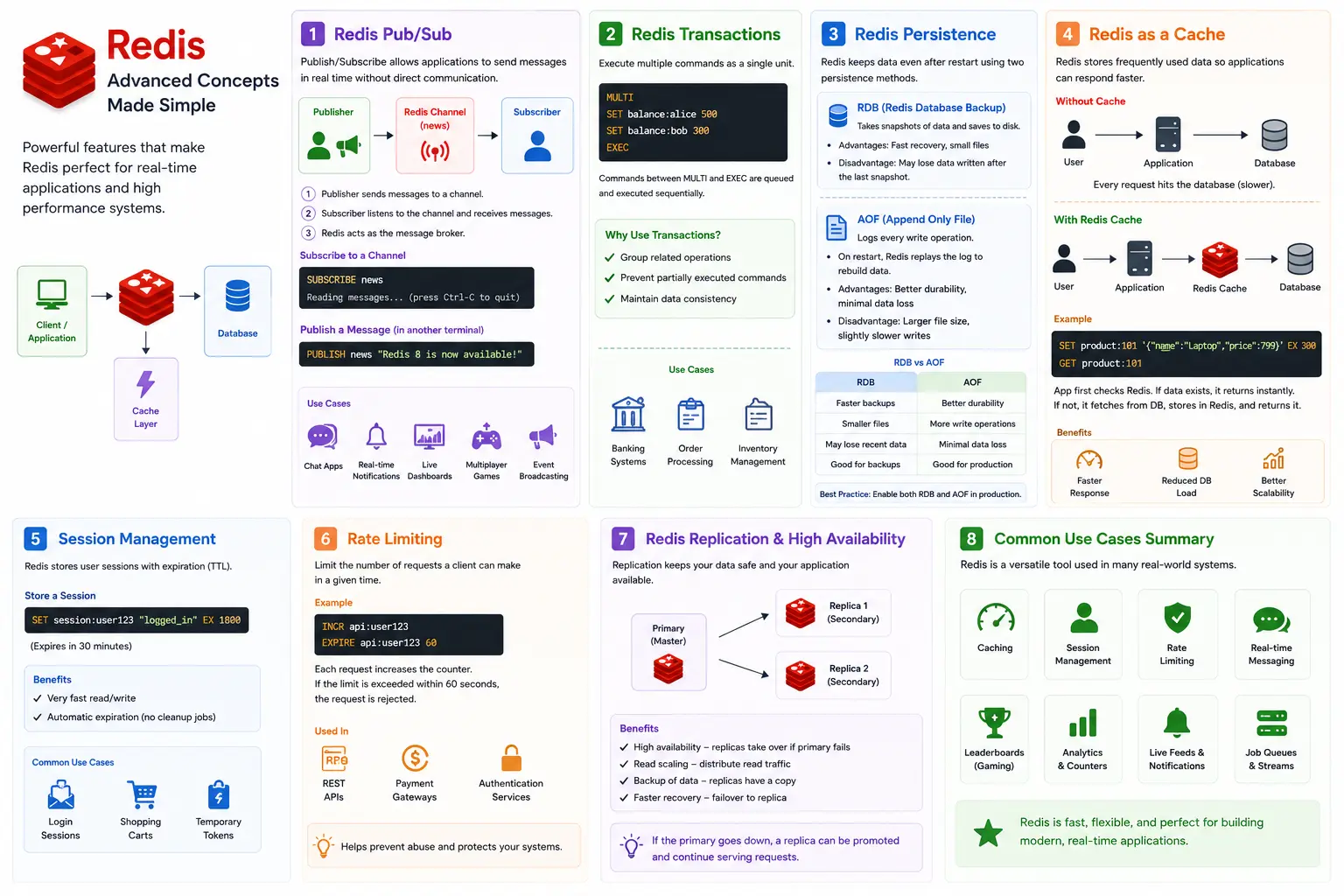
Redis Pub/Sub
Redis provides a lightweight Publish/Subscribe (Pub/Sub) messaging system that enables applications to exchange messages in real time without directly communicating with each other.
In a Pub/Sub model:
Publisher sends messages to a channel.
Subscriber listens to that channel and receives messages instantly.
Redis acts as the message broker between publishers and subscribers.
This pattern is commonly used for:
Chat applications
Real-time notifications
Live dashboards
Multiplayer games
Event broadcasting
Subscribe to a Channel
SUBSCRIBE newsOutput:
Reading messages... (press Ctrl-C to quit)Publish a Message
Open another terminal and run:
PUBLISH news "Redis 8 is now available!"Subscribers connected to the news channel immediately receive the message.
Redis Transactions
Sometimes multiple operations need to be executed together. Redis supports transactions using MULTI, EXEC, WATCH, and DISCARD.
Example
MULTI
SET balance:alice 500
SET balance:bob 300
EXEC
Redis queues all commands between MULTI and EXEC and executes them sequentially.
Why Use Transactions?
Group related operations
Prevent partially executed commands
Maintain data consistency
Transactions are useful for scenarios like:
Banking systems
Order processing
Inventory management
Redis Persistence
Redis stores data in memory, but production applications often require data to survive restarts.
Redis provides two persistence mechanisms.
RDB (Redis Database Backup)
RDB periodically creates snapshots of the dataset and stores them on disk.
Advantages
Fast recovery
Small backup files
Good for scheduled backups
Disadvantages
Data written after the last snapshot may be lost if the server crashes.
AOF (Append Only File)
Instead of taking snapshots, AOF logs every write operation.
When Redis restarts, it replays these operations to rebuild the dataset.
Advantages
Better durability
Minimal data loss
Disadvantages
Larger file size
Slightly slower writes compared to RDB
Which Should You Choose?
RDB | AOF |
|---|---|
Faster backups | Better durability |
Smaller files | More write operations |
May lose recent data | Minimal data loss |
Good for backups | Good for production |
Many production deployments enable both RDB and AOF to balance performance and durability.
Redis as a Cache
Caching is one of the most common Redis use cases.
Without caching:
User
   ⇩
Application
   ⇩
Database
Every request hits the database, increasing response time.
With Redis:
User
   ⇩
Application
   ⇩
Redis Cache
   ⇩
Database
Example
SET product:101 '{"name":"Laptop","price":799}' EX 300Retrieve it:
GET product:101The application first checks Redis. If the key exists, it returns the cached data immediately. If not, it fetches the data from the database, stores it in Redis, and serves the response.
This approach significantly reduces database load and improves application performance.
Session Management
Redis is widely used for storing user sessions because of its speed and built-in expiration.
Store a Session
SET session:user123 "logged_in" EX 1800The session automatically expires after 30 minutes.
This eliminates the need for scheduled cleanup jobs.
Common use cases include:
Login sessions
Shopping carts
Temporary authentication tokens
Rate Limiting
APIs often need to prevent abuse by limiting how many requests a client can make within a certain time.
Redis makes rate limiting simple.
Example
INCR api:user123
EXPIRE api:user123 60
Every API request increments the counter.
If the counter exceeds the allowed limit within 60 seconds, the request can be rejected.
This technique is commonly used by:
REST APIs
Payment gateways
Authentication services
Replication and High Availability
Production applications require high availability.
Redis supports replication, where one server acts as the primary and one or more servers act as replicas.
Benefits include:
Improved availability
Read scaling
Backup copies of data
Faster recovery from failures
If the primary server becomes unavailable, a replica can be promoted to continue serving requests.
Common Redis Use Cases
Redis powers many modern applications.
Use Case | Redis Feature |
|---|---|
API Cache | Strings + TTL |
User Sessions | Strings + Expiration |
Shopping Cart | Hashes |
Job Queue | Lists |
Chat System | Pub/Sub |
Leaderboards | Sorted Sets |
Notifications | Streams |
Analytics Counters | Strings + INCR |
Rate Limiting | INCR + EXPIRE |
Common Beginner Mistakes
Avoid these common pitfalls when working with Redis.
Mistake | Better Approach |
|---|---|
Using one key for unrelated data | Organize data with clear key prefixes |
Forgetting TTL for temporary data | Set expiration using |
Using | Use |
Storing everything as strings | Choose the correct Redis data structure |
Ignoring persistence | Configure RDB, AOF, or both based on requirements |
Not monitoring memory | Set appropriate memory limits and eviction policies |
Conclusion
Redis is far more than a simple key-value store. Its in-memory architecture, rich data structures, and support for messaging, persistence, replication, and automatic expiration make it a powerful tool for building high-performance applications.
Across this three-part guide, you've learned:
What Redis is and why it's widely used
How to install and run Redis
Essential Redis commands
Core data structures and their practical applications
Production features like Pub/Sub, transactions, persistence, caching, and replication
Best practices for developing scalable and reliable systems
Whether you're building a REST API, an e-commerce platform, a gaming application, or a real-time analytics system, Redis can help improve performance, reduce database load, and deliver a faster experience to your users.
The best way to deepen your understanding is to experiment with Redis locally. Try creating your own data models, explore additional commands with redis-cli, and build small projects that use caching, queues, or leaderboards. Hands-on practice is the fastest path to mastering Redis.
Frequently Asked Questions (FAQ)
1.Is Redis a database or a cache?
Redis is an in-memory data store that can function as both a database and a cache. While many applications use it for caching, Redis also supports persistence, allowing it to be used as a primary database for certain workloads.
2.Why is Redis so fast?
Redis stores data in RAM, which is much faster to access than disk storage. Its efficient data structures and single-threaded command execution model also contribute to its high performance.
3.Can Redis store data permanently?
Yes. Redis supports RDB snapshots and AOF (Append Only File) persistence, enabling data to survive server restarts.
4.What programming languages support Redis?
Redis provides client libraries for many languages, including Java, Python, JavaScript (Node.js), Go, PHP, C#, Ruby, Rust, and C++.
5.Is Redis free to use?
Yes. Redis is available under an open-source license, and managed Redis services are also offered by various cloud providers.
Ready to go deeper?
Professional Training
Hands-on, mentor-led training aligned with industry certifications.
About the Author
Sharper every day
Daily tutorials, analysis, and career playbooks across all 12 Xcademia disciplines, straight to your inbox. No spam.