CI/CD Pipeline Explained: A Beginner's Guide to Faster and Reliable Software Delivery
Learn what a CI/CD pipeline is, how Continuous Integration and Continuous Delivery/Deployment work, and why automation is essential in modern DevOps. This beginner-friendly guide explains every pipeline stage, popular CI/CD tools, benefits, best practices, and real-world workflows.
Introduction
Imagine you're building a house. After completing each room, you invite an inspector to verify the electrical wiring, plumbing, and structural safety. If a problem is found, it's fixed immediately before construction continues.
Now imagine the opposite - you build the entire house first and only then discover that the foundation is unstable. Fixing it would require tearing down walls, replacing materials, and spending weeks on repairs.
Software development works the same way.
Years ago, developers often worked on features for weeks or even months before combining their code into a single project. When it was finally time to release the application, unexpected bugs, compatibility issues, and failed deployments were common. Finding the root cause became difficult because hundreds of code changes had accumulated over time.
Modern software teams needed a better approach.
That's where CI/CD (Continuous Integration and Continuous Delivery/Deployment) transformed software development. Instead of waiting until the end of a project to test and deploy code, developers now integrate, test, and release changes continuously. This automation helps teams build software faster, detect issues earlier, and deliver updates with confidence.
Today, companies such as Google, Microsoft, Netflix, Amazon, Spotify, and thousands of startups rely on CI/CD pipelines to release software frequently - sometimes dozens or even hundreds of times each day.
Whether you're a beginner learning DevOps or a developer looking to improve your workflow, understanding CI/CD is one of the most valuable skills in modern software engineering.
In this guide, we'll explore what CI/CD is, why it matters, how Continuous Integration works, and how it lays the foundation for faster, more reliable software delivery.
What is a CI/CD Pipeline?
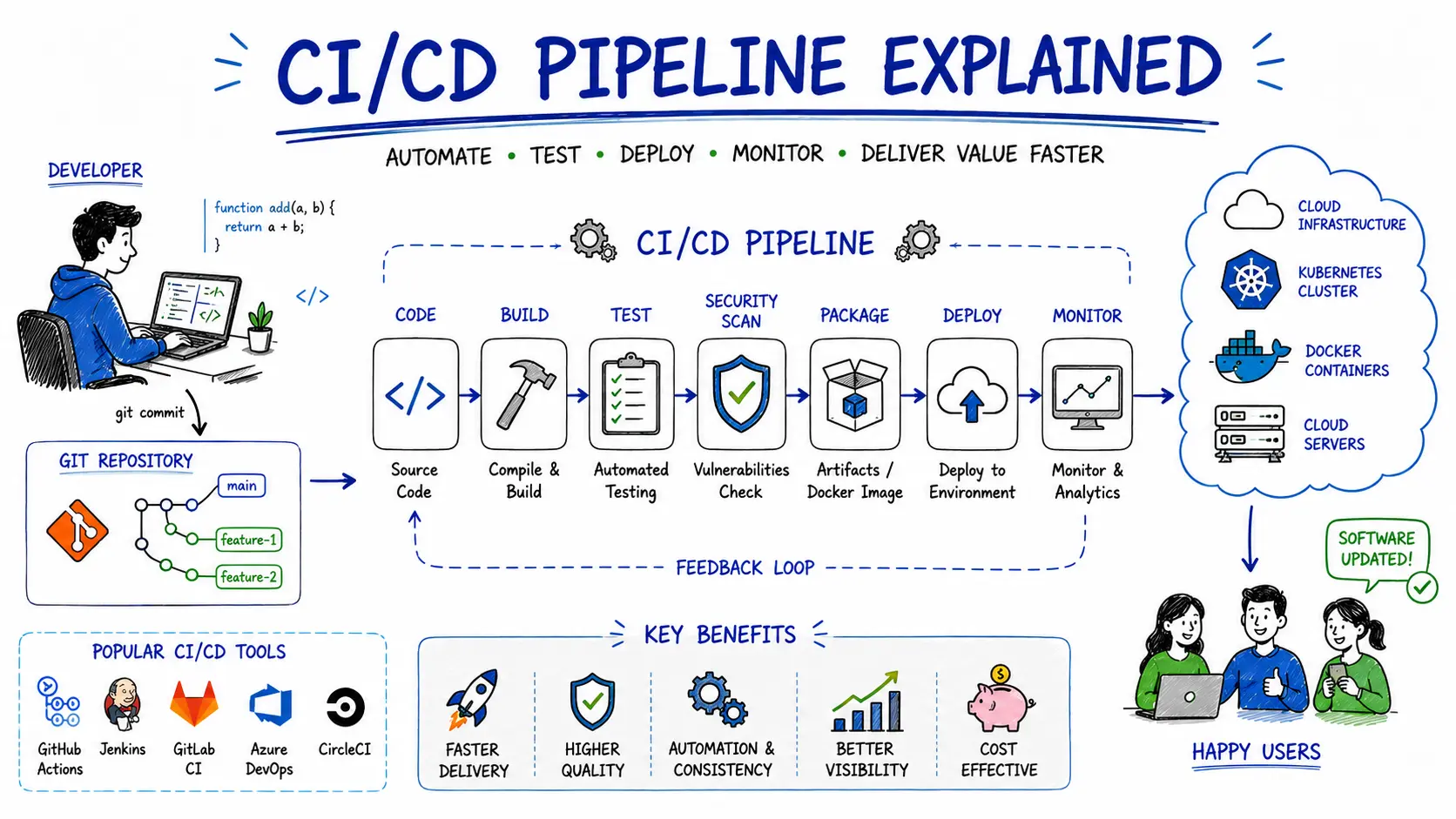
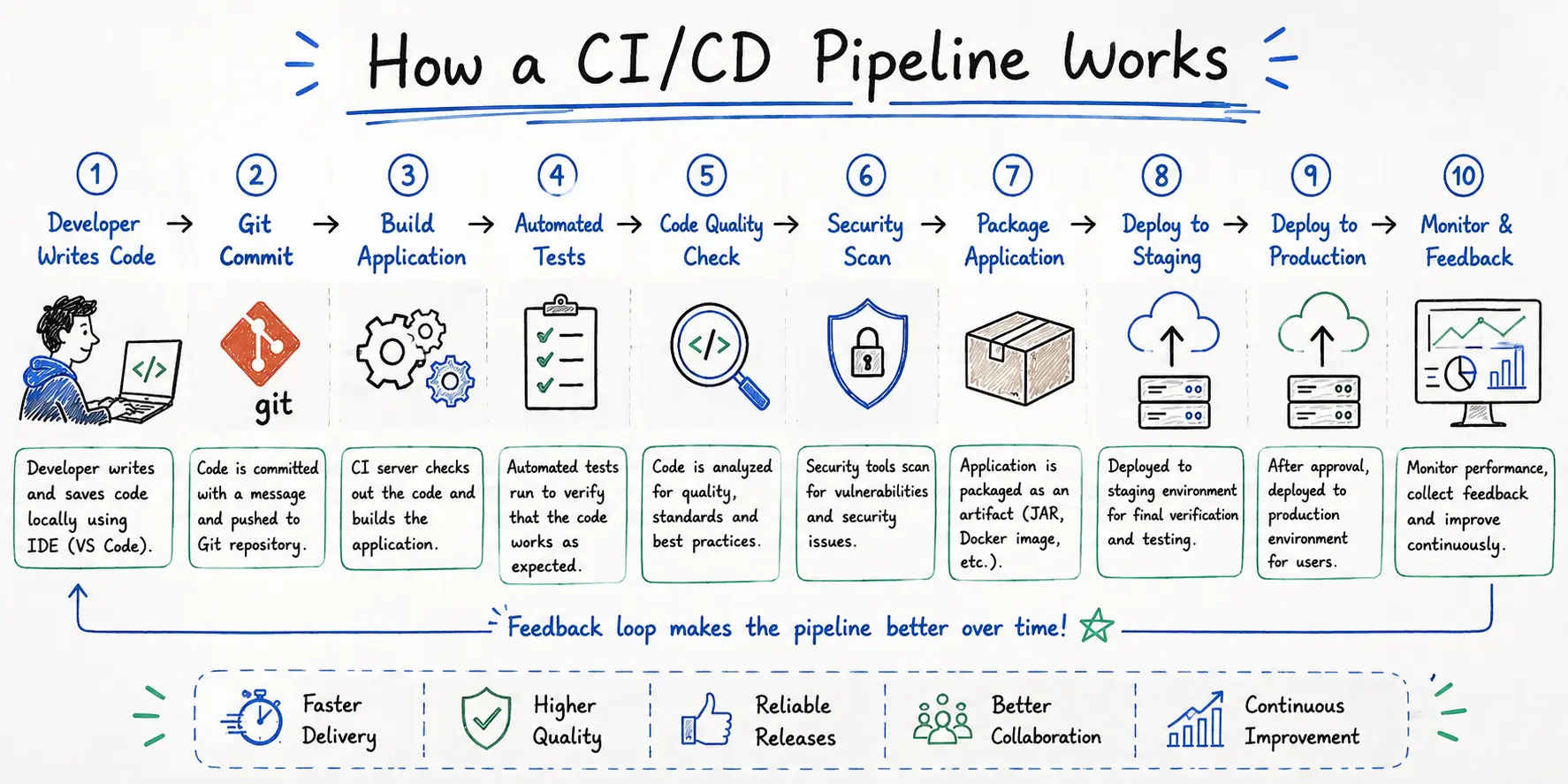
A CI/CD pipeline is an automated workflow that takes source code from a developer's computer and moves it through a series of steps - including building, testing, and deploying - until it's ready for users.
Think of it as an automated assembly line for software.
Just as a manufacturing assembly line ensures every product passes through quality checks before reaching customers, a CI/CD pipeline ensures every code change is verified before it reaches production.
A typical pipeline performs tasks such as:
Retrieving the latest source code from a version control system
Compiling or building the application
Running automated tests
Performing code quality and security checks
Packaging the application
Deploying it to testing or production environments
Monitoring deployments for issues
Instead of developers performing these tasks manually, automation handles them consistently and reliably.
This saves time, reduces human error, and allows teams to focus on building features rather than repeating deployment steps.
Breaking Down CI/CD
CI/CD consists of two major concepts:
Continuous Integration (CI)
Continuous Integration is the practice of frequently merging code changes into a shared repository.
Whenever a developer pushes new code, an automated process immediately begins.
The system typically:
Downloads the latest code
Builds the application
Runs automated unit tests
Checks code quality
Reports whether everything succeeded
If something fails, developers receive immediate feedback so they can fix the issue before other team members are affected.
The goal is simple:
Integrate small changes often instead of large changes occasionally.
Continuous Delivery (CD)
Continuous Delivery ensures that software is always ready to be released.
After the CI process completes successfully, the application is automatically prepared for deployment.
However, production deployment usually requires manual approval.
This provides organisations with flexibility - they can release new features whenever business needs require.
Continuous Deployment
Continuous Deployment goes one step further.
If every automated test passes, the application is deployed to production automatically without human intervention.
This enables organisations to release software many times each day.
While Continuous Delivery prepares software for release, Continuous Deployment actually performs the release automatically.
Why Does CI/CD Matter?
Modern software is expected to evolve constantly.
Users expect:
Faster updates
Better performance
New features
Immediate bug fixes
High reliability
Traditional software development struggles to meet these expectations.
Imagine a team of ten developers working on the same application.
Without CI/CD:
Code is merged only after several weeks.
Developers overwrite each other's work.
Bugs remain hidden until release day.
Deployments become stressful.
Releases are delayed.
Now imagine the same team using CI/CD.
Every small code change is:
Integrated immediately
Tested automatically
Verified continuously
Ready for deployment
Problems are detected within minutes instead of weeks.
Developers spend less time debugging and more time creating valuable features.
Real-World Analogy: The Restaurant Kitchen
One of the easiest ways to understand CI/CD is through a restaurant.
Imagine you're running a busy restaurant.
Customers place food orders throughout the day.
Without an organised workflow:
Chefs cook randomly.
No one checks food quality.
Meals are delivered without inspection.
Customers receive incorrect or undercooked dishes.
The restaurant quickly gains a bad reputation.
Now imagine a professional kitchen.
Every order follows the same process:
Customer places an order.
Chef prepares the meal.
Ingredients are checked.
Food is cooked.
Quality inspection takes place.
Meal is packaged.
Waiter delivers it to the customer.
Each step happens automatically and consistently.
Software delivery works exactly the same way.
Restaurant | CI/CD Pipeline |
|---|---|
Customer order | Code commit |
Chef prepares food | Application build |
Ingredient check | Code validation |
Taste testing | Automated tests |
Packaging | Build artefacts |
Waiter delivers meal | Deployment |
Customer feedback | Monitoring |
Just as restaurants use a consistent process to deliver quality meals, software teams use CI/CD pipelines to deliver reliable applications.
Understanding Continuous Integration (CI)
Continuous Integration is the first and arguably the most important stage of the CI/CD process.
Its purpose is to ensure that new code integrates smoothly with the existing application.
Instead of waiting days or weeks before merging changes, developers integrate their work several times each day.
Every commit automatically triggers a pipeline.
For example:
A developer fixes a login bug.
They push their changes to GitHub.
Immediately:
The CI server detects the commit.
The project is downloaded.
Dependencies are installed.
The application is built.
Unit tests execute.
Static code analysis checks for quality issues.
Security scanners inspect known vulnerabilities.
Results are reported back to the developer.
If every step succeeds, the code is considered safe to continue through the pipeline.
If any step fails, the pipeline stops immediately.
This prevents faulty code from affecting the rest of the application.
What Happens During Continuous Integration?
Although every organisation has its own workflow, most CI systems follow these core steps:
1. Code Commit
A developer writes code and commits the changes to a version control system such as Git.
This commit becomes the trigger for the automated pipeline.
2. Source Code Checkout
The CI server retrieves the latest version of the project from the repository.
This ensures testing always occurs against the most recent codebase.
3. Build Process
The application is compiled or packaged.
Examples include:
Building a Java application
Creating a React production build
Compiling a .NET project
Packaging a Docker container
If the application cannot build successfully, the pipeline stops immediately.
4. Automated Testing
Tests verify that the new code behaves as expected.
Common test types include:
Unit tests
Integration tests
API tests
Smoke tests
Automated testing catches defects long before users encounter them.
5. Code Quality Analysis
Static analysis tools inspect the code for:
Bugs
Duplicate logic
Poor coding practices
Maintainability issues
Security vulnerabilities
Maintaining high code quality keeps projects easier to understand and extend over time.
6. Pipeline Result
If every stage succeeds, the build is marked as successful.
If any stage fails, developers receive immediate feedback so they can investigate and resolve the issue quickly.
This rapid feedback loop is one of the biggest advantages of Continuous Integration.
Key Benefits of Continuous Integration
Adopting Continuous Integration provides several advantages:
Detects bugs early in development
Reduces integration conflicts
Improves code quality
Encourages smaller, manageable changes
Speeds up development cycles
Increases developer confidence
Simplifies collaboration across teams
Creates a stable foundation for Continuous Delivery and Continuous Deployment
Rather than treating testing as a final step, CI makes quality assurance an integral part of everyday development.
Continuous Delivery vs Continuous Deployment
After your code has successfully passed the Continuous Integration (CI) stage, it's time to deliver it to users. This is where the CD in CI/CD comes into play.
Many beginners think Continuous Delivery and Continuous Deployment mean the same thing, but they serve different purposes.
Let's understand the difference.
What is Continuous Delivery?
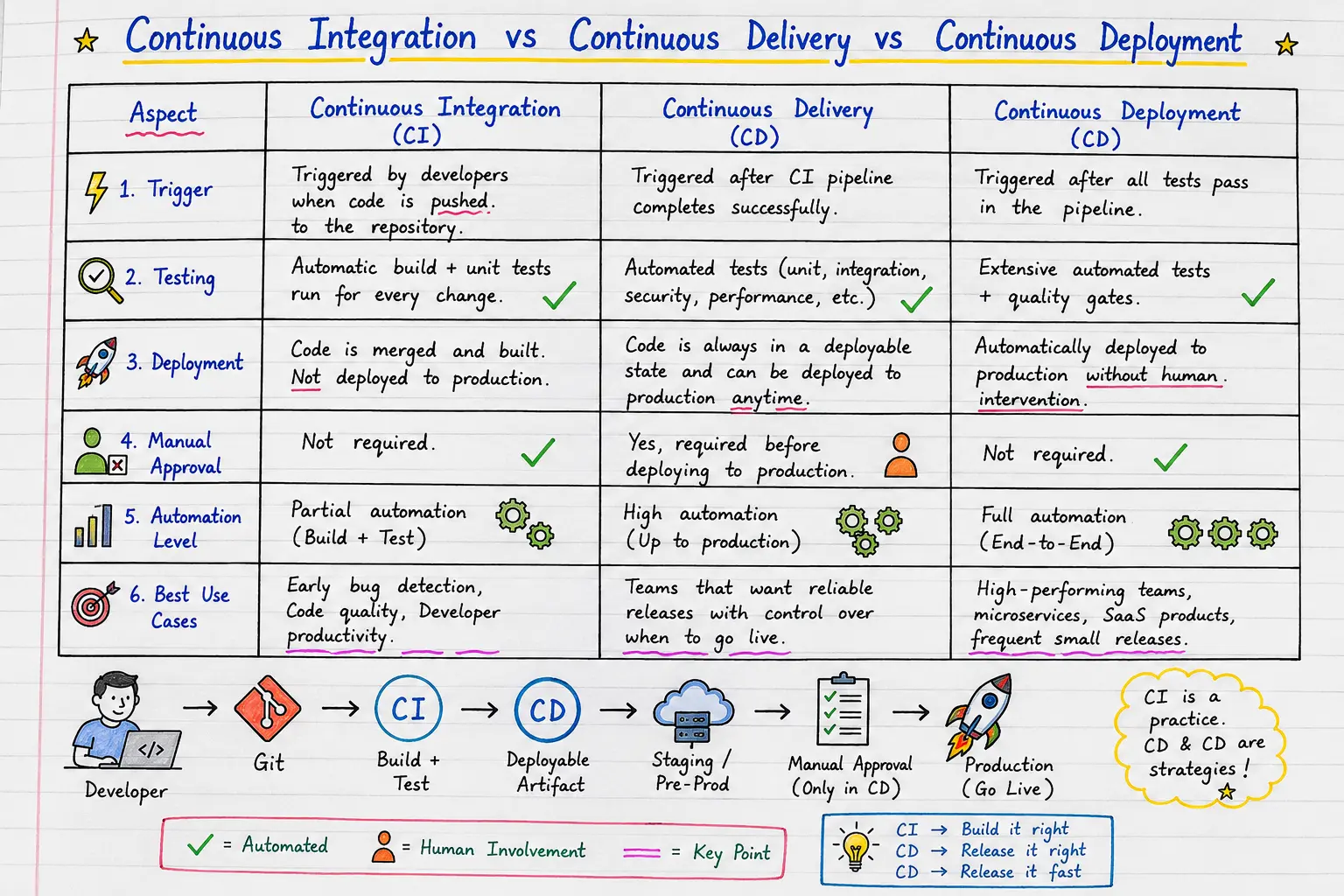
Continuous Delivery is the practice of automatically preparing your application for release.
Once the application passes all automated checks, it is deployed to a staging or pre-production environment where it is ready to go live. However, a human approval is still required before releasing it to production.
Think of it as packing a product and placing it in the warehouse. It's ready to ship, but someone decides when it actually leaves.
Continuous Delivery Workflow
Developer Pushes Code
        ↓
Continuous Integration
(Build + Test + Quality Checks)
        ↓
Deploy to Staging
        ↓
Manual Approval
        ↓
Production Deployment
When is Continuous Delivery Used?
Continuous Delivery is commonly used by:
Banks
Healthcare organisations
Government agencies
Insurance companies
Large enterprises
These industries often require compliance checks, business approvals, or scheduled release windows before software reaches customers.
What is Continuous Deployment?
Continuous Deployment takes automation one step further.
If the application successfully passes every stage of the pipeline, it is automatically deployed to production without any manual intervention.
No approval button.
No waiting.
Every successful code change becomes available to users almost immediately.
Continuous Deployment Workflow
Developer Pushes Code
        ↓
Build Application
        ↓
Run Automated Tests
        ↓
Security Checks
        ↓
Deploy Automatically
        ↓
Users Receive New Version
This approach allows organisations to release software dozens or even hundreds of times per day.
Continuous Delivery vs Continuous Deployment
Feature | Continuous Delivery | Continuous Deployment |
|---|---|---|
Automated Build | ✅ | ✅ |
Automated Testing | ✅ | ✅ |
Production Ready | ✅ | ✅ |
Manual Approval Required | ✅ Yes | ❌ No |
Automatic Production Release | ❌ | ✅ |
Risk Level | Lower | Higher |
Best For | Enterprise Software | SaaS Products, Startups |
A simple way to remember the difference:
Continuous Delivery = Always ready to release.
Continuous Deployment = Automatically released.
Understanding the Complete CI/CD Pipeline
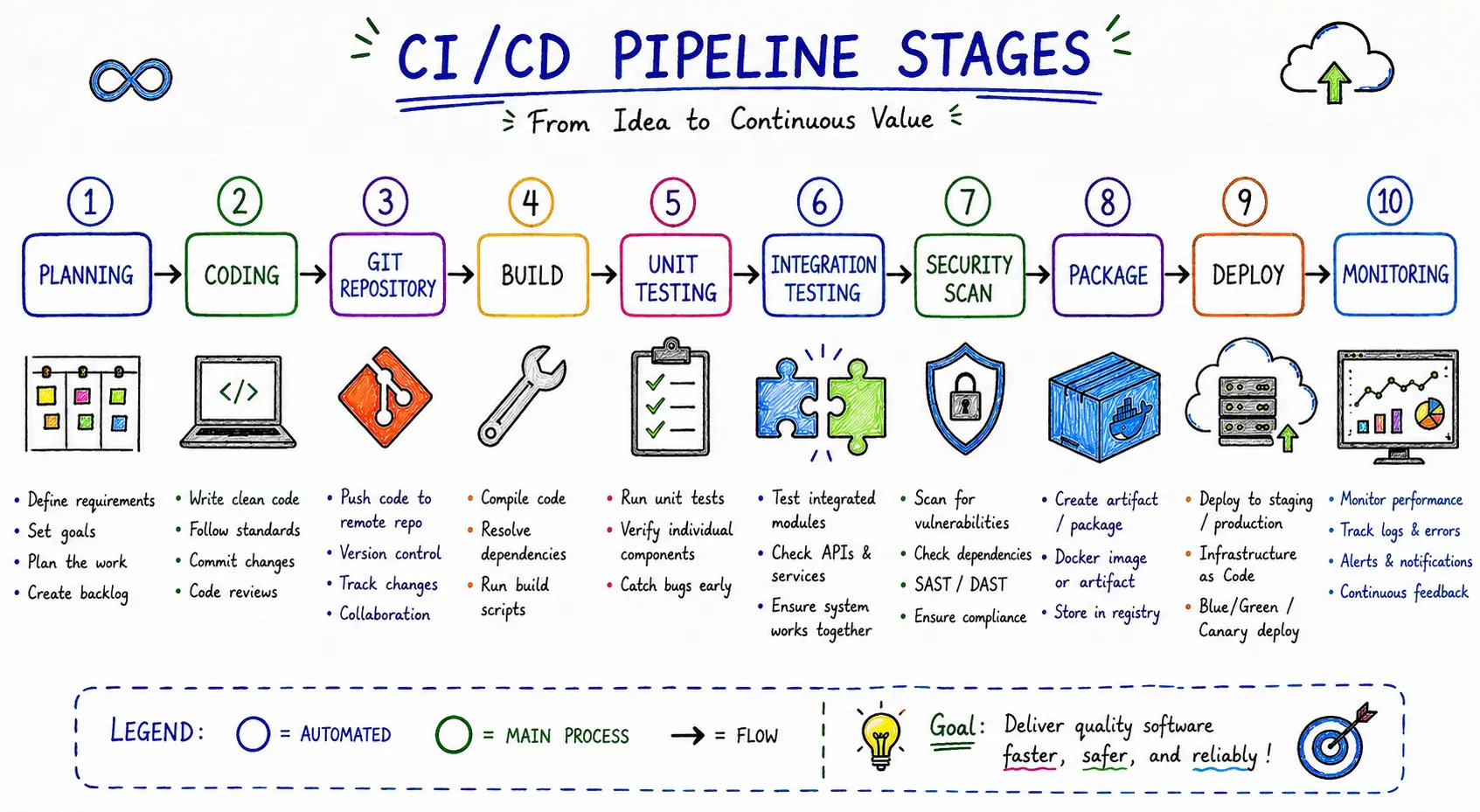
A CI/CD pipeline isn't a single step - it's a sequence of automated stages that every code change passes through before reaching users.
Let's walk through each stage.
Stage 1: Planning
Everything begins with planning.
Teams discuss:
New features
Bug fixes
User requirements
Sprint goals
Technical design
Popular tools:
Jira
Azure Boards
Trello
Linear
Stage 2: Coding
Developers write code using their preferred IDE.
Examples include:
Visual Studio Code
IntelliJ IDEA
Visual Studio
PyCharm
Code is committed to a version control system such as Git.
Example Git commands:
git add .
git commit -m "Add user authentication"
git push origin main
The push triggers the CI pipeline automatically.
Stage 3: Source Control
The repository stores every version of the application.
Popular platforms include:
GitHub
GitLab
Bitbucket
Azure Repos
Version control enables:
Collaboration
Rollbacks
Branching
Pull Requests
Code Reviews
Stage 4: Build
The build server converts source code into an executable application.
Examples:
Compile Java code
Build a React application
Package a Node.js application
Create Docker images
If the build fails, the pipeline stops immediately.
Stage 5: Automated Testing
Testing ensures new code doesn't break existing functionality.
Common testing types include:
Unit Testing
Tests individual functions or methods.
Example:
Login Function
↓
Valid Username?
↓
Expected Output
Integration Testing
Checks whether multiple services work correctly together.
Examples:
Login API + Database
Payment Gateway + Backend
Email Service + Application
End-to-End Testing
Simulates a real user's journey.
Example:
User Login
↓
Browse Products
↓
Add to Cart
↓
Checkout
↓
Payment Successful
This validates the entire application flow.
Stage 6: Code Quality Analysis
Automated quality tools inspect your code for issues before deployment.
They detect:
Duplicate code
Code smells
Bugs
Security vulnerabilities
Maintainability issues
Popular tools include:
SonarQube
ESLint
Checkstyle
PMD
High-quality code is easier to maintain, debug, and scale.
Stage 7: Security Scanning
Modern DevOps pipelines integrate security into the development lifecycle - a practice known as DevSecOps.
Security scans can identify:
Vulnerable libraries
Secrets accidentally committed to source control
Misconfigured dependencies
Container image vulnerabilities
Licence compliance issues
Fixing security issues before deployment is significantly cheaper and safer than addressing them after release.
Stage 8: Packaging
Once everything passes, the application is packaged for deployment.
Examples include:
Docker Image
JAR File
WAR File
ZIP Package
NuGet Package
npm Package
This package becomes the release artefact used across different environments.
Stage 9: Deployment
The application is deployed to one or more environments.
Typical flow:
Development
↓
Testing
↓
Staging
↓
Production
Automation ensures each environment receives the same build, reducing configuration differences and deployment errors.
Stage 10: Monitoring
Deployment isn't the end of the pipeline.
Teams continuously monitor:
Application availability
Response times
Error rates
CPU usage
Memory consumption
User activity
Crash reports
Monitoring helps detect issues quickly so they can be resolved before affecting many users.
Popular CI/CD Tools
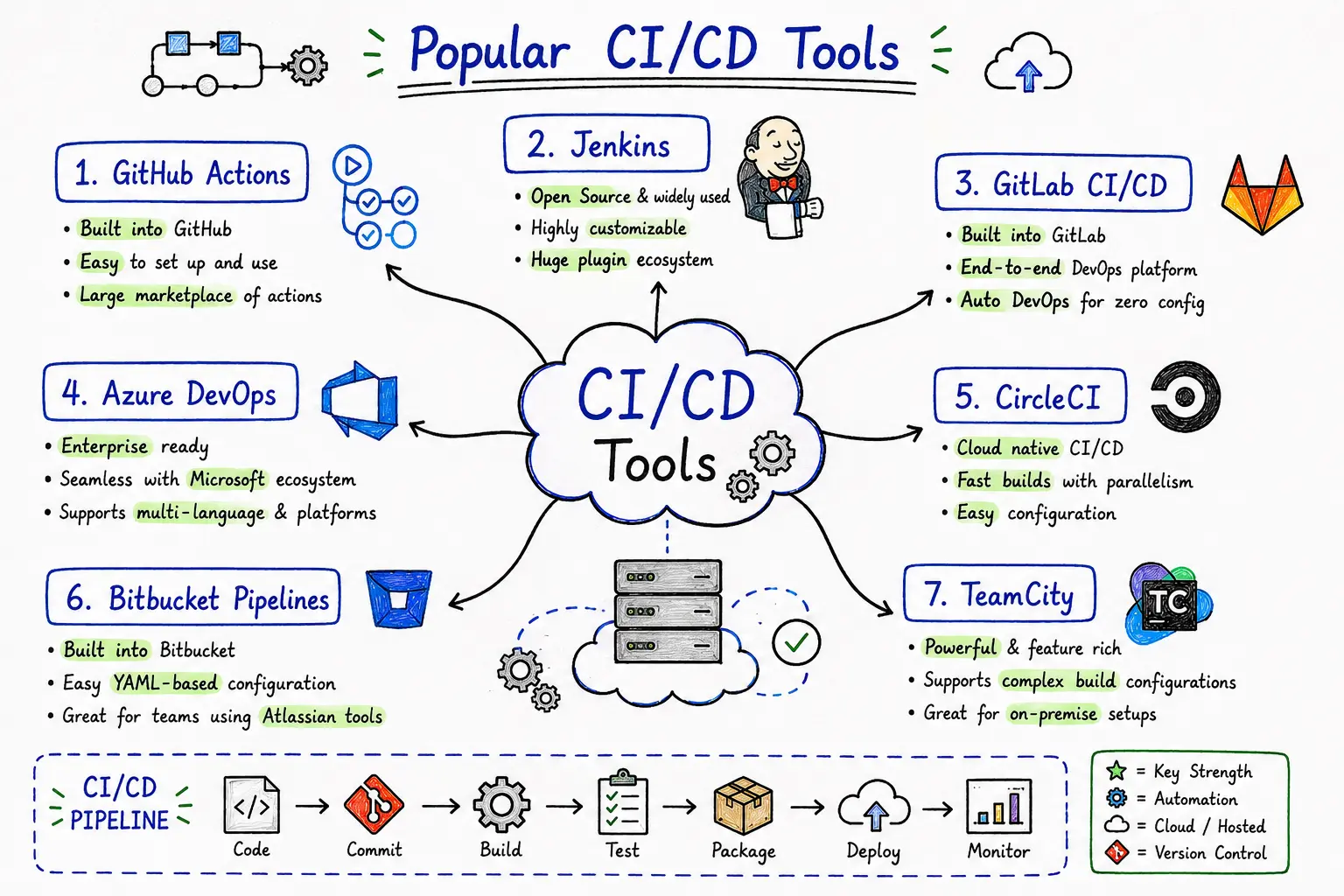
Choosing the right tool depends on your team's size, technology stack, and hosting platform.
Here are some of the most widely used CI/CD solutions.
1. GitHub Actions
Best for teams using GitHub.
Features
Built into GitHub
Workflow automation using YAML
Large marketplace of reusable actions
Excellent integration with repositories
Example workflow:
name: Build Application

on:
  push:
    branches:
      - main

jobs:
  build:
    runs-on: ubuntu-latest

    steps:
      - uses: actions/checkout@v4

      - name: Install Dependencies
        run: npm install

      - name: Run Tests
        run: npm test
2. Jenkins
One of the oldest and most powerful open-source automation servers.
Advantages:
Highly customisable
Thousands of plugins
Large community
Supports virtually every programming language
Ideal for enterprise environments with complex automation requirements.
3. GitLab CI/CD
A complete DevOps platform with integrated CI/CD.
Features include:
Source control
CI/CD pipelines
Security scanning
Package registry
Monitoring
Issue tracking
Everything is available within a single platform.
4. Azure DevOps
Designed for organisations using Microsoft technologies.
Provides:
Azure Pipelines
Azure Repos
Azure Boards
Azure Test Plans
Azure Artifacts
It integrates seamlessly with .NET, Azure Cloud, and Visual Studio.
5. CircleCI
Known for its speed and ease of use.
Advantages:
Cloud-native
Fast parallel builds
Docker support
Kubernetes integration
Flexible workflows
Popular among startups and SaaS companies.
6. Bitbucket Pipelines
Integrated directly into Bitbucket repositories.
Benefits:
Simple YAML configuration
Tight integration with Atlassian tools
Suitable for teams already using Jira and Bitbucket
7. TeamCity
A CI/CD solution developed by JetBrains.
Features:
Intelligent build management
Detailed reporting
Support for multiple build configurations
Enterprise scalability
Which Tool Should Beginners Learn?
If you're just starting your DevOps journey, consider this progression:
Tool | Beginner Friendly | Best For |
|---|---|---|
GitHub Actions | ⭐⭐⭐⭐⭐ | Personal projects and GitHub repositories |
GitLab CI/CD | ⭐⭐⭐⭐☆ | Full DevOps workflows |
Jenkins | ⭐⭐⭐☆☆ | Enterprise automation and custom pipelines |
Azure DevOps | ⭐⭐⭐⭐☆ | Microsoft ecosystems |
CircleCI | ⭐⭐⭐⭐☆ | Cloud-native applications |
Bitbucket Pipelines | ⭐⭐⭐☆☆ | Atlassian-based teams |
For most beginners, GitHub Actions is an excellent starting point because it's easy to configure, integrates directly with GitHub, and introduces the core concepts you'll use with other CI/CD platforms.
Benefits of CI/CD Pipelines
Implementing a CI/CD pipeline is more than just automating builds and deployments - it's about creating a faster, more reliable, and more collaborative software development process. Teams that adopt CI/CD often experience shorter release cycles, fewer production issues, and greater confidence in delivering new features.
Let's explore the key benefits.
1. Faster Software Delivery
Traditional software releases often take weeks or months because testing, integration, and deployment are performed manually.
With CI/CD, these tasks are automated, allowing teams to release updates multiple times a day if needed.
Example:
Instead of waiting for a monthly release, a bug fix can reach users within hours.
2. Early Bug Detection
One of the biggest advantages of Continuous Integration is immediate feedback.
Every code change is automatically built and tested. If something breaks, the pipeline alerts the developer before the issue reaches production.
Early detection means:
Less debugging time
Lower development costs
Faster fixes
Better software quality
3. Improved Code Quality
Automated code quality tools analyse your source code for:
Bugs
Code smells
Duplicate code
Security vulnerabilities
Coding standard violations
Developers receive actionable feedback before the code is merged.
This helps maintain a clean, consistent, and maintainable codebase.
4. Reduced Human Error
Manual deployments often involve repetitive tasks such as:
Copying files
Running deployment scripts
Updating configurations
Restarting services
Even experienced engineers can make mistakes during these processes.
CI/CD automates repetitive tasks, ensuring every deployment follows the same reliable workflow.
5. Faster Feedback Loops
Developers don't have to wait until release day to discover problems.
Instead, they receive feedback within minutes after pushing code.
This encourages frequent commits and smaller, manageable changes.
6. Better Team Collaboration
Since developers integrate their code regularly, merge conflicts become smaller and easier to resolve.
CI/CD also promotes:
Shared responsibility
Transparent workflows
Consistent development practices
Improved communication between development, testing, and operations teams
7. Reliable Releases
Every deployment follows the same tested pipeline.
This consistency reduces deployment failures and increases confidence during releases.
8. Easier Rollbacks
If a deployment introduces an issue, modern CI/CD platforms allow teams to quickly revert to a previous stable version.
This minimises downtime and improves the user experience.
9. Enhanced Security
Security is no longer treated as a final checkpoint.
Modern pipelines integrate DevSecOps, where automated tools scan code and dependencies for vulnerabilities throughout the development lifecycle.
This proactive approach helps identify and address security risks before they reach production.
10. Greater Customer Satisfaction
Frequent, reliable updates mean:
Faster bug fixes
New features delivered sooner
Improved application stability
Better overall user experience
Satisfied users are more likely to continue using your product and recommend it to others.
CI/CD Best Practices
Simply adopting CI/CD tools isn't enough. Following industry best practices ensures your pipeline remains efficient, secure, and scalable.
Commit Small Changes Frequently
Avoid working on large features for weeks before merging them.
Smaller commits are:
Easier to review
Easier to test
Easier to debug
Less likely to create merge conflicts
Automate Everything Possible
Automate repetitive tasks such as:
Building
Testing
Deployment
Code quality checks
Security scans
Notifications
The fewer manual steps involved, the more reliable your pipeline becomes.
Keep Pipelines Fast
Developers expect quick feedback.
A pipeline that takes 45 minutes to complete discourages frequent commits.
Optimise by:
Running tests in parallel
Caching dependencies
Removing unnecessary steps
Using incremental builds where possible
Write Meaningful Automated Tests
Your pipeline is only as effective as your tests.
Aim for a balanced testing strategy:
Unit Tests
Integration Tests
API Tests
End-to-End Tests
Reliable tests increase confidence in every release.
Use Version Control for Everything
Store not only application code but also:
Infrastructure as Code (IaC)
Pipeline configurations
Deployment scripts
Environment templates
This ensures consistency across environments and simplifies collaboration.
Monitor Every Deployment
After deployment, monitor key metrics such as:
Error rates
Response times
CPU usage
Memory usage
Application availability
User activity
Monitoring enables teams to identify and resolve issues before they affect users.
Secure Secrets Properly
Never store sensitive information directly in source code.
Instead, use secure secret management solutions provided by your CI/CD platform or cloud provider.
Examples include:
API keys
Database passwords
Cloud credentials
Authentication tokens
Common CI/CD Mistakes Beginners Make
Skipping automated tests – Can lead to bugs reaching production.
Making large commits – Harder to review, test, and debug.
Ignoring failed pipelines – Always fix pipeline errors before moving on.
Hardcoding secrets – Never store passwords or API keys in your code.
Not monitoring deployments – Track your application after release to catch issues early.
Overcomplicating the pipeline – Keep your CI/CD workflow simple and easy to maintain.
The Future of CI/CD: AI + DevOps
Artificial Intelligence (AI) is making CI/CD pipelines smarter, faster, and more efficient. Instead of only automating tasks, AI can now help teams make better decisions throughout the software delivery process.
Some exciting trends include:
🤖 AI-Powered Testing – Automatically generates and improves test cases.
🔍 Smart Bug Detection – Finds bugs and suggests possible fixes faster.
🛡️ Security Analysis – Detects vulnerabilities before deployment.
📊 Predictive Deployments – Uses past data to identify risky releases.
⚡ Intelligent Automation – Optimises pipeline performance and cloud resources.
As AI continues to evolve, CI/CD pipelines will become more intelligent, helping developers build, test, and deploy software with greater speed, reliability, and confidence.
Conclusion
CI/CD has become a cornerstone of modern software development.
By automating integration, testing, and deployment, organisations can release software more frequently, with greater confidence and higher quality.
For beginners, understanding the core concepts of Continuous Integration, Continuous Delivery, and Continuous Deployment provides a strong foundation for exploring the broader DevOps ecosystem.
Whether you're building personal projects or working within an enterprise team, mastering CI/CD will help you develop better software, collaborate more effectively, and deliver value to users faster.
The journey doesn't end here. Once you're comfortable with the fundamentals, explore tools such as GitHub Actions, Jenkins, GitLab CI/CD, or Azure DevOps, and start building your own pipelines. Hands-on practice is the best way to deepen your understanding and prepare for real-world DevOps workflows.
Frequently Asked Questions (FAQ)
1. What does CI/CD stand for?
CI/CD stands for Continuous Integration and Continuous Delivery or Continuous Deployment. It is a set of practices that automate building, testing, and deploying software.
2. Is CI/CD part of DevOps?
Yes. CI/CD is one of the core practices of DevOps, enabling faster collaboration between development and operations teams through automation.
3. Which CI/CD tool should beginners learn first?
GitHub Actions is an excellent starting point because it integrates directly with GitHub, uses simple YAML configuration files, and supports a wide range of programming languages and frameworks.
4. What programming languages support CI/CD?
CI/CD is language-agnostic. Popular languages include Java, Python, JavaScript, TypeScript, C#, Go, PHP, Ruby, and many others.
5. What is the difference between CI and DevOps?
Continuous Integration (CI) focuses on frequently integrating and validating code changes through automated builds and tests. DevOps is a broader culture and set of practices that combines development, operations, automation, monitoring, collaboration, and continuous improvement.
6. Can small teams benefit from CI/CD?
Absolutely. Even solo developers and small startups benefit from automated testing, reliable deployments, and faster release cycles.
7. Do I need Docker or Kubernetes to use CI/CD?
No. While Docker and Kubernetes are commonly used with CI/CD pipelines, they are not mandatory. You can implement CI/CD for many types of applications without using containers.
Ready to go deeper?
Professional Training
Hands-on, mentor-led training aligned with industry certifications.
About the Author
Sharper every day
Daily tutorials, analysis, and career playbooks across all 12 Xcademia disciplines, straight to your inbox. No spam.