NGINX Explained: The Complete Beginner's Guide to Web Servers, Reverse Proxy, Load Balancing & More
NGINX is a high-performance web server and reverse proxy that improves application speed, security, and scalability. Learn how it routes client requests, balances traffic across backend servers, enables SSL termination, and enhances the reliability of modern web applications.
Introduction
Imagine you're trying to access your favorite website-whether it's GitHub, Netflix, Amazon, or WordPress. You type the website's URL into your browser, press Enter, and within a fraction of a second, the page appears.
Behind that seemingly simple action, several technologies work together to deliver the content quickly and securely. One of the most important technologies in this process is NGINX.
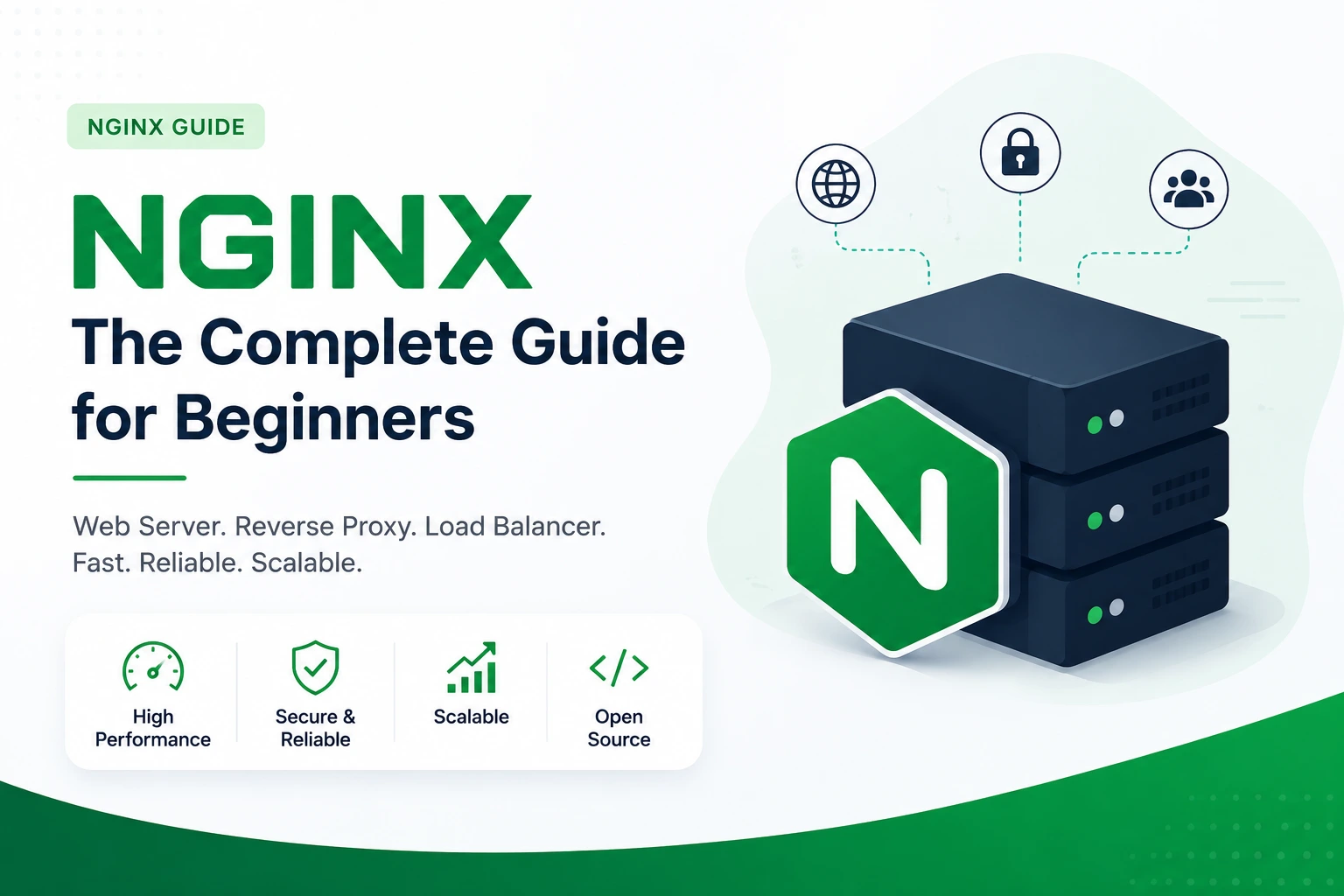
NGINX (pronounced "Engine-X") is one of the world's most popular web servers and application delivery solutions. It is trusted by startups and global enterprises alike because of its exceptional performance, scalability, and reliability. Beyond serving web pages, NGINX acts as a reverse proxy, load balancer, HTTP cache, and SSL terminator, making it an essential tool for modern web applications.
If you're learning Web Development, DevOps, Cloud Computing, or preparing to deploy applications on platforms like AWS, understanding NGINX is a valuable skill.
In this guide, we'll explore NGINX from the ground up using simple explanations, practical examples, and real-world scenarios.
What is NGINX?
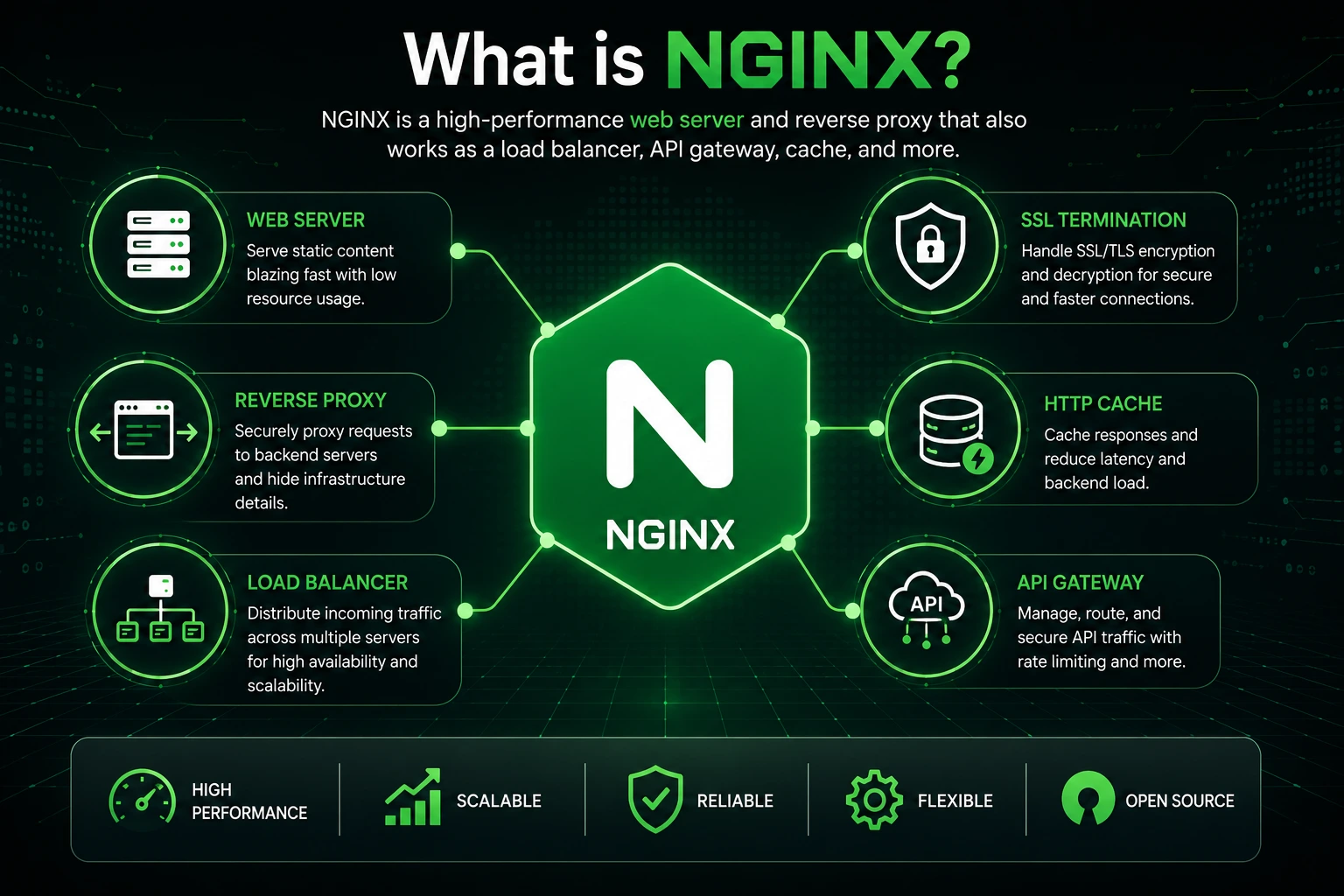
NGINX is a high-performance, open-source web server that is designed to serve websites quickly and efficiently. Over the years, it has evolved into a complete application delivery platform capable of handling multiple networking tasks.
Today, NGINX can function as:
🌐 Web Server
🔄 Reverse Proxy
⚖️ Load Balancer
🔒 SSL/TLS Terminator
⚡ HTTP Cache
🚪 API Gateway
Unlike traditional web servers that create a separate process or thread for each incoming request, NGINX uses an event-driven asynchronous architecture. This allows it to handle thousands of simultaneous connections while consuming very little memory.
This design makes NGINX an excellent choice for websites with high traffic and applications that require speed and scalability.
💡 Did You Know?
Many of the world's largest technology companies use NGINX, including:
Netflix
GitHub
WordPress
Dropbox
Airbnb
Cloudflare
These organizations rely on NGINX because it delivers excellent performance under heavy traffic while remaining lightweight and reliable.
Why Was NGINX Created?
To understand why NGINX became so popular, we need to look back at the early days of the internet.
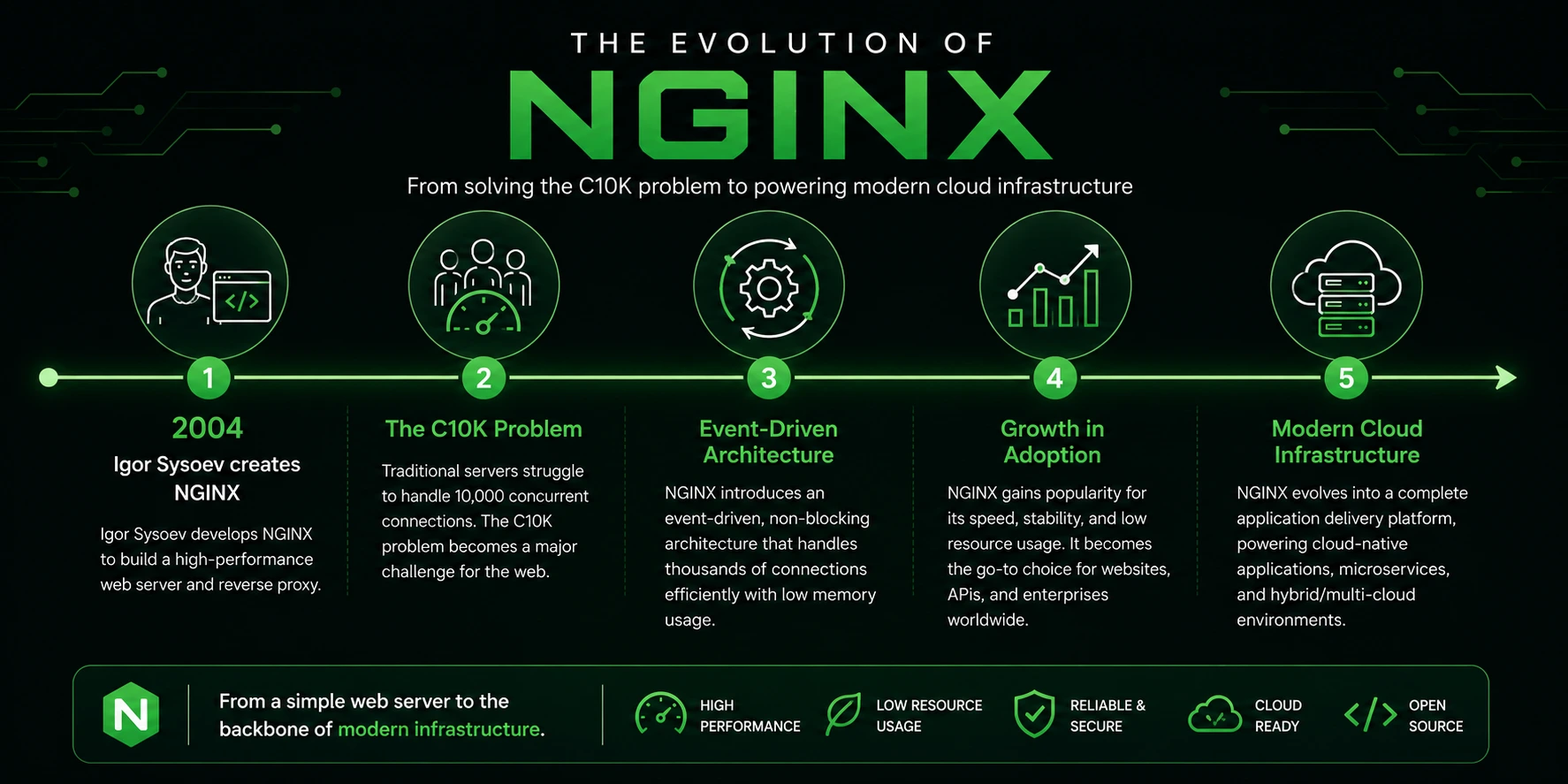
In the late 1990s and early 2000s, websites started attracting millions of visitors. Traditional web servers struggled to manage such large numbers of simultaneous users because they created a new thread or process for every incoming request.
As traffic increased, servers consumed more memory and CPU resources, leading to slower performance and occasional crashes.
This challenge became known as the C10K Problem-the challenge of handling 10,000 concurrent client connections efficiently.
In 2004, Russian software engineer Igor Sysoev developed NGINX to solve this problem.
Instead of creating a separate thread for each request, NGINX introduced an event-driven architecture, where a small number of worker processes could manage thousands of connections simultaneously.
This innovative approach dramatically improved performance and resource utilization, making NGINX one of the fastest web servers available.
Today, NGINX powers millions of websites and applications worldwide.
How Does the Internet Deliver a Website?
Before learning how NGINX works, it's important to understand what happens when you open a website.
Imagine you type the following URL into your browser:
https://example.comAlthough it appears simple, several steps happen behind the scenes.
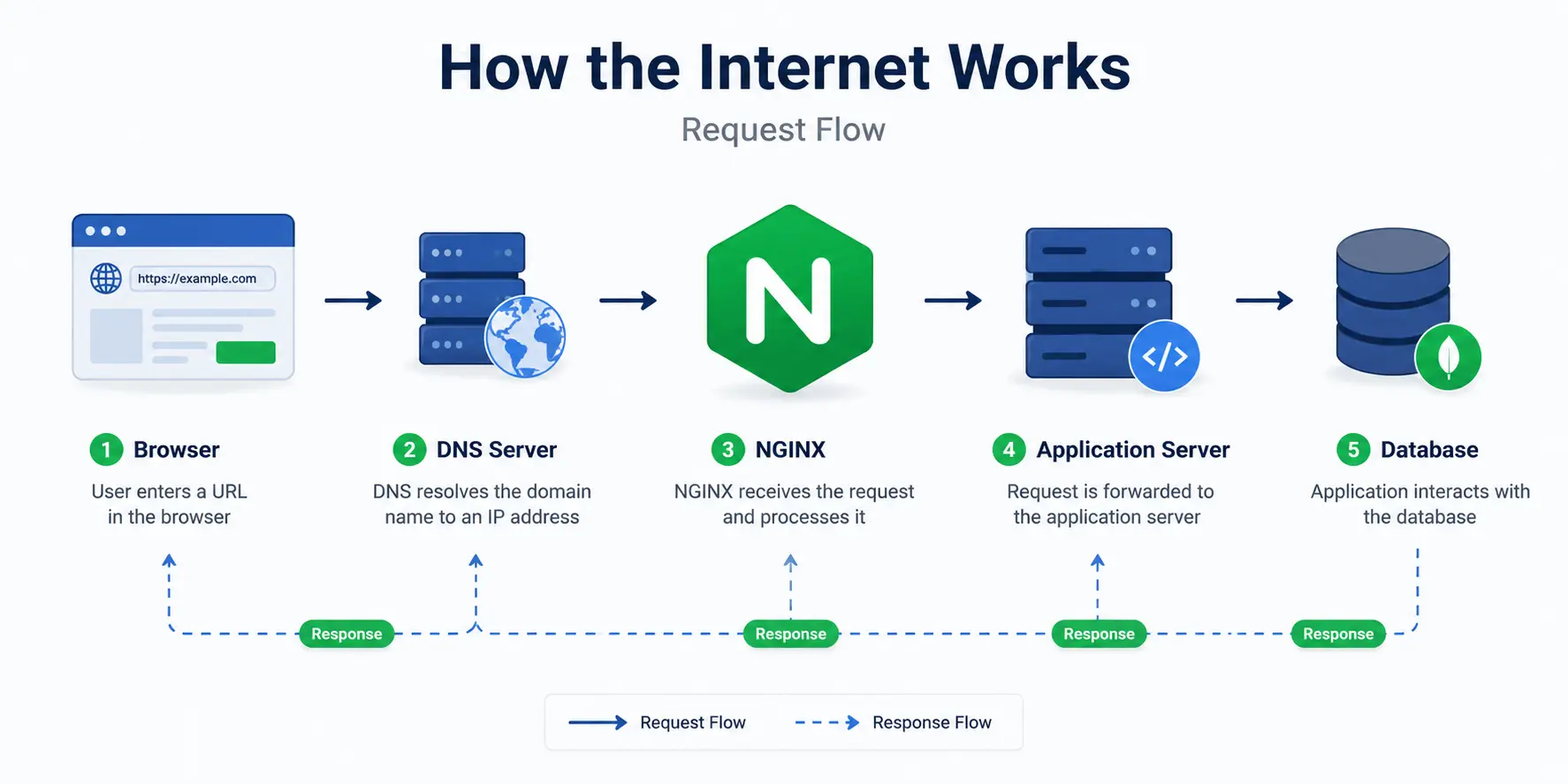
Step 1 – Browser Sends a Request
Your browser sends a request asking for the website.
↓
Step 2 – DNS Finds the Server
The Domain Name System (DNS) converts the domain name into an IP address so your browser knows where the website is hosted.
↓
Step 3 – Request Reaches the Web Server
The request reaches a web server like NGINX.
↓
Step 4 – NGINX Processes the Request
NGINX decides how to handle the request.
It may:
Serve a static HTML page
Forward the request to an application
Return cached content
Redirect the request
Secure the connection
↓
Step 5 – Response Returns to the Browser
Finally, your browser receives the response and displays the website.
What is a Web Server?
A web server is software that receives requests from users and sends back the requested content over the internet.
For example, when someone visits your website, they may request:
HTML pages
CSS files
JavaScript files
Images
Videos
PDFs
Fonts
The web server's responsibility is to locate these resources and deliver them to the user's browser.
A Real-Life Analogy
Imagine you're at a restaurant.
You don't walk directly into the kitchen to ask the chef for food.
Instead:
You tell the waiter what you'd like to order.
The waiter delivers your request to the kitchen.
The chef prepares the meal.
The waiter brings the food back to your table.
The waiter acts as the bridge between you and the kitchen.
Similarly:
Browser → Customer
NGINX → Waiter
Application → Chef
NGINX receives requests from users and delivers them to the appropriate application or resource before returning the response.
Web Server Workflow
         Browser
            ⇩
       HTTP Request
            ⇩
     NGINX Web Server
            ⇩
    Processes Request
            ⇩
Returns HTML, CSS, JS, Images
Why Do Developers Choose NGINX?
NGINX has become one of the most widely adopted web servers because it delivers an exceptional balance of performance, scalability, reliability, and flexibility. Whether you're hosting a personal blog, a business website, or a large-scale enterprise application, NGINX provides the tools needed to handle web traffic efficiently.
Its lightweight architecture and rich feature set make it a preferred choice for developers, system administrators, and DevOps engineers worldwide.
Let's explore some of the key advantages that make NGINX stand out.
High Performance
NGINX is built on an event-driven, asynchronous architecture, allowing it to handle thousands of concurrent connections with minimal resource consumption. Unlike traditional web servers that create a separate process or thread for each request, NGINX efficiently manages multiple connections using a small number of worker processes. This results in faster response times and lower memory usage, even during periods of high traffic.
Fast Static File Delivery
Serving static assets such as HTML, CSS, JavaScript, images, fonts, and videos is one of NGINX's greatest strengths. It can deliver these files directly to users without involving the application server, significantly reducing server load and improving page load times.
This makes NGINX an excellent choice for websites that prioritize speed and user experience.
Excellent Scalability
As your application grows, so does the number of users accessing it. NGINX is designed to scale effortlessly, making it suitable for both small websites and large enterprise platforms. Whether your application serves hundreds or millions of requests each day, NGINX helps maintain consistent performance without requiring significant architectural changes.
Enhanced Security
NGINX acts as a protective layer between clients and your backend applications. By functioning as a reverse proxy, it prevents direct access to application servers, manages HTTPS connections, supports SSL/TLS termination, and can be configured to limit malicious requests. These capabilities help strengthen the overall security of your web infrastructure.
Flexible and Easy Configuration
NGINX uses straightforward, human-readable configuration files that make it easy to manage websites, virtual hosts, reverse proxies, and load-balancing rules. Most configuration changes require only a simple reload of the service, allowing updates with little or no downtime.
Open Source and Community Driven
NGINX is an open-source project with a large global community that continuously contributes improvements, modules, and best practices. Extensive documentation, tutorials, and community support make it easy for beginners to learn and for experienced professionals to build production-ready applications.
Trusted in Production Environments
NGINX is used by organizations of all sizes, from startups to some of the world's largest technology companies. Its proven reliability, high availability, and ability to manage heavy workloads make it a standard component in modern cloud and DevOps environments.
Key Benefits at a Glance
Feature | Benefit |
|---|---|
High Performance | Handles thousands of concurrent connections efficiently |
Static File Serving | Delivers images, CSS, JavaScript, and other assets with minimal latency |
Scalability | Supports applications ranging from small websites to enterprise platforms |
Security | Protects backend servers through reverse proxy and SSL/TLS support |
Simple Configuration | Easy-to-read configuration files simplify server management |
Open Source | Free to use with strong community support and continuous development |
Key Takeaway: NGINX is more than just a web server. It combines speed, security, scalability, and flexibility into a single solution, making it an essential technology for hosting modern websites and deploying production-ready applications.
Installing NGINX on Ubuntu
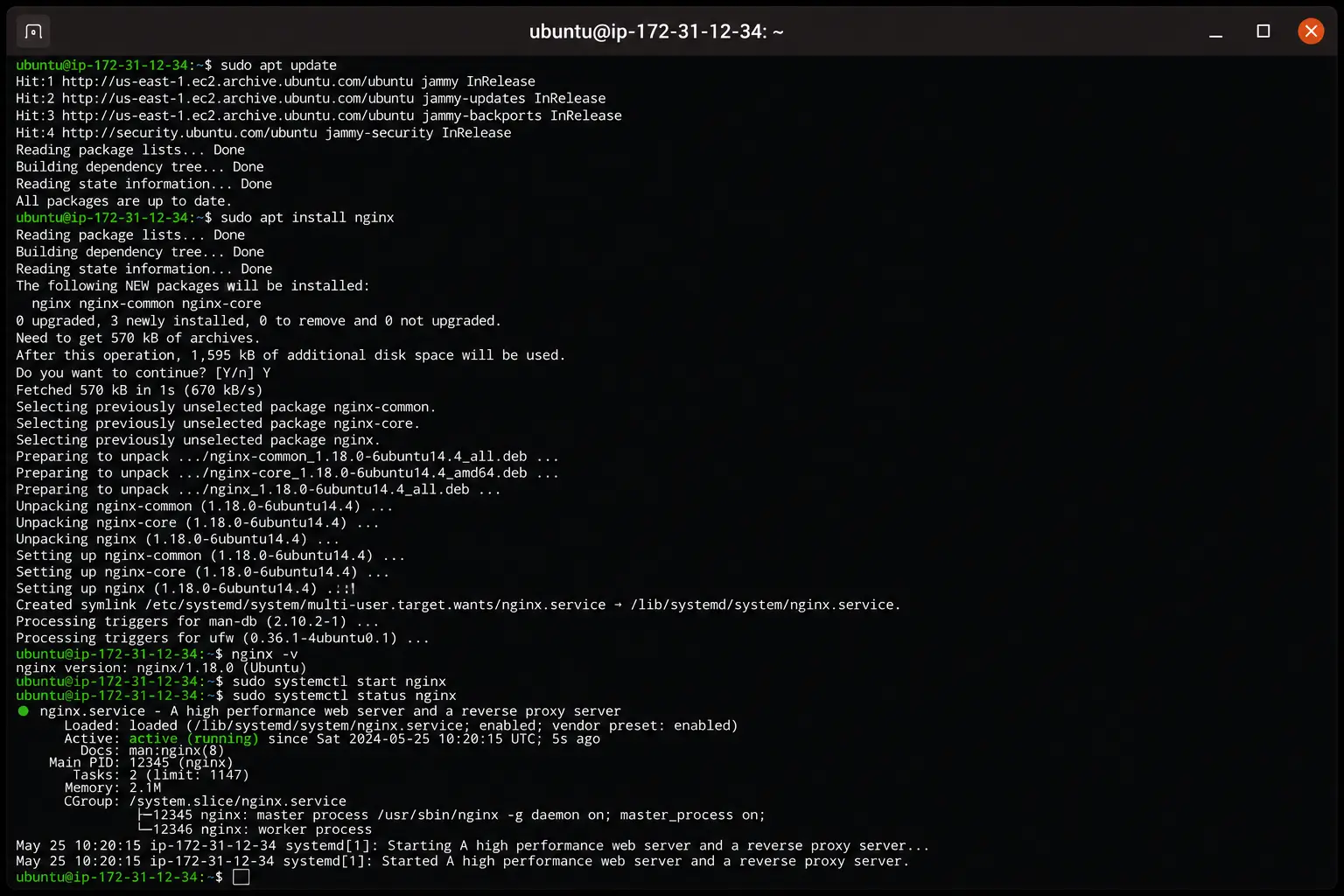
Installing NGINX on Ubuntu is straightforward.
Step 1 – Update Package Index
sudo apt updateStep 2 – Install NGINX
sudo apt install nginxStep 3 – Verify Installation
nginx -vExample output:
nginx version: nginx/1.24.0Step 4 – Start the Service
sudo systemctl start nginxStep 5 – Enable NGINX at Boot
sudo systemctl enable nginxStep 6 – Check Service Status
sudo systemctl status nginxIf everything is working correctly, you'll see that the service is active (running).
Hosting Your First Website with NGINX
Now that NGINX is installed, let's host a simple static website.
Move to the default web directory:
cd /var/www/htmlCreate a new HTML file:
sudo nano index.htmlPaste the following code:
<!DOCTYPE html>
<html>
<head>
    <title>My First NGINX Website</title>
</head>
<body>
    <h1>Welcome to My First NGINX Website!</h1>
    <p>Congratulations! Your NGINX server is running successfully.</p>
</body>
</html>
Save the file and exit the editor.
Now, open your browser and visit:
http://YOUR_SERVER_IPIf everything is configured correctly, you'll see your first website served directly by NGINX.
Congratulations! 🎉 You've successfully deployed your first web page using one of the world's fastest web servers.
NGINX Architecture
One of the biggest reasons NGINX is known for its speed and reliability is its event-driven architecture. Unlike traditional web servers that create a new process or thread for every incoming request, NGINX uses a lightweight, asynchronous model that allows it to handle thousands of connections simultaneously while consuming minimal system resources.
At the heart of this architecture are two types of processes:
Master Process
Worker Processes
Master & Worker Processes
The Master process is responsible for managing the overall NGINX server. It reads the configuration file, starts worker processes, reloads configurations, and gracefully shuts down or restarts workers when needed.
The Worker processes handle the actual client requests. Each worker can manage thousands of simultaneous connections using an event-driven, non-blocking architecture.
How It Works
                Client Requests
                       ⇩
               +----------------+
               | Master Process |
               +----------------+
                       │
        ┌──────────────┼──────────────┐
        ⇩              ⇩              ⇩
+---------------+ +---------------+ +---------------+
| Worker 1      | | Worker 2      | | Worker 3      |
| Handles       | | Handles       | | Handles       |
| Requests      | | Requests      | | Requests      |
+---------------+ +---------------+ +---------------+
Responsibilities
Master Process | Worker Process |
|---|---|
Reads configuration | Handles HTTP requests |
Starts workers | Serves files |
Reloads configuration | Proxies requests |
Monitors workers | Manages client connections |
Graceful shutdown | Executes request processing |
Why This Architecture Is Fast
Instead of creating a new thread for every request, NGINX allows each worker process to manage thousands of connections simultaneously.
This results in:
Lower memory usage
Higher performance
Better scalability
Faster response times
Efficient CPU utilization
Reverse Proxy
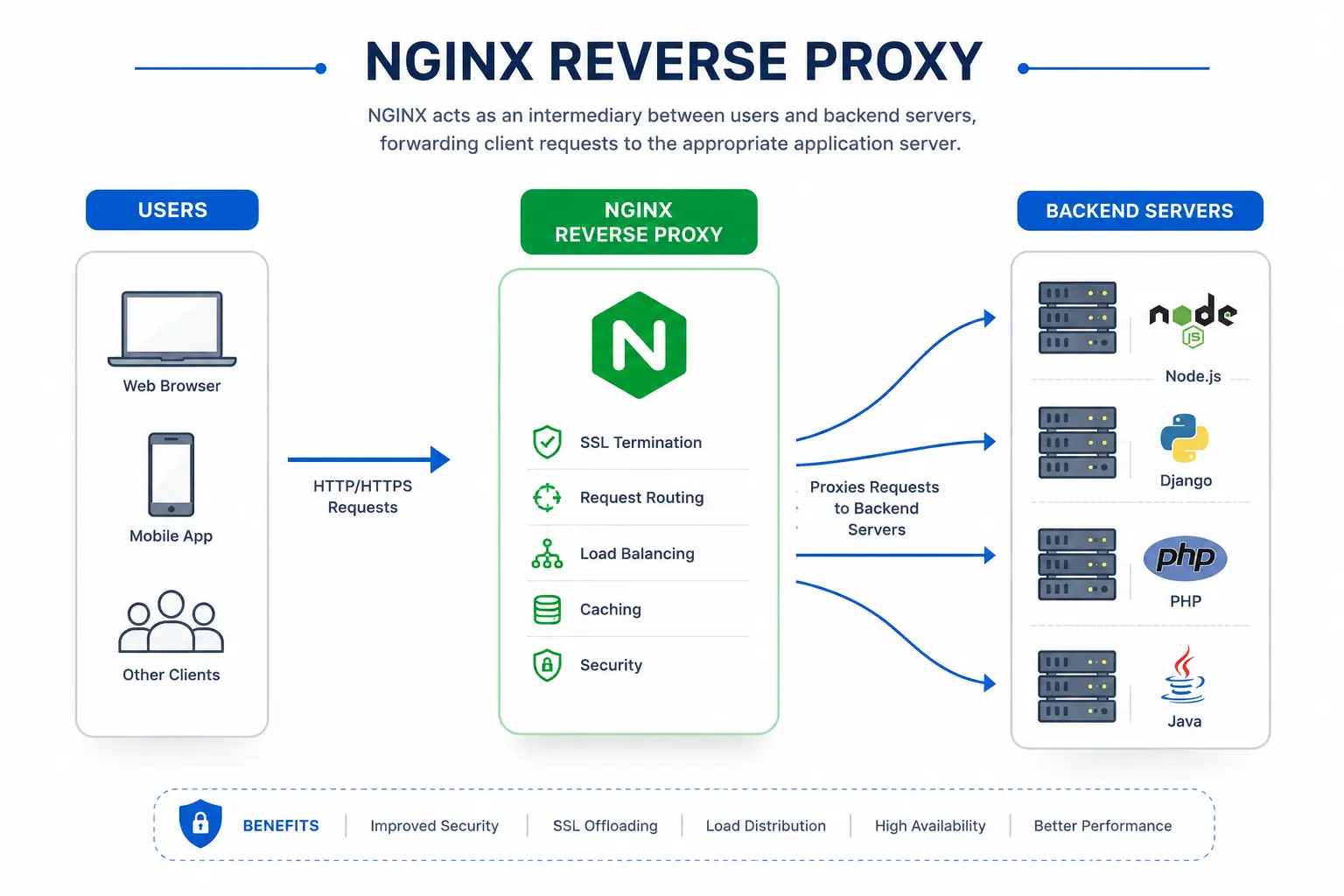
A reverse proxy sits between users and your backend servers.
Instead of users directly accessing your application, every request first reaches NGINX. NGINX then forwards the request to the appropriate backend server and returns the response to the user.
User
  ⇩
NGINX
  ⇩
Application Server
(Node.js / Django / PHP / Java)
Benefits of Reverse Proxy
Hides backend servers from users
Improves security
Enables load balancing
Supports SSL termination
Caches responses
Improves application performance
Example Reverse Proxy Configuration
server {
    listen 80;

    server_name example.com;

    location / {
        proxy_pass http://localhost:3000;

        proxy_set_header Host $host;
        proxy_set_header X-Real-IP $remote_addr;
        proxy_set_header X-Forwarded-For $proxy_add_x_forwarded_for;
    }
}
What This Configuration Does
Listens on port 80
Accepts requests for example.com
Forwards requests to an application running on localhost:3000
Passes the original client IP and host information to the backend
Load Balancing
Imagine you own an online shopping website, and during a sale, 10,000 users visit your website at the same time.
If all requests are sent to one server, that server may become overloaded, slow down, or even crash.
Load balancing solves this problem by distributing incoming client requests across multiple backend servers instead of sending everything to a single server. This helps improve application performance, reliability, and availability. NGINX acts as the traffic manager, deciding which backend server should handle each request.
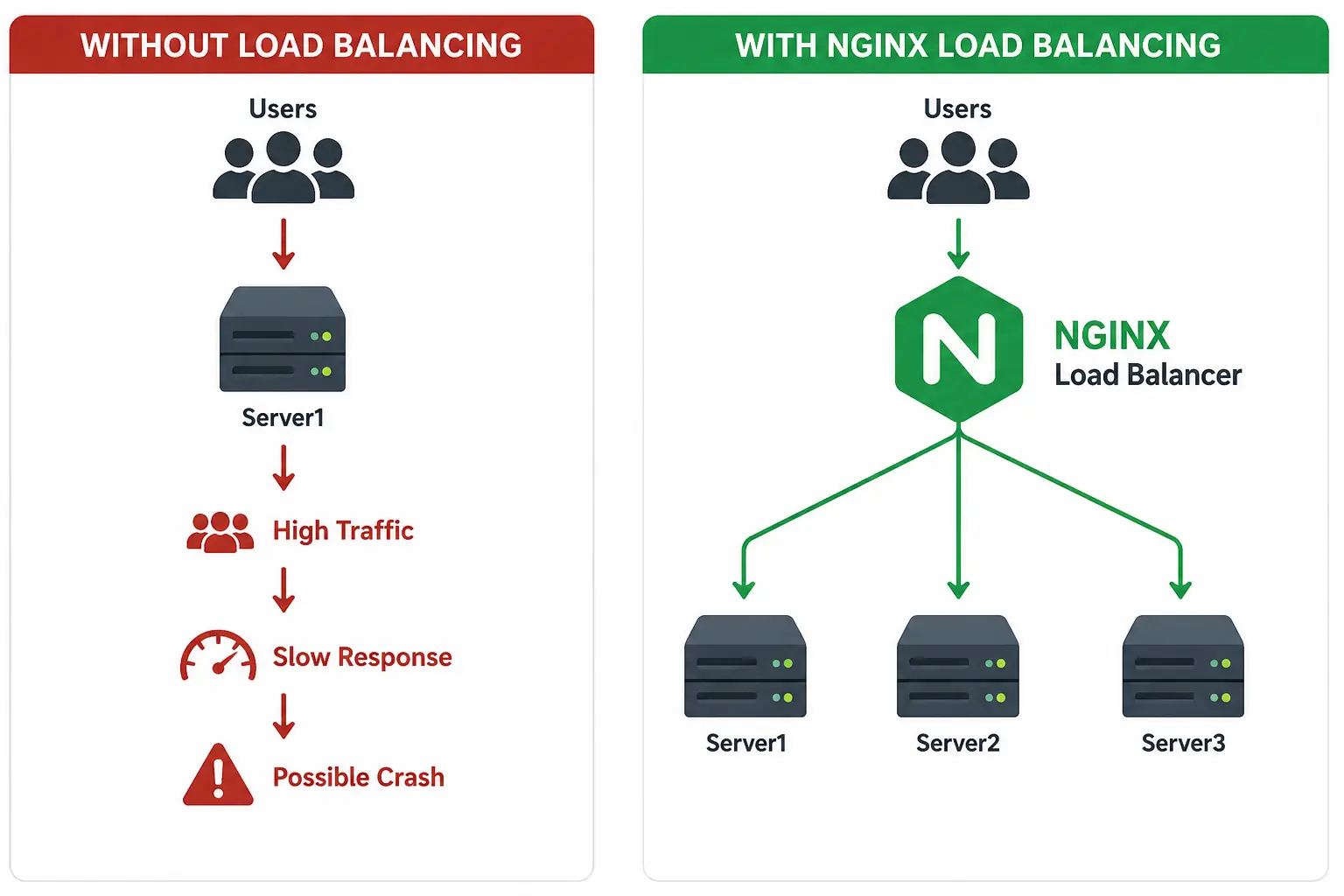
Instead of overwhelming a single server, NGINX distributes requests across multiple servers, ensuring that no single server becomes a bottleneck.
Benefits of NGINX Load Balancing
Improved Performance – Requests are shared across multiple servers, reducing response times.
High Availability – If one server goes down, traffic can be routed to healthy servers.
Scalability – New backend servers can be added as traffic grows.
Better Resource Utilization – All available servers share the workload efficiently.
How NGINX Chooses a Server
NGINX supports multiple load-balancing algorithms, each designed for different use cases:
Method | Description | Best Use Case |
|---|---|---|
Round Robin (Default) | Requests are distributed one after another to each server. | General web applications |
Least Connections | Sends traffic to the server with the fewest active connections. | Long-running requests, APIs |
IP Hash | A user's IP address determines which server handles their requests. | Applications requiring session persistence |
Weighted Round Robin | Servers receive traffic based on assigned weights. More powerful servers can handle more requests. | Servers with different hardware capacities |
Real-World Example
Suppose your application runs on three servers:
Server 1 –
192.168.1.101Server 2 –
192.168.1.102Server 3 –
192.168.1.103
When 9 users visit your website, NGINX (using Round Robin) distributes requests like this:
User | Server |
|---|---|
User 1 | Server 1 |
User 2 | Server 2 |
User 3 | Server 3 |
User 4 | Server 1 |
User 5 | Server 2 |
User 6 | Server 3 |
User 7 | Server 1 |
User 8 | Server 2 |
User 9 | Server 3 |
This keeps the workload balanced and prevents any one server from becoming overloaded.
Static File Serving
NGINX can serve static files directly without sending the request to your application.
Static files include:
HTML
CSS
JavaScript
Images
Videos
PDFs
Fonts
This makes your website load faster and reduces the workload on your application server.
How it Works
  Browser
     ⇩
   NGINX
     ⇩
CSS / JS / Images
Example
server {
    listen 80;

    location /images/ {
        root /var/www/html;
    }
}
If a user visits:
http://example.com/images/logo.pngNGINX serves:
/var/www/html/images/logo.pngwithout sending the request to the application.
SSL Termination
SSL termination means NGINX handles HTTPS requests before passing them to your application.
The user's connection is secure (HTTPS), while the application can communicate with NGINX using HTTP.
How it Works
  User (HTTPS)
       ⇩
    NGINX
 (Decrypts SSL)
       ⇩
Application (HTTP)
Benefits
Keeps user data secure
Reduces work for the application server
Makes SSL certificates easier to manage
Example
server {
    listen 443 ssl;
    server_name example.com;

    ssl_certificate /etc/nginx/ssl/fullchain.pem;
    ssl_certificate_key /etc/nginx/ssl/private.key;

    location / {
        proxy_pass http://localhost:3000;
    }
}
This configuration allows users to access your website securely using HTTPS, while NGINX forwards requests to your application running on HTTP.
Caching
Caching stores frequently requested content so NGINX can respond without contacting the backend server every time.
User
 ⇩
NGINX Cache
 │
 ├── Cache Hit → Return Cached Response
 │
 └── Cache Miss → Backend Server
Benefits
Faster response times
Lower backend load
Better scalability
Improved user experience
Reduced database requests
Basic Cache Configuration
http {

    proxy_cache_path /var/cache/nginx
                     levels=1:2
                     keys_zone=mycache:10m
                     max_size=1g
                     inactive=60m;

    server {

        location / {

            proxy_cache mycache;

            proxy_pass http://backend;

        }

    }

}
Understanding nginx.conf
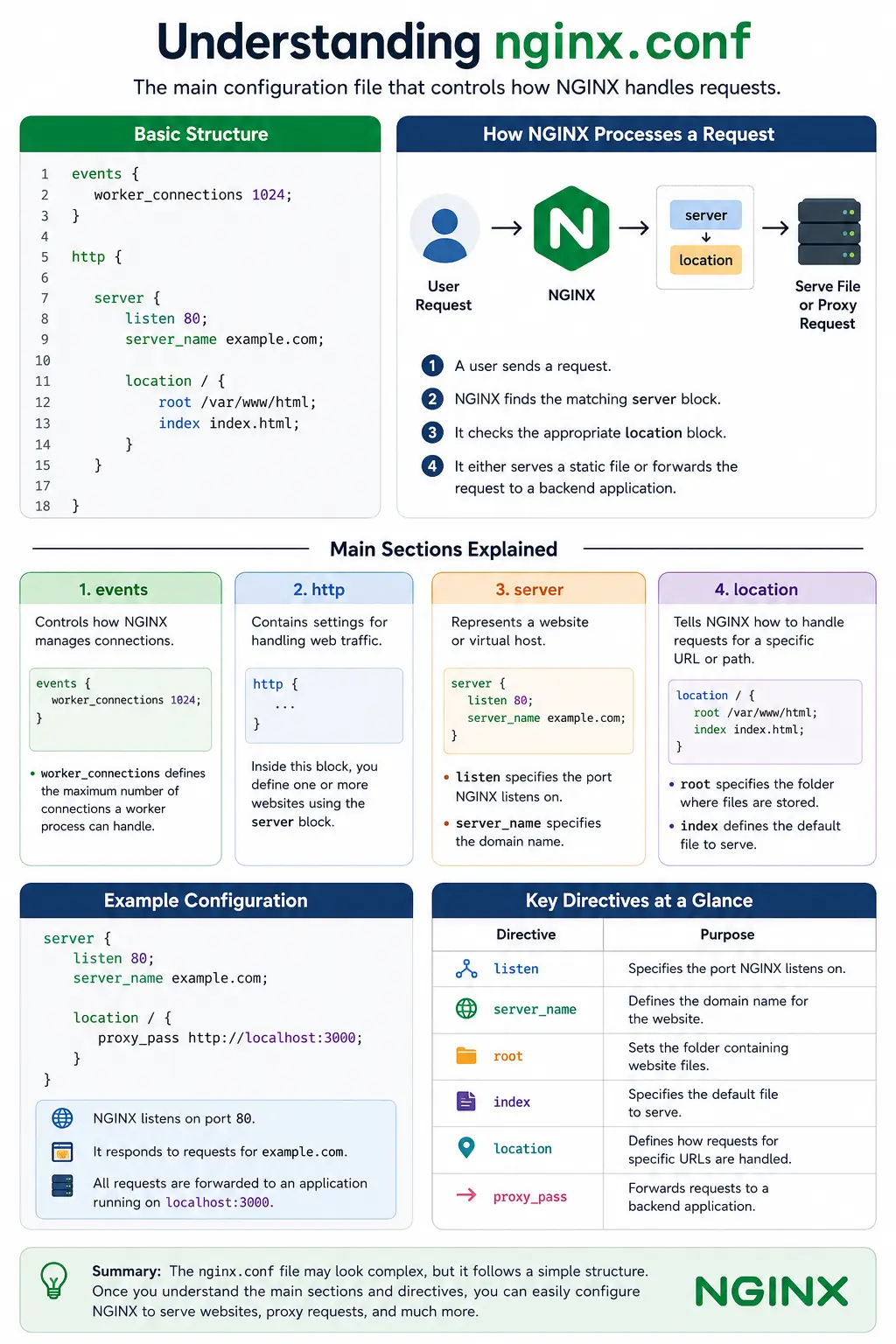
The nginx.conf file is the main configuration file of NGINX. It controls how NGINX handles incoming requests, serves websites, and communicates with backend servers.
Most NGINX settings are written in this file or in configuration files that it includes.
Basic Structure
events {
    worker_connections 1024;
}

http {

    server {

        listen 80;

        server_name example.com;

        location / {
            root /var/www/html;
            index index.html;
        }

    }

}
Main Sections
1. events
The events block controls how NGINX manages connections.
events {
    worker_connections 1024;
}worker_connectionsdefines the maximum number of connections a worker process can handle.
2. http
The http block contains settings for handling web traffic.
http {
    ...
}
Inside this block, you define one or more websites using the server block.
3. server
A server block represents a website or virtual host.
server {
    listen 80;
    server_name example.com;
}listenspecifies the port NGINX listens on.server_namespecifies the domain name.
4. location
The location block tells NGINX how to handle requests for a specific URL or path.
location / {
    root /var/www/html;
    index index.html;
}rootspecifies the folder where website files are stored.indexdefines the default file to serve, such asindex.html.
How NGINX Processes a Request
User Request
    ⇩
server
    ⇩
location
    ⇩
Serve File or Proxy Request
A user sends a request.
NGINX finds the matching
serverblock.It checks the appropriate
locationblock.It either serves a static file or forwards the request to a backend application.
Key Directives at a Glance
Directive | Purpose |
|---|---|
| Specifies the port NGINX listens on. |
| Defines the domain name for the website. |
| Sets the folder containing website files. |
| Specifies the default file to serve. |
| Defines how requests for specific URLs are handled. |
| Forwards requests to a backend application. |
Example
server {
    listen 80;
    server_name example.com;

    location / {
        proxy_pass http://localhost:3000;
    }
}
In this example:
NGINX listens on port 80.
It responds to requests for example.com.
All requests are forwarded to an application running on localhost:3000.
This basic understanding of nginx.conf will help you read and create NGINX configurations more confidently.
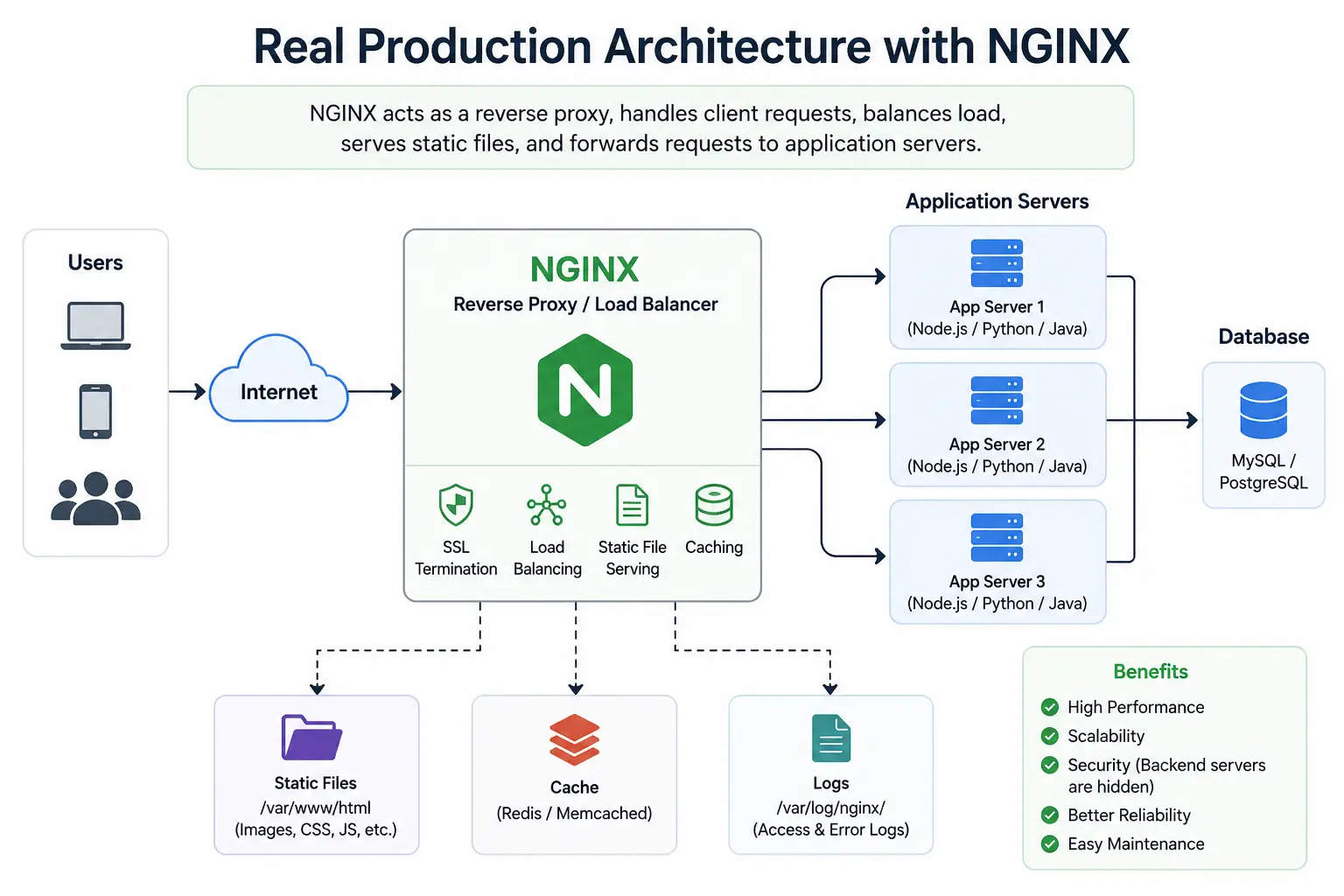
Real Production Architecture
In production, NGINX is usually placed between users and your application servers. It receives all incoming requests, serves static files, balances traffic across multiple servers, and forwards dynamic requests to the application.
This architecture improves performance, scalability, and reliability.
Architecture
                 Internet
                     ⇩
              ┌─────────────┐
              │    NGINX    │
              │Reverse Proxy│
              └─────────────┘
                │         │
         ┌──────┘         └──────┐
         ⇩                       ⇩
   Application 1          Application 2
     (Node.js)              (Node.js)
         │                       │
         └──────────┬────────────┘
                    ⇩
                Database
Why use this architecture?
Improves application performance
Distributes traffic across multiple servers
Keeps backend servers hidden from users
Makes scaling much easier
Adds an extra layer of security
NGINX vs Apache
Both NGINX and Apache are popular web servers, but they work differently.
Feature | NGINX | Apache |
|---|---|---|
Architecture | Event-driven | Process/Thread-based |
Performance | Very fast | Good |
Static Files | Excellent | Good |
Reverse Proxy | Built-in | Requires modules |
Load Balancing | Yes | Limited |
Memory Usage | Low | Higher |
Best For | High-traffic websites | Shared hosting & legacy apps |
Best Practices
Follow these best practices to keep your NGINX server secure and efficient.
Keep NGINX Updated
Install the latest version to receive security patches and new features.
Test Configuration Before Reloading
Always check your configuration before restarting NGINX.
sudo nginx -tReload Instead of Restart
Reload applies configuration changes without interrupting active connections.
sudo systemctl reload nginxEnable HTTPS
Use SSL certificates to secure communication between users and your server.
Organize Configuration Files
Store each website in its own configuration file.
Example:
/etc/nginx/sites-available/
/etc/nginx/sites-enabled/
Monitor Logs
Error log
/var/log/nginx/error.logAccess log
/var/log/nginx/access.logLogs help you troubleshoot issues and monitor server activity.
Common Beginner Mistakes
Many beginners face these issues when learning NGINX.
Forgetting to test configuration
Always run:
sudo nginx -tbefore reloading.
Editing the wrong configuration file
Verify whether you're modifying:
nginx.conf
sites-available
sites-enabled
Forgetting to reload NGINX
Configuration changes won't take effect until you reload the service.
sudo systemctl reload nginxIncorrect file permissions
Ensure NGINX has permission to access website files.
Port already in use
If port 80 or 443 is occupied, NGINX won't start.
Check:
sudo lsof -i :80Frequently Asked Questions (FAQs)
1.Is NGINX free?
Yes. The open-source version is free to use.
2.Is NGINX a web server or a reverse proxy?
Both. It can serve websites, act as a reverse proxy, perform load balancing, and much more.
3.Can NGINX run on Windows?
Yes, but it is mainly designed for Linux and Unix-based systems.
4.Which is faster: NGINX or Apache?
NGINX generally performs better for serving static files and handling many simultaneous connections.
5.Where is the NGINX configuration file?
The main configuration file is:
/ etc/nginx/nginx.confConclusion
NGINX is much more than a web server. It can serve static files, act as a reverse proxy, balance traffic across multiple servers, secure applications with HTTPS, and improve performance.
By learning its basic configuration and core features, you can confidently deploy modern web applications. As your projects grow, NGINX provides the flexibility and scalability needed for production environments.
Whether you're a beginner or an experienced developer, mastering NGINX is a valuable skill for building fast, secure, and reliable web applications.
Ready to go deeper?
Professional Training
Hands-on, mentor-led training aligned with industry certifications.
About the Author
Sharper every day
Daily tutorials, analysis, and career playbooks across all 12 Xcademia disciplines, straight to your inbox. No spam.