n8n for Beginners: The Complete Guide to Workflow Automation in 2026
Learn what n8n is, how workflow automation works, and how to build powerful automations using nodes, triggers, webhooks, APIs, and AI in this beginner-friendly guide.
Introduction
Imagine receiving an email attachment and having it automatically saved to Google Drive, summarized by AI, added to Notion, and then notifying your team on Slack - all without you touching your computer.
This isn't science fiction. It's workflow automation, and one of the most powerful tools making it possible today is n8n.
Businesses spend countless hours every week on repetitive tasks like copying data between applications, sending notifications, updating spreadsheets, creating reports, and responding to customer requests. These tasks are necessary, but they consume valuable time that could be spent on more meaningful work.
Automation changes that.
Instead of performing the same actions repeatedly, you create a workflow once and let it run automatically whenever the required event occurs.
Whether you're a developer, marketer, student, freelancer, or business owner, learning workflow automation can significantly improve productivity.
Among the many automation platforms available today, n8n has become one of the most popular choices because it combines visual workflow building with the flexibility of custom code and API integrations.
In this guide, you'll learn everything you need to get started with n8n - even if you've never built an automation before.
By the end of this article, you'll understand:
What n8n is
How workflow automation works
The building blocks of n8n
Why developers love it
Where it can be used
The core concepts you'll need before creating your first workflow
What is Workflow Automation?
Before learning n8n, it's important to understand the problem it solves.
Workflow automation means using software to perform a sequence of tasks automatically based on predefined rules.
Instead of manually completing each step, a workflow performs those actions for you.
For example, imagine someone fills out a contact form on your website.
Without automation, you might:
Open your email.
Copy the customer's details.
Paste them into a spreadsheet.
Add them to your CRM.
Send a welcome email.
Notify your sales team.
Now imagine all of those steps happening automatically within seconds.
That's workflow automation.
Automation can connect hundreds of different applications together so information flows seamlessly without manual effort.
Everyday Examples of Automation
You may already use automation without realizing it.
For example:
Receiving a notification when someone mentions you on Slack.
Automatically backing up photos from your phone.
Receiving order confirmations after shopping online.
Password reset emails.
Calendar reminders.
SMS delivery updates.
Social media scheduling.
Behind each of these experiences is an automated workflow.
What is n8n?
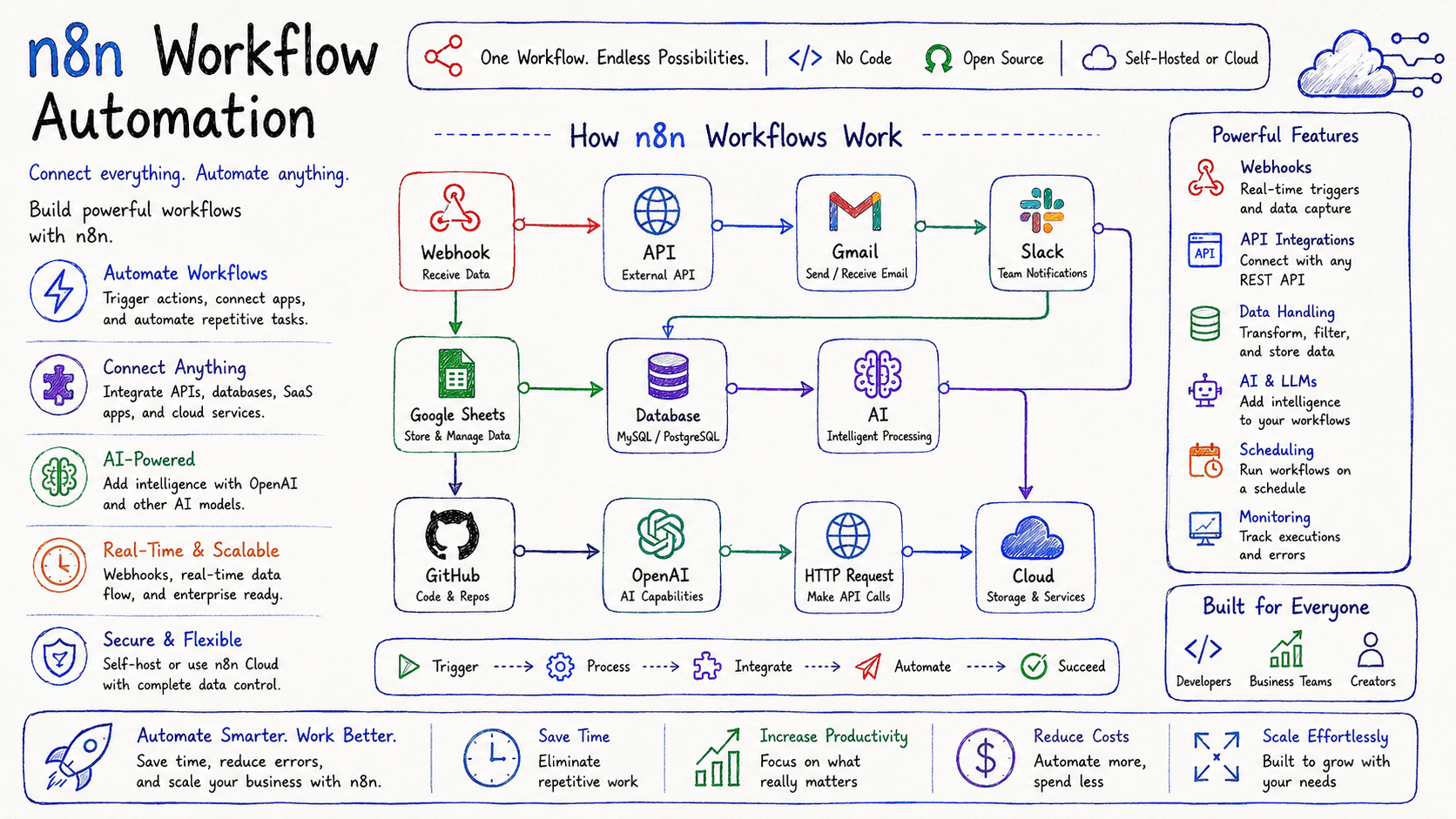
n8n (pronounced "en-eight-en") is an open-source workflow automation platform that allows you to connect applications, APIs, databases, AI models, and cloud services using a visual workflow editor.
Think of it as the glue that connects all your digital tools together.
Instead of writing hundreds of lines of integration code, you visually build workflows by connecting blocks called nodes.
Each node performs a specific task, such as:
Reading an email
Calling an API
Saving data
Sending a Slack message
Updating a database
Running JavaScript
Using AI
Processing files
Triggering another workflow
A workflow can contain just a few nodes or hundreds, depending on the complexity of the automation.
Unlike many automation tools that focus only on simple drag-and-drop experiences, n8n offers both visual simplicity and developer-level flexibility.
If needed, you can write custom JavaScript, create HTTP requests, manipulate JSON data, or integrate virtually any REST API.
This makes n8n suitable for both beginners and experienced developers.
Why is n8n Becoming So Popular?
In recent years, workflow automation has evolved beyond simple task scheduling.
Organizations now need platforms that can connect modern cloud applications, AI services, internal databases, messaging tools, and custom APIs - all within a single workflow.
n8n stands out because it combines ease of use with powerful customization.
Some reasons behind its growing popularity include:
Open Source
Unlike many automation platforms, n8n is open source.
You can self-host it on your own infrastructure, giving you greater control over your data and workflows.
Low-Code with Developer Flexibility
Beginners can build workflows visually without writing code.
Developers can extend workflows using:
JavaScript
HTTP Requests
Custom APIs
Database queries
Expressions
Environment variables
This balance makes n8n suitable for teams with varying technical expertise.
Large Integration Ecosystem
Modern businesses rely on many different applications.
n8n can integrate with hundreds of services, including:
Gmail
Slack
Discord
GitHub
Google Sheets
Notion
Airtable
MySQL
PostgreSQL
MongoDB
Telegram
Microsoft Teams
OpenAI
AWS
Stripe
Shopify
And if a service isn't available as a built-in integration, you can usually connect it using its API.
AI-Ready Workflows
One of n8n's biggest strengths today is its support for AI-powered automation.
You can create workflows that:
Summarize documents
Generate content
Analyze customer support tickets
Build AI chatbots
Extract information from PDFs
Translate text
Classify emails
Generate reports
Automate research
This makes n8n increasingly popular for AI agents and intelligent business automation.
Why Learn n8n?
Learning n8n isn't just about mastering another software tool - it's about acquiring a valuable automation skill.
Companies today are investing heavily in workflow automation because it helps them:
Reduce repetitive work
Improve productivity
Minimize human error
Save operational costs
Scale business processes
Deliver faster customer experiences
For developers, n8n also provides a practical way to connect APIs, automate deployments, process data, and build backend workflows without creating entire applications from scratch.
Whether you're automating personal tasks or enterprise processes, the same core concepts apply.
Where Can You Use n8n?
One of n8n's greatest strengths is its versatility.
Here are some common use cases.
Business Automation
Automatically process customer inquiries, manage leads, generate invoices, send notifications, and synchronize data across different systems.
Marketing
Create workflows that publish social media posts, collect leads, send newsletters, update CRMs, and analyze campaign performance.
Software Development
Automate deployments, monitor repositories, create GitHub issues, notify teams, and manage CI/CD processes.
Customer Support
Automatically categorize support tickets, assign priorities, summarize conversations using AI, and notify support agents.
Data Processing
Collect data from APIs, transform it into structured formats, store it in databases, and generate analytics reports.
AI Applications
Build AI-powered assistants that combine language models with external tools, databases, and business systems.
Core Concepts of n8n
Before creating your first workflow, you need to understand a few important concepts.
These are the building blocks that make every automation work.
1. Workflow
A workflow is a sequence of connected steps that perform a task automatically.
Think of it as a flowchart where each step leads to the next.
Example:
New Email
      ↓
Extract Attachment
      ↓
Upload to Google Drive
      ↓
Notify Slack
Each block performs one action before passing data to the next.
2. Node
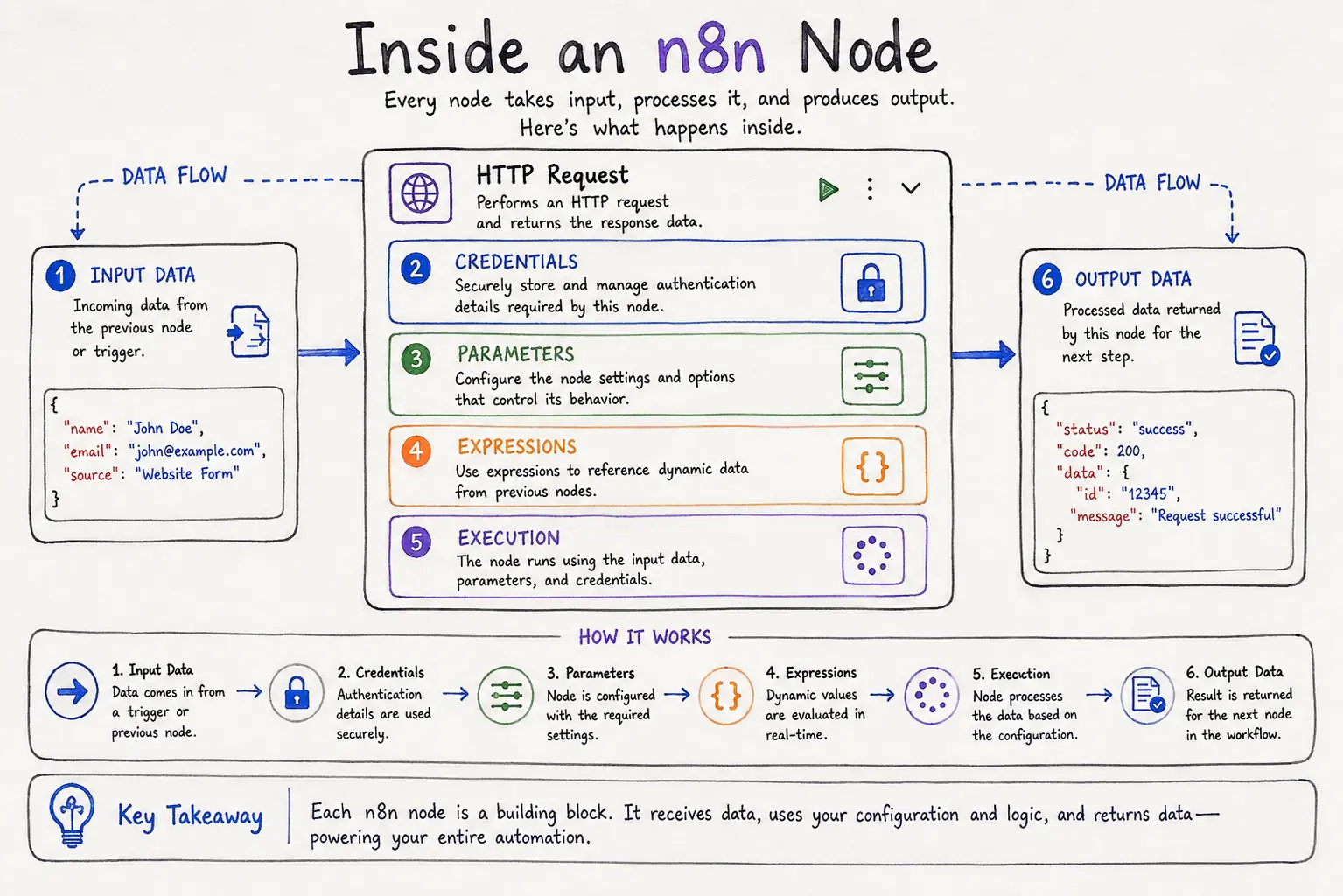
Nodes are the individual building blocks inside a workflow.
Every workflow consists of one or more nodes.
Examples include:
Gmail Node
Slack Node
HTTP Request Node
OpenAI Node
Google Sheets Node
MySQL Node
Webhook Node
Code Node
Each node has one specific responsibility.
You connect multiple nodes together to complete a larger process.
3. Trigger
A workflow needs something to start it.
This starting event is called a trigger.
Examples include:
Someone submits a form
A webhook receives data
A scheduled time is reached
A new email arrives
A file is uploaded
A database changes
A GitHub repository receives a push
Without a trigger, a workflow never begins.
4. Connections
Nodes don't work independently.
They pass information from one node to another.
This flow of information creates the automation.
For example:
Webhook
     ↓
HTTP Request
     ↓
Transform Data
     ↓
Database
     ↓
Slack Notification
Each node receives data, processes it, and forwards the result.
5. Data
Everything inside n8n revolves around data.
A workflow receives information, modifies it, and sends it elsewhere.
This information usually consists of:
JSON objects
Text
Images
Files
Numbers
Dates
API responses
Database records
Understanding how data flows through a workflow is one of the most important skills you'll develop.
Installing n8n
One of the reasons n8n has become so popular is that it's easy to get started. Whether you want a managed solution or full control over your environment, there are several installation options.
Option 1: n8n Cloud (Recommended for Beginners)
If you're new to automation, the quickest way to start is with n8n Cloud.
With the cloud version:
No installation required
Automatic updates
Secure hosting
Easy project management
Perfect for learning and small projects
Simply create an account, log in, and start building workflows from your browser.
Best for: Beginners, freelancers, and small teams.
Option 2: Docker
Docker is the preferred installation method for developers and production environments.
Advantages include:
Easy deployment
Portable setup
Simple updates
Consistent environments
Ideal for servers and VPS hosting
Many organizations use Docker to self-host n8n because it provides flexibility and full control over data.
Best for: Developers and production deployments.
Option 3: npm
If you already have Node.js installed, you can install n8n using npm.
This approach is useful for local development and testing.
It allows developers to quickly experiment with workflows without setting up containers.
Best for: JavaScript developers.
Option 4: Self-Hosting
Many businesses choose to host n8n on their own infrastructure.
Benefits include:
Complete ownership of data
Better privacy
Custom security policies
Unlimited workflow customization
No dependency on third-party hosting
Self-hosting is especially useful when workflows process sensitive customer information.
Exploring the n8n Interface
After opening n8n for the first time, you'll notice a clean visual editor.
The interface is designed around workflows instead of code.
The main sections include:
Workflow Canvas
This is your workspace.
You'll drag nodes onto the canvas and connect them to create automations.
Think of it as a digital whiteboard where every block represents one step in a process.
Node Panel
On the left side, you'll find hundreds of available integrations.
Examples include:
Gmail
Slack
Discord
Google Sheets
OpenAI
GitHub
PostgreSQL
MySQL
Airtable
HTTP Request
Telegram
Notion
Simply search for a service and drag it into your workflow.
Properties Panel
When you select a node, its settings appear here.
This is where you'll configure:
Authentication
API credentials
Input fields
Expressions
Filters
Conditions
Execution Panel
Every time a workflow runs, n8n records its execution.
You can inspect:
Input data
Output data
Errors
Execution time
Node-by-node results
This makes debugging much easier than traditional coding.
Your First Workflow
Let's create a simple automation.
Goal
Whenever someone submits a contact form:
Receive the data
Save it to Google Sheets
Notify your team on Slack
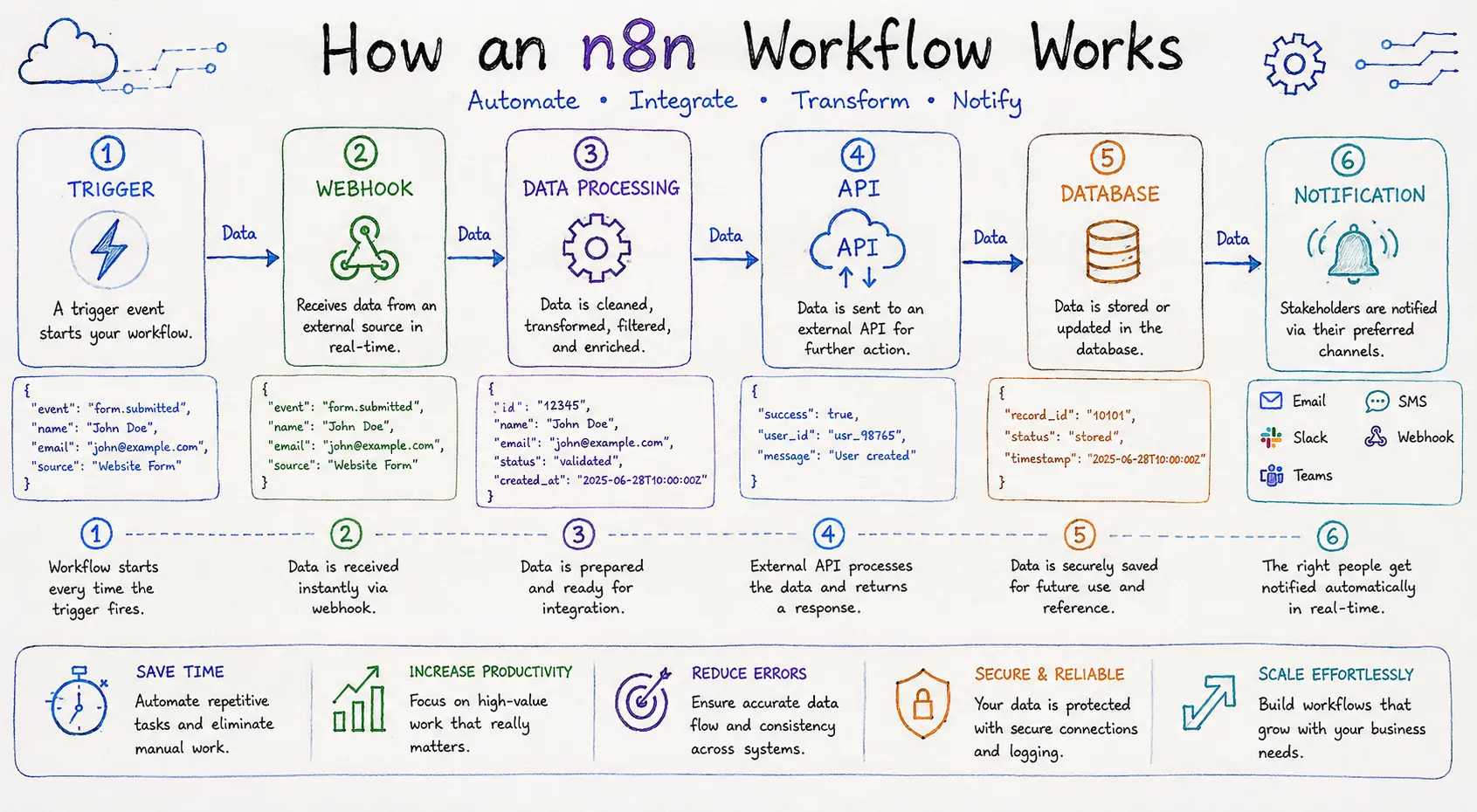
The workflow looks like this:
Form Submission
       ↓
Webhook Trigger
       ↓
Google Sheets
       ↓
Slack Notification
Here's what happens:
Step 1 - Webhook Trigger
The workflow starts when your website sends data to a webhook.
Example data:
{
  "name": "John Smith",
  "email": "john@example.com",
  "message": "I'd like a demo."
}
Step 2 - Google Sheets
The workflow automatically inserts the customer's details into a spreadsheet.
Instead of manually copying information, everything is stored instantly.
Step 3 - Slack
Finally, your sales team receives a notification.
Example:
📩 New Lead

Name: John Smith
Email: john@example.com

A new inquiry has been received.
The entire process completes in just a few seconds without manual work.
Understanding Nodes
Nodes are the heart of every n8n workflow.
Each node performs a single task.
Think of them as Lego blocks.
One block alone isn't very useful, but connecting many blocks allows you to build something powerful.
Trigger Nodes
Trigger nodes start workflows.
Examples include:
Webhook
Schedule
Gmail Trigger
GitHub Trigger
Telegram Trigger
Discord Trigger
Without a trigger, nothing happens.
Action Nodes
Action nodes perform work.
Examples:
Send Email
Create Database Record
Upload File
Send Slack Message
Call an API
Create Notion Page
These are the "do something" nodes.
Logic Nodes
Sometimes workflows need decision-making.
Logic nodes help control the flow.
Examples:
IF
Switch
Merge
Wait
Loop Over Items
Imagine automatically sending VIP customers to one team while directing everyone else to another.
That's where logic nodes become useful.
Data Transformation Nodes
Data often needs to be modified before sending it elsewhere.
Transformation nodes can:
Rename fields
Convert formats
Remove unwanted data
Merge information
Perform calculations
Example:
Input:
{
  "firstName": "John",
  "lastName": "Smith"
}
Output:
{
  "fullName": "John Smith"
}
Code Node
Sometimes visual automation isn't enough.
The Code node lets developers write JavaScript for advanced processing.
Typical uses include:
Complex calculations
Custom validations
JSON transformations
API response processing
This flexibility is one reason developers enjoy working with n8n.
Understanding Webhooks
A webhook is one of the most important concepts in automation.
A webhook is a unique URL that waits for incoming data.
When another application sends data to that URL, the workflow starts immediately.
Instead of constantly asking,
"Has something happened yet?"
the application simply says,
"Something happened - here's the data."
This makes webhooks fast and efficient.
Real-World Example
Imagine an online store.
When a customer places an order:
Customer Places Order
         ↓
Store Sends Webhook
         ↓
n8n Workflow Starts
         ↓
Generate Invoice
         ↓
Send Confirmation Email
         ↓
Notify Warehouse
Everything happens automatically within seconds.
Another Example
A job application website receives a new application.
Instead of checking every few minutes:
The website sends a webhook.
n8n receives it instantly.
Resume is saved.
HR receives a notification.
Candidate receives a confirmation email.
No manual intervention is needed.
Why Webhooks Are Better Than Polling
Many beginners confuse webhooks with polling.
Polling
Application asks repeatedly:
Anything new?

Anything new?

Anything new?

Anything new?
Most requests return nothing.
This wastes resources.
Webhooks
The application sends data only when something actually happens.
New Order!

Here's the information.
Advantages include:
Faster responses
Less server load
Lower API usage
Better scalability
Real-time automation
Understanding APIs
Almost every modern application provides an API.
API stands for Application Programming Interface.
It allows software applications to communicate with each other.
Think of an API as a waiter in a restaurant.
You tell the waiter what you want.
The waiter takes your request to the kitchen.
The kitchen prepares the meal.
The waiter brings it back.
Similarly:
Your workflow sends a request.
The API processes it.
The API returns a response.
How n8n Uses APIs
Most nodes in n8n communicate with APIs behind the scenes.
When you use:
Gmail Node
Slack Node
GitHub Node
Stripe Node
you're actually interacting with each service's API - n8n simply provides a visual interface.
HTTP Request Node
One of the most powerful nodes in n8n is the HTTP Request node.
It allows you to connect with virtually any service that exposes a REST API, even if n8n doesn't have a built-in integration.
With this node, you can:
Fetch weather information
Retrieve cryptocurrency prices
Access AI models
Communicate with your own backend
Integrate internal business systems
Work with third-party APIs
If you can make an HTTP request, you can usually automate it with n8n.
Understanding API Requests
Every API request typically includes:
URL
The destination you want to reach.
Example:
https://api.example.com/usersMethod
Common HTTP methods include:
Method | Purpose |
|---|---|
GET | Retrieve data |
POST | Create new data |
PUT | Update existing data |
PATCH | Partially update data |
DELETE | Remove data |
Headers
Headers carry additional information such as:
Authentication tokens
Content type
API keys
Example:
Authorization: Bearer YOUR_API_KEY
Content-Type: application/json
Body
The body contains the data you're sending.
Example:
{
  "name": "Alice",
  "email": "alice@example.com"
}
Authentication in n8n
Many APIs require authentication before they allow access.
Common authentication methods include:
API Keys
OAuth 2.0
Basic Authentication
Bearer Tokens
Personal Access Tokens
n8n securely stores credentials so you don't have to repeatedly enter sensitive information into every workflow.
This also makes workflows easier to manage and more secure.
Testing Your Workflow
After building a workflow, always test it before activating it.
Check:
Did every node execute successfully?
Was the expected data received?
Were API responses correct?
Were notifications delivered?
Were records created correctly?
The execution history provides detailed information about every step, making it easier to identify and fix issues.
Real-World Workflow Examples
One of n8n's biggest strengths is its ability to connect multiple applications into a single automated process.
Instead of switching between tools, you create one workflow that handles everything for you.
Let's explore some practical examples.
1. Lead Management Automation
Imagine a visitor fills out a contact form on your website.
Without automation, someone from your team has to:
Check the email
Copy the information
Update the CRM
Notify the sales team
Send a welcome email
With n8n, this entire process happens automatically.
Website Form
      ↓
Webhook Trigger
      ↓
Validate Data
      ↓
Add Lead to CRM
      ↓
Send Welcome Email
      ↓
Notify Sales Team on Slack
Benefits
Faster response times
No manual data entry
Reduced human error
Improved customer experience
2. Social Media Content Publishing
Content creators often post the same content across multiple platforms.
Instead of publishing manually, you can automate it.
New Blog Published
        ↓
Generate Social Caption
        ↓
Publish to LinkedIn
        ↓
Publish to X
        ↓
Notify Marketing Team
This ensures your content reaches multiple audiences without repeating the same task.
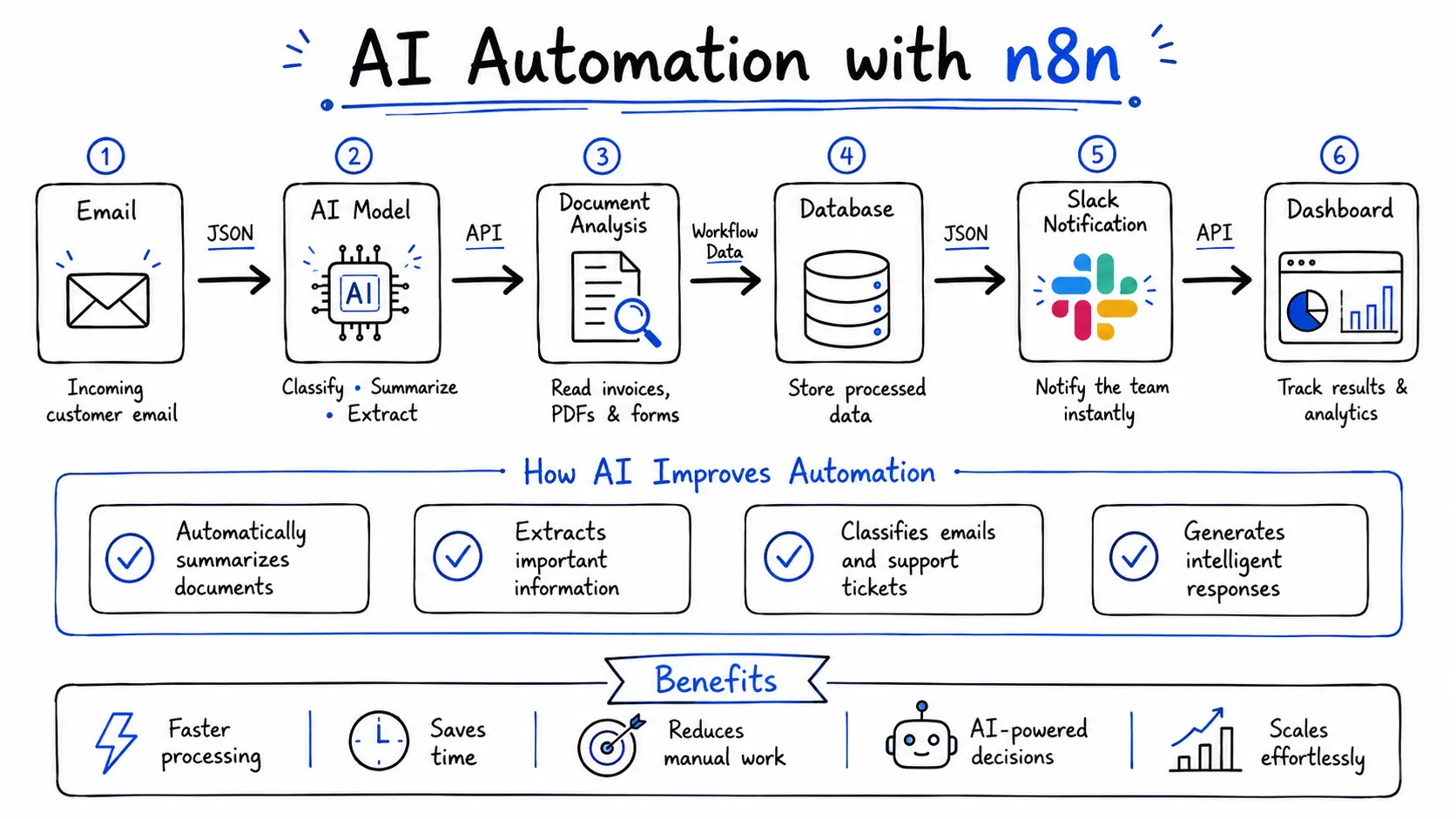
3. AI Customer Support Assistant
AI is transforming customer support, and n8n makes it easy to integrate AI into existing workflows.
Imagine a customer sends an email asking about pricing.
The workflow can:
New Email
      ↓
OpenAI
      ↓
Classify Request
      ↓
Search Knowledge Base
      ↓
Generate Response
      ↓
Send Reply
If the issue requires a human agent, the workflow can automatically assign the ticket to the appropriate team.
4. Invoice Processing
Businesses receive invoices every day.
Instead of manually entering invoice details, n8n can automate the process.
Invoice Received
        ↓
Extract PDF Text
        ↓
AI Data Extraction
        ↓
Store in Database
        ↓
Notify Finance Team
This reduces manual work while improving accuracy.
AI Automation in n8n
Artificial Intelligence has become one of the biggest reasons people are adopting workflow automation.
Instead of simply moving data between applications, AI allows workflows to understand, analyze, summarize, classify, and generate content.
n8n supports AI by integrating with services such as:
OpenAI
Google Gemini
Anthropic Claude
Local LLMs (via APIs)
Hugging Face models
Custom AI services
This means your workflows can make intelligent decisions rather than following only predefined rules.
AI Use Cases
Content Generation
Generate:
Blog outlines
Product descriptions
Social media posts
Email drafts
Meeting summaries
Example workflow:
New Topic
    ↓
OpenAI
    ↓
Generate Draft
    ↓
Review
    ↓
Publish
Email Classification
Instead of manually sorting emails, AI can identify:
Sales inquiries
Support requests
Billing questions
Spam
High-priority messages
The workflow automatically routes each email to the correct team.
Error Handling
No workflow is perfect.
APIs may become unavailable.
Servers can go offline.
Authentication tokens can expire.
Instead of allowing workflows to fail silently, build proper error handling.
Good strategies include:
Retry failed requests
Log errors
Send Slack alerts
Notify administrators
Save failed records for later processing
Example:
API Request
     ↓
Success?
   ┌───────┐
   │       │
  Yes      No
   ↓       ↓
Continue  Retry
           ↓
        Slack Alert
Proper error handling makes workflows more reliable in production environments.
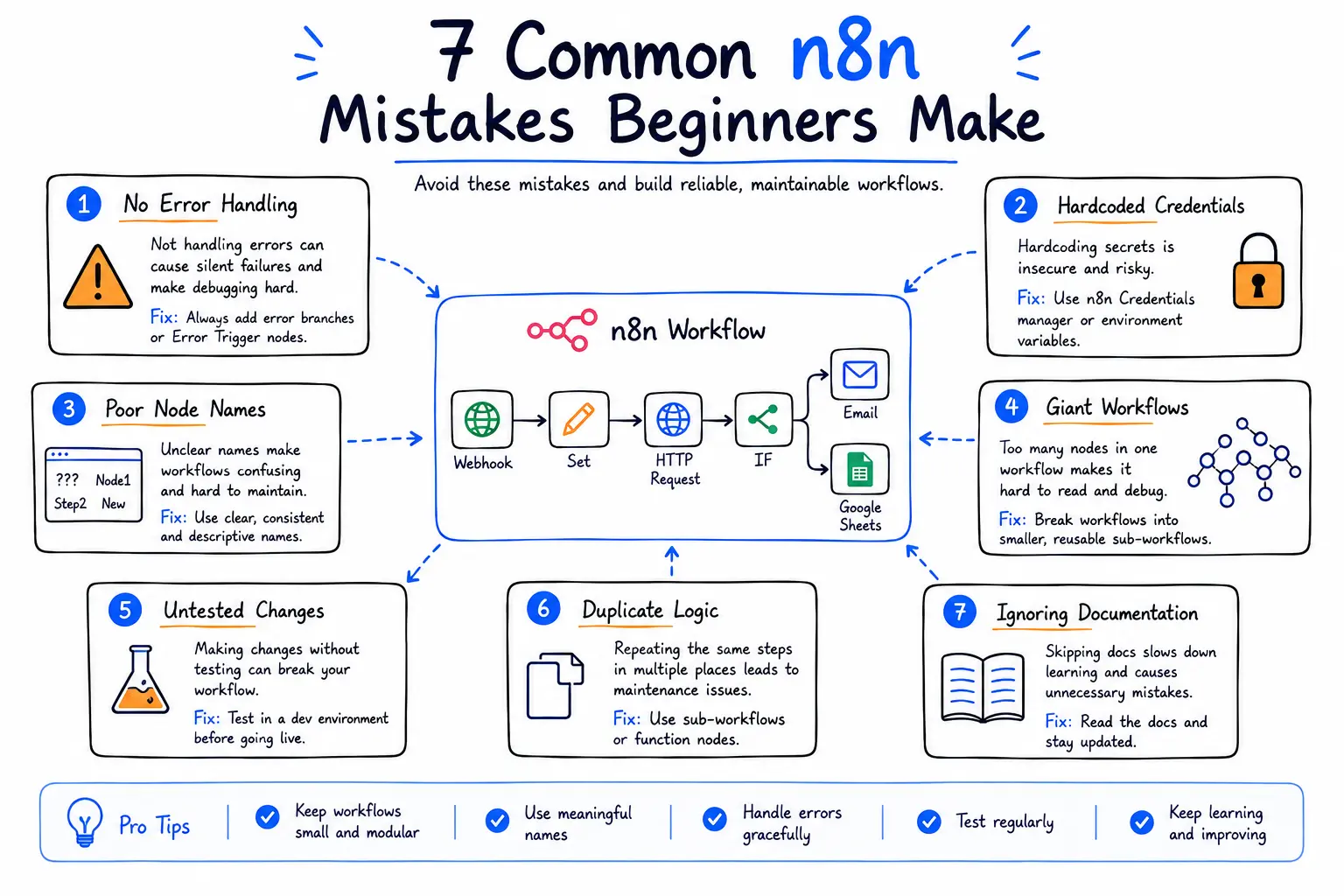
Common Mistakes Beginners Make
Almost everyone makes mistakes when starting with workflow automation.
Here are the most common ones - and how to avoid them.
1. Making One Giant Workflow
Large workflows become difficult to understand and maintain.
Break complex automations into smaller, reusable workflows whenever possible.
2. Ignoring Error Handling
Many beginners assume APIs will always respond successfully.
Always prepare for failures by adding retries, notifications, or fallback paths.
3. Not Testing Incrementally
Trying to debug a 50-node workflow all at once can be frustrating.
Test each section before moving on.
4. Hardcoding Values
Avoid typing fixed values directly into nodes if they should change with each execution.
Use expressions and variables instead.
5. Poor Naming Conventions
Names like:
HTTP Request 1
HTTP Request 2
Code 3
become confusing as workflows grow.
Use descriptive names that explain each node's purpose.
6. Exposing Sensitive Credentials
Never store:
API keys
Passwords
Access tokens
inside code or workflow notes.
Use n8n's credential management system instead.
7. Ignoring Documentation
As workflows become more complex, add notes and comments explaining key steps.
Future you - and your teammates - will appreciate it.
Scaling Your Automations
Once you're comfortable building simple workflows, you can gradually expand your automation ecosystem.
Many organizations eventually automate:
HR onboarding
Sales pipelines
Customer support
Marketing campaigns
Invoice processing
Database synchronization
AI document analysis
Reporting dashboards
DevOps notifications
Internal approval systems
Instead of dozens of disconnected processes, n8n can become the central automation hub that connects all your business tools.
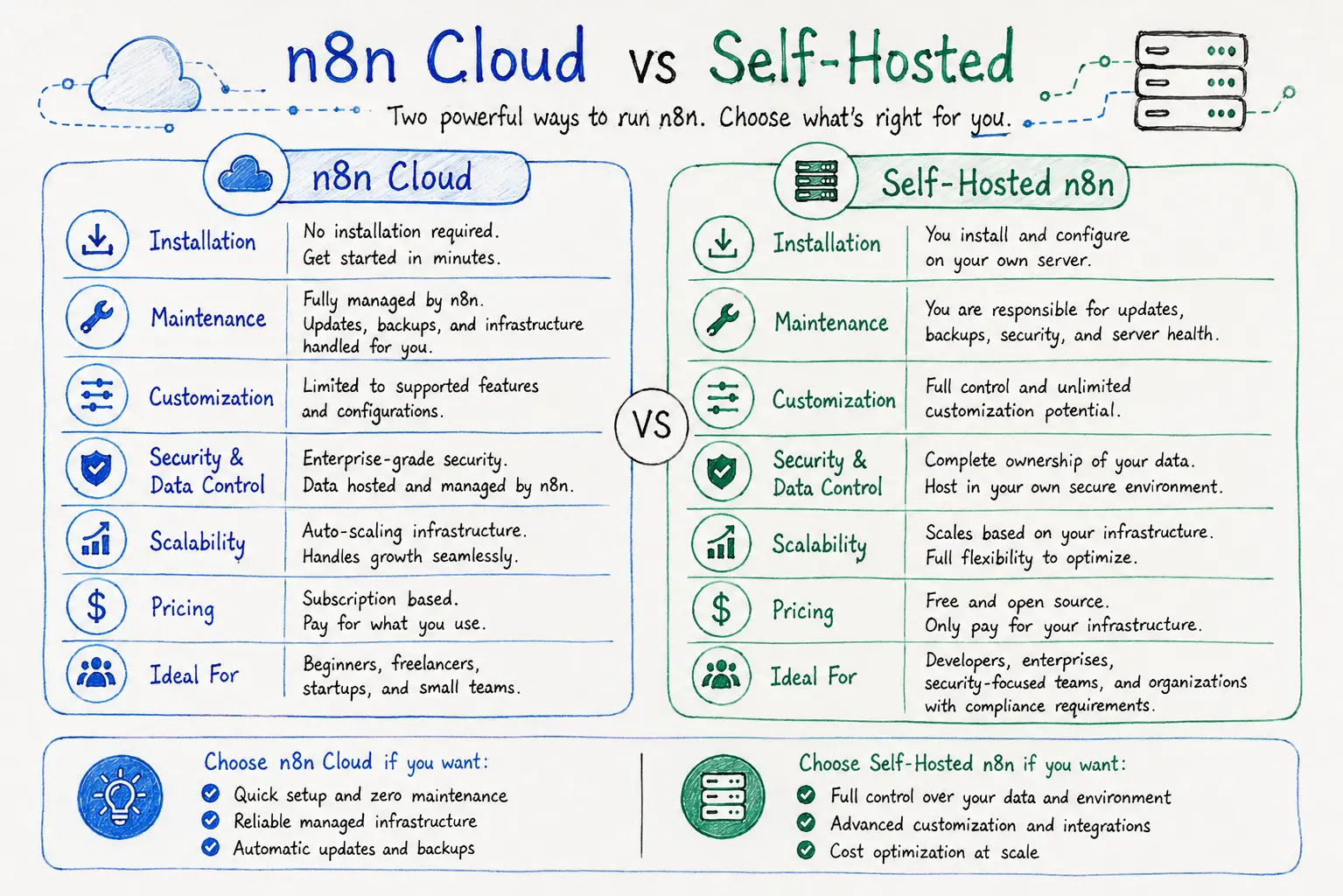
n8n Cloud vs Self-Hosted
One of the biggest advantages of n8n is that it gives you a choice: use a managed cloud service or host it yourself.
Each option has its own strengths depending on your experience, budget, and security requirements.
Feature | n8n Cloud | Self-Hosted |
|---|---|---|
Installation | No setup required | You install and manage it |
Maintenance | Managed by n8n | You handle updates and backups |
Infrastructure | Hosted by n8n | Your own server or cloud provider |
Customization | Limited to supported features | Full customization |
Data Control | Managed service | Complete ownership of data |
Scaling | Automatic | Depends on your infrastructure |
Best For | Beginners, freelancers, startups | Developers, enterprises, security-focused teams |
Choose n8n Cloud If...
n8n Cloud is the easiest way to begin your automation journey.
It's ideal if you:
Want to start immediately
Don't want to manage servers
Prefer automatic updates
Need reliable managed hosting
Are learning workflow automation
This lets you focus on building workflows instead of maintaining infrastructure.
Choose Self-Hosted If...
Self-hosting is a great choice when you need more flexibility and control.
Consider it if you:
Handle sensitive business data
Need advanced customization
Want complete control over your environment
Need to comply with internal security policies
Already manage your own servers or cloud infrastructure
Many organizations choose self-hosting because it offers full ownership of workflows, credentials, and data.
When Should You Use n8n?
n8n is an excellent choice for:
Small Businesses
Automate repetitive administrative work, customer communication, and reporting.
Developers
Connect APIs, automate deployments, monitor applications, and simplify backend tasks.
Marketing Teams
Schedule content, sync leads with CRMs, automate email campaigns, and generate reports.
Customer Support Teams
Route support tickets, send automated responses, summarize conversations, and notify agents.
Data Teams
Collect, transform, and synchronize data between databases, APIs, and cloud services.
AI Projects
Create AI-powered workflows that combine large language models with business tools and external APIs.
Limitations of n8n
While n8n is powerful, it's important to understand its limitations.
Learning Curve
Although the visual editor is beginner-friendly, concepts such as APIs, JSON, authentication, and expressions take time to master.
API Dependencies
If an external API is unavailable or changes its behavior, related workflows may fail until updated.
Performance
Large workflows with many API calls, loops, or AI requests may require optimization and appropriate server resources.
Maintenance
For self-hosted deployments, you are responsible for updates, monitoring, backups, and security.
Understanding these limitations helps you design more reliable workflows.
The Future of Workflow Automation
Workflow automation is evolving rapidly.
Instead of simply moving data from one application to another, modern automation platforms are becoming intelligent systems that can reason, analyze, and make decisions with the help of AI.
In the coming years, expect to see:
AI agents that coordinate multiple business tasks
Smarter workflow recommendations
Natural language workflow creation
Deeper integrations with enterprise platforms
More event-driven architectures
Improved security and governance
Greater adoption of self-hosted automation
As AI and automation continue to converge, tools like n8n are becoming central to modern software development and business operations.
Learning n8n today is not just about automating tasks - it's about building skills that will remain valuable as organizations increasingly rely on intelligent workflows.
Final Thoughts
n8n is much more than a workflow automation platform.
It's a powerful ecosystem that enables you to connect applications, automate repetitive tasks, integrate APIs, and build intelligent AI-driven workflows - all through an intuitive visual interface.
Whether you're automating a personal project, streamlining business operations, or creating enterprise-grade systems, the core principles remain the same:
Start small.
Understand how data flows.
Build modular workflows.
Test frequently.
Secure your credentials.
Keep improving your automations over time.
Workflow automation isn't about replacing people - it's about eliminating repetitive work so you can focus on solving meaningful problems.
If you're new to automation, there's no better time to begin. Build your first workflow, experiment with integrations, and gradually explore more advanced capabilities. Every workflow you create is another step toward working smarter, not harder.
Frequently Asked Questions (FAQs)
1. Is n8n free?
Yes. n8n is open source, and you can self-host it for free. There is also a managed cloud version with paid plans for users who prefer not to manage their own infrastructure.
2. Do I need programming knowledge?
No.
You can build many workflows using the visual editor.
However, basic knowledge of APIs, JSON, and JavaScript will help you create more advanced automations.
3. Can I connect services that don't have built-in integrations?
Yes.
Using the HTTP Request node, you can connect to almost any service that provides a REST API.
4. Is n8n suitable for beginners?
Absolutely.
Simple workflows can be built with little to no coding, making it a great platform for learning automation.
5. Is n8n only for developers?
No.
It is widely used by:
Marketing teams
HR departments
Operations teams
Sales teams
Customer support
Finance teams
Product managers
Developers
Anyone who works with repetitive digital tasks can benefit from workflow automation.
6. Can I use AI inside n8n?
Yes.
n8n integrates with many AI providers, allowing you to build workflows for:
Text generation
Document summarization
Email classification
Chatbots
Translation
Sentiment analysis
Data extraction
7. Can n8n replace manual work?
For repetitive, rule-based tasks - yes.
However, tasks that require human judgment, creativity, or strategic decision-making still benefit from human involvement. n8n is best used to automate repetitive processes and free people to focus on higher-value work.
Ready to go deeper?
Professional Training
Hands-on, mentor-led training aligned with industry certifications.
About the Author
Sharper every day
Daily tutorials, analysis, and career playbooks across all 12 Xcademia disciplines, straight to your inbox. No spam.