How to Use AI Tools to Speed Up a Digital Forensics Investigation
Six practical AI-assisted digital forensics workflows used by analysts today: Windows Event Log triage, Volatility memory analysis, timeline narration, malware sandbox interpretation, forensic report drafting, and IOC extraction. Faster investigations without compromising forensic discipline.
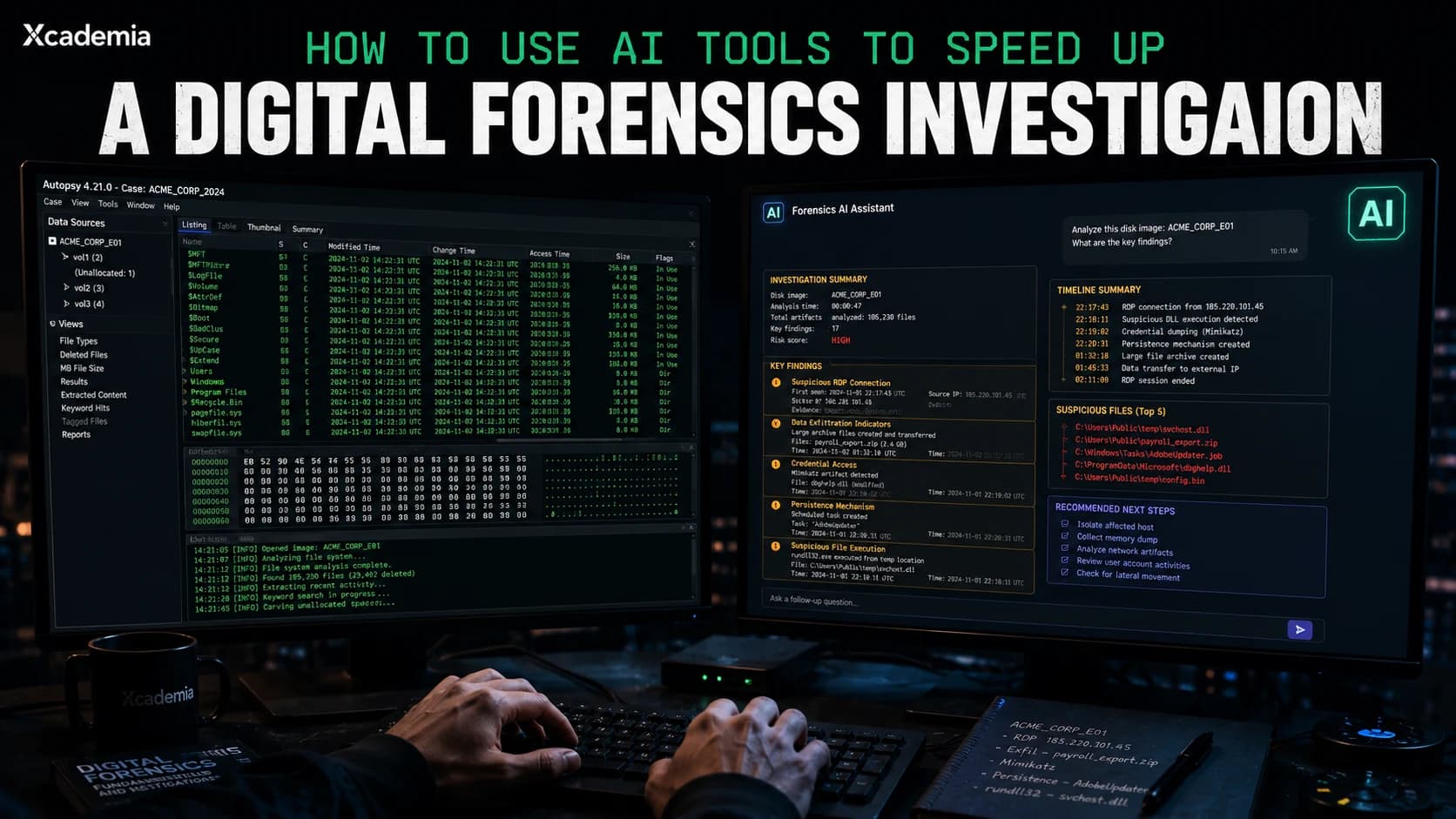
Practical workflows for forensic analysts. Specific tools named inside
A digital forensics investigation without AI assistance in 2026 is the equivalent of doing a database query without an index. The data is there. The findings are there. The tool is slow, the output is verbose, and the analyst's time is the bottleneck.
AI tools do not replace forensic methodology. They do not replace the analyst's judgement. What they do is eliminate the hours spent reading raw output to find the things that matter, the time spent writing the same phrases in every report, and the cognitive overhead of context-switching between tools that do not talk to each other.
This article is a practical how-to. Not theory. Actual workflows. The specific AI tools are named inside because the search term deserves a real answer. These workflows are being used by forensic analysts today.
The forensic analyst using AI tools is not a worse analyst. They are the same analyst with the ability to triage ten times more artefacts in the same time window. The skill is unchanged. The throughput is not.
What AI Can and Cannot Do in Forensics
Before the workflows: the boundaries. AI tools in a forensics context are powerful within specific constraints and useless or dangerous outside them.
Where AI adds genuine value
Log analysis at volume: Reading tens of thousands of lines of EVTX, Syslog, or firewall logs to find the handful that matter
Timeline summarisation: Taking Plaso or log2timeline output and producing a human-readable narrative of what happened and when
Malware behaviour description: Interpreting Cuckoo Sandbox or any.run output into plain-language IOC summaries
Report drafting: Converting structured findings into professional report language with consistent formatting
IOC extraction: Pulling IPs, hashes, domains, and registry keys from unstructured threat intel or raw log data
Volatile memory triage: Interpreting Volatility plugin output and flagging anomalous processes, network connections, or injected code
Where AI does not belong in forensics
Chain of custody documentation: AI-generated content has no place in legally admissible forensic records
Hash verification and integrity checking: Use forensic tooling for this, not a language model
Attribution conclusions: AI can help describe behaviour patterns but never make attribution statements that will appear in a report
Anything you cannot verify: If an AI tool produces a finding that cannot be traced back to specific artefacts, it does not go in the report
AI tools in forensics work as a triage and analysis acceleration layer. The verified finding still comes from the evidence. The report still comes from the analyst. The AI compresses the distance between raw evidence and structured finding.
The Workflows
These are practical, working workflows. The AI tools named are tools currently in active use by security professionals. Prompts are described at the approach level, not copied verbatim, because effective prompting requires adapting to the specific evidence and context you are working with.
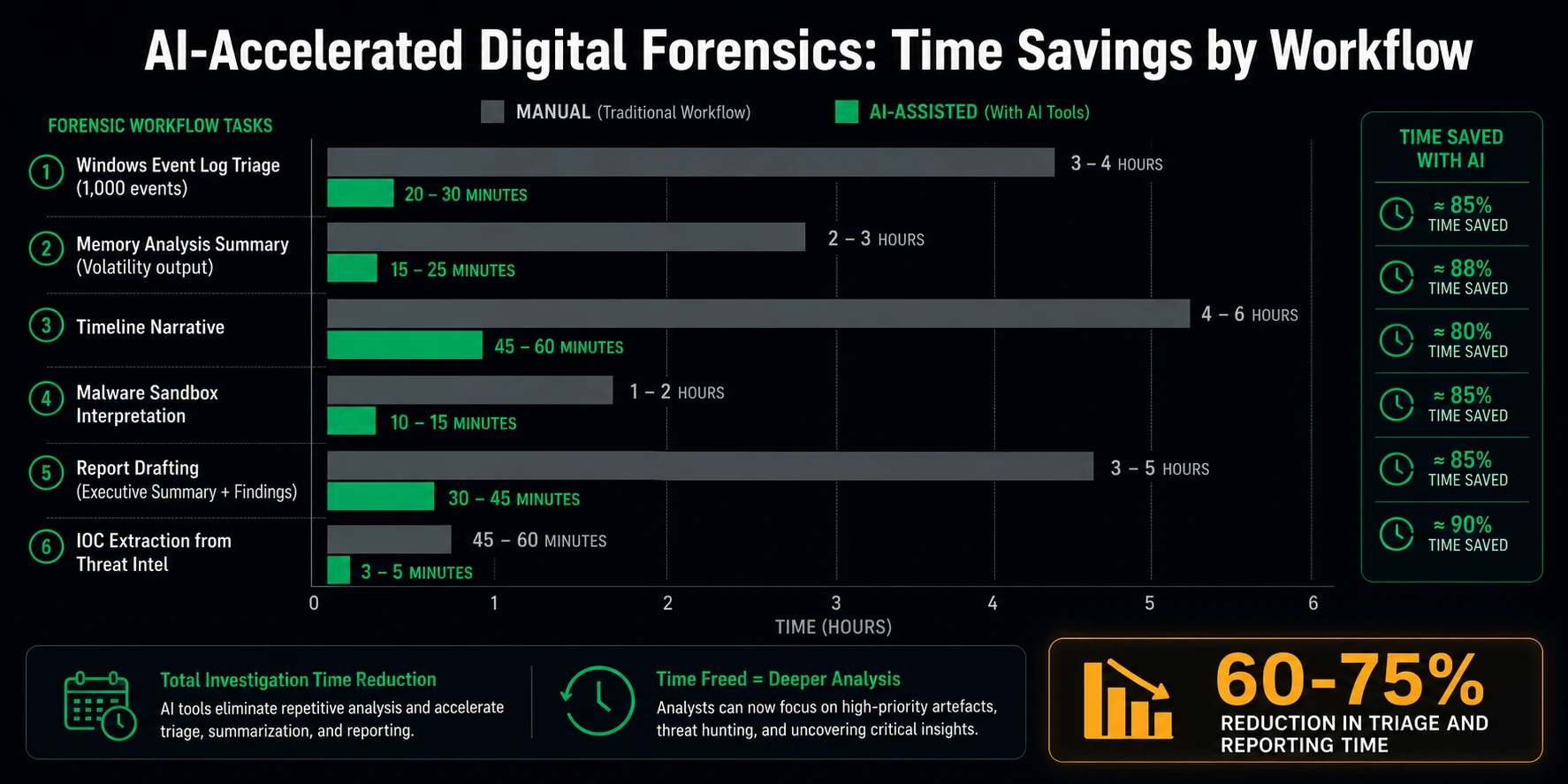
01 | Windows Event Log Triage | ChatGPT, Claude, or Microsoft Copilot PROMPT: Export relevant EVTX logs to CSV or text using EvtxECmd or Get-WinEvent. Paste a focused block (500-1000 lines maximum) into the AI with a specific instruction: "You are a digital forensics analyst. Identify authentication anomalies, privilege escalation events, lateral movement indicators, and any Event IDs associated with known attack techniques in MITRE ATT&CK. Present findings as a numbered list with the Event ID, timestamp, and why it is significant." OUTPUT: A structured list of suspicious events extracted from raw log data in seconds rather than hours. The analyst then validates each finding against the raw log. The AI found it. The analyst confirms it. |
02 | Volatility Memory Analysis Summarisation | Claude or ChatGPT with plugin output PROMPT: Run Volatility plugins: pslist, pstree, netscan, malfind, cmdline. Copy the output of each plugin into the AI with instruction: "You are a memory forensics analyst. Analyse this Volatility output. Identify: processes that appear suspicious (unusual parent-child relationships, unusual paths, or known malware process names), active or recently active network connections to external IPs, and any indicators of process injection or hollowing. For each finding, state what it is, why it is suspicious, and what you would investigate next." OUTPUT: A prioritised triage report from memory. Unusual processes identified, suspicious network connections flagged, injection indicators highlighted. The analyst then examines each flagged item in the raw output to confirm the finding. |
03 | Timeline Narrative Generation | Claude or ChatGPT with log2timeline/Plaso CSV output PROMPT: Export a filtered Plaso timeline CSV covering a specific time window around the suspected compromise. Paste a representative sample or summary of key events. Instruct: "You are a senior incident responder. This is a forensic timeline excerpt from a compromised Windows workstation. Write a chronological narrative of what appears to have happened, including: initial access, execution, persistence mechanisms, lateral movement, and data staging or exfiltration indicators. Write in past tense as if documenting confirmed findings, but flag anything that requires additional verification." OUTPUT: A readable forensic narrative that can be refined into the Timeline section of your investigation report. The analyst validates each statement against the timeline evidence before it goes in the final document. |
04 | Malware Sandbox Report Interpretation | Claude or ChatGPT with any.run, Cuckoo, or VirusTotal output PROMPT: Copy the behaviour summary from a sandbox analysis. Include: network connections attempted, files created or modified, registry keys accessed, processes spawned. Instruct: "You are a malware analyst. This is a sandbox behaviour report. Summarise: the likely malware family or category, the key indicators of compromise I should add to our blocklist, the attacker objectives suggested by this behaviour, and the forensic artefacts I should look for on the victim machine." OUTPUT: A structured IOC list and a plain-language description of what the malware was trying to do. Feed the IOCs directly into your SIEM or threat intel platform for hunting across the environment. |
05 | Forensic Report Drafting | Claude with structured notes PROMPT: Before using AI for report drafting, produce your own structured notes: timeline of events confirmed, artefacts examined, findings per artefact, IOCs identified. Then instruct: "You are writing a digital forensics investigation report section. Using these structured notes, write the Executive Summary and Findings sections in professional forensic report language. Use past tense. State findings as confirmed observations referencing specific artefacts. Flag anything that is inferred or requires further investigation. Do not attribute actions to specific individuals." OUTPUT: A professional report draft that uses your findings as the source of truth. The AI handles the language, structure, and formatting. You verify every statement against your evidence before signing off. |
06 | IOC Extraction From Threat Intel | Claude or any capable LLM PROMPT: Paste a threat intelligence report, blog post, or vendor advisory. Instruct: "Extract all actionable indicators of compromise from this text. Organise them into categories: IP addresses, domain names, file hashes (with hash type), registry keys, file paths, and email addresses. Present as a structured table I can import into a threat intelligence platform." OUTPUT: A clean, structured IOC table extracted from unstructured text in under a minute. What previously required manual copy-paste across multiple paragraphs becomes a formatted import-ready table. |
The Rules That Keep You Out of Trouble
AI-assisted forensics creates specific professional risks if the workflow is not disciplined. These rules are not optional.
Never paste sensitive evidence into a commercial AI tool. Personal data, client names, internal systems information, and case-specific details must stay within your approved evidence handling perimeter. Use local models or approved enterprise AI tools for sensitive material.
Every AI-generated finding must be verified against primary evidence before it goes in any report. The AI identified something. You confirmed it. That is the chain of analysis that stands up to scrutiny.
Label AI-assisted sections in your working notes. Know which parts of your analysis were AI-accelerated so you can defend your methodology if challenged.
AI tools hallucinate. They produce plausible-sounding false findings. In a forensic context, a hallucinated finding that makes it into a report is a professional and potentially legal liability. Verify everything.
Jurisdiction matters. Check your jurisdiction's position on AI use in legal proceedings before using AI-assisted analysis in cases that may proceed to court.
The forensic analyst who uses AI carelessly produces reports that do not stand up. The one who uses it with discipline produces the same quality of report in a fraction of the time. The discipline is the differentiator, not the tool.
Ready to go deeper?
Professional Training
Hands-on, mentor-led training aligned with industry certifications.
About the Author
Sharper every day
Daily tutorials, analysis, and career playbooks across all 12 Xcademia disciplines, straight to your inbox. No spam.