
Elasticsearch Explained: The Hidden Engine Powering Lightning-Fast Search Across Millions of Records
Behind every fast search experience is a powerful indexing engine. Discover how Elasticsearch transforms millions of records into instant, relevant results for applications, platforms, and modern digital services.

Introduction
Imagine trying to find a single sentence inside a library containing millions of books.
A traditional database would often need to scan large amounts of data before returning results. As datasets grow into millions or billions of records, searching becomes increasingly expensive.
This is where Elasticsearch shines.
Elasticsearch is designed specifically to search, analyze, and retrieve information at extremely high speeds, even across massive datasets.
It powers:
E-commerce search engines
Security monitoring platforms
Log management systems
Enterprise search applications
AI-powered knowledge bases
Companies such as Netflix, Uber, LinkedIn, and many cybersecurity platforms rely on Elasticsearch to process enormous volumes of information in near real time.
What Is Elasticsearch?
Simple Definition
Elasticsearch is a distributed search and analytics engine that stores data in a format optimized for searching rather than traditional transaction processing.
Think of it as:
"Google Search for your own application data."
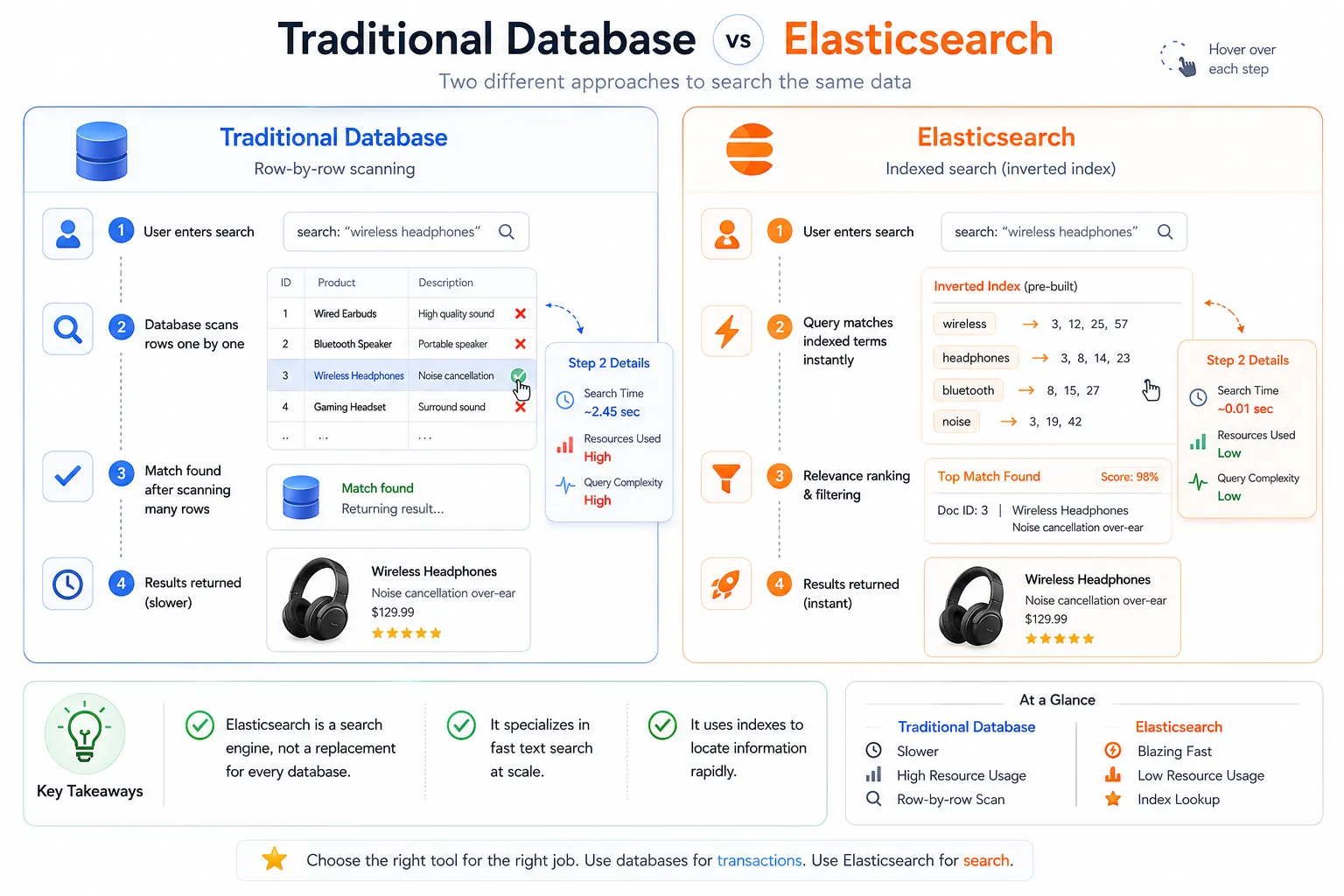
Instead of searching the entire dataset every time a user enters a query, Elasticsearch creates a highly optimized searchable index.
Real-World Analogy
Imagine a textbook.
Without an index:
You read every page to find a topic.
With an index:
You jump directly to the relevant pages.
Elasticsearch works like the index of a giant digital textbook.
What Makes It Different?
Traditional databases are optimized for:
Creating records
Updating records
Transactions
Elasticsearch is optimized for:
Searching text
Ranking results
Analyzing large datasets
Aggregating data
Why Was Elasticsearch Created?
The Problem
As applications grew larger, traditional databases began struggling with:
Full-text searches
Fuzzy matching
Relevance ranking
Large-scale analytics
For example:
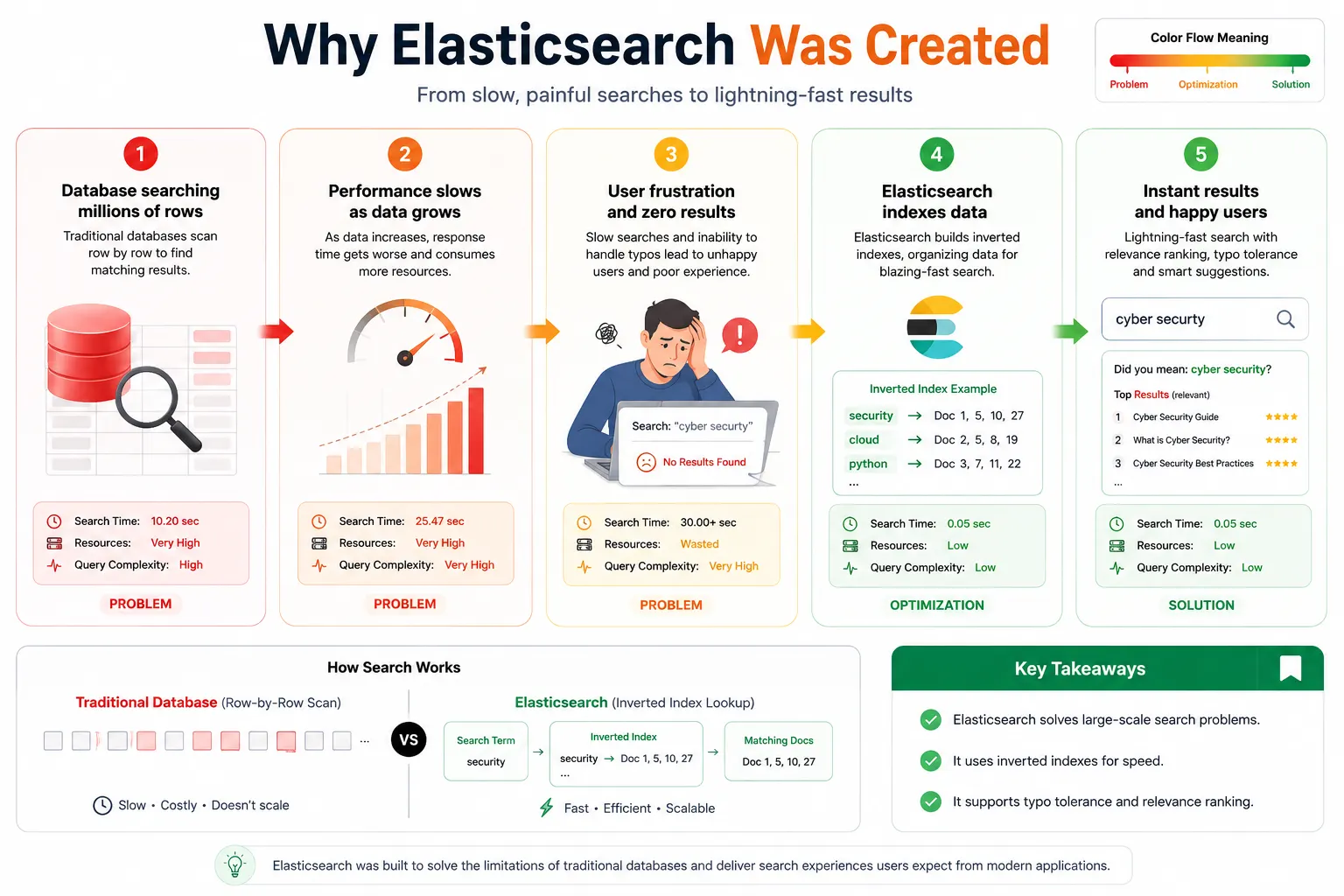
Imagine searching:
cyber security
A user accidentally types:
cyber securty
Most databases return:
No Results
Elasticsearch can intelligently understand:
Did you mean cyber security?
Search Challenges at Scale
Consider an online store with:
Dataset | Records |
|---|---|
Products | 10 Million |
Reviews | 100 Million |
Logs | 5 Billion |
Searching this data efficiently requires specialized indexing structures.
The Solution
Elasticsearch introduced:
Inverted Indexes
Instead of storing:
Document → Words
It stores:
Word → Documents
Example:
security → Doc1, Doc5, Doc10
cloud → Doc2, Doc5
python → Doc3, Doc7
This dramatically reduces search time.
Where Is Elasticsearch Used?
1. Website Search
Most websites contain thousands of pages.
Examples:
Documentation portals
Blogs
Knowledge bases
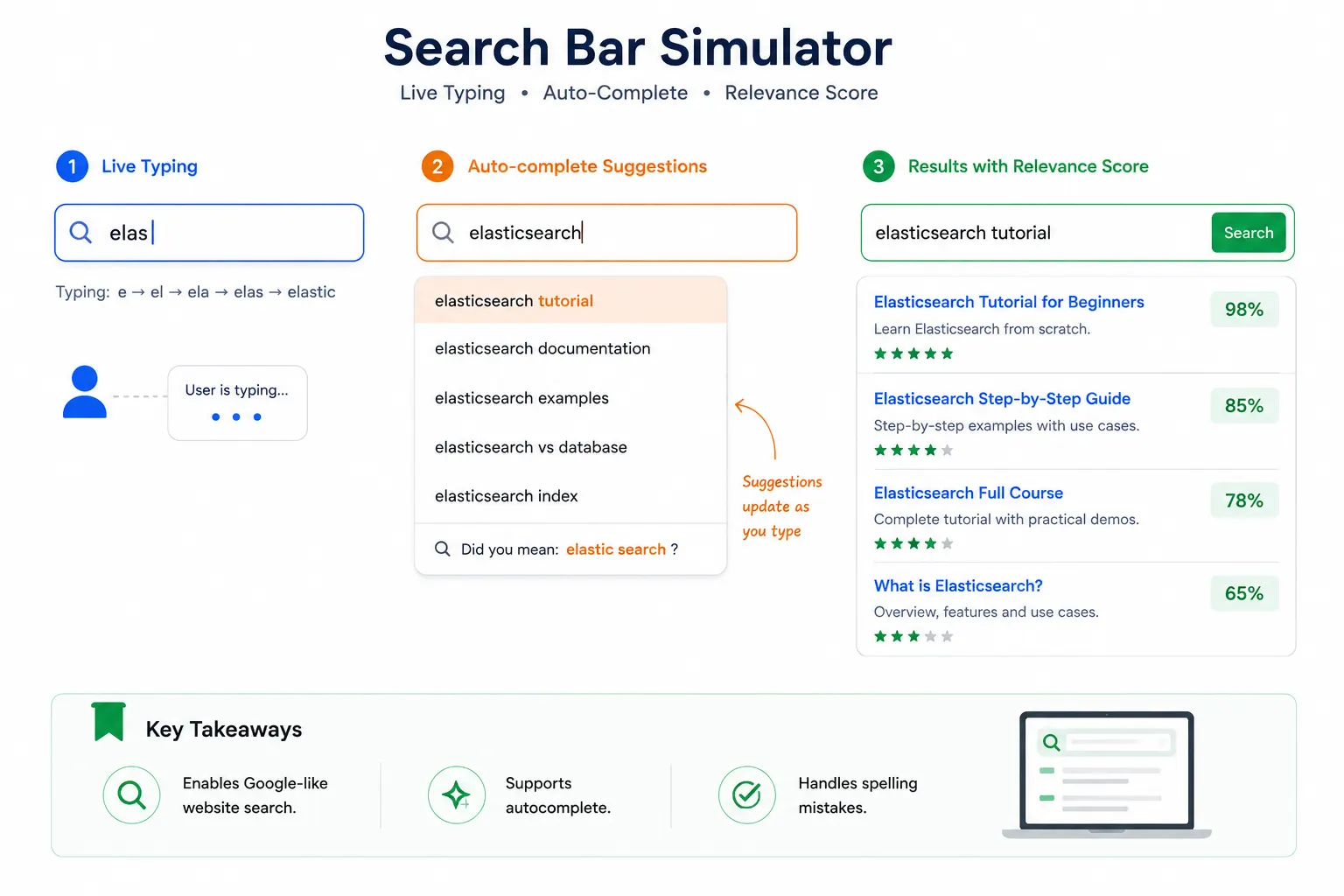
Users expect Google-like search experiences.
Elasticsearch enables:
Instant search
Auto-complete
Synonyms
Typo correction
Example Workflow
User types:
"elast"
    ⇩
Autocomplete Suggestions

Elastic
Elasticsearch
Elastic Cloud
    ⇩
User clicks result
2. Product Search
E-commerce platforms rely heavily on Elasticsearch.
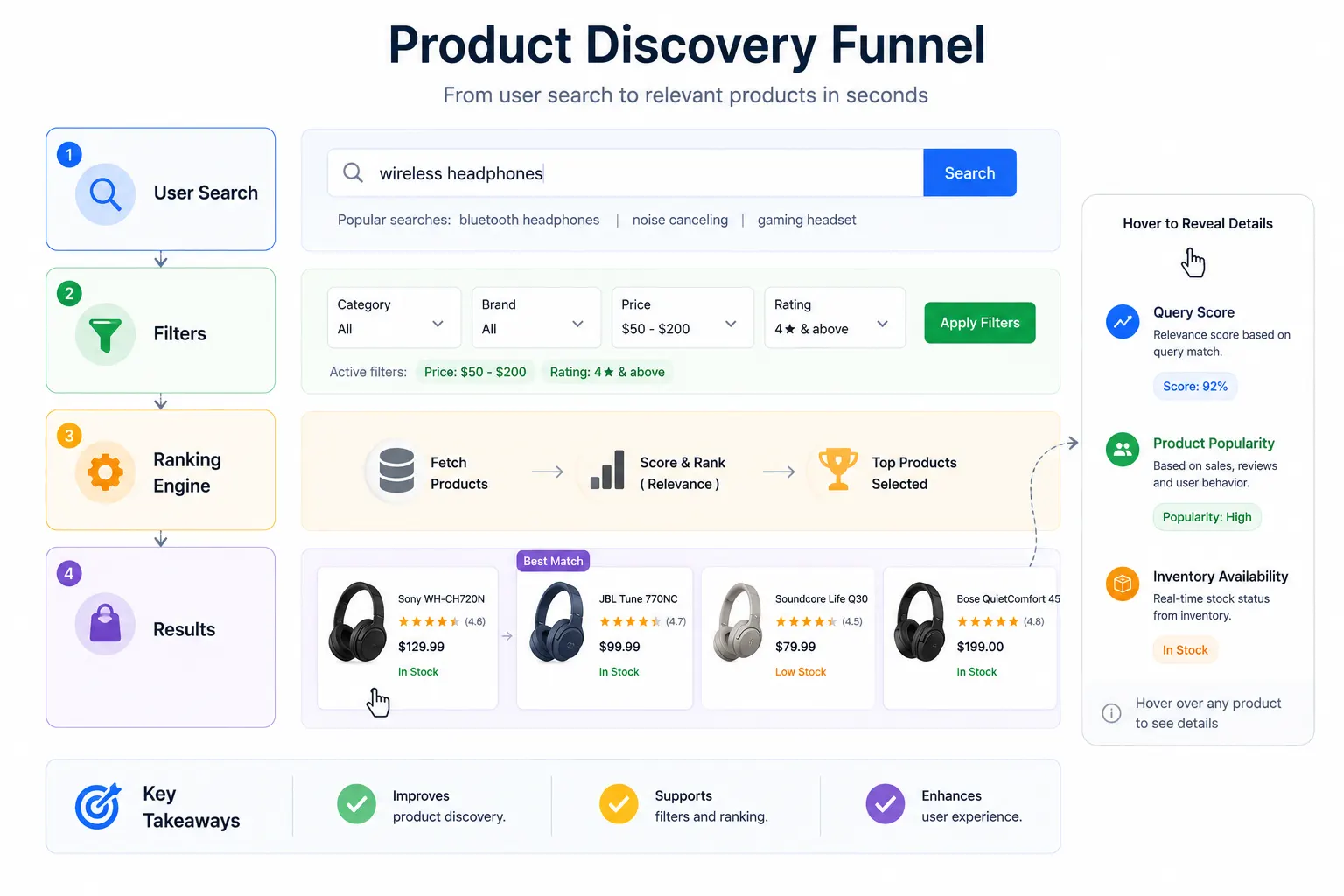
Imagine searching:
wireless headphones
Instead of exact matches, Elasticsearch ranks products by relevance.
Features
Filters
Brand: Sony
Price: $50-$200
Rating: 4+
Sorting
Highest Rated
Newest
Best Selling
Suggestions
Customers also searched:
Bluetooth Headphones
Gaming Headsets
3. Log Analysis
One of Elasticsearch's biggest use cases.
Applications generate logs continuously.
Example:
INFO User Login
ERROR Database Timeout
WARNING Memory Usage High
Thousands of servers can produce billions of logs daily.
Why Elasticsearch?
Because engineers need to search:
Show all database errors
from yesterday
within seconds.
ELK Stack
Elasticsearch is commonly used with:
Elasticsearch
Logstash
Kibana
Together they form:
ELK Stack
Architecture Diagram
Servers
   ⇩
Logstash
   ⇩
Elasticsearch
   ⇩
Kibana Dashboard
4. Monitoring and Observability
Modern systems require continuous monitoring.
Metrics include:
CPU Usage
Memory Usage
API Latency
Network Traffic
Example
A server suddenly becomes slow.
Elasticsearch helps answer:
When did the issue start?
Which server was affected?
What changed?
How Elasticsearch Works
High-Level Flow
Database
Logs
APIs
Files
   ⇩
Elasticsearch
   |
   +--> Full Text Search
   |
   +--> Analytics
   |
   +--> Aggregations
   |
   +--> Ranked Results
Core Components
Documents
Equivalent to rows.
Example:
{
  "id": 1,
  "title": "Learning Elasticsearch",
  "author": "John Doe"
}
Index
Equivalent to a database table.
books
products
users
logs
Shards
Large indexes are split into pieces.
Index
├── Shard 1
├── Shard 2
└── Shard 3
This allows parallel searching.
Key Takeaways
✅ Documents store data.
✅ Indexes organize documents.
✅ Shards enable scalability.
Getting Started with Elasticsearch
Using Docker
Run Elasticsearch
# Start an Elasticsearch container
docker run -d \
  --name elasticsearch \
  -p 9200:9200 \
  -e discovery.type=single-node \
  -e xpack.security.enabled=false \
  docker.elastic.co/elasticsearch/elasticsearch:8.14.0
Verify Installation
curl http://localhost:9200
Expected Output:
{
  "name": "node-1",
  "cluster_name": "docker-cluster",
  "version": {
    "number": "8.14.0"
  }
}
$ docker ps

CONTAINER ID
STATUS
PORTS

9200->9200
Callouts:
Container Running
API Endpoint Active
Indexing Data
Create an Index
# Create a new index called books
curl -X PUT "localhost:9200/books"
Insert a Document
# Add a document into the books index
curl -X POST "localhost:9200/books/_doc/1" \
-H "Content-Type: application/json" \
-d '
{
  "title": "Learning Elasticsearch",
  "author": "John Doe"
}'
Search Data
# Search for the word Elasticsearch
curl -X GET "localhost:9200/books/_search" \
-H "Content-Type: application/json" \
-d '
{
  "query": {
    "match": {
      "title": "Elasticsearch"
    }
  }
}'
Response
{
  "hits": {
    "total": {
      "value": 1
    },
    "hits": [
      {
        "_source": {
          "title": "Learning Elasticsearch"
        }
      }
    ]
  }
}
Real-World Search Workflow
User Search
      ⇩
Application
      ⇩
Elasticsearch
      ⇩
      +--> Index Lookup
      +--> Relevance Ranking
      +--> Filters
      +--> Aggregations
      ⇩
Results Returned
Elasticsearch Architecture Explained
Elasticsearch is designed to store and search massive amounts of data quickly by distributing information across multiple machines. Instead of relying on a single server, it uses a distributed architecture that provides high performance, scalability, and fault tolerance. This architecture enables applications to continue serving search requests even if one or more servers become unavailable.
At its core, Elasticsearch is organized into several key components: Clusters, Nodes, Indexes, Documents, Primary Shards, and Replica Shards. Each component plays a specific role in storing, managing, and searching data efficiently.
The Building Blocks of Elasticsearch
1. Cluster
A Cluster is the highest-level component in Elasticsearch. It is a collection of one or more nodes that work together as a single search system. Every node in the cluster shares the same cluster name and collaborates to index data, execute search queries, and maintain data availability.
When a search request is received, the cluster automatically determines which nodes contain the required data and coordinates the search process behind the scenes.
Responsibilities of a Cluster:
Manages all nodes
Stores indexes
Coordinates search requests
Balances data across nodes
Provides high availability
Example
Elasticsearch Cluster
├── Node 1
├── Node 2
├── Node 3
└── Node 4
2. Node
A Node is an individual Elasticsearch server that stores data and participates in indexing and searching. Each node has its own CPU, memory, and storage resources.
As data grows, additional nodes can be added to the cluster, allowing Elasticsearch to distribute the workload automatically. This horizontal scaling enables the system to handle billions of documents while maintaining fast response times.
Types of Nodes
Master Node
The Master Node manages the overall cluster rather than storing user data. It is responsible for:
Creating and deleting indexes
Managing cluster settings
Assigning shards to nodes
Monitoring node health
Handling node failures
There is only one active Master Node at any given time, ensuring consistent cluster management.
Data Node
Data Nodes store documents and execute indexing and search operations. These nodes perform the majority of the workload, including processing search queries, aggregations, and analytics.
3. Index
An Index is a logical collection of related documents. It functions similarly to a database table in relational databases, but it is optimized for search operations.
For example, an e-commerce platform might organize its data into separate indexes:
Index | Stores |
|---|---|
products | Product information |
users | Customer details |
orders | Purchase history |
logs | Application logs |
Each index has its own configuration, mappings, and shard allocation.
4. Document
A Document is the smallest unit of data stored in Elasticsearch. Documents are stored in JSON format, making them flexible and easy to work with.
Example document:
{
  "id": 101,
  "title": "Learning Elasticsearch",
  "author": "John Doe",
  "category": "Technology",
  "published": true
}
Every document belongs to a single index and receives a unique identifier.
5. Primary Shards
As indexes become larger, storing all data on a single server becomes inefficient. Elasticsearch solves this by dividing an index into smaller pieces called Primary Shards.
Instead of storing one massive index, Elasticsearch distributes these shards across multiple nodes.
Example:
Books Index

├── Primary Shard 1
├── Primary Shard 2
├── Primary Shard 3
└── Primary Shard 4
Each shard contains only a portion of the overall data, allowing multiple nodes to process search requests simultaneously.
Benefits
Faster searches
Parallel processing
Better scalability
Balanced resource utilization
6. Replica Shards
To ensure high availability and fault tolerance, Elasticsearch creates Replica Shards, which are copies of Primary Shards.
For example:
Primary Shard 1
        ⇩
Replica Shard 1
        ⇩
Primary Shard 2
        ⇩
Replica Shard 2
If the server containing a Primary Shard fails, its Replica Shard is automatically promoted to become the new Primary Shard. This allows applications to continue operating without interruption.
Benefits
Data redundancy
High availability
Improved search performance
Automatic failover
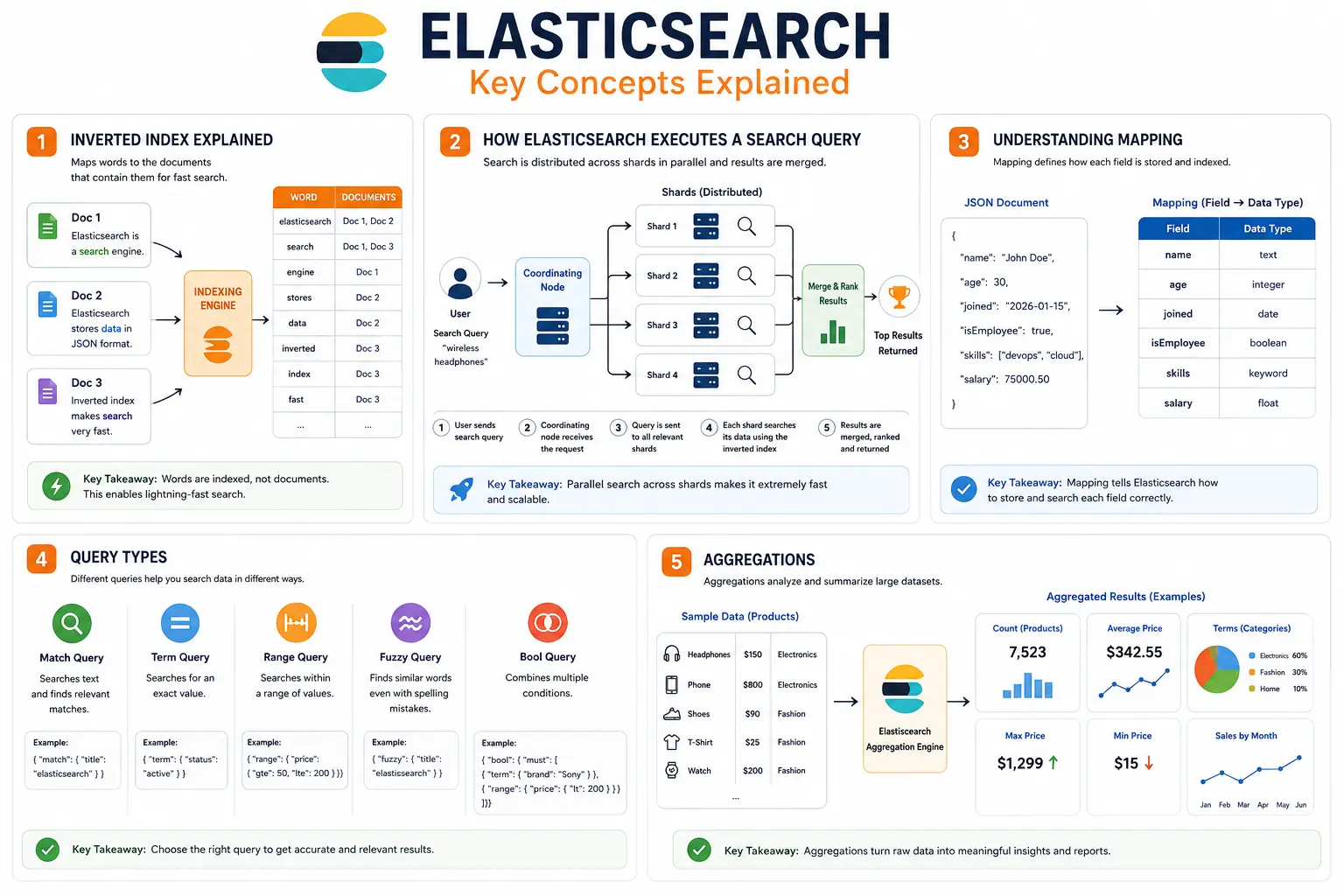
Inverted Index Explained
One of the biggest reasons Elasticsearch is so fast is its Inverted Index. Instead of searching every document one by one, Elasticsearch creates a special index that maps words to the documents that contain them.
Think of it like the index at the back of a textbook. If you want to find information about "networking," you don't read every page—you look up the word in the index, which tells you exactly where to find it. Elasticsearch works in a very similar way.
Traditional Search
In a traditional database, if you search for the word "security", the system may need to scan every record until it finds a match. As the amount of data grows, this process becomes slower.
Inverted Index
Elasticsearch stores data differently. It creates a lookup table where each word points directly to the documents that contain it.
For example:
Word         Documents
-------------------------
security     Doc1, Doc3, Doc7
cloud        Doc2, Doc5
docker       Doc4, Doc6
When a user searches for "security", Elasticsearch immediately finds the related documents instead of scanning the entire database.
Why Is It Important?
Extremely fast search
Handles millions of documents efficiently
Supports typo correction
Powers full-text search
How Elasticsearch Executes a Search Query
Whenever a user searches for something, Elasticsearch follows a series of steps to return the most relevant results quickly.
Step 1: User Sends a Search Request
A user enters a search query in an application.
Example:
Search: wireless headphonesStep 2: Coordinating Node Receives the Request
The request is first received by a Coordinating Node. This node doesn't search the data itself—it simply manages the search process.
Step 3: Query Is Sent to All Relevant Shards
The Coordinating Node sends the search request to every shard that contains the required data.
Since multiple shards work at the same time, Elasticsearch searches in parallel.
Step 4: Each Shard Searches Its Data
Every shard searches its own documents using the Inverted Index and calculates a relevance score for each result.
Step 5: Results Are Combined
The Coordinating Node collects results from all shards, sorts them based on relevance, and returns the best matches to the user.
Search Workflow
User Search
      ⇩
Coordinating Node
      ⇩
Search All Shards
      ⇩
Merge Results
      ⇩
Return Best Matches
Understanding Mapping
Before Elasticsearch stores data, it needs to understand what type of data each field contains. This process is called Mapping.
A mapping tells Elasticsearch how each field should be stored and searched.
For example, consider the following document:
{
  "name": "John Doe",
  "age": 30,
  "joined": "2026-01-15",
  "isEmployee": true
}
Elasticsearch automatically identifies the data types:
Field | Data Type |
|---|---|
name | Text |
age | Integer |
joined | Date |
isEmployee | Boolean |
This helps Elasticsearch store and search the data correctly.
Dynamic Mapping
Elasticsearch can automatically detect field types when new data is added.
Explicit Mapping
Developers can also define field types manually for better control and performance.
Why Mapping Matters
Organizes data correctly
Improves search accuracy
Increases performance
Prevents incorrect data types
Query Types
Elasticsearch supports different types of queries depending on what you want to search. Choosing the right query helps return more accurate results.
1. Match Query
Used for searching text.
Example:
{
  "query": {
    "match": {
      "title": "Elasticsearch"
    }
  }
}
Best for articles, blogs, and descriptions.
2. Term Query
Searches for an exact value.
Example:
Status = ActiveBest for IDs, usernames, and categories.
3. Range Query
Searches within a range of values.
Example:
Price: $50 – $200Useful for prices, dates, and ratings.
4. Fuzzy Query
Finds similar words even if the spelling is incorrect.
Example:
Search:
Elastisearch

Result:
Elasticsearch
5. Bool Query
Combines multiple conditions together.
Example:
Brand = Sony

AND

Price < $200
Aggregations
Searching is only one part of Elasticsearch. It can also analyze data and calculate statistics using Aggregations.
Instead of returning individual documents, aggregations summarize your data.
For example, imagine an online store with thousands of products. Instead of listing every product, Elasticsearch can answer questions like:
How many products are in each category?
What is the average product price?
Which brand has the most products?
How many orders were placed this month?
Common Aggregations
Aggregation | Purpose |
|---|---|
Count | Counts documents |
Average | Calculates average value |
Sum | Adds values together |
Max | Finds the highest value |
Min | Finds the lowest value |
Terms | Groups data by category |
Example
Product Prices:
100
150
200
250
Average Price:
175Why Aggregations Are Useful
Build dashboards
Create reports
Analyze business data
Monitor application performance
Generate charts and graphs
Common Pitfalls for Beginners
1. Treating Elasticsearch Like a Database
Wrong:
Replace MySQL entirely
Better:
MySQL + Elasticsearch
Store data in MySQL.
Search data with Elasticsearch.
2. Ignoring Index Design
Poor index structures can create slow searches.
Plan:
Fields
Data types
Search behavior
Before indexing data.
3. Over-Sharding
More shards ≠ better performance.
Too many shards can waste memory.
4. Forgetting Relevance Tuning
Default ranking isn't always ideal.
Optimize:
Boosting
Synonyms
Search weights
Frequently Asked Questions
1. Is Elasticsearch a database?
Technically yes, but it is primarily a search and analytics engine.
2. Can Elasticsearch replace SQL databases?
Usually no.
Most applications use:
MySQL/PostgreSQL
+
Elasticsearch
3. What is the ELK Stack?
E = Elasticsearch
L = Logstash
K = Kibana
Used for search, logging, monitoring, and analytics.
4. Is Elasticsearch difficult to learn?
Not really.
Beginners can start by understanding:
Documents
Indexes
Queries
Shards
The fundamentals are straightforward.
Final Thoughts
Elasticsearch became popular because traditional databases were never designed to provide lightning-fast full-text search across millions or billions of records. By leveraging inverted indexes, distributed architecture, relevance scoring, and scalable sharding, Elasticsearch delivers the kind of search experience users expect from modern applications.
Whether you're building:
An e-commerce platform
A SaaS product
A cybersecurity monitoring system
A documentation portal
An AI-powered knowledge base
Elasticsearch can dramatically improve how users discover, search, and analyze information.
Ready to go deeper?
Professional Training
Hands-on, mentor-led training aligned with industry certifications.
About the Author
Sharper every day
Daily tutorials, analysis, and career playbooks across all 12 Xcademia disciplines, straight to your inbox. No spam.