Apache Kafka Explained: A Complete Beginner's Guide to Event Streaming
Learn Apache Kafka from the ground up with this beginner-friendly guide. Explore Kafka's architecture, core components, event streaming concepts, real-world use cases, and why it's the preferred platform for building scalable, high-throughput, real-time applications.
Introduction
In today's software world, applications generate and process massive amounts of data every second. Whether it's processing online payments, tracking deliveries, sending notifications, monitoring IoT devices, or analyzing user activity, businesses need a platform that can handle continuous streams of data quickly, reliably, and at scale.
This is where Apache Kafka comes in.
Apache Kafka is a distributed event streaming platform designed to collect, store, and process real-time data with high throughput and low latency. Originally developed at LinkedIn and now maintained by the Apache Software Foundation, Kafka has become the industry standard for building scalable, fault-tolerant, and event-driven applications.
From startups to global enterprises like Netflix, Uber, LinkedIn, and Airbnb, organizations rely on Kafka to power mission-critical systems that require real-time communication between services and continuous data processing.
In this guide, you'll learn what Apache Kafka is, why it's become one of the most sought-after technologies for backend developers, and how it enables modern applications to process millions of events every second.
What is Apache Kafka?
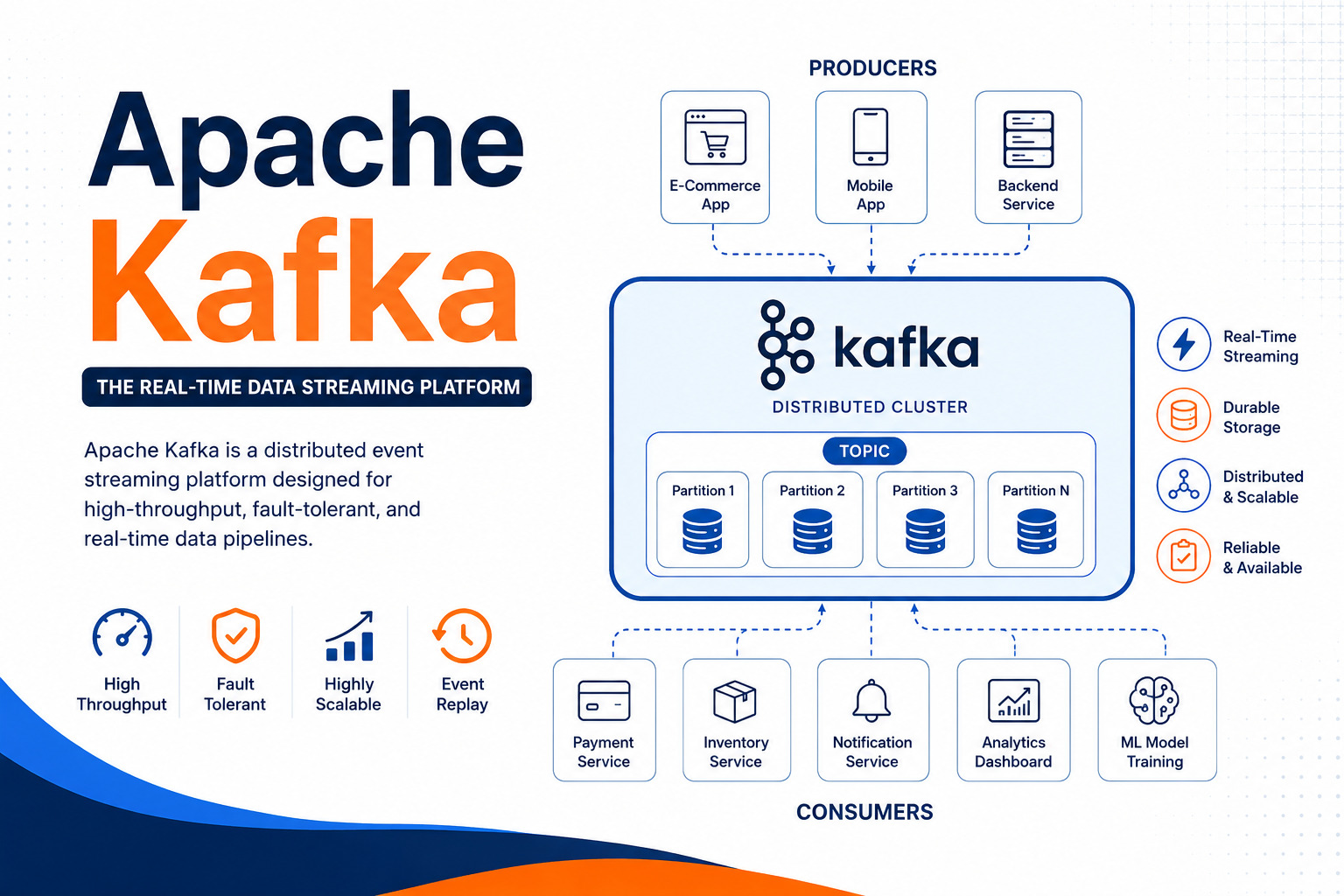
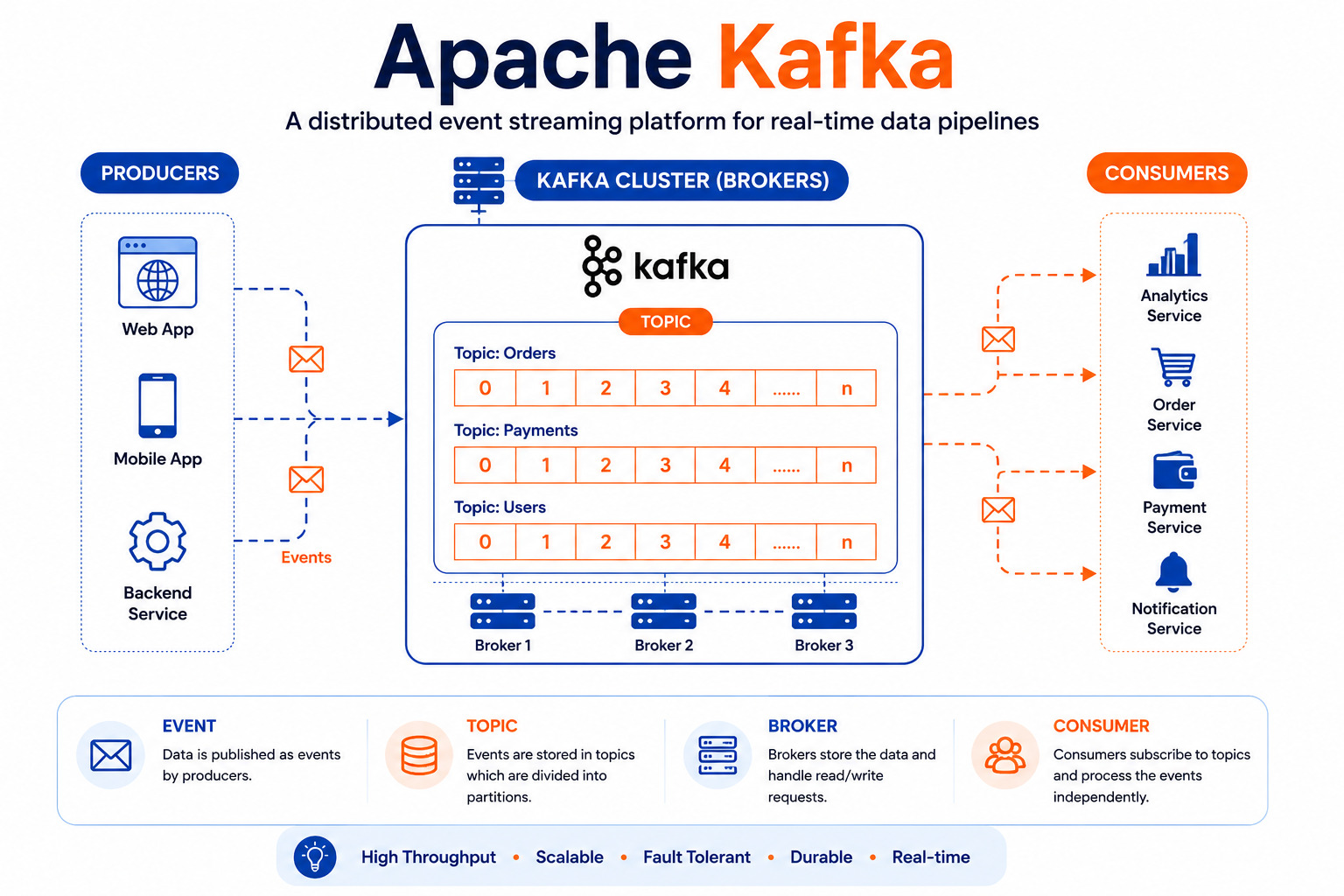
Apache Kafka is an open-source distributed event streaming platform designed to handle large volumes of data in real time. It enables applications, services, and systems to send, receive, and process millions of events every second with high reliability.
Unlike traditional messaging systems that simply pass messages from one application to another, Kafka stores events so they can be processed later as well. This makes it ideal for building scalable, fault-tolerant, and real-time applications.
Think of Kafka as a high-speed data highway where multiple applications can continuously exchange information without slowing each other down.
Why Was Apache Kafka Created?
As companies like LinkedIn grew, they needed a better way to move massive amounts of data between different services.
Traditional messaging systems had several limitations:
Difficult to scale
Slower with increasing traffic
Messages could be lost
Poor fault tolerance
Hard to process data in real time
To solve these challenges, LinkedIn developed Apache Kafka in 2011. Later, it became an Apache Software Foundation project and is now one of the world's most popular event streaming platforms.
Why Do We Need Kafka?
Imagine an e-commerce website.
Every second, users are:
Searching products
Adding items to carts
Making payments
Receiving notifications
Updating inventory
Tracking orders
If every service communicated directly with every other service, the system would quickly become difficult to maintain.
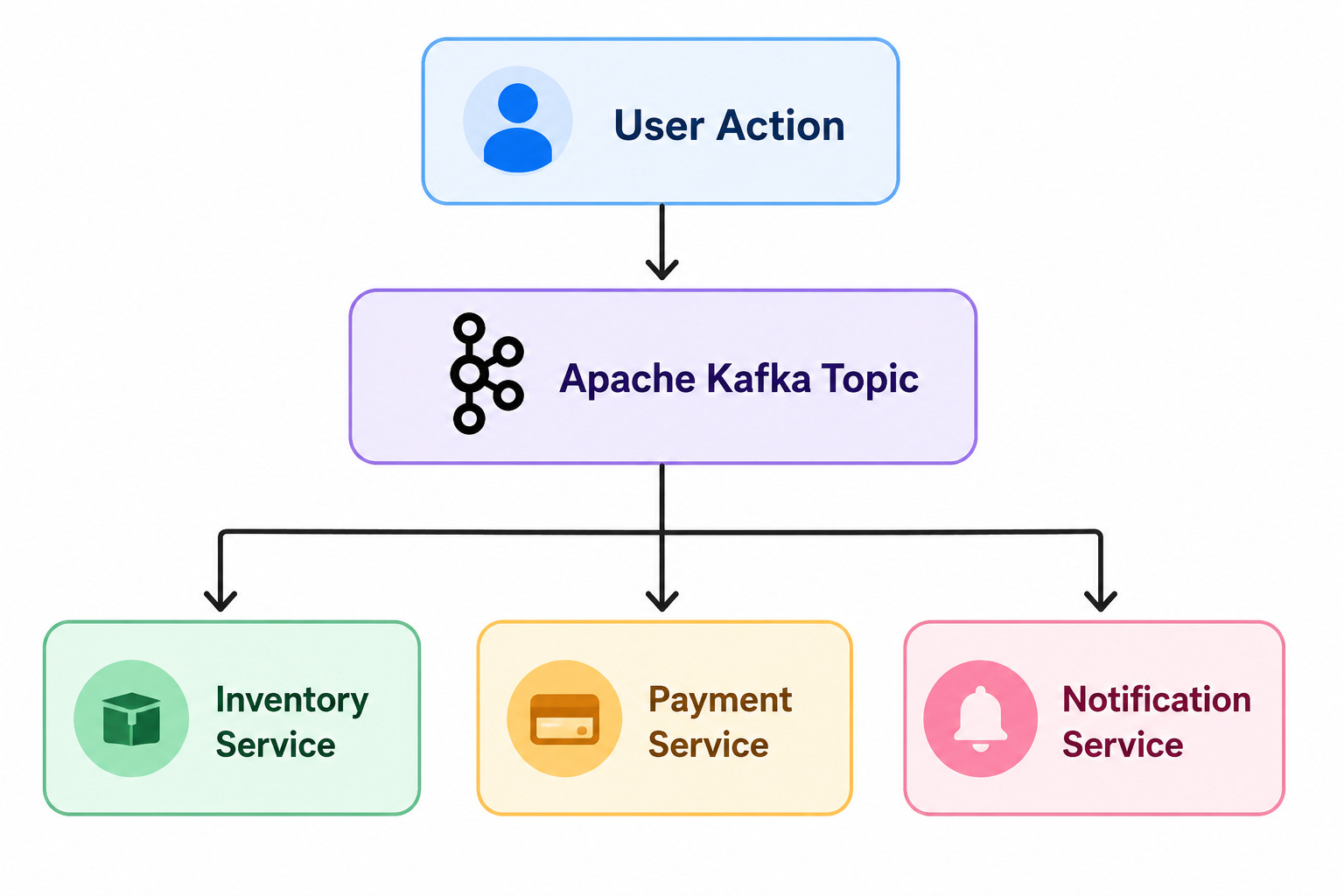
Instead, every event is sent to Kafka.
User Action
⇩
Apache Kafka Topic
⇩ ⇩ ⇩
Inventory Service
Payment Service
Notification Service
Core Components of Kafka
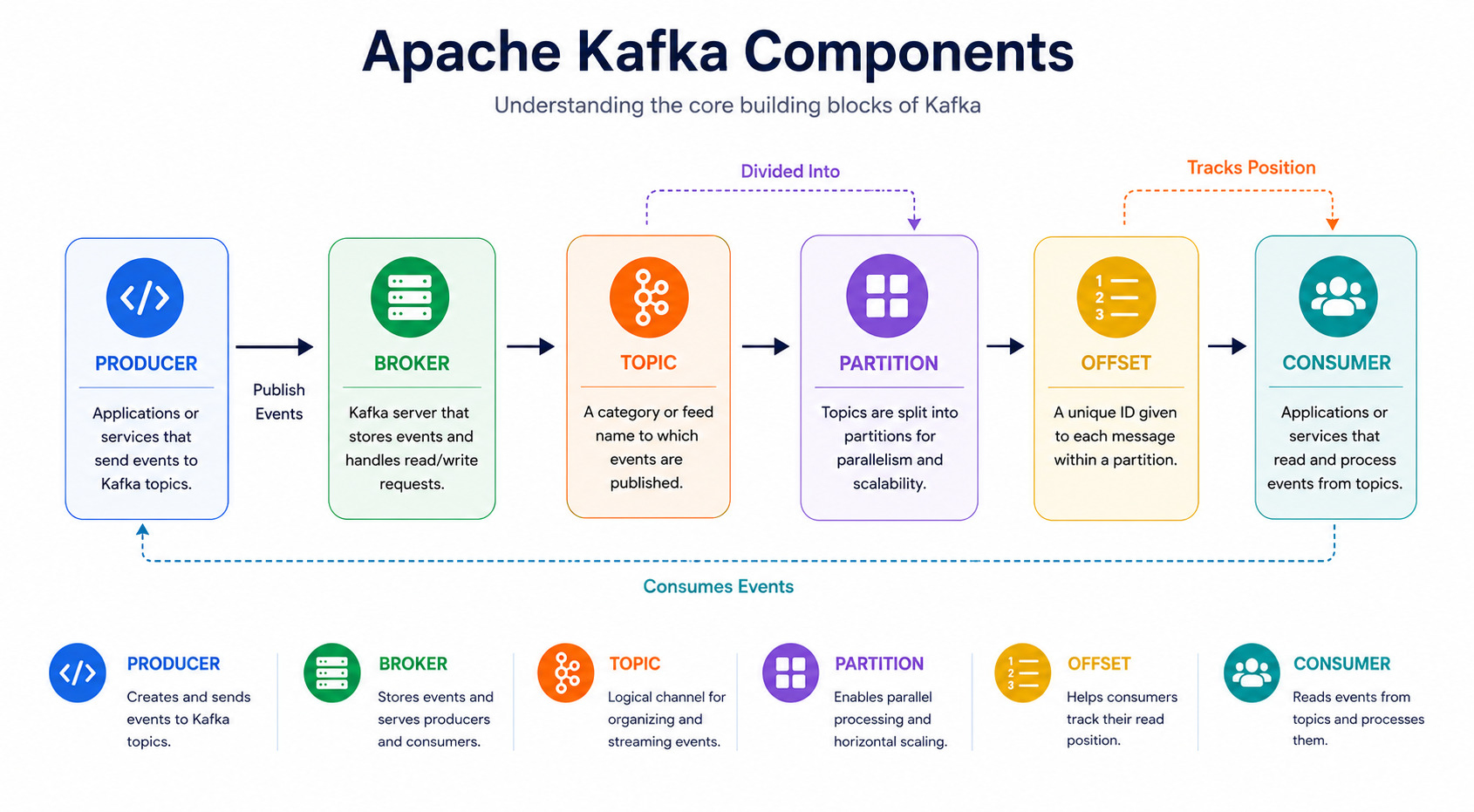
1. Producer
A Producer sends messages (events) to Kafka.
Example:
Payment Service
Login Service
Order Service
Whenever something happens, the producer publishes an event.
Example:
User placed an order.2. Topic
A Topic is like a category or channel where related events are stored.
Examples:
Payments

Users

Notifications
Applications subscribe only to the topics they need.
3. Broker
A Broker is a Kafka server responsible for storing data.
A Kafka cluster usually contains multiple brokers.
Benefits:
High availability
Better scalability
Fault tolerance
4. Consumer
Consumers read messages from Kafka.
Examples:
Email service
Analytics system
Recommendation engine
Inventory service
Multiple consumers can read the same event independently.
5. Partition
Topics are divided into partitions.
Instead of storing everything in one place, Kafka distributes data across multiple partitions.
Benefits:
Parallel processing
Faster performance
Better scalability
Example:
Orders Topic

Partition 1
Partition 2
Partition 3
Partition 4
Different consumers can process different partitions simultaneously.
6. Offset
Every message inside a partition gets a unique number called an Offset.
Example:
Offset 0
Offset 1
Offset 2
Offset 3
Consumers use offsets to know which messages they have already processed.
How Does Kafka Work?
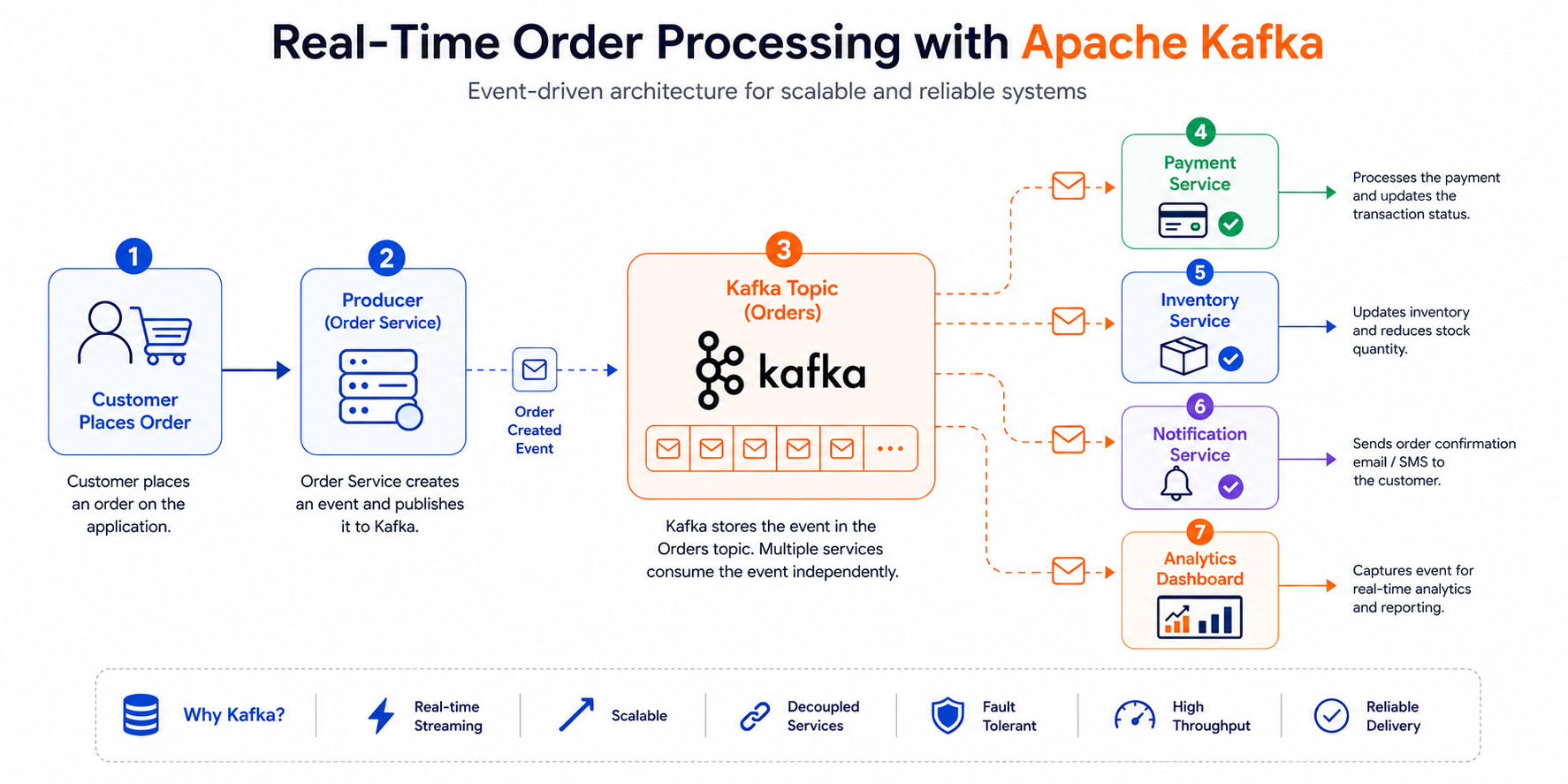
Let's understand the complete flow.
Step 1
A customer places an order.
⇩
Step 2
The Order Service publishes an event.
⇩
Step 3
Kafka stores it inside the "Orders" topic.
⇩
Step 4
Different services consume the event.
Payment Service
Inventory Service
Shipping Service
Notification Service
Analytics Dashboard
Every service receives the same event independently.
This architecture removes tight coupling between services.
Kafka Architecture
                Producer
                   ⇩
          ┌────────────────┐
          │ Apache Kafka   │
          │     Broker     │
          └────────────────┘
              Orders Topic
      ┌────────----┼---─────────┐
      ⇩            ⇩            ⇩
 Payment       Inventory     Analytics
 Consumer       Consumer      Consumer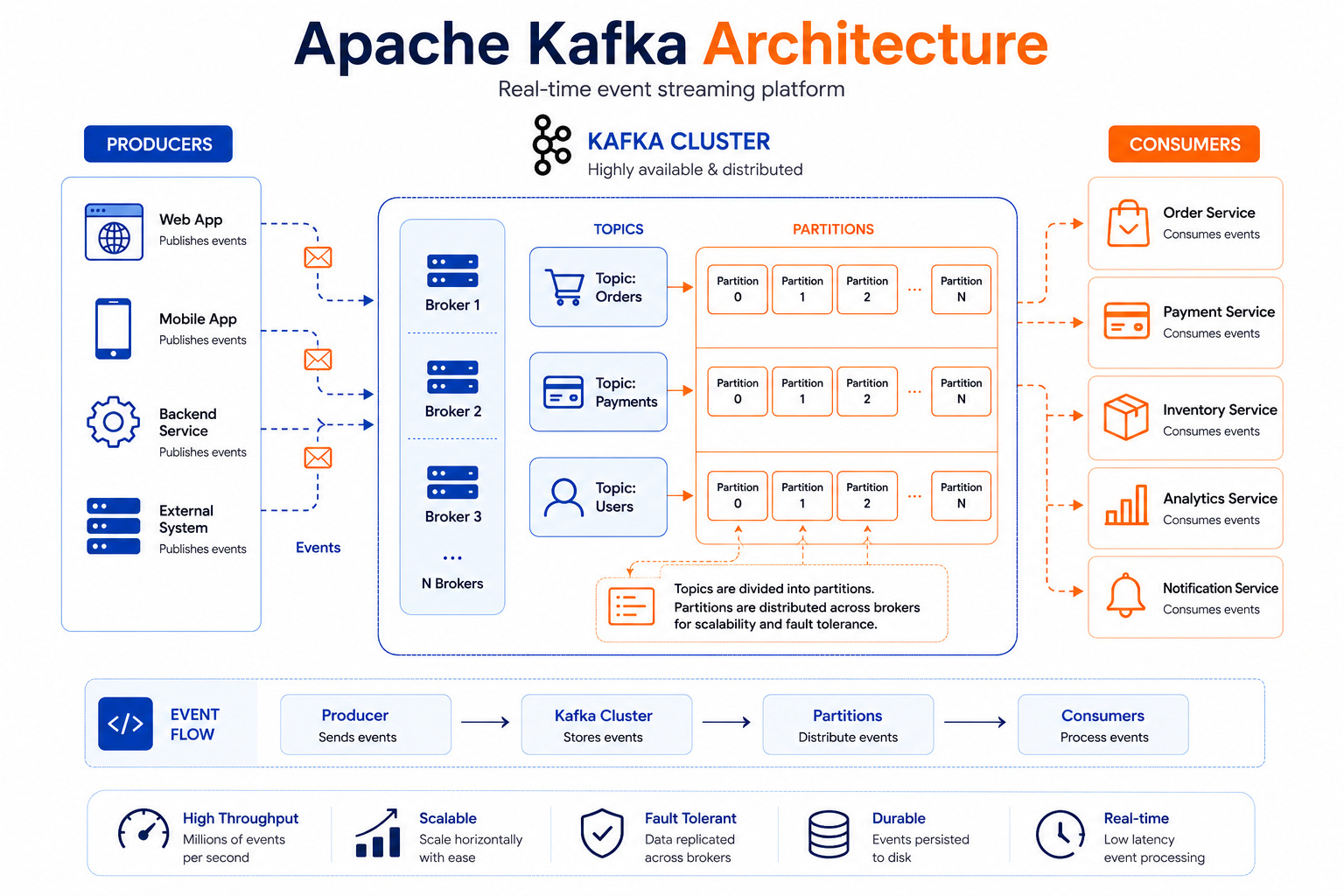
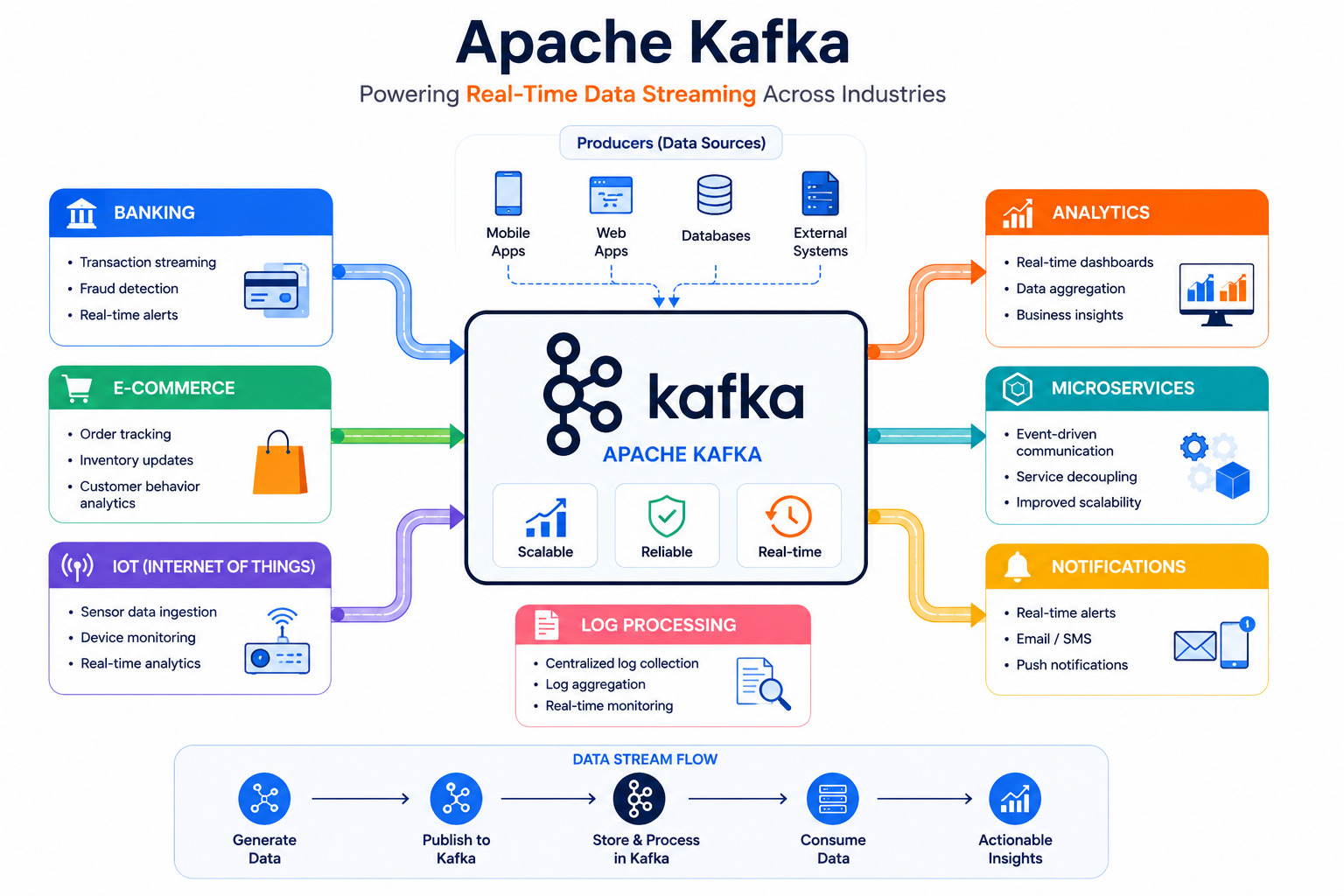
Where Is Apache Kafka Used?
Kafka powers many large-scale systems.
Real-Time Analytics
Track user activity instantly.
Examples:
Website traffic
Live dashboards
Customer behavior
Banking
Banks stream:
Transactions
Fraud detection
ATM events
Payment processing
E-Commerce
Online shopping platforms use Kafka for:
Orders
Payments
Inventory
Recommendations
Notifications
IoT Devices
Thousands of sensors continuously send data.
Kafka efficiently streams this information for processing.
Log Aggregation
Applications generate millions of logs every day.
Kafka collects and distributes these logs to monitoring systems.
Microservices
Kafka allows independent services to communicate through events instead of direct API calls.
Advantages of Apache Kafka
High Throughput
Handles millions of messages every second.
Fault Tolerant
Data is replicated across brokers, ensuring availability even if a server fails.
Scalable
Add more brokers as traffic increases.
Durable
Events are stored on disk and can be replayed later.
Low Latency
Processes events within milliseconds.
Reliable
Designed for mission-critical applications.
Disadvantages of Kafka
Initial setup can be complex
Learning curve for beginners
Requires monitoring and maintenance
Overkill for very small applications
Real-World Companies Using Kafka
Many leading technology companies use Kafka, including:
LinkedIn
Netflix
Uber
Airbnb
Spotify
Pinterest
Twitter (X)
Walmart
These organizations process billions of events every day.
Why Companies Prefer Apache Kafka
Traditional systems often struggle when millions of events need to be processed every second. Apache Kafka solves this problem by distributing data across multiple servers (brokers) and allowing applications to read data independently.
Companies prefer Kafka because it offers:
High Throughput: Handles millions of messages per second.
Fault Tolerance: Data is replicated across brokers.
Scalability: Add more brokers as traffic grows.
Durability: Messages can be stored for days, weeks, or months.
Decoupled Architecture: Producers and consumers work independently.
This makes Kafka an ideal choice for modern cloud-native and microservices-based applications.
Kafka Ecosystem Components
Apache Kafka is more than just brokers, producers, and consumers. It includes several powerful ecosystem tools.
Kafka Connect
Kafka Connect simplifies data integration between Kafka and external systems.
Examples:
MySQL
PostgreSQL
Elasticsearch
MongoDB
Amazon S3
Developers can move data without writing custom integration code.
Kafka Streams
Kafka Streams is a Java library used to process and analyze data streams directly within applications.
Common use cases include:
Data transformation
Event aggregation
Filtering
Real-time analytics
Schema Registry
Schema Registry helps maintain consistency in event structures by managing schemas for data formats such as Avro and JSON.
Benefits of Learning Apache Kafka
If you're pursuing a career in backend development, cloud computing, DevOps, or data engineering, Kafka is a highly valuable skill.
Learning Kafka helps you:
Understand distributed systems
Build event-driven architectures
Design scalable applications
Work with microservices effectively
Process real-time data streams
Improve your system design skills
Many companies actively seek developers with Kafka experience because modern applications increasingly rely on real-time data processing.
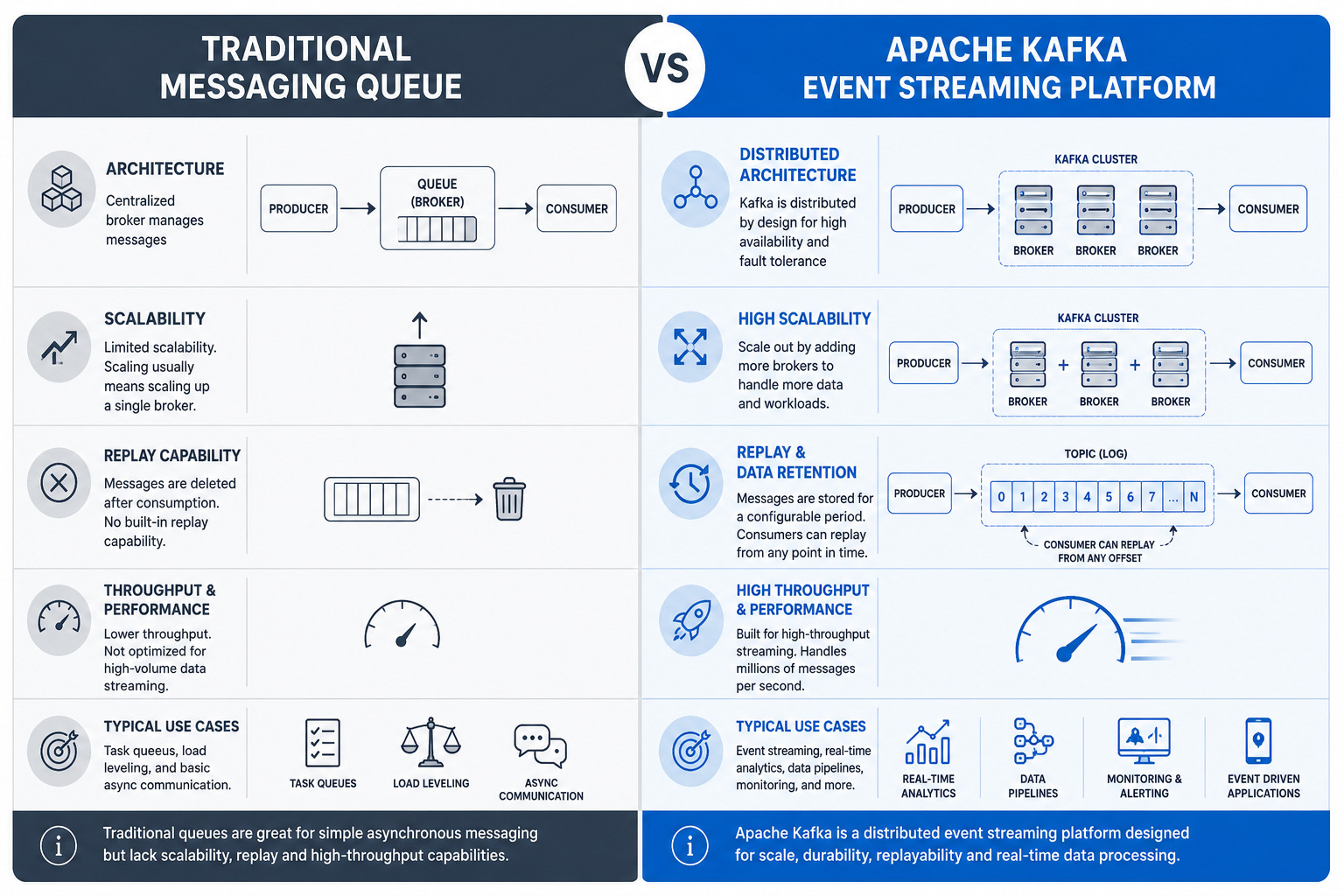
Apache Kafka vs Traditional Message Queues
Many beginners wonder how Kafka differs from traditional messaging systems.
Feature | Traditional Queue | Apache Kafka |
|---|---|---|
Message Storage | Temporary | Persistent |
Scalability | Limited | Highly Scalable |
Replay Messages | Not Available | Supported |
Throughput | Moderate | Very High |
Distributed Architecture | Limited | Native |
Real-Time Streaming | Basic | Excellent |
Kafka is not just a message queue; it is a complete event streaming platform designed for modern distributed systems.
Why Should Developers Learn Kafka?
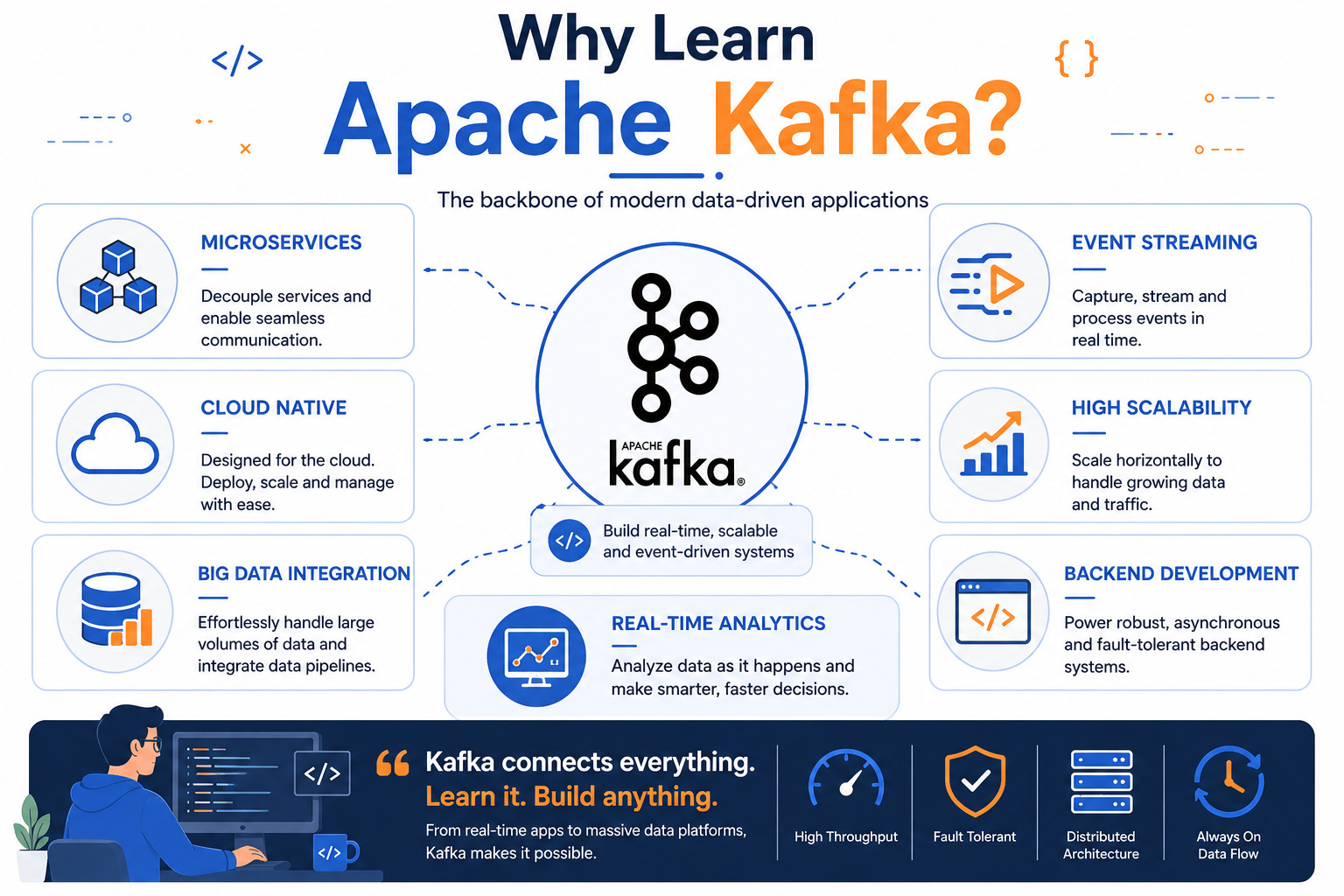
Kafka has become one of the most important technologies for backend engineers, cloud developers, and system architects.
Learning Kafka helps you understand:
Event-driven architecture
Distributed systems
Microservices communication
Real-time data pipelines
Large-scale backend systems
It is widely used in modern cloud-native applications and is a valuable skill for software engineers working with scalable systems.
Conclusion
Apache Kafka is much more than a messaging system. It is a powerful event streaming platform that enables applications to exchange data quickly, reliably, and at scale.
Whether you're building an e-commerce platform, a banking application, an IoT solution, or a microservices architecture, Kafka provides the foundation for real-time communication between services.
If you're interested in backend development or distributed systems, learning Kafka is a worthwhile investment that will help you build modern, scalable applications.
Common Apache Kafka Interview Questions
What is Apache Kafka?
Apache Kafka is a distributed event streaming platform used for building real-time data pipelines and streaming applications.
What is a Topic in Kafka?
A Topic is a logical channel where events are stored and organized.
What is a Partition?
A Partition is a subset of a topic that enables parallel processing and scalability.
What is an Offset?
An Offset is a unique identifier assigned to each message within a partition.
What is a Consumer Group?
A Consumer Group is a collection of consumers working together to process messages from a topic.
Why is Kafka Faster Than Traditional Messaging Systems?
Kafka uses sequential disk writes, batching, partitioning, and efficient replication mechanisms to achieve high throughput.
Ready to go deeper?
Professional Training
Hands-on, mentor-led training aligned with industry certifications.
About the Author
Sharper every day
Daily tutorials, analysis, and career playbooks across all 12 Xcademia disciplines, straight to your inbox. No spam.