
Google Cloud and Mandiant Warn That Exposed Serverless Apps Could Become the Next Major Cloud Security Risk
Google Cloud and Mandiant are urging organizations to strengthen serverless security as public Cloud Run services become attractive targets for cyberattacks. Their latest guidance explains common attack techniques and practical hardening strategies to reduce cloud compromise risk
Xcademia Team
Xcademia Research Team
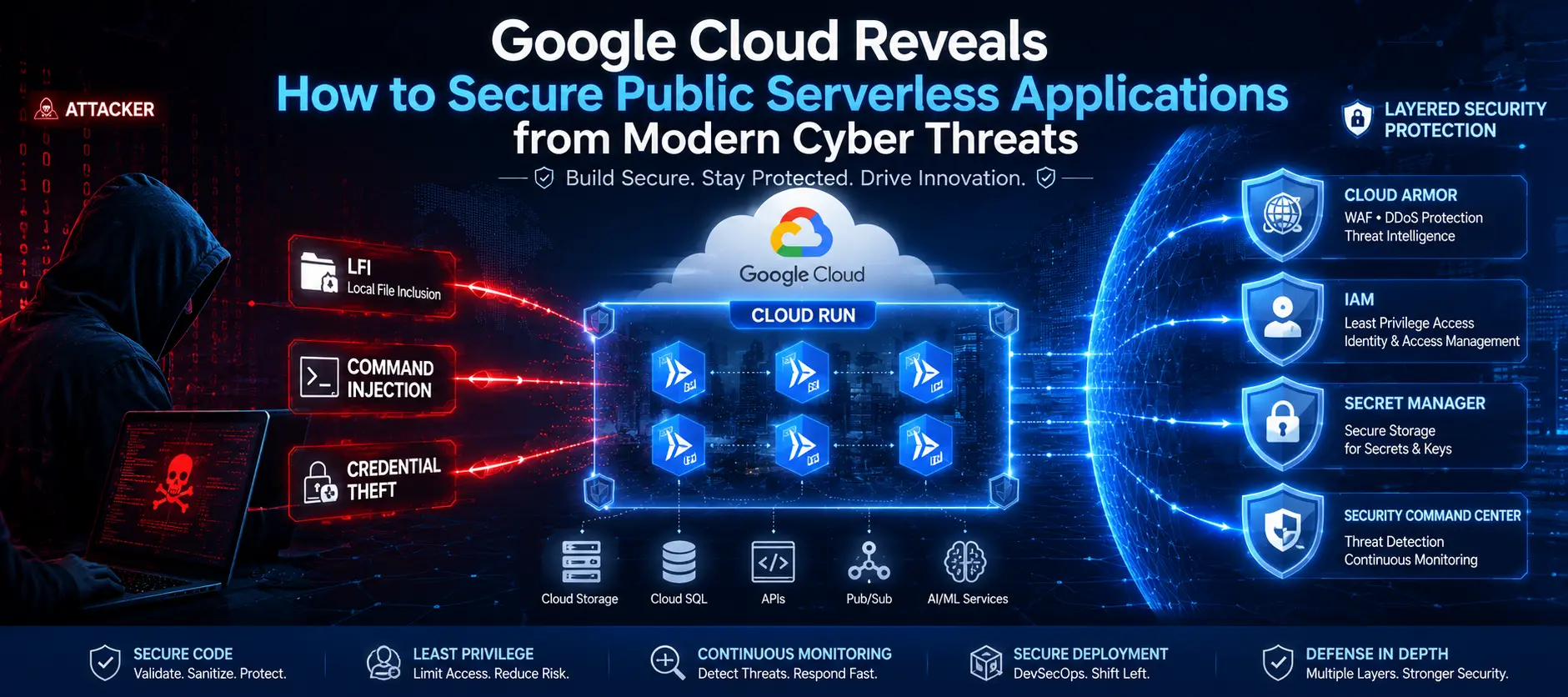
Google Cloud and Mandiant Warn That Exposed Serverless Apps Could Become the Next Major Cloud Security Risk
Cloud computing has transformed how modern applications are built, deployed, and scaled. Among the technologies driving this transformation, serverless computing has emerged as one of the fastest-growing approaches for delivering cloud-native applications. By removing the need to manage servers, developers can focus entirely on writing code while cloud platforms automatically handle infrastructure, scaling, and availability.
Today, serverless services power everything from online shopping platforms and payment systems to AI chatbots, image generation tools, event-driven automation, and enterprise APIs. As organizations accelerate digital transformation and integrate artificial intelligence into daily operations, serverless workloads have become the backbone of many critical business applications.
However, the same technology that enables rapid innovation is also expanding the attack surface for cybercriminals.
In a newly published security guide, Google Cloud's Threat Intelligence team, working alongside Mandiant, highlights how publicly accessible serverless applications can become attractive entry points for attackers when proper security controls are not in place. Rather than reporting a newly discovered vulnerability, the report draws on real-world security assessments and customer engagements to demonstrate how common coding mistakes and overly permissive cloud configurations can allow attackers to move from a single exposed application to an organization's broader cloud environment.
The guidance focuses primarily on Google Cloud Run and Cloud Functions, two of Google's most widely used serverless services, but the underlying security principles apply across virtually every public serverless platform. As businesses increasingly deploy AI-powered applications and cloud-native services at scale, Google believes organizations must adopt stronger security practices throughout the entire software development lifecycle instead of relying solely on default cloud configurations.
The report reinforces an important message for security teams: serverless infrastructure is not inherently insecure, but applications running on it can become vulnerable when secure coding practices, identity management, and runtime protections are overlooked.
What Is Serverless Computing?
Serverless computing, often referred to as Function-as-a-Service (FaaS), allows developers to deploy individual pieces of application code without provisioning or maintaining servers. Instead of running continuously on dedicated infrastructure, serverless functions execute only when triggered by an event such as an API request, file upload, scheduled task, or database update.
Cloud providers automatically handle infrastructure management, operating system updates, resource allocation, scaling, and availability. Developers simply upload their code while the platform ensures it runs whenever needed.
Because organizations pay only for the computing resources consumed during execution, serverless architecture has become highly attractive for businesses seeking greater scalability and lower operational costs.
Today, serverless technologies are widely used across industries to support:
AI assistants and intelligent chatbots
Payment processing systems
E-commerce platforms
Mobile application backends
Data processing pipelines
Image and video generation services
Event-driven automation
REST APIs and microservices
The rapid adoption of generative AI has further accelerated serverless deployment. Modern AI workflows often rely on dozens of backend functions working together to retrieve information, process prompts, interact with databases, generate responses, and automate complex business tasks.
This growing reliance on serverless architecture also means that a single vulnerable function may provide attackers with an unexpected pathway into larger cloud environments.
Why Serverless Applications Are Becoming Prime Targets for Attackers
According to Google Cloud and Mandiant, publicly exposed serverless applications frequently represent one of the first systems attackers probe during cloud intrusion attempts.
Unlike traditional infrastructure, serverless applications are typically composed of custom-developed code combined with numerous third-party libraries, frameworks, and open-source packages. While these components significantly accelerate software development, they can also introduce vulnerabilities if not properly maintained or secured.
Common risks include:
Poor input validation
Vulnerable third-party dependencies
Hardcoded credentials
Misconfigured Identity and Access Management (IAM)
Overly permissive service accounts
Exposed APIs
Weak authentication controls
When attackers discover a vulnerable public function, their goal extends far beyond compromising a single application.
Instead, they often attempt to:
Read application source code
Identify sensitive configuration files
Extract API keys and database credentials
Locate internal cloud resources
Retrieve authentication tokens
Escalate privileges
Move laterally across cloud workloads
One of the most significant concerns highlighted in Google's report involves access to cloud metadata services. If attackers successfully execute malicious code within a serverless container, they may attempt to obtain temporary OAuth tokens associated with the application's service account. If those identities have excessive permissions, attackers could potentially gain access to storage services, secrets, databases, and other critical cloud resources.
As organizations deploy more AI-powered services and publicly accessible APIs, these risks continue to grow, making secure serverless development an increasingly important priority for enterprise security teams.
Educational Code Example: How Poor Input Validation Can Introduce Local File Inclusion Risks
One of the examples discussed in Google's guidance demonstrates how trusting user-supplied input can unintentionally expose sensitive files stored inside an application.
# Example for educational purposes only

filename = request.json["file"]

with open(filename, "r") as file:
    content = file.read()

return content
At first glance, this code appears harmless. The application simply reads a file requested by the user. However, because the filename is accepted without validation, an attacker may request files outside the intended directory.
For example, instead of requesting:
report.pdfAn attacker could attempt something like:
../../../etc/passwdor target configuration files that contain sensitive information, such as environment variables or application secrets.
Google Cloud recommends validating all user input, restricting file access to approved directories, and storing sensitive credentials in dedicated secret management services rather than within application files.
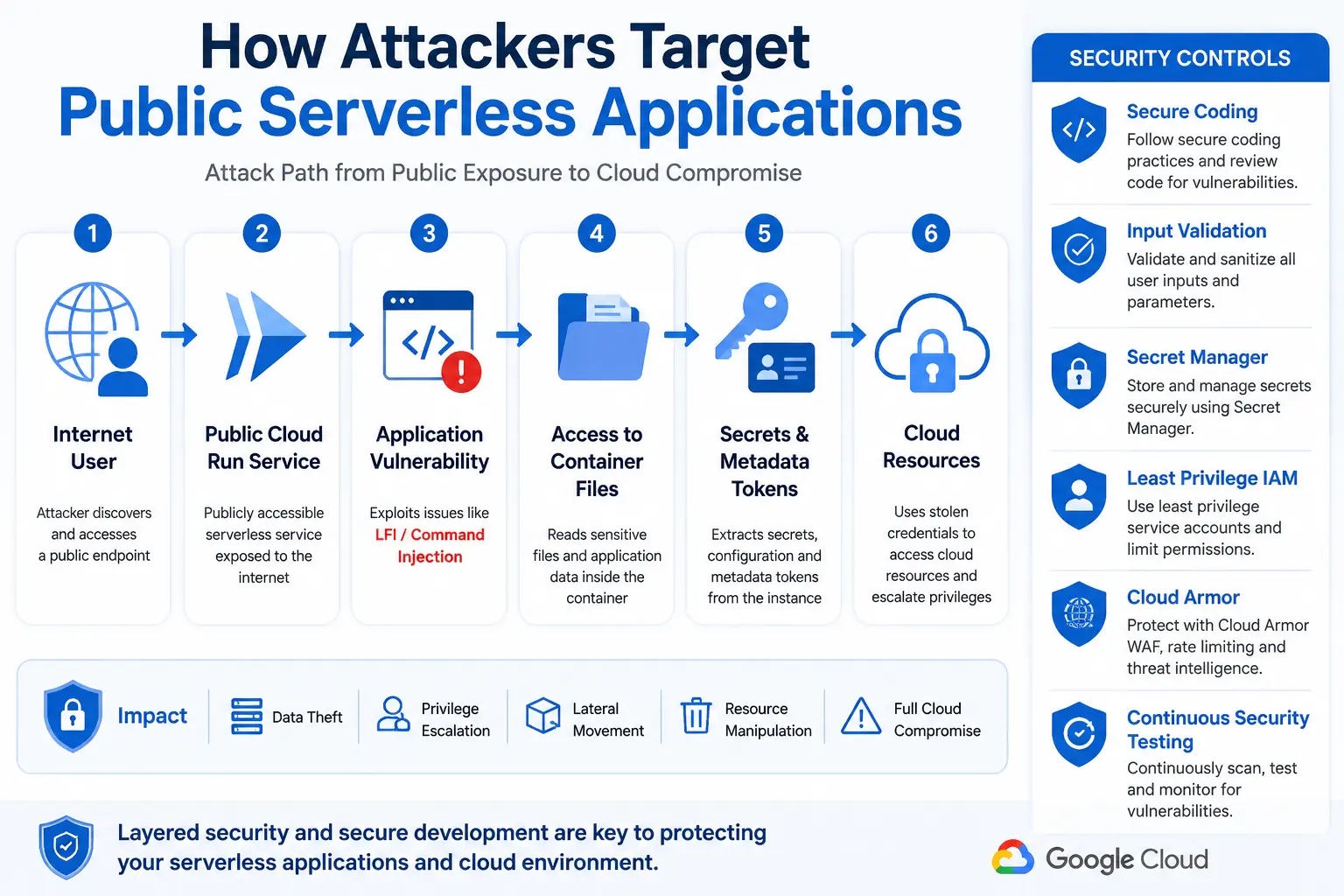
How a Small Coding Mistake Can Lead to a Major Cloud Security Incident
Many organizations assume that serverless platforms automatically provide comprehensive security because cloud providers manage the underlying infrastructure. While services such as Google Cloud Run significantly reduce operational complexity, they cannot protect applications from vulnerabilities introduced during development.
Google Cloud and Mandiant emphasize that the security of a serverless application ultimately depends on the quality of its code and configuration. Even a seemingly minor mistake, such as failing to validate user input, can give attackers an entry point into the application.
Once inside, attackers rarely stop at exploiting a single vulnerability. Their objective is to gather intelligence, steal credentials, and move deeper into the cloud environment. This progression is often referred to as the attack chain, where one weakness enables another until sensitive cloud resources are compromised.
The report highlights two of the most common attack techniques observed during security assessments: Local File Inclusion (LFI) and Command Injection.
Local File Inclusion (LFI): When Applications Expose Their Own Secrets
Local File Inclusion occurs when an application allows users to specify which file should be opened but fails to verify whether that file is actually safe to access.
This vulnerability may appear harmless at first. Developers often build features that allow users to download reports, images, or documents. However, if file paths are accepted without proper validation, attackers can manipulate requests to access files that were never intended to be public.
Instead of downloading an approved document, an attacker may attempt to browse directories within the application container and retrieve sensitive files.
Potential targets include:
Application source code
Configuration files
Environment variables
Dependency manifests
Application logs
Database credentials
API keys
Internal service endpoints
Each piece of exposed information helps attackers understand how the application works and identify additional weaknesses.
According to Google's guidance, attackers frequently look for files such as .env, package.json, requirements.txt, and go.mod because they reveal installed software versions and configuration details that may contain known vulnerabilities.
For organizations running AI-powered applications, exposing configuration files may also reveal API credentials used to access large language models or other cloud services.
Educational Code Example: Understanding Local File Inclusion
The following simplified example demonstrates how accepting user input without validation can unintentionally expose application files.
# Educational example only

filename = request.json["file"]

with open(filename, "r") as file:
    return file.read()
The application expects users to request legitimate files, such as:
report.pdfHowever, because the filename is never validated, an attacker may instead attempt requests like:
../../../etc/passwdor
.envIf successful, the application could reveal sensitive information that helps attackers plan the next stage of their attack.
Security Best Practice
Rather than trusting user input directly:
Allow access only to approved directories.
Validate file names against a predefined list.
Store credentials in Google Secret Manager instead of application files.
Avoid exposing configuration files inside public containers.
Command Injection: Giving Attackers Control of the Server
While Local File Inclusion focuses on reading files, Command Injection allows attackers to execute operating system commands directly on the server running the application.
This type of vulnerability typically appears when applications execute shell commands using data supplied by users.
Although developers often use system commands for legitimate purposes such as file conversion, image processing, or network diagnostics, failing to sanitize user input can unintentionally hand control of the system to an attacker.
Google's report identifies this as one of the highest-risk vulnerabilities affecting public serverless workloads.
Educational Code Example: Unsafe Command Execution
Consider the following simplified example:
import subprocess

user_input = request.json["command"]

subprocess.run(user_input, shell=True)
The intention may be to execute a simple command supplied by the application.
Unfortunately, using:
shell=Truemeans the operating system interprets the entire user input as a shell command.
An attacker could attempt to execute additional commands beyond what the developer intended.
Safer Alternative
Instead of allowing unrestricted shell execution, developers should pass commands as separate arguments.
import subprocess

hostname = request.json["hostname"]

subprocess.run(
    ["ping", hostname],
    shell=False
)
Using shell=False significantly reduces the risk of command injection because the operating system no longer interprets special shell operators.
Google recommends avoiding shell execution whenever possible and validating all external input before processing it.
Why Metadata Servers Are a High-Value Target
One of the most important sections of Google's guidance focuses on the metadata server, a component that many cloud developers never interact with directly.
Every Cloud Run instance can communicate with Google's internal metadata service to obtain temporary authentication credentials associated with its service account.
These credentials are designed to allow applications to securely access other Google Cloud services without storing passwords.
However, if an attacker gains remote code execution through a vulnerable application, they may also attempt to retrieve these temporary access tokens.
Although the tokens expire after a limited time, they may still provide enough access for attackers to perform significant actions inside the cloud environment.
This is why protecting service account permissions is just as important as securing application code.
How the Attack Progresses
The attack typically follows several stages:
Internet
      ⇩
Public Cloud Run Service
      ⇩
Application Vulnerability
      ⇩
Remote Code Execution
      ⇩
Metadata Server Access
      ⇩
Temporary OAuth Token
      ⇩
Google Cloud Resources
Each successful step gives attackers more visibility into the environment and increases the potential impact of the compromise.
Why Service Account Permissions Matter
Not all stolen credentials pose the same level of risk.
The impact depends entirely on the permissions assigned to the compromised service account.
If the application follows the Principle of Least Privilege, attackers may gain access to only a limited set of resources.
However, if the application uses the default Compute Engine service account with broad permissions, the consequences can be far more severe.
Google warns that overly permissive identities may allow attackers to:
View or modify Cloud Storage buckets
Read sensitive secrets
Access databases
Deploy new cloud services
Delete existing workloads
Change cloud configurations
Create persistent backdoors
Move laterally into additional projects
This demonstrates why identity management has become one of the most critical components of cloud security.
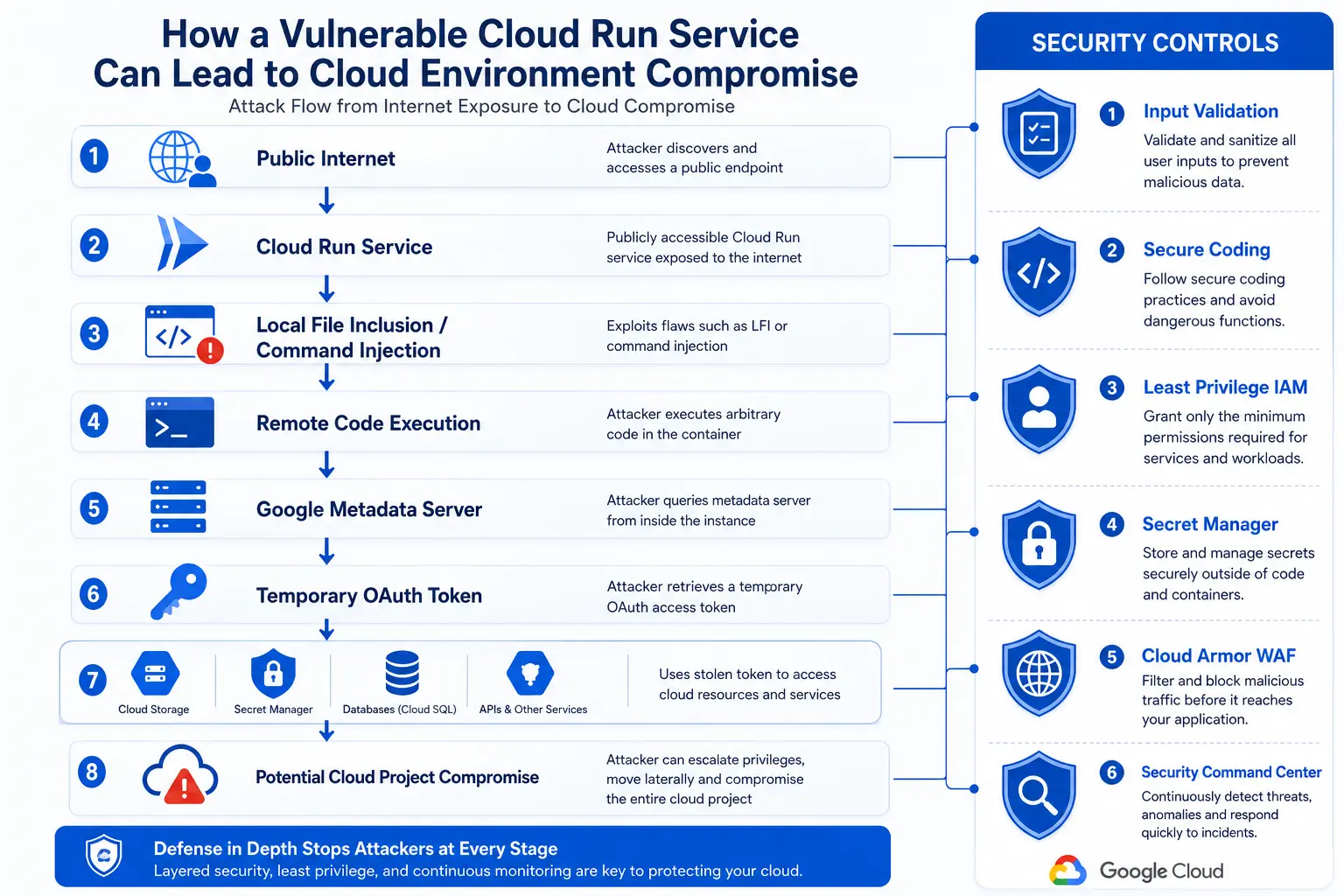
Building a Secure Serverless Environment - Google and Mandiant's Recommended Defense Strategy
While vulnerabilities such as Local File Inclusion and Command Injection can provide attackers with an initial foothold, Google Cloud and Mandiant emphasize that a successful compromise should never automatically result in complete access to a cloud environment.
The report advocates a defense-in-depth approach, where multiple security layers work together to prevent, detect, and contain attacks. Rather than relying on a single security control, organizations should combine secure coding, identity management, runtime protection, and continuous monitoring throughout the application lifecycle.
Below are the key recommendations highlighted in Google's guidance.
1. Secure Software Development Should Begin Before Deployment
One of the strongest messages in the report is that security should be integrated into the software development process from the very beginning rather than added after an application is deployed.
Google recommends adopting a Secure Software Development Lifecycle (S-SDLC) that incorporates security into every development stage.
Organizations should include:
Secure code reviews
Automated vulnerability scanning
Dependency and package analysis
Static Application Security Testing (SAST)
Dynamic Application Security Testing (DAST)
Continuous security testing within CI/CD pipelines
Least privilege access reviews before deployment
By identifying vulnerabilities early, developers can significantly reduce the risk of exposing insecure applications to the internet.
Developer Security Checklist
A secure deployment pipeline should verify that:
Input validation has been implemented.
Secrets are not stored inside source code.
Third-party libraries are up to date.
IAM permissions follow least privilege.
Security testing has passed before deployment.
2. Protect Secrets with Google Secret Manager
One of the most common mistakes discovered during security assessments is storing credentials directly inside application code or configuration files.
Examples include:
API keys
Database passwords
OAuth tokens
Cloud credentials
Encryption keys
If attackers exploit an application vulnerability, these files are often among the first targets they attempt to retrieve.
Instead, Google recommends storing sensitive information in Google Secret Manager, where access is controlled through Identity and Access Management (IAM) policies.
Educational Code Example: Hardcoded Secret vs Secret Manager
❌ Unsafe Approach
API_KEY = "sk-live-xxxxxxxxxxxxxxxx"

database_password = "Admin@123"
Hardcoded credentials remain inside application files and can easily be exposed if the application is compromised.
Recommended Approach
from google.cloud import secretmanager

client = secretmanager.SecretManagerServiceClient()

secret = client.access_secret_version(
    request={"name": "projects/PROJECT_ID/secrets/API_KEY/versions/latest"}
)

api_key = secret.payload.data.decode("UTF-8")
Using a dedicated secret management solution prevents sensitive credentials from being stored directly inside source code while allowing administrators to rotate secrets without modifying the application.
3. Apply the Principle of Least Privilege
Google strongly advises against using default service accounts with broad permissions.
Instead, each Cloud Run service should have its own dedicated service account with only the permissions required to perform its specific task.
For example:
Service Requirement | Recommended IAM Permission |
|---|---|
Read files from Cloud Storage | Storage Object Viewer |
Access application secrets | Secret Manager Secret Accessor |
Write logs | Logging Writer |
Read Pub/Sub messages | Pub/Sub Subscriber |
This approach limits the damage attackers can cause even if a workload is compromised.
4. Place Public Services Behind Cloud Armor
Applications exposed directly to the internet face constant scanning from automated bots searching for vulnerable endpoints.
Google recommends placing publicly accessible Cloud Run services behind an external Layer 7 Application Load Balancer integrated with Cloud Armor, Google's Web Application Firewall (WAF).
Cloud Armor provides protection against many common web attacks before malicious requests ever reach the application.
Key capabilities include:
Web Application Firewall (WAF)
Request filtering
Rate limiting
Traffic inspection
IP reputation filtering
DDoS mitigation
SSL policy enforcement
Detailed security logging
The report highlights Cloud Armor's preconfigured rules that help block attacks such as:
Local File Inclusion (LFI)
Remote Code Execution (RCE)
Directory Traversal
Server-Side Request Forgery (SSRF)
This additional security layer significantly reduces the likelihood of vulnerable requests reaching application code.
5. Secure AI-Generated Code Before Production
One of the most timely sections of Google's guidance addresses the rapid growth of AI-assisted software development, often referred to as "vibe coding."
Developers increasingly rely on AI tools to generate application code, automate repetitive tasks, and accelerate software delivery.
Although AI improves productivity, Google cautions that AI-generated code should never bypass traditional security practices.
The report recommends that organizations:
Review all AI-generated code before deployment.
Restrict AI experimentation to isolated environments.
Use approved IDEs and verified plugins.
Limit plugin permissions using least privilege.
Prevent sensitive production data from being shared with AI tools.
Apply the same S-SDLC controls used for human-written code.
The message is clear: AI can accelerate development, but human oversight remains essential for secure software.
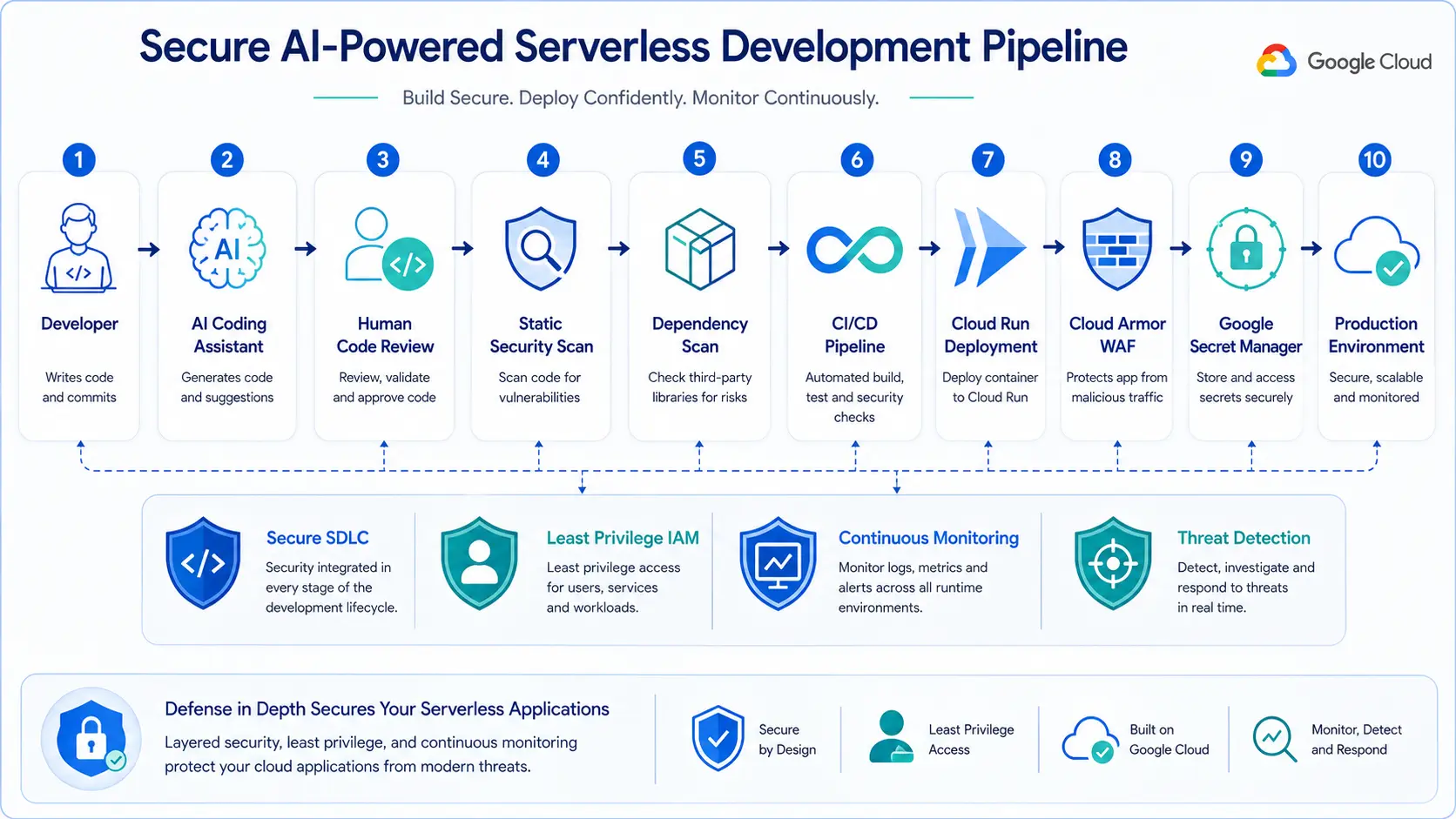
6. Monitor Cloud Run with Security Command Center
Even the most secure applications require continuous monitoring.
Google recommends using Security Command Center (SCC) to detect suspicious activities targeting Cloud Run workloads.
Security Command Center can identify:
Credential theft attempts
Suspicious API activity
Reverse shell execution
Script execution
Cloud reconnaissance
Privilege escalation attempts
Instead of waiting until an attacker has already compromised multiple systems, security teams receive early indicators of malicious behavior and can respond more quickly.
For organizations operating large cloud environments, continuous monitoring provides an additional layer of protection beyond preventive controls.
Expert Analysis
The latest guidance from Google Cloud and Mandiant reflects a broader shift in enterprise cybersecurity. As organizations increasingly adopt cloud-native architectures and AI-assisted development, the focus is moving beyond securing infrastructure alone to securing the applications that run on it.
Serverless platforms simplify infrastructure management, but they do not eliminate application-level vulnerabilities. Poor input validation, excessive permissions, exposed secrets, and insecure development practices remain common causes of cloud incidents.
The report reinforces a growing industry consensus: modern cloud security depends on multiple layers of protection working together rather than a single defensive measure.
Conclusion
Serverless computing has become a cornerstone of modern cloud applications, powering everything from enterprise APIs and AI assistants to large-scale automation platforms. Its ability to simplify infrastructure management enables organizations to innovate faster, but speed should never come at the cost of security.
Google Cloud and Mandiant's latest guidance serves as a timely reminder that most cloud compromises begin with relatively simple mistakes, such as weak input validation, excessive permissions, or exposed credentials. By embracing secure software development practices, enforcing least-privilege access, protecting secrets with dedicated management services, deploying applications behind Cloud Armor, and continuously monitoring workloads with Security Command Center, organizations can significantly reduce the risk of a single vulnerable function becoming a gateway to a broader cloud compromise.
As AI accelerates software development and serverless adoption continues to grow, building security into every stage of the application lifecycle is no longer optional. It has become a fundamental requirement for protecting modern cloud environments against increasingly sophisticated cyber threats.
About the Author