
Google Cloud Adds Native Scale-to-Zero Capabilities to GKE
Google Cloud is introducing native scale-to-zero capabilities in GKE 1.37, allowing workloads to scale down to zero replicas when idle and restart as demand returns. Capacity buffers help reduce startup delays while limiting idle resource consumption.
Xcademia Team
Xcademia Research Team
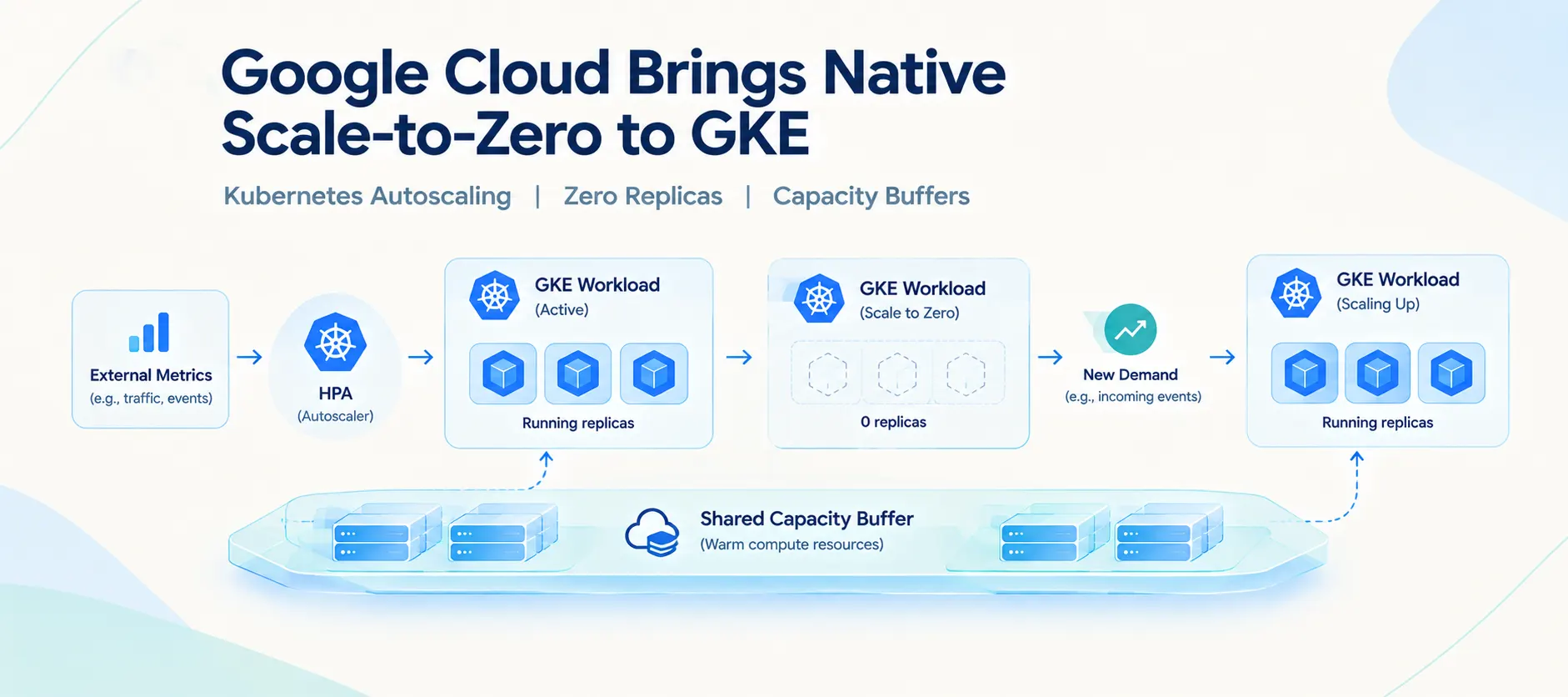
Google Cloud is introducing native scale-to-zero capabilities in Google Kubernetes Engine (GKE) 1.37, enabling workloads to scale down to zero replicas when they have no active demand and scale back up when new work arrives.
The update targets workloads that run intermittently, including batch processors, event-driven workers and development environments. These workloads can remain idle for extended periods while continuing to consume compute resources.
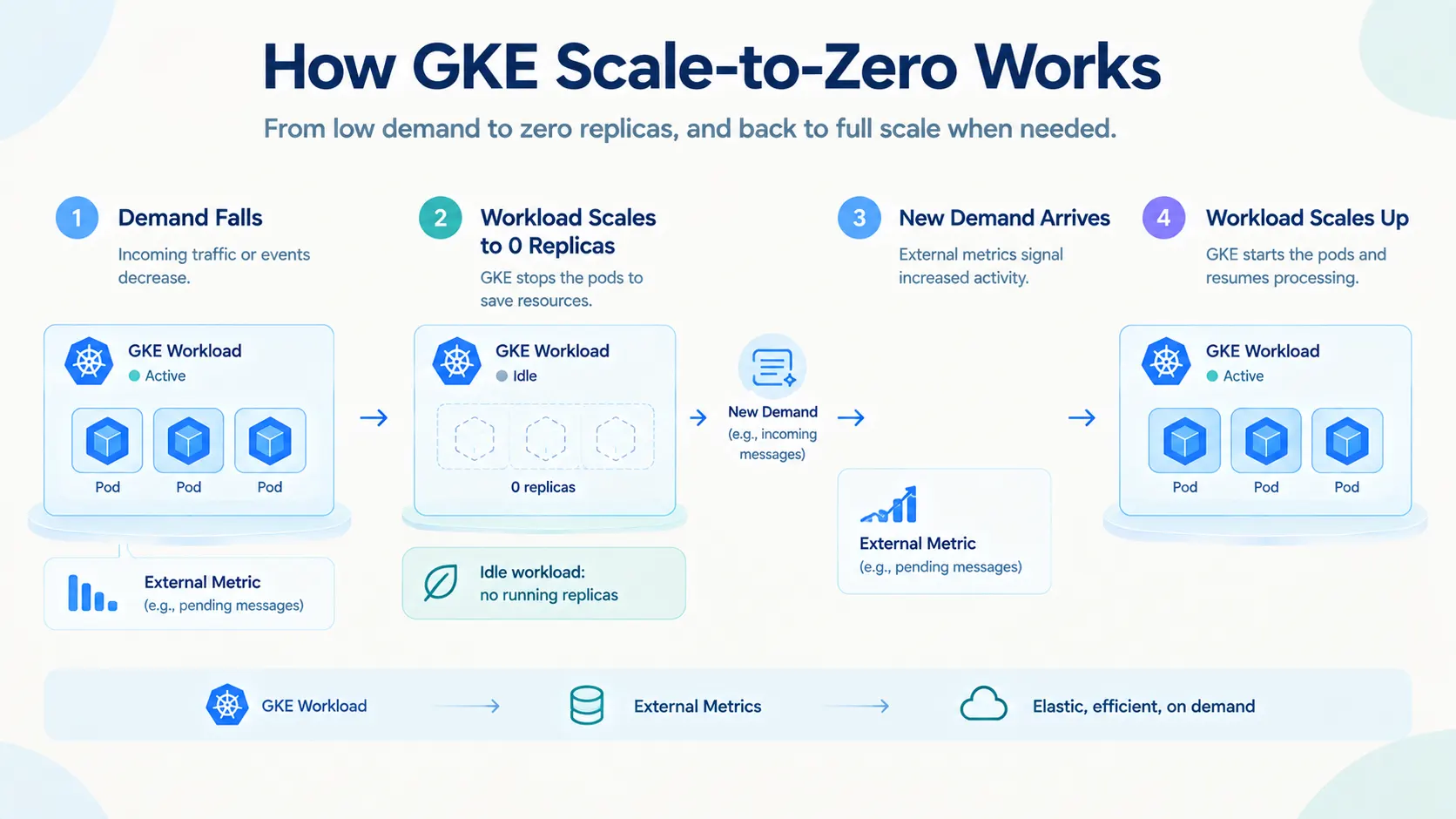
With the new capabilities, eligible workloads can stop running pods when demand falls and restart when external metrics indicate that work is available.
Google Cloud is combining this functionality with GKE capacity buffers, which provide warm compute capacity to help workloads restart without waiting for new nodes to be provisioned.
The approach aims to reduce idle infrastructure consumption while keeping workloads responsive when demand returns.
Why Scale-to-Zero Matters for Kubernetes Workloads
Kubernetes supports horizontal scaling through the Horizontal Pod Autoscaler (HPA), which adjusts the number of pod replicas based on observed metrics.
However, workloads that experience long periods of inactivity can still consume resources if they maintain a minimum number of running replicas.
Scale-to-zero addresses this situation by allowing a workload to run with no active replicas when there is no demand.
This model is particularly relevant to:
Event-driven workers: Services that process messages or events as they arrive.
Batch processors: Jobs that run when scheduled or triggered.
Development environments: Workspaces that are used during specific working hours.
Intermittent services: Applications that experience irregular or highly variable demand.
The key difference is that a workload does not need to keep a running pod simply to remain available for future work.
Instead, an external metric can signal when the workload needs to restart.
Native GKE Scale-to-Zero Versus KEDA
Google Cloud positions the new capabilities as an alternative to configurations that use Kubernetes Event-Driven Autoscaling (KEDA) to scale workloads to zero.
KEDA is an optional Kubernetes component that supports event-driven scaling. It can be used with the HPA to scale workloads based on external events and metrics.
According to Google Cloud, native scale-to-zero in GKE reduces the need to deploy and manage additional autoscaling components.
The company highlights differences in operational overhead, configuration and the path used to deliver scaling signals.
Feature | Native GKE Scale-to-Zero | KEDA-Based Setups |
|---|---|---|
Operational management | Managed service with no additional autoscaling operators required | Requires management of KEDA operators and |
Configuration | Uses native HPA and GKE custom resources | Uses KEDA-specific configuration and resources |
Metrics path | Native integration with external metrics | May involve polling intervals and additional processing steps |
Configuration complexity | Google Cloud describes the approach as requiring minimal YAML | Google Cloud says large deployments can involve extensive configuration |
Google Cloud says integrating scale-to-zero into the GKE control plane reduces the need for additional operators and complex configuration.
The comparison reflects Google's description of its managed approach. Actual operational requirements can vary depending on the workload, existing infrastructure and autoscaling configuration.
How GKE Scale-to-Zero Works Under the Hood
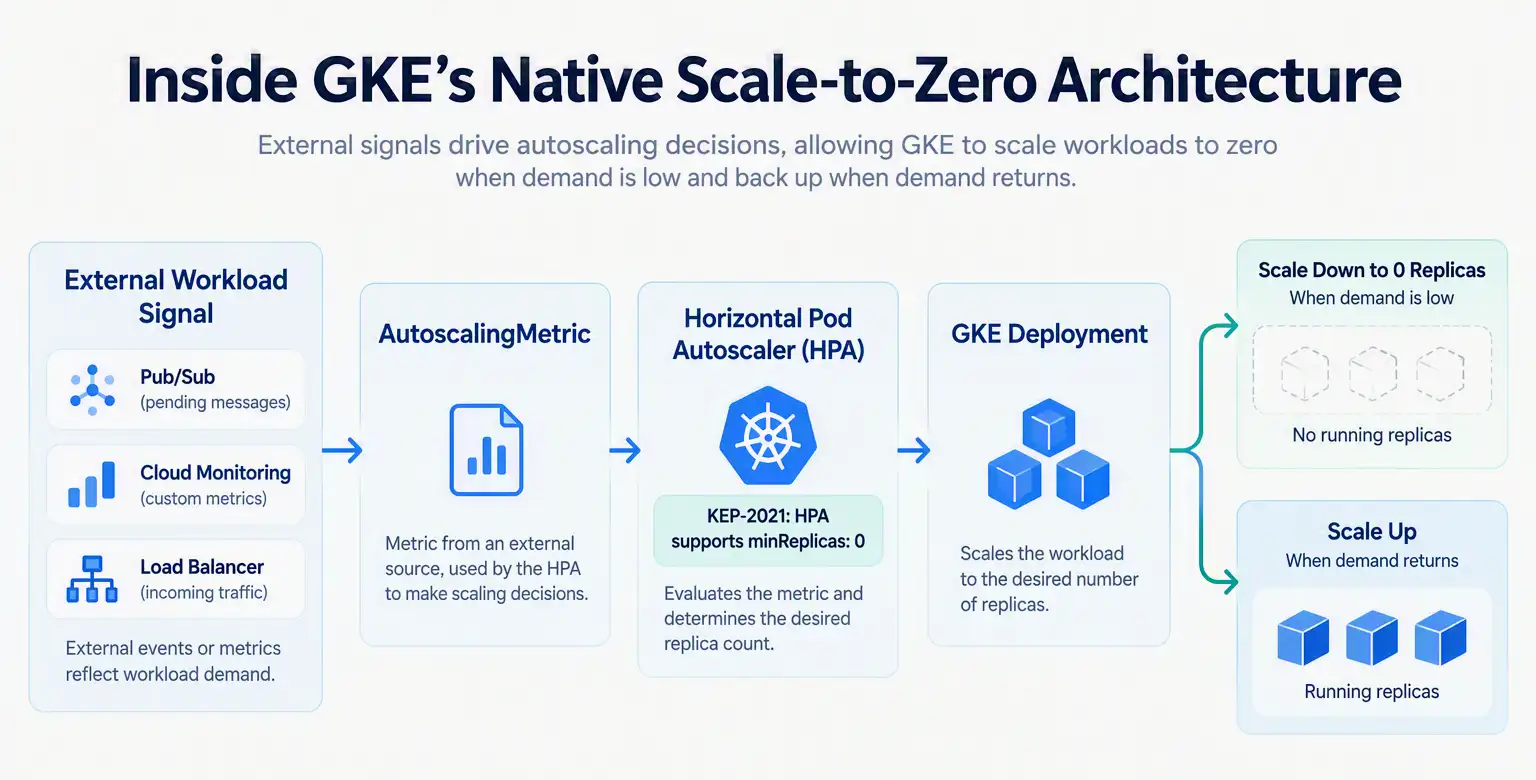
The new functionality relies on two primary components: the Horizontal Pod Autoscaler with AutoscalingMetric and Kubernetes Enhancement Proposal 2021, or KEP-2021.
Together, these components allow the HPA to use external metrics to scale a workload down to zero replicas and bring it back when demand returns.
1. HPA With AutoscalingMetric
The AutoscalingMetric custom resource definition (CRD) connects external metrics to the GKE autoscaling system.
Google Cloud says the integration supports metrics from Google Cloud Managed Service for Prometheus, allowing workloads to use signals from services such as:
Pub/Sub
Cloud Monitoring
Load Balancing
The managed metrics pipeline allows the HPA to receive external signals without requiring a separate metrics adapter.
This provides the metrics foundation for deciding when a workload should scale down or restart.
2. KEP-2021 and Minimum Replicas of Zero
KEP-2021 enables the HPA to support minReplicas: 0.
This allows a workload's replica count to fall to zero when the configured metric drops below the relevant threshold.
When the metric indicates that work is pending, the HPA can scale the workload back up.
The combination of external metrics and zero-replica support makes it possible to build a workload that stops running while idle and restarts when demand returns.
Configuring a Scale-to-Zero Workload
Google Cloud provides a configuration example that uses the number of undelivered messages in a Pub/Sub subscription as the scaling signal.
The setup requires two primary Kubernetes objects:
An
AutoscalingMetricresource that defines the external metric.An HPA configuration that references the metric and sets the minimum replica count to zero.
The following examples preserve the configuration provided in the Google Cloud Blog source.
Step 1: Define the External Metric
The AutoscalingMetric resource maps an external Cloud Monitoring metric to the GKE cluster.
In this example, the metric tracks the number of undelivered messages in a Pub/Sub subscription named my-subscription.
apiVersion: autoscaling.gke.io/v1beta1
kind: AutoscalingMetric
metadata:
  name: my-autoscalingmetric
spec:
  metrics:
  - promql:
      name: pubsub-undelivered
      query: >
        {
          "pubsub.googleapis.com/subscription/num_undelivered_messages",
          subscription_id="my-subscription"
        }
The resource defines the metric name pubsub-undelivered and associates it with the Pub/Sub subscription's undelivered-message metric.
This provides the signal that the autoscaler can use to determine whether the worker has pending work.
Step 2: Configure the HPA With minReplicas: 0
The next step is to configure the HPA to reference the external metric and allow the workload to scale down to zero replicas.
apiVersion: autoscaling/v2
kind: HorizontalPodAutoscaler
metadata:
  name: worker-hpa
spec:
  scaleTargetRef:
    apiVersion: apps/v1
    kind: Deployment
    name: worker-deployment
  minReplicas: 0
  maxReplicas: 50
  metrics:
  - type: External
    pods:
      metric:
        name: autoscaling.gke.io|my-autoscalingmetric|pubsub-undelivered
      target:
        type: AverageValue
        averageValue: 10
The configuration targets the worker-deployment deployment.
The key settings include:
minReplicas: 0: Allows the workload to scale down to zero replicas.maxReplicas: 50: Sets the configured upper replica limit.averageValue: 10: Defines the target average value for the external metric.
The HPA references the metric defined in the AutoscalingMetric resource through the name autoscaling.gke.io|my-autoscalingmetric|pubsub-undelivered.
Together, the two resources configure a worker that can scale to and from zero based on the external metric.
Important: The configuration above reproduces the source example. It is not a complete deployment guide. Workload-specific settings and prerequisites should be checked against the official GKE documentation before implementation.
External Metrics Support Reduces Adapter Complexity
Google Cloud says native scale-to-zero builds on GKE's support for external metrics from Cloud Monitoring.
The extended AutoscalingMetric resource can query metrics from Google Managed Service for Prometheus without requiring complex third-party adapters.
This integration is intended to simplify the configuration and security model while reducing the number of components involved in delivering metrics to the autoscaler.
External metrics are central to event-driven scaling because the workload's demand may not be reflected in CPU or memory usage alone.
For example, a message-processing worker may need to scale up when a queue accumulates undelivered messages, even if no worker pods are currently running.
Google Cloud has also published a companion article covering native support for Prometheus metrics in GKE.
GKE Capacity Buffers Help Reduce Cold-Start Delays
Scaling a workload from zero introduces a practical challenge: cold-start latency.
When a workload needs to restart, GKE may have to provision a node, pull the container image and start the pod before the application can begin processing work.
Google Cloud says this process can involve a wait of 60 to 90 seconds for a new GKE node to become available in the scenario described in its announcement.
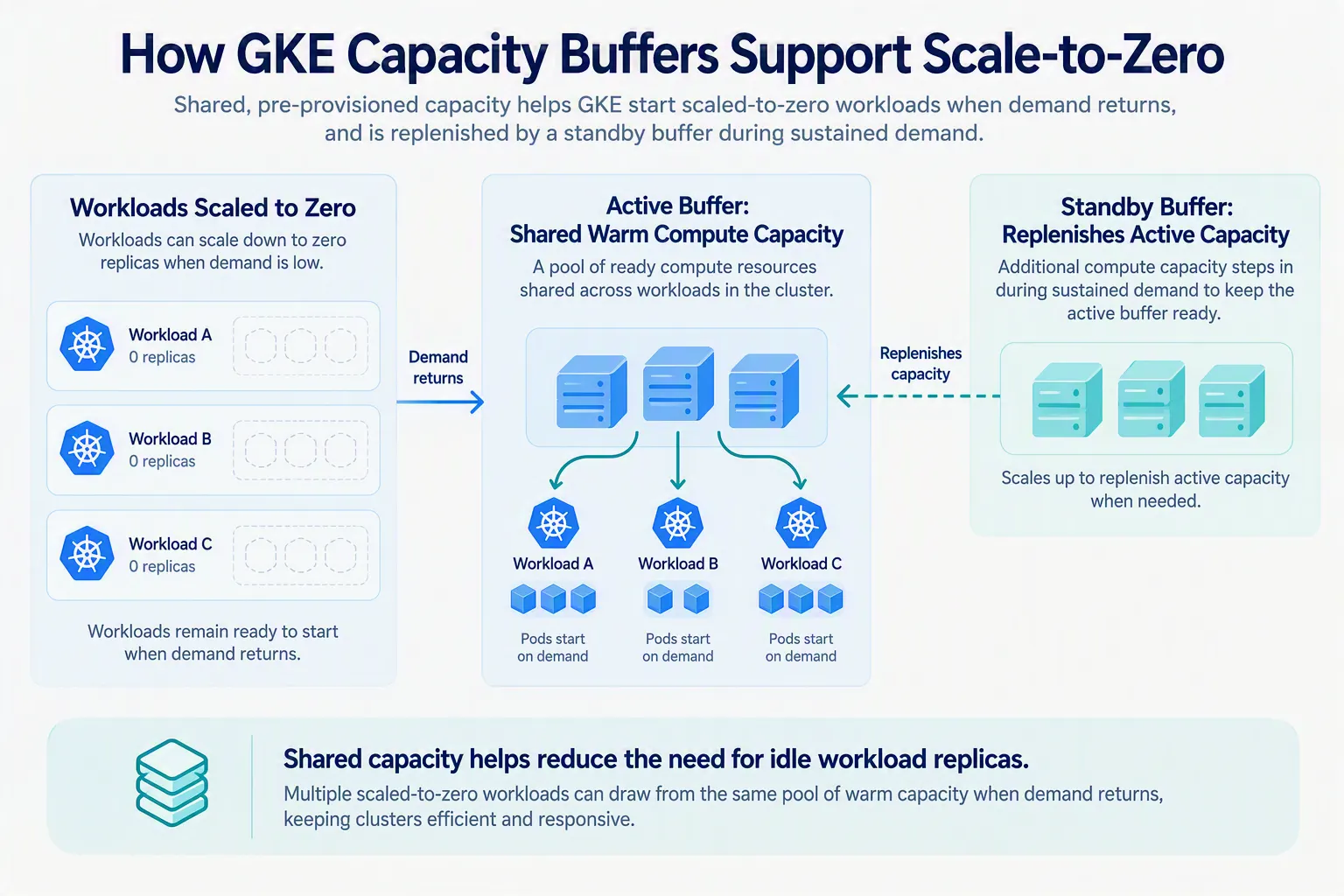
To address this, GKE capacity buffers provide pooled warm compute capacity that workloads can use when they scale up.
Instead of requiring every workload to maintain a running replica, a shared buffer can provide resources for multiple workloads that have scaled to zero.
When the HPA scales a workload from zero to one replica, the pod can claim available capacity from the buffer.
Google Cloud says this can eliminate the wait for a new node to spin up in the described scenario, helping reduce startup delays.
The company describes the model as a way to combine lower idle workload resource consumption with faster scaling when demand returns.
The exact startup behavior depends on capacity availability and the workload's requirements.
Active and Standby Capacity Buffers
GKE capacity buffers come in two forms: active and standby.
Each serves a different role in the capacity management process.
Active Buffers
An active buffer maintains warm compute capacity that can be used by workloads scaling from zero.
Google Cloud says a small active buffer can serve hundreds of workloads that have scaled to zero, allowing them to share available capacity instead of maintaining individual running replicas.
This shared model is intended to reduce the need for each workload to keep compute resources active while waiting for demand.
Standby Buffers
A standby buffer provides additional capacity that can replenish the active buffer when sustained demand increases.
Google Cloud describes standby capacity as costing a fraction of an active buffer.
The standby buffer helps the cluster maintain available capacity as workloads consume resources from the active buffer.
Combining Active and Standby Buffers
Google Cloud says using both buffer types can support faster scaling while helping control infrastructure costs.
The active buffer provides immediately available capacity, while the standby buffer helps replenish that capacity during sustained demand.
The company does not disclose a universal buffer configuration or cost-saving percentage in the announcement.
Planned Improvements: More Control Over Scaling Windows
Google Cloud says it is continuing to expand GKE's elasticity capabilities.
One example discussed in the announcement is the ability to define recurring scale-to-zero windows for workloads such as development environments.
A development environment could, for example, be configured to scale down at 8:00 PM and scale back up at 7:00 AM.
Google Cloud says developers should watch for methods that provide more precise control over recurring scaling schedules.
These capabilities are described as part of the company's ongoing roadmap. The announcement does not provide a release date or detailed implementation specifications for scheduled scaling.
How to Get Started With GKE Scale-to-Zero
Google Cloud outlines three steps for adopting native scale-to-zero.
1. Identify a Workload With Fluctuating Demand
Start with a workload that has clear periods of inactivity.
Event-driven workers, batch processors and development environments are examples of workloads that may benefit from scaling down when no work is pending.
2. Configure the Metric and HPA
Define the external metric through AutoscalingMetric and configure the HPA with minReplicas: 0.
The metric should reflect the workload's actual demand, such as the number of undelivered messages in a queue.
3. Add Capacity Buffers
Configure capacity buffers for the cluster or workload to help reduce the time needed to obtain compute resources when the workload scales up.
Google Cloud recommends capacity buffers as part of its approach to keeping workloads responsive while scaling from zero.
For implementation details, consult the official documentation:
What Native Scale-to-Zero Means for Cloud Infrastructure
GKE's native scale-to-zero capabilities highlight a broader infrastructure trend: making compute consumption more closely reflect actual workload demand.
For organizations running event-driven applications or intermittent workloads, maintaining a minimum number of replicas can create resource consumption during periods when no work is being processed.
Scaling to zero offers a way to reduce that idle workload footprint.
However, scaling down completely also introduces a responsiveness challenge. Applications must be able to restart when demand returns, and the underlying infrastructure must provide capacity quickly enough to meet workload requirements.
Google Cloud's approach combines external metric-driven autoscaling with shared capacity buffers to address both sides of that challenge.
For platform engineering teams, the practical considerations include selecting the right demand metric, configuring HPA thresholds, understanding startup behavior and determining whether capacity buffers are appropriate for the workload.
The announcement highlights a broader industry shift toward more demand-driven infrastructure management, where workload readiness and continuously running compute resources do not necessarily have to remain tied together.
Conclusion
Google Cloud is adding native scale-to-zero capabilities to GKE 1.37, allowing supported workloads to scale down to zero replicas and restart when external metrics indicate that demand has returned.
The implementation combines HPA support for zero replicas, the AutoscalingMetric resource and external metrics from Google Cloud monitoring services.
Capacity buffers complement the scaling mechanism by providing shared warm compute capacity that can help reduce cold-start delays.
The update is aimed at workloads with intermittent demand, including event-driven workers, batch processors and development environments.
For teams considering adoption, the main steps are to identify suitable workloads, configure the external metric and HPA, and evaluate capacity buffers based on the application's startup and availability requirements.
Source: Google Cloud Blog
About the Author