
Google Brings SQL and Python Together in BigQuery, Making Data Analytics Faster and Simpler
Google Cloud has introduced the %%bqsql magic for BigQuery DataFrames, enabling developers to seamlessly combine SQL and Python in Jupyter notebooks. The new workflow reduces data movement, simplifies analytics, and scales from local datasets to enterprise workloads.
Xcademia Team
Xcademia Research Team
Introduction
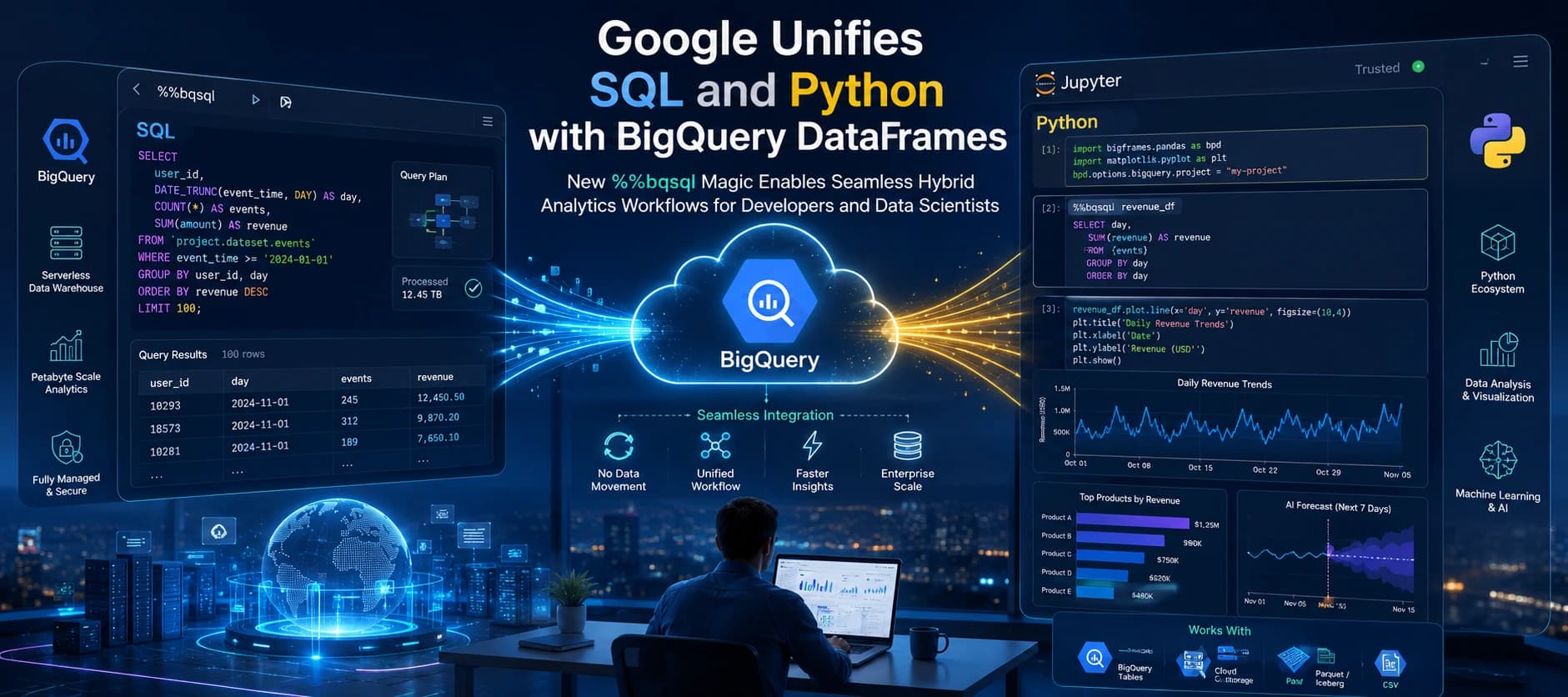
Google Cloud has announced a major enhancement for data professionals by introducing the %%bqsql IPython magic for BigQuery DataFrames. The new capability enables developers, analysts, and data scientists to work with SQL and Python in the same notebook without the traditional overhead of manually moving data between programming environments.
For years, professionals have relied on SQL for querying large datasets while using Python for visualization, machine learning, and statistical analysis. However, combining both languages in a single workflow often required exporting SQL results into Python memory or uploading Python DataFrames into temporary database tables before continuing the analysis.
Google's latest innovation removes this friction by creating a seamless bridge between SQL and Python directly inside Jupyter notebooks and Colab. Developers can now alternate between SQL and Python while keeping data processing inside BigQuery's scalable engine.
The announcement represents another step in Google's strategy to simplify cloud-native analytics while making advanced data engineering accessible to a broader developer community.
The Evolution of Data Analytics Workflows
Where to add:
After Introduction
What to cover
Explain how analytics has evolved over the past decade.
Topics:
Traditional SQL-only analytics
Rise of Python and pandas
Growth of Jupyter Notebooks
Why organizations now use both SQL and Python
Why hybrid workflows became necessary
This gives readers context before introducing Google's solution.
Google Removes the Traditional Barrier Between SQL and Python
Data teams rarely rely on a single programming language.
SQL remains the preferred language for querying structured datasets, filtering records, joining tables, and performing large-scale aggregations. Python, on the other hand, dominates machine learning, artificial intelligence, visualization, automation, and statistical computing.
Until now, switching between these two environments created unnecessary complexity.
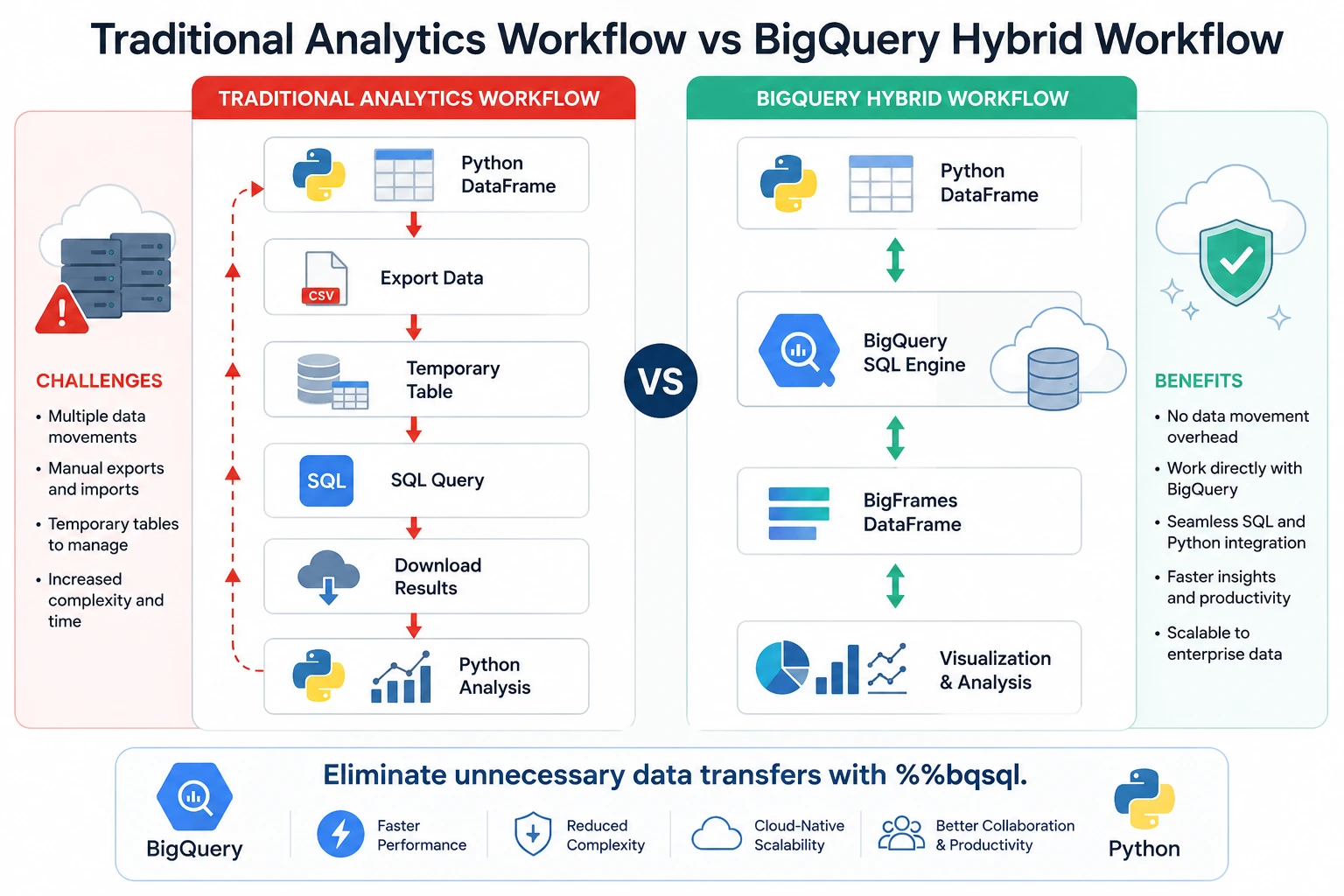
A common workflow looked like this:
Execute SQL query
Export results into pandas
Process data in Python
Upload processed data back into BigQuery
Execute another SQL query
Repeat the cycle
Each transition introduced additional processing time, memory consumption, and maintenance overhead.
With the new %%bqsql notebook magic, Google Cloud removes these repetitive steps.
Instead of copying datasets between SQL and Python, developers can reference Python DataFrames directly from SQL cells, while SQL query results automatically become reusable BigQuery DataFrames for subsequent Python operations.
The experience feels like both languages are working together as a single analytics environment.
How the New Hybrid Workflow Works
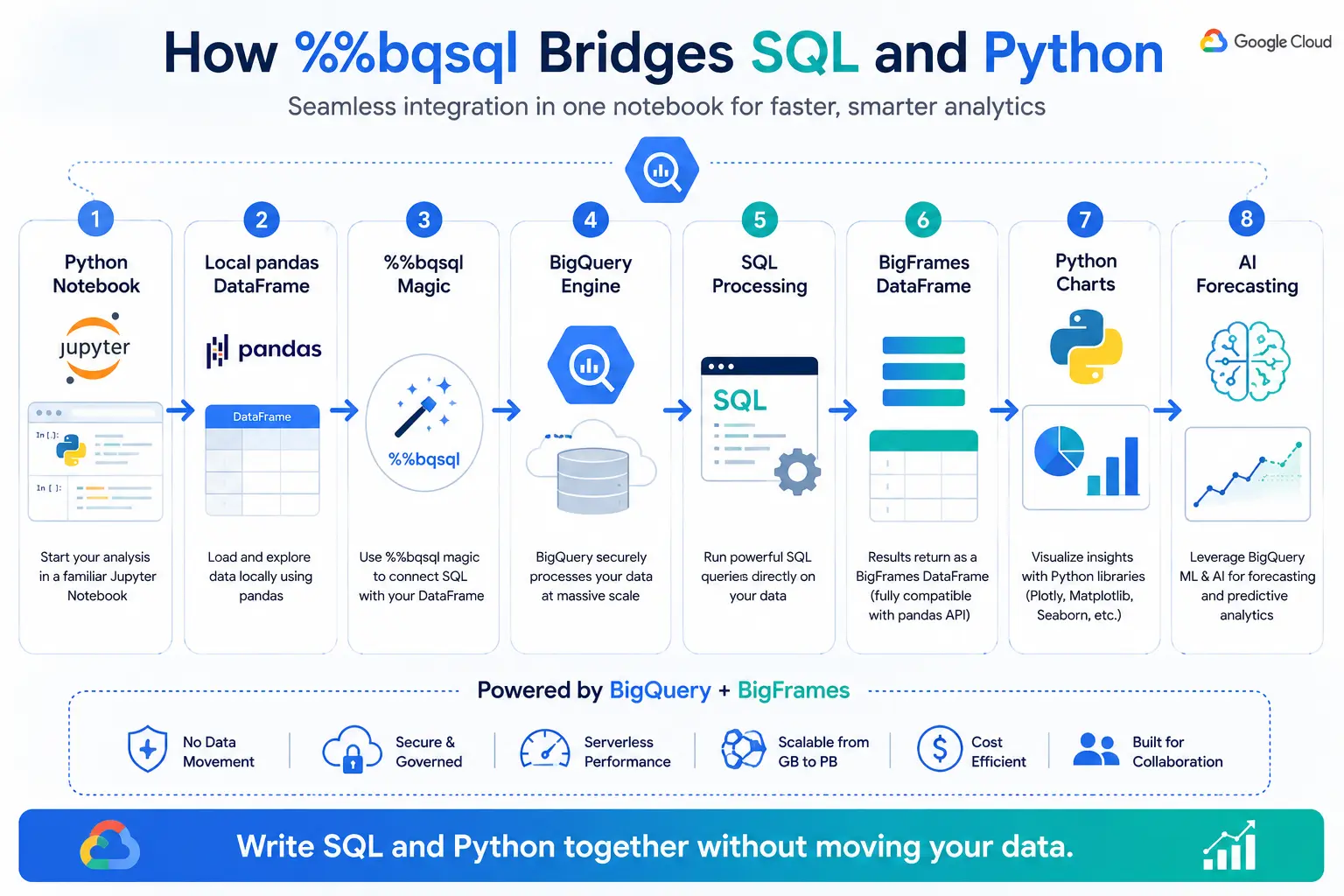
The workflow begins with a familiar Python environment such as JupyterLab or Google Colab.
Developers first load local datasets using pandas.
Example
import pandas as pd

df = pd.read_excel(
    url,
    sheet_name="Table05",
    dtype_backend="pyarrow",
    engine="calamine",
    header=1,
)
Once the data is available, the BigFrames extension connects the notebook to BigQuery.
Load BigFrames Extension
%load_ext bigframesConfigure your Google Cloud project.
import bigframes.pandas as bpd

bpd.options.bigquery.project = "your-project-id"
Now SQL can directly access the local pandas DataFrame.
%%bqsql

SELECT *
FROM {df}
Behind the scenes, BigQuery temporarily uploads the dataset and executes the query using Google's distributed analytics engine.
Developers no longer need to manually create temporary tables or export intermediate datasets.
Understanding BigQuery DataFrames
Where to add:
After How the New Hybrid Workflow Works
Explain
Many readers won't know what BigFrames actually are.
Cover:
What are BigQuery DataFrames?
Difference between pandas and BigFrames
Why Google created BigFrames
How BigFrames keeps computation inside BigQuery
Memory advantages
Similar pandas API
Include a comparison table.
Example
pandas | BigFrames |
|---|---|
Local memory | BigQuery engine |
Small datasets | Massive datasets |
Laptop CPU | Distributed cloud |
Limited RAM | Practically unlimited |
SQL and Python Now Form a Continuous Analytics Pipeline
One of the most significant improvements introduced by Google Cloud is the ability to chain SQL and Python operations together without interruption.
Instead of treating SQL and Python as separate processing environments, developers can build an end-to-end analytical pipeline inside a single notebook.
For example, SQL can filter a dataset before passing it back into Python.
%%bqsql yearly

SELECT *
FROM {full_rows}
WHERE STARTS_WITH(`Time period`, 'MY')
The resulting dataset becomes a BigQuery DataFrame that behaves similarly to a pandas DataFrame.
Another SQL transformation can immediately build upon the previous output.
%%bqsql timeseries

SELECT
TIMESTAMP(CONCAT(
REGEXP_EXTRACT(`Marketing year 1`, r'([0-9]+)/'),
'-01-01')) AS year,
*
FROM {yearly}
After SQL processing is complete, Python can generate charts directly from the transformed dataset.
timeseries.set_index("year").sort_index().plot.line()This alternating workflow allows developers to choose the best language for each step rather than forcing an entire pipeline into either SQL or Python.
Google says the same workflow can easily scale from a small local dataset to billions of rows stored in production BigQuery tables with minimal code changes.
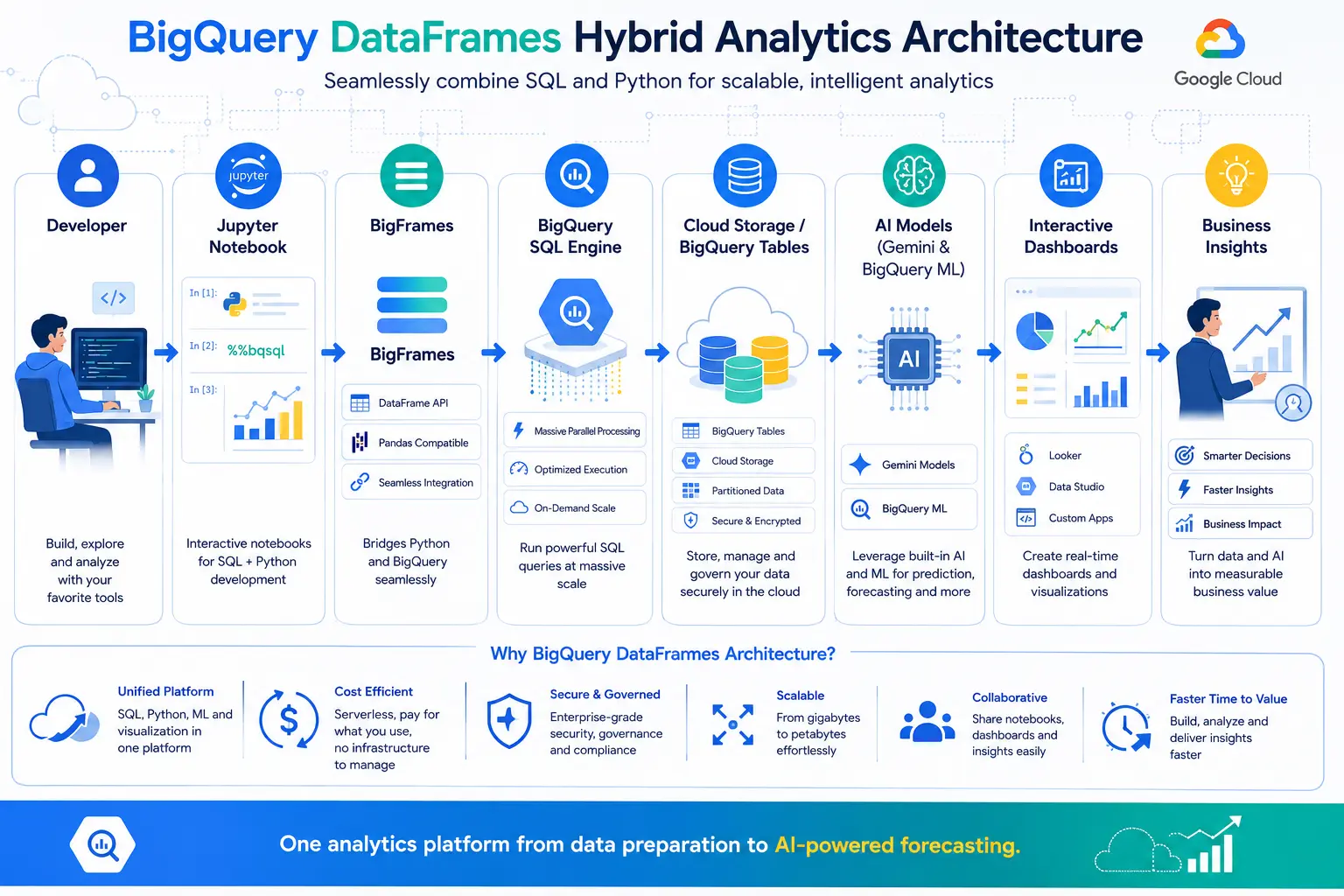
Breaking Down %%bqsql Step by Step
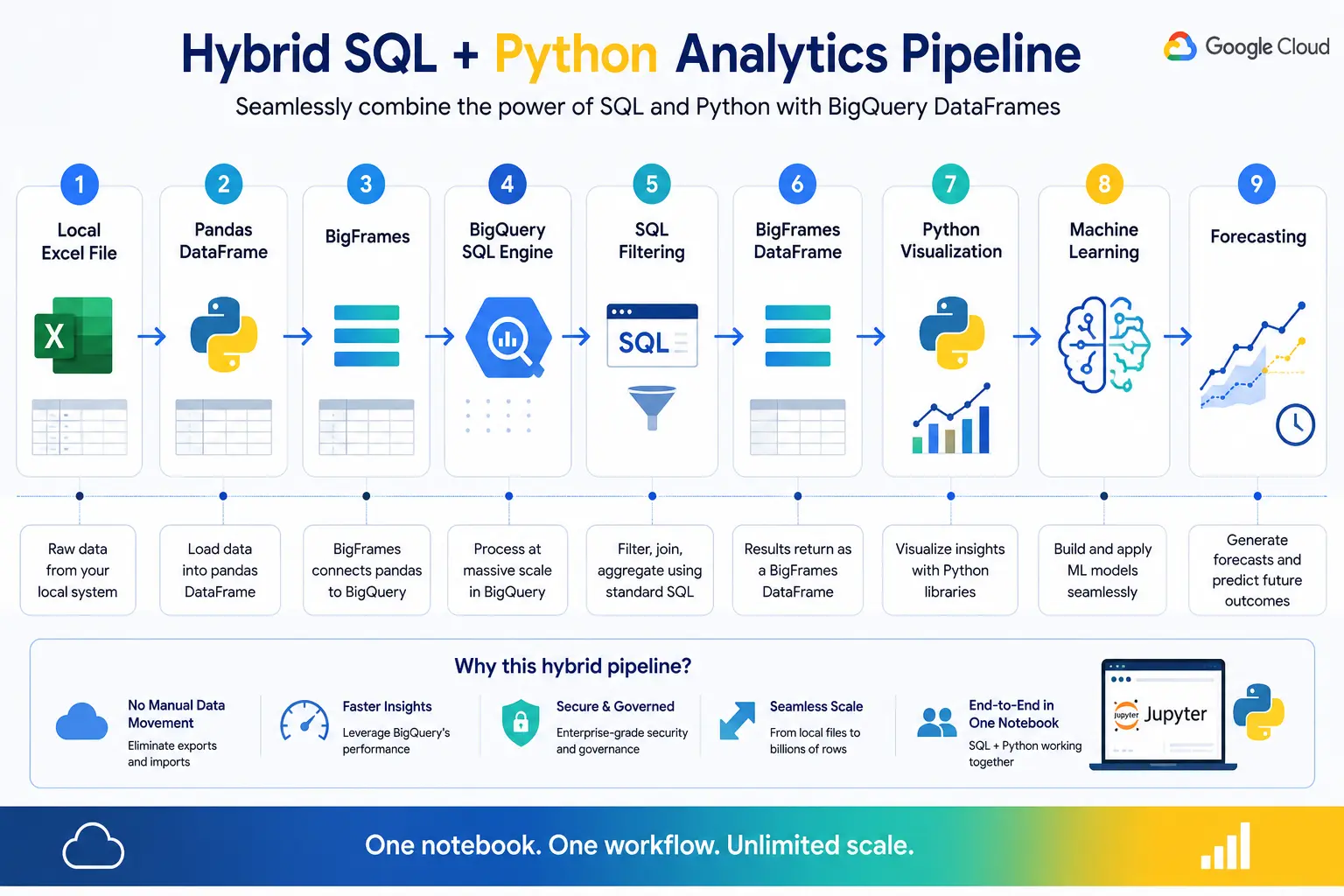
Instead of just showing commands, explain every stage.
Example workflow
Excel File

    ⇩

pandas DataFrame

    ⇩

%%bqsql

    ⇩

BigQuery

    ⇩

BigFrames

    ⇩

Visualization

    ⇩

AI Forecasting
Explain what happens at every step.
Comparing Traditional vs Modern Analytics Pipelines
Traditional Pipeline
Export CSV
Upload
Temporary tables
Download
Repeat
Problems
Slow
Human errors
Duplicate datasets
Storage costs
Modern BigQuery Pipeline
One notebook
SQL
Python
AI
Visualization
Benefits
Faster
Cleaner
Less maintenance
Easier collaboration
Designed for Everyone from Data Analysts to AI Engineers
The new %%bqsql magic is not limited to experienced database administrators. Google has designed the feature for a broad range of users, including data analysts, data engineers, data scientists, machine learning practitioners, and developers who regularly work with both SQL and Python.
A business analyst can prepare a dataset using SQL before visualizing trends with Python. A data scientist can clean data using pandas, perform transformations with SQL, and continue directly into machine learning workflows. Data engineers can build scalable pipelines that run on BigQuery without constantly moving data between local memory and cloud storage.
This flexibility makes notebooks more readable and easier to maintain, especially for collaborative teams where some members prefer SQL while others are more comfortable with Python.
Getting Started with BigQuery SQL Magic
Google has made the new workflow accessible using the BigQuery Sandbox, allowing developers to experiment without providing a credit card.
The basic setup requires only a few steps.
Install Required Packages
pip install --upgrade jupyterlab bigframes python-calamineStart JupyterLab
jupyter labLoad the BigFrames Extension
%load_ext bigframesConfigure Your Project
import bigframes.pandas as bpd

bpd.options.bigquery.project = "your-project-id"
Once configured, notebooks can freely alternate between SQL and Python cells.
Working with Local Data Made Simple
One of the most useful additions is the ability to query local pandas DataFrames directly from SQL.
Instead of creating temporary tables manually, developers simply reference the DataFrame name inside curly braces.
%%bqsql

SELECT *
FROM {full_rows}
Behind the scenes, BigFrames automatically uploads the DataFrame as a temporary BigQuery table, executes the SQL query, and returns the results.
This automation removes several manual steps that previously slowed down notebook-based analytics.
Scaling from Local Development to Enterprise Analytics
Perhaps the most important advantage of Google's approach is scalability.
Developers often prototype analytics pipelines using small datasets on their laptops before deploying them to production environments containing billions of rows.
Traditionally, this transition required rewriting significant portions of the code.
With BigQuery DataFrames, the same notebook can move from local experimentation to enterprise-scale analytics with only minor modifications.
Developers simply replace the local pandas DataFrame with a BigQuery DataFrame reference while keeping the SQL logic almost identical.
This significantly reduces development time and lowers maintenance costs for production analytics pipelines.
Beyond SQL: Built-in AI and Forecasting
Google also highlighted how BigFrames integrates with advanced BigQuery capabilities beyond standard SQL.
After preparing data, developers can take advantage of BigQuery Machine Learning (BQML) and Google AI models for predictive analytics.
For example, a processed time-series dataset can be forecast using just a few lines of Python.
forecasted_df = (
    pddf
    .reset_index(drop=False)
    .bigquery.ai.forecast(
        data_col="Production",
        timestamp_col="year",
        horizon=10,
    )
)
Instead of exporting data to external machine learning platforms, organizations can keep analytics, forecasting, and AI workloads inside the BigQuery ecosystem.
According to Google, connecting a billing account unlocks additional capabilities such as AI-powered forecasting functions and other advanced BigQuery ML features that are unavailable in the free sandbox environment.
Improving Notebook Readability
Large analytics projects often contain SQL queries with dozens of Common Table Expressions (CTEs) or lengthy Python scripts performing equivalent transformations.
Google believes alternating between SQL and Python makes notebooks easier to understand.
Rather than writing one enormous SQL statement, developers can split processing into logical stages:
Load data with Python
Clean records using pandas
Filter and aggregate using SQL
Return results to Python
Visualize insights
Apply AI models
Generate forecasts
This modular workflow improves collaboration, debugging, and long-term maintenance.
Open Source and Community Driven
Google is expanding this experience beyond its managed cloud services.
The %%bqsql magic is available through the open-source BigFrames project, allowing developers to use it with Jupyter notebooks, pandas, and the BigQuery Sandbox.
Google is also encouraging community participation by inviting developers to submit bug reports, request new features, and share feedback through the BigFrames GitHub repository and mailing list.
This open approach is expected to accelerate adoption while helping improve future releases.
Why This Announcement Matters
As organizations increasingly adopt AI-driven analytics, the ability to combine SQL and Python without friction becomes more valuable.
SQL remains the language of enterprise data warehouses, while Python powers modern artificial intelligence, automation, and scientific computing.
Google's latest enhancement brings these two ecosystems together into a single workflow that is simpler, faster, and easier to scale.
For businesses, this means less time managing infrastructure and more time generating insights from data.
For developers, it means writing cleaner notebooks, reducing repetitive work, and leveraging BigQuery's distributed processing engine without leaving familiar Python environments.
As data volumes continue to grow, hybrid workflows like %%bqsql could become a standard approach for cloud-native analytics.
Supporting Modern AI Development
Artificial intelligence projects rarely begin with model training.
Instead, the majority of development time is spent collecting, cleaning, transforming, and validating data before any machine learning algorithm can be applied.
Google's latest enhancement simplifies this preparation stage.
Developers can now:
Load raw datasets using pandas
Perform exploratory data analysis
Use SQL for complex joins and aggregations
Return processed datasets to Python
Train machine learning models
Generate visualizations
Deploy AI workflows
All of these steps can occur inside a single notebook environment.
This significantly improves productivity for AI engineers who frequently alternate between SQL queries and Python code throughout the lifecycle of an AI project.
Reducing Infrastructure Complexity
One of the hidden costs of modern analytics pipelines is infrastructure management.
Traditional workflows often require:
Temporary database tables
Intermediate CSV exports
Cloud Storage staging buckets
ETL pipelines
Additional synchronization jobs
Manual cleanup of temporary resources
Each additional component increases maintenance requirements while introducing potential points of failure.
By allowing SQL and Python to share the same processing pipeline, Google reduces the number of supporting systems developers must manage.
Fewer moving parts generally translate into lower operational costs, improved reliability, and simpler analytics architectures.
Performance Benefits of BigQuery's Distributed Engine
Unlike local pandas operations that depend on the memory available on a developer's computer, BigQuery executes SQL queries using Google's distributed cloud infrastructure.
This provides several important advantages.
Massive Parallel Processing
Large SQL queries can be distributed across Google's infrastructure, allowing billions of records to be processed much faster than a local workstation.
Reduced Local Memory Usage
Instead of downloading entire datasets, BigQuery processes information in the cloud and returns only the required results.
This minimizes notebook memory consumption while enabling analysts to work with significantly larger datasets.
Faster Iteration
Because heavy computation occurs inside BigQuery, developers spend less time waiting for data processing and more time analyzing results.
A Better Experience for Collaborative Teams
Modern analytics projects are rarely completed by a single individual.
Data engineers, analysts, machine learning engineers, and business intelligence specialists often contribute to the same notebook or analytics pipeline.
However, these team members frequently have different technical backgrounds.
Some prefer writing SQL.
Others are more comfortable with Python.
The new %%bqsql capability allows each team member to work using the language that best suits the task without disrupting the overall workflow.
This collaborative approach improves code readability, simplifies peer reviews, and makes notebooks easier for new team members to understand.
Instead of forcing everyone to learn one programming style, Google enables organizations to combine the strengths of both SQL and Python within a shared environment.
Conclusion
Google Cloud's introduction of the %%bqsql magic for BigQuery DataFrames represents an important step toward unifying two of the most widely used languages in data analytics. By enabling SQL and Python to work together seamlessly within a single notebook, developers can build cleaner, more efficient, and highly scalable workflows without the burden of repeatedly moving data between environments.
Whether analyzing local spreadsheets, querying enterprise-scale datasets, or building AI-powered forecasting models, the new hybrid workflow offers a more streamlined development experience. As organizations continue to invest in cloud analytics and artificial intelligence, tools like %%bqsql are likely to become an essential part of modern data engineering and data science practices.
Source: Google Cloud Blog
About the Author