
Google Brings Native BM25 Search to AlloyDB and Cloud SQL
Google is previewing native BM25 indexing in AlloyDB and Cloud SQL for PostgreSQL 17+, bringing keyword and vector search into the same database for hybrid AI search applications.
Xcademia Team
Xcademia Research Team
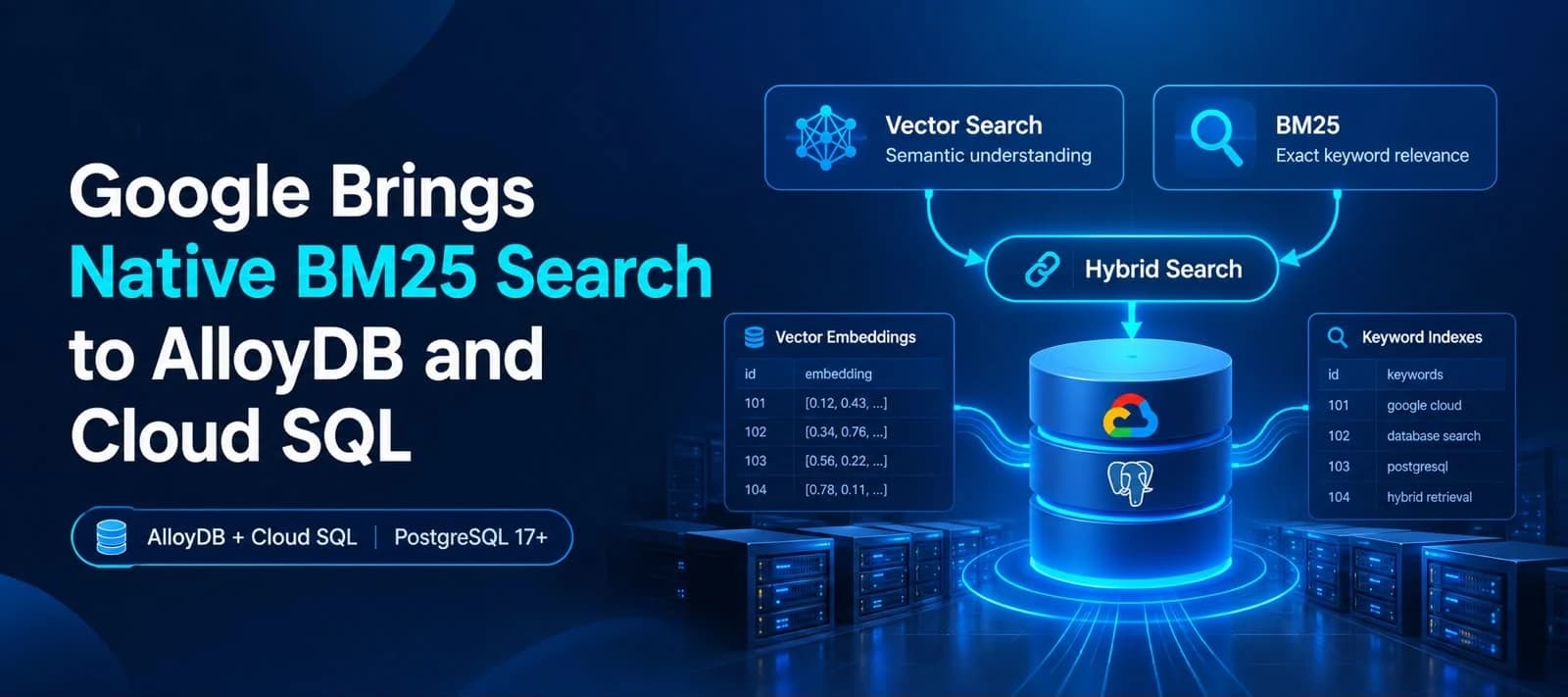
Google Cloud is previewing native BM25 ranking for AlloyDB and Cloud SQL for PostgreSQL 17+, allowing applications to combine traditional keyword search with vector-based semantic search directly inside the database.
The announcement addresses a common limitation of vector search.
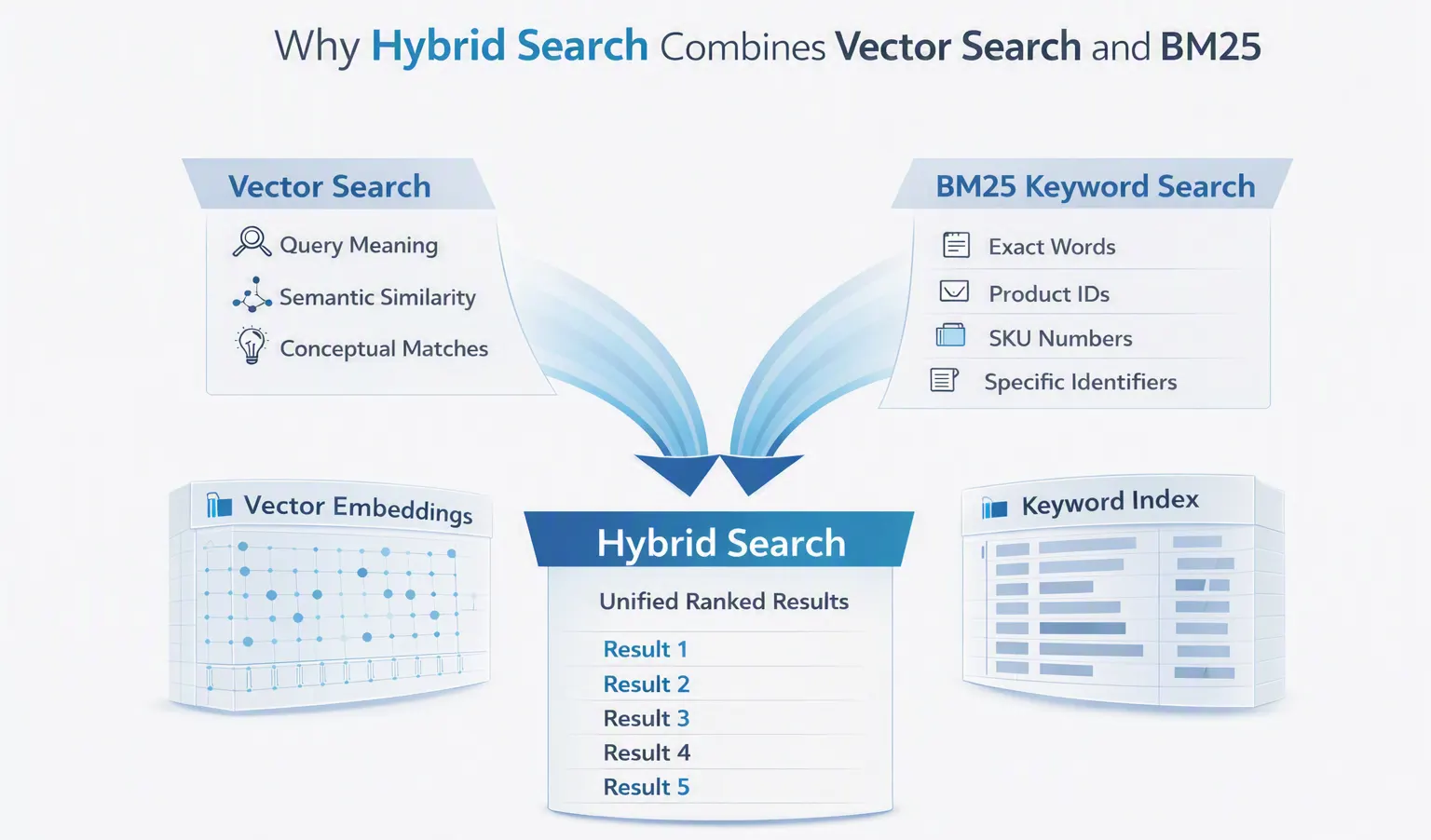
Vector embeddings are useful for understanding the conceptual meaning of a query, but Google notes that they can struggle with exact identifiers such as alphanumeric IDs and product SKU numbers. Combining semantic vector search with traditional full-text search can therefore provide a more complete search experience.
Google calls this approach hybrid search.
Until now, organizations using BM25 ranking with AlloyDB or Cloud SQL needed a separate full-text search backend. Google says that approach could introduce data duplication, synchronization delays and additional operational complexity.
The new native BM25 capability brings keyword ranking directly into the database through the open-source pg_textsearch PostgreSQL extension created by Tiger Data.
Why BM25 Matters for Hybrid Search
BM25, or Best Matching 25, is an information retrieval algorithm used to estimate how relevant a document is to a search query.
Google says BM25 provides three important capabilities:
Inverse document frequency: rarer terms receive more weight than common terms.
Term-frequency saturation: repeatedly using the same word does not allow repetition alone to dominate ranking.
Document length normalization: document length is considered when calculating relevance.
Google contrasts this with PostgreSQL's built-in ts_rank, saying its ranking quality can degrade as a corpus grows and that it does not provide inverse document frequency or term-frequency saturation in the same way.
The new implementation uses Tiger Data's open-source pg_textsearch extension to provide BM25 ranking directly within PostgreSQL-based databases.
Native BM25 Keeps Search Inside the Database
Google says the native approach removes the need to provision and manage a separate full-text search backend.
According to the announcement, the preview provides:
BM25 keyword ranking through
pg_textsearchFull-text and vector retrieval from the same database
No separate data duplication or ETL pipeline required for maintaining another search backend
Reduced synchronization complexity between operational data and search data
Native hybrid search capabilities for AlloyDB and Cloud SQL
For AlloyDB specifically, Google also highlights vector search performance using ScaNN and HNSW index types. The company says AlloyDB can deliver up to 6x and 10x faster vector search queries compared with standard PostgreSQL, depending on the index type.
How to Create a Native BM25 Index
Google's example uses a sample PostgreSQL table called cymbal_products.
The table contains:
uniq_id, the unique identifierproduct_nameproduct_descriptionproduct_embedding
The example assumes the table contains retail product information, including indoor and outdoor plants.
To begin using BM25, the pg_textsearch extension must be enabled.
The source provides the following SQL:
-- Install pg_textsearch extension
CREATE EXTENSION pg_textsearch;
The BM25 index can then be created on the product_description column:
-- Create the native BM25 index on the content column
CREATE INDEX idx_docs_bm25
ON cymbal_products
USING bm25 (product_description)
WITH (text_config='english');
A full-text query uses the <@> operator. Google's example searches for cherry tree:
-- Full text search query
SELECT product_name, product_description <@> 'cherry tree' AS bm25_score
FROM cymbal_products
ORDER BY bm25_score
LIMIT 5;
Google notes that in the resulting BM25 output, a more negative score indicates a stronger relevance match.
This example demonstrates the basic BM25 workflow: enable the extension, create the index, run a keyword query and order the results according to their BM25 score.
AlloyDB Combines BM25 With Vector Search
AlloyDB can use the native BM25 index alongside a vector index on the same table.
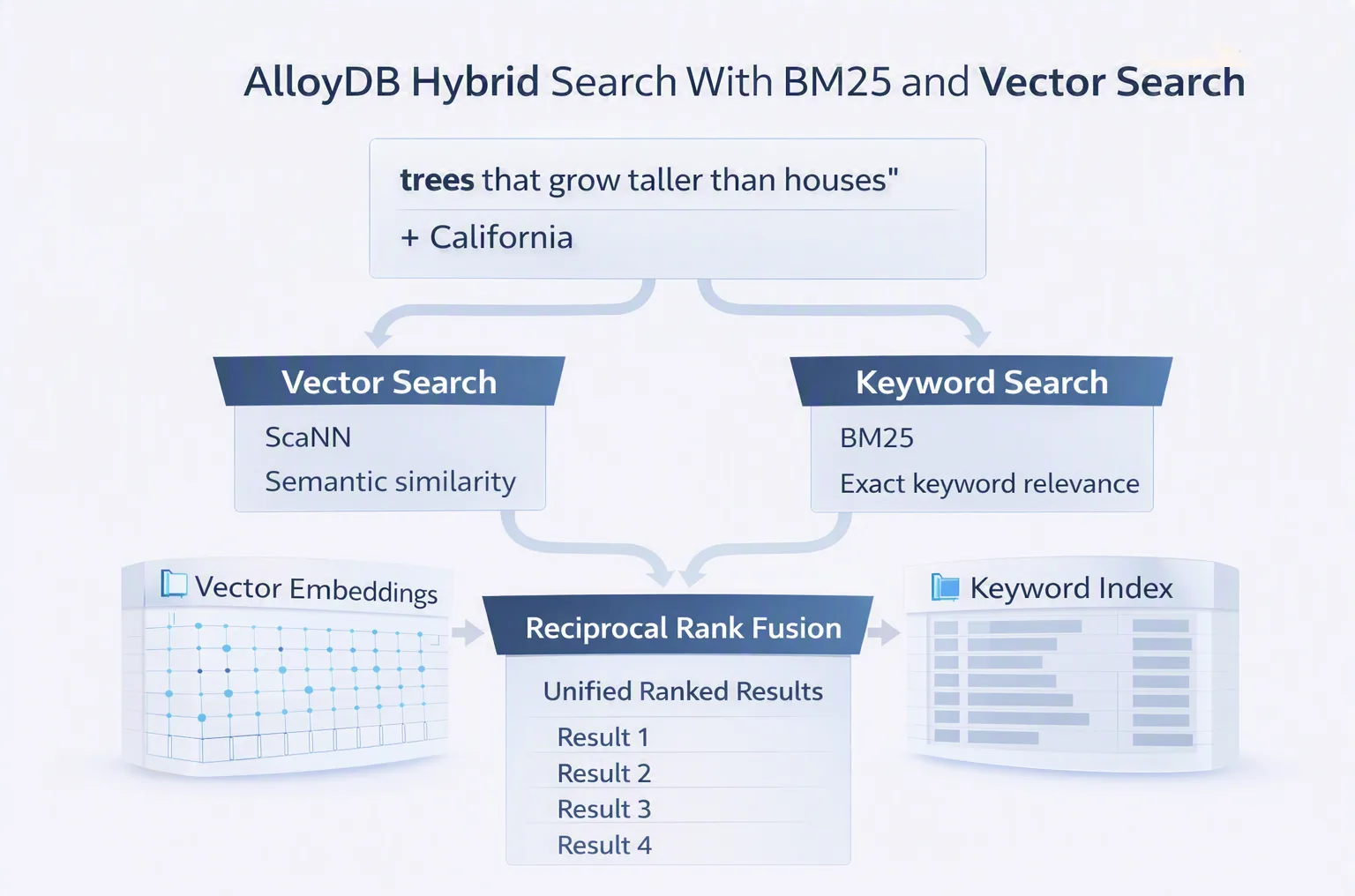
Google's example uses ScaNN for vector search and AlloyDB's hybrid search user-defined function to combine the two result sets.
First, the required extensions are installed:
-- Install vector extension
CREATE EXTENSION vector;

-- Install scann extension
CREATE EXTENSION IF NOT EXISTS alloydb_scann;

-- Create scann vector search index
CREATE INDEX cymbal_products_embeddings_scann
ON cymbal_products
USING scann(product_embedding cosine);
The hybrid search function then combines keyword and vector results using Reciprocal Rank Fusion, or RRF.
Google's example searches for the semantic concept trees that grow taller than houses while also searching for the keyword California:
CREATE EXTENSION google_ml_integration;

SELECT *
FROM ai.hybrid_search(
  search_inputs => ARRAY[
    '{
      "data_type": "vector",
      "weight": 0.5,
      "table_name": "cymbal_products",
      "key_column": "uniq_id",
      "vec_column": "product_embedding",
      "distance_operator": "public.<=>",
      "limit": 10,
      "query_vector": "ai.embedding(''text-embedding-005'', ''trees that grow taller than houses'')::vector"
    }'::JSONB,
    '{
      "data_type": "text",
      "weight": 0.5,
      "table_name": "cymbal_products",
      "key_column": "uniq_id",
      "text_column": "product_description",
      "limit": 10,
      "ranking_function": "<@>",
      "query_text_input": "California"
    }'::JSONB
  ],
);
The source says the hybrid search UDF merges the ranked results from the two search components into a unified list using the Reciprocal Rank Fusion algorithm. The resulting records are ranked by their RRF scores.
The example illustrates the distinction between the two search methods.
The vector query can identify products based on a conceptual description, while the BM25 query can provide exact keyword matching. Combining the two allows the final ranking to incorporate both types of relevance.
Google's example uses California Sycamore to illustrate how a specific keyword can help prioritize a locally relevant result.
Cloud SQL Uses HNSW and RRF for Hybrid Search
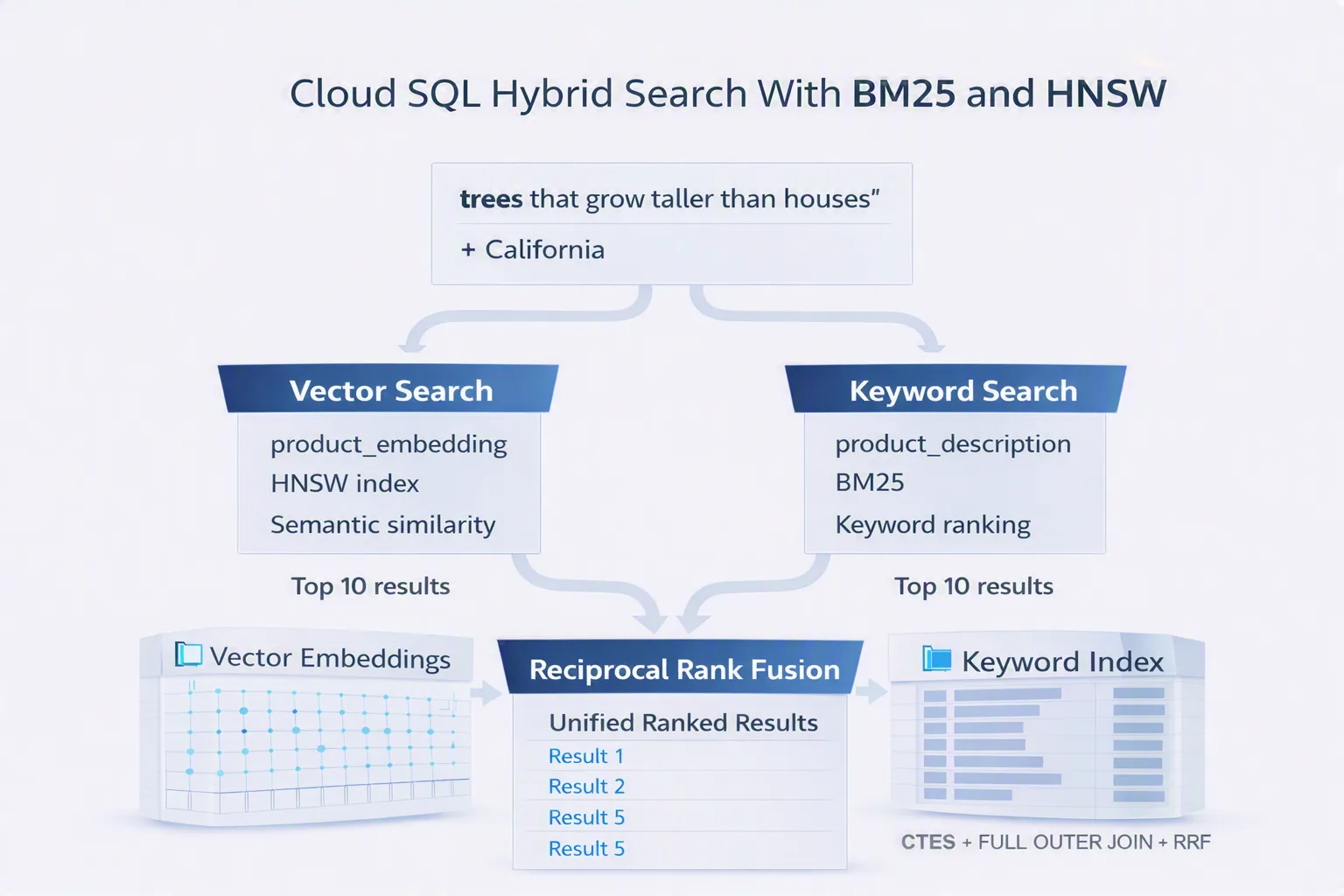
Cloud SQL follows the same general concept but uses a different implementation for combining the search results.
Google's example creates an HNSW vector index on the embedding column.
-- Install vector extension
CREATE EXTENSION vector;

-- Create an HNSW index on the embedding column for fast approximate nearest neighbor search
CREATE INDEX product_hnsw_idx
ON cymbal_products
USING hnsw(product_embedding vector_cosine_ops);
The hybrid query then creates two result sets.
The first uses BM25 keyword ranking for California.
The second uses vector similarity for the semantic query trees that grow taller than houses.
Google's example uses Common Table Expressions, or CTEs, and ROW_NUMBER() to assign rankings to the two result sets.
CREATE EXTENSION google_ml_integration;

-- BM25 keyword results
WITH keyword_results AS (
  SELECT uniq_id, product_name,
         ROW_NUMBER() OVER (ORDER BY product_description <@> 'California') AS rank_kw
  FROM cymbal_products
  ORDER BY product_description <@> 'California'
  LIMIT 10
),

-- Semantic vector results
semantic_results AS (
  SELECT uniq_id, product_name,
         ROW_NUMBER() OVER (ORDER BY product_embedding <=> google_ml.embedding('text-embedding-005', 'trees that grow taller than houses')::vector) AS rank_vec
  FROM cymbal_products
  ORDER BY product_embedding <=> google_ml.embedding('text-embedding-005', 'trees that grow taller than houses')::vector
  LIMIT 10
)

-- Reciprocal Rank Fusion (RRF) to merge and score both lists
SELECT COALESCE(k.uniq_id, s.uniq_id) AS uniq_id,
       COALESCE(k.product_name, s.product_name) AS product_name,
       COALESCE(1.0 / (60 + k.rank_kw), 0) + COALESCE(1.0 / (60 + s.rank_vec), 0) AS rrf_score
FROM keyword_results k
FULL OUTER JOIN semantic_results s ON k.uniq_id = s.uniq_id
ORDER BY rrf_score DESC
LIMIT 5;
The RRF calculation combines the ranking positions from the keyword and semantic result sets into a single score.
Google says the resulting output is identical to the AlloyDB hybrid search results shown in the announcement.
Why Keeping Both Search Methods Together Matters
The announcement is ultimately about bringing two different forms of search closer together.
Vector search is useful when the application needs to understand what a user means.
For example:
"trees that grow taller than houses"
does not require an exact text match. A semantic search system can look for products or documents that correspond to the concept expressed by the query.
Keyword search is different.
A query such as:
"California"
or an exact product SKU may require precise matching rather than semantic interpretation.
Hybrid search combines these approaches so that applications can use semantic relevance and exact keyword relevance together.
For AI applications, this distinction is particularly relevant to retrieval-augmented generation, generative AI applications and data agents, all of which Google identifies as use cases where vector search is important but may not be sufficient on its own.
BM25 Is Now Part of the PostgreSQL Search Layer
The preview of native BM25 support means developers using AlloyDB or Cloud SQL for PostgreSQL 17+ can use the pg_textsearch extension for BM25 indexing without adding a separate full-text search backend.
The result is a search architecture in which operational data, keyword search and vector search can remain closer together.
For developers building AI applications, this can simplify the architecture of systems that need both semantic retrieval and exact keyword matching.
The announcement also demonstrates that the implementation does not require developers to abandon familiar PostgreSQL workflows. BM25 indexes are created with SQL, vector indexes remain available, and hybrid ranking can be performed through AlloyDB's hybrid search UDF or through SQL-based RRF logic in Cloud SQL.
What the Announcement Means for AI Search
Analysis:
The announcement highlights a broader industry shift toward combining semantic retrieval with traditional information retrieval rather than treating them as competing approaches.
Vector search can capture conceptual similarity, while BM25 can preserve the precision needed for identifiers, product names and other exact terms.
Bringing both capabilities into the same database can also reduce the architectural separation between operational data and search infrastructure.
For developers, the practical significance is less about replacing vector search and more about giving applications another ranking signal that can be combined with vector similarity.
Google's examples show this directly through RRF, where separate keyword and vector rankings are merged into one result list.
Availability
Google says native BM25 indexing is available in preview for AlloyDB and Cloud SQL for PostgreSQL 17+, using the open-source pg_textsearch extension created by Tiger Data.
Google also provides documentation for AlloyDB BM25 indexes, AlloyDB hybrid search and Cloud SQL BM25 support.
The announcement includes additional resources for AlloyDB, Cloud SQL and Tiger Data's pg_textsearch project.
Source: Google Cloud Blog
About the Author