
From Weeks to Minutes: Google Cloud Introduces Data Agent Kit for Agentic Data Pipelines
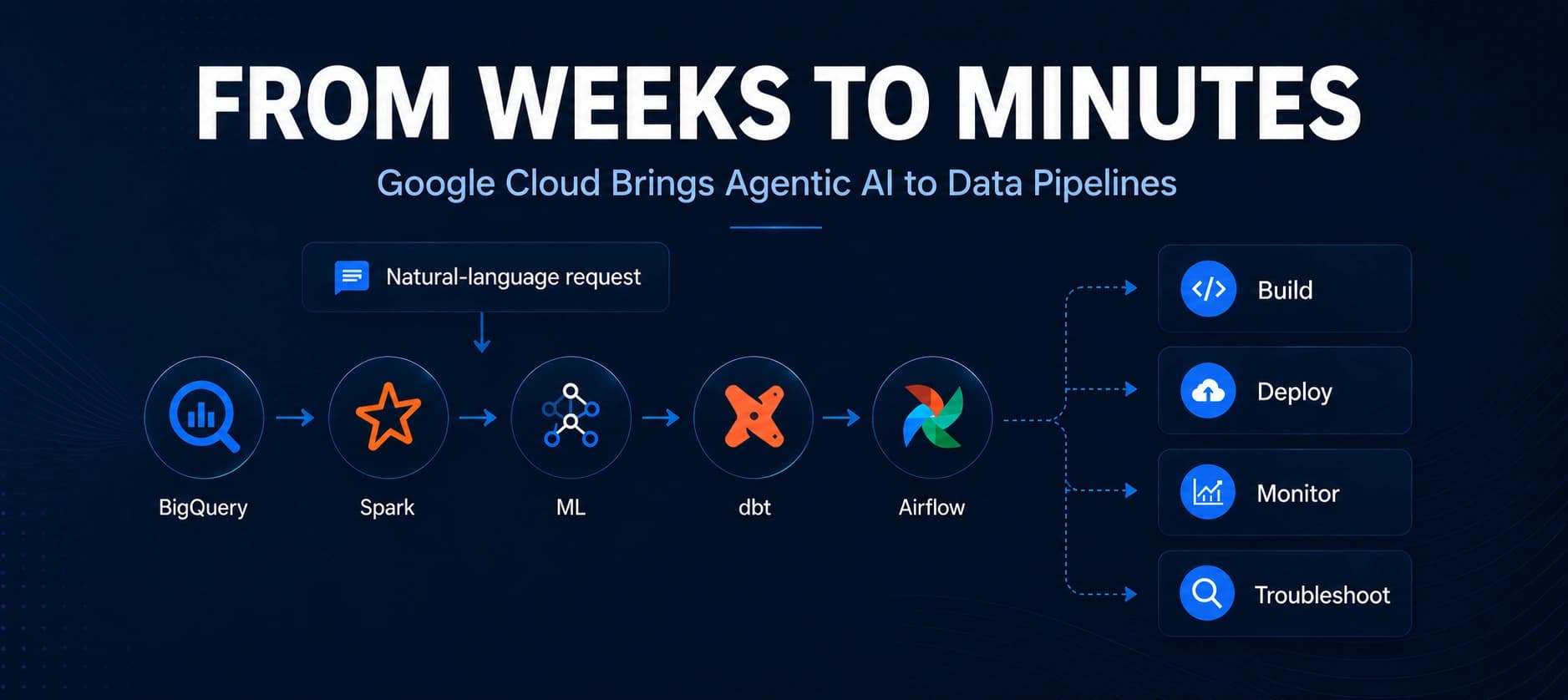
Google Cloud has introduced the Data Agent Kit, an open-source toolkit that brings agentic data engineering into IDEs and CLIs, helping teams author, deploy and troubleshoot Apache Airflow pipelines using natural language and declarative YAML.
Xcademia Team
Xcademia Research Team
Google Cloud Brings Agentic Data Pipeline Development Into the IDE
Google Cloud has introduced the Data Agent Kit, an open-source collection of data engineering and data science tools designed to bring data pipeline development directly into developers' preferred IDEs and command-line environments. The announcement follows Google's introduction of the Orchestration Pipelines framework at Google Cloud NEXT '26.
According to Google Cloud, the Data Agent Kit integrates the orchestration framework into environments such as VS Code, Claude Code and Codex, allowing data professionals to author, deploy and troubleshoot production-grade Apache Airflow DAGs using natural language.
The approach is built around two key components.
The first is a dedicated Data Engineering tab for pipeline management.
The second is an agentic skill designed to help users author, deploy and troubleshoot Airflow DAGs.
Google Cloud also combines these capabilities with a declarative YAML DSL, allowing users to describe pipeline logic without having to write all of the underlying Python Airflow boilerplate manually.
The company demonstrates the approach through an MLOps example involving delivery-time prediction, automated inference and model drift evaluation.
What Is the Data Agent Kit?
The Data Agent Kit is described by Google Cloud as a unified, freely available and open-source collection of data engineering and data science tools.
It is designed to work inside an existing development workflow rather than requiring data professionals to move between separate interfaces for pipeline authoring, deployment and troubleshooting.
Google Cloud says the kit can be used with IDEs and CLI environments including:
VS Code
VS Code forks
Antigravity
Claude Code
Antigravity CLI
Codex
The toolkit embeds the Orchestration Pipelines framework into these environments.
The framework separates high-level orchestration logic from the underlying compute execution.
Instead of requiring every pipeline workflow to be expressed through Python-based Airflow operators, users can define orchestration through YAML and interact with the development environment using natural language.
Google Cloud positions this approach as a way to make pipeline orchestration accessible to a broader range of data professionals, including analysts and ML engineers.
How the Agentic Pipeline Workflow Works
The workflow described by Google Cloud begins inside a compatible development environment.
After installing and authenticating the Data Agent Kit, users can enable the gcp-pipelines-orchestration skill.
Google Cloud says this skill provides the agent with contextual knowledge about:
Pipeline syntax
Variable substitution
Secret management
Automated incident diagnosis for Airflow runs
Once the skill is enabled, users can begin authoring orchestration pipelines using natural language.
The company demonstrates this with an MLOps scenario where a single prompt is used to describe a continuous feedback loop.
The Data Agent Kit then generates the underlying:
PySpark scripts
dbt configurations
Declarative YAML pipelines
Google Cloud notes that model responses can vary depending on model versions, workspace context and token depth.
If an initial response leaves out a parameter, dataset path or dependency, users can provide a follow-up prompt.
Three Pipelines Form the Core Architecture
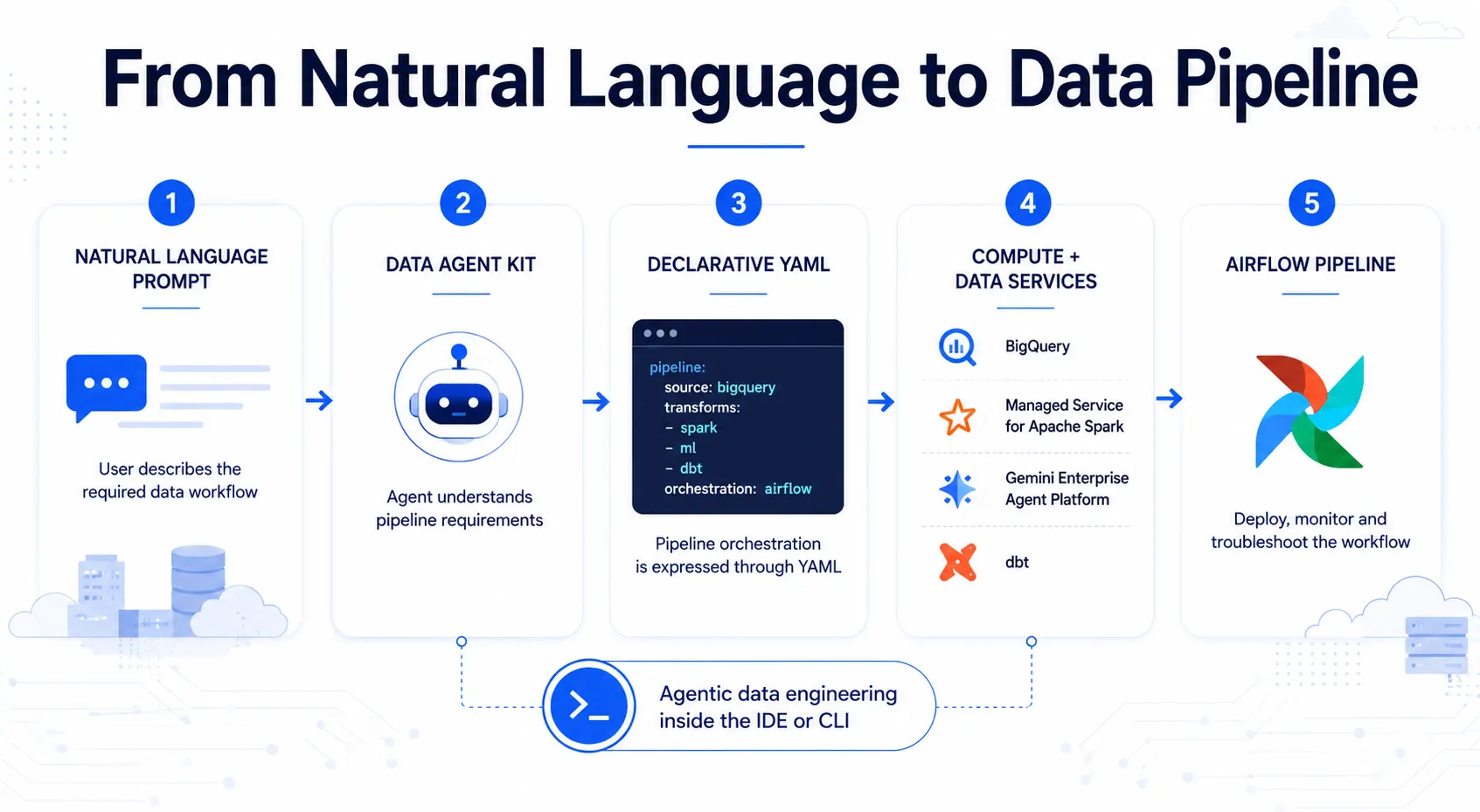
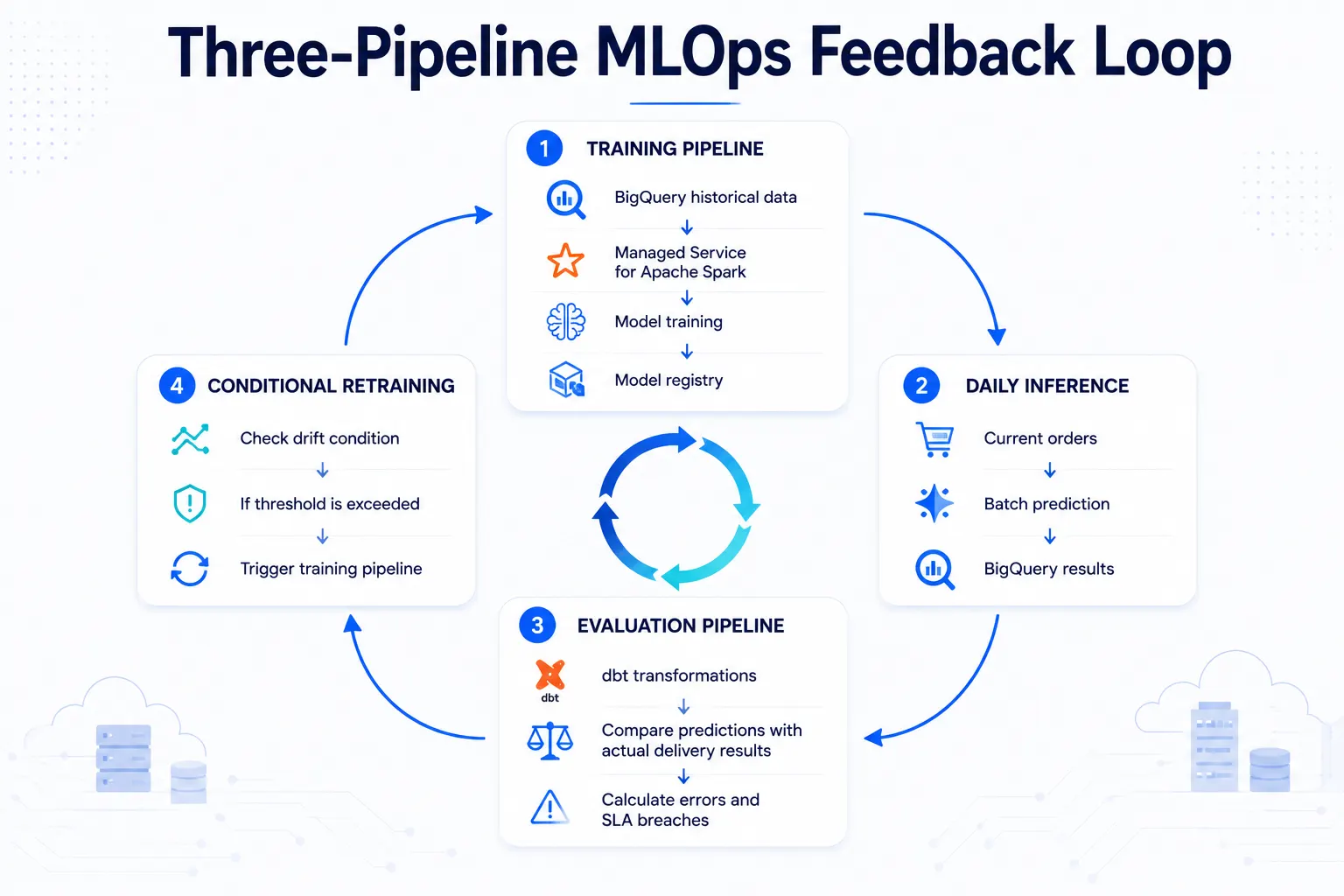
The demonstration is divided into three declarative orchestration pipelines.
They represent three stages of the MLOps workflow:
Training
Daily inference
Automated evaluation and retraining
Together, these pipelines demonstrate how the framework can connect data preparation, machine learning execution, evaluation and conditional orchestration.
Pipeline 1: The Training Engine
The first pipeline acts as the heavy-compute portion of the demonstration.
According to Google Cloud, the generated pipeline first queries BigQuery to extract historical completed orders.
It then provisions Managed Service for Apache Spark serverless compute to calculate geographical distances and train the model.
Finally, the trained model is uploaded to the Gemini Enterprise Agent Platform Model Registry.
The source provides the following YAML definition:
modelVersion: "1.0"
pipelineId: "training-pipeline"
runner: airflow
owner: "mlops"
tags:
  - "job:datacloud:antigravity"
defaults:
  projectId: "your-project-id"
  location: "us-central1"
  executionConfig:
    retries: 0

actions:
  - sql:
      name: "extract_training_data"
      engine:
        bigquery:
          location: "US"
          destinationTable: "your-project-id.mlops.training_dataset"
      query:
        path: "blogpostdemo/training_query.sql"

  - pyspark:
      name: "train_model_dataproc"
      dependsOn:
        - "extract_training_data"
      engine:
        dataprocServerless:
          location: "us-central1"
          resourceProfile:
            inline:
              runtimeConfig:
                version: "2.3"
                properties:
                  "spark.dataproc.driverEnv.PYTHONPATH": "./libs/lib/python3.11/site-packages"
                  "spark.executorEnv.PYTHONPATH": "./libs/lib/python3.11/site-packages"
      mainFilePath: "blogpostdemo/train_model.py"
      environment:
        requirements:
          inline:
            list:
              - "tensorflow==2.14.1"
              - "numpy<2.0.0"
              - "protobuf<5.0.0dev"
              - "google-cloud-storage"

  - ai:
      name: "upload_model_vertex"
      dependsOn:
        - "train_model_dataproc"
      agentPlatform:
        projectId: "your-project-id"
        location: "us-central1"
        modelUpload:
          modelName: "transit_days_predictor"
          modelArtifactUri: "gs://your-bucket-name/models/tf_transit_days_model"
          servingContainerImageUri: "us-docker.pkg.dev/vertex-ai/prediction/tf2-cpu.2-14:latest"
The pipeline establishes dependencies between the individual actions.
The training data extraction must complete before the PySpark training stage begins.
The model upload then depends on the training stage.
This creates a defined sequence:
BigQuery extraction → Spark processing and training → Model upload
Pipeline 2: Daily Inference
The second pipeline handles the operational inference workflow.
Instead of retraining the model, this pipeline applies the existing model to currently in-transit orders.
The workflow:
Extracts inference data through BigQuery.
Runs batch prediction.
Writes the prediction results back into BigQuery.
Google Cloud describes the output as a way to identify potential SLA breaches for the customer support team.
The source provides this YAML:
modelVersion: "1.0"
pipelineId: "inference-pipeline"
runner: airflow
owner: "mlops"
tags:
  - "job:datacloud:antigravity"
defaults:
  projectId: "your-project-id"
  location: "us-central1"
  executionConfig:
    retries: 0

actions:
  - sql:
      name: "extract_inference_data"
      engine:
        bigquery:
          location: "US"
          destinationTable: "your-project-id.mlops.inference_dataset"
      query:
        path: "blogpostdemo/inference_query.sql"

  - ai:
      name: "run_vertex_batch_prediction"
      dependsOn:
        - "extract_inference_data"
      agentPlatform:
        projectId: "your-project-id"
        location: "us-central1"
        batchInference:
          jobDisplayName: "inference_job"
          modelName: "projects/your-project-id/locations/us-central1/models/your-model-id"
          bigquerySource: "bq://your-project-id.mlops.inference_dataset"
          bigqueryDestinationPrefix: "bq://your-project-id.mlops"
Here, the dependency is straightforward.
The inference job starts after the BigQuery extraction stage.
The resulting prediction output is directed back into BigQuery.
This creates the operational path:
BigQuery inference data → Batch prediction → BigQuery results
Pipeline 3: Automated Evaluation and Branching
The third pipeline introduces automated evaluation and conditional orchestration.
The pipeline triggers dbt models that compare predictions against actual delivery timestamps.
The evaluation calculates absolute errors and SLA breaches.
The resulting metrics are then checked against an acceptable threshold.
If the model's error rate exceeds that threshold, the workflow can trigger the training pipeline again.
The source provides this YAML:
modelVersion: "1.0"
pipelineId: "evaluation-pipeline"
runner: airflow
owner: "mlops"
tags:
  - "job:datacloud:antigravity"
defaults:
  projectId: "your-project-id"
  location: "us-central1"
  executionConfig:
    retries: 0

actions:
  - pipeline:
      name: "run_dbt_models"
      framework:
        dbt:
          airflowWorker:
            projectDirectoryPath: "blogpostdemo/dbt_project"

  - python:
      name: "check_retraining_condition"
      dependsOn:
        - "run_dbt_models"
      mainFilePath: "blogpostdemo/evaluate_drift.py"
      pythonCallable: "check_drift"
      engine:
        local: {}

  - orchestrationPipeline:
      name: "trigger_retraining_pipeline"
      dependsOn:
        - "check_retraining_condition"
      pipelineId: "training-pipeline"
      bundleId: "my-first-bundle"
      waitForCompletion: false
The three pipelines therefore create a feedback loop:
Training → Inference → Evaluation → Conditional Retraining
This is the central MLOps architecture demonstrated in the Google Cloud announcement.
Deployment Through CI/CD
Google Cloud says authoring pipeline logic is only part of the process.
The pipelines also need to be deployed to a production environment.
With Orchestration Pipelines, the deployment process is integrated with standard CI/CD practices.
According to the announcement, the Data Agent Kit can automatically generate continuous integration workflows for the workspace, including workflows such as GitHub Actions.
The pipeline bundle can then be packaged and deployed to the Managed Airflow environment.
Google Cloud describes the workflow as allowing users to commit their changes and have the orchestration pipeline bundle deployed through the configured CI/CD process.
The company also points users to its deployment documentation for integrating these workflows with existing CI/CD environments.
Monitoring Pipelines From the IDE
The Data Agent Kit is not limited to pipeline creation.
Google Cloud also highlights day-two operations, including monitoring.
The Data Agent Kit brings the orchestration control plane into the IDE, allowing users to monitor Managed Airflow runs without constantly switching to a browser-based interface.
The source includes visuals showing:
Real-time monitoring of Managed Airflow runs
Visualization of the created pipeline
This keeps pipeline development and operational monitoring within the same development environment.
Agentic Troubleshooting for Failed Pipelines
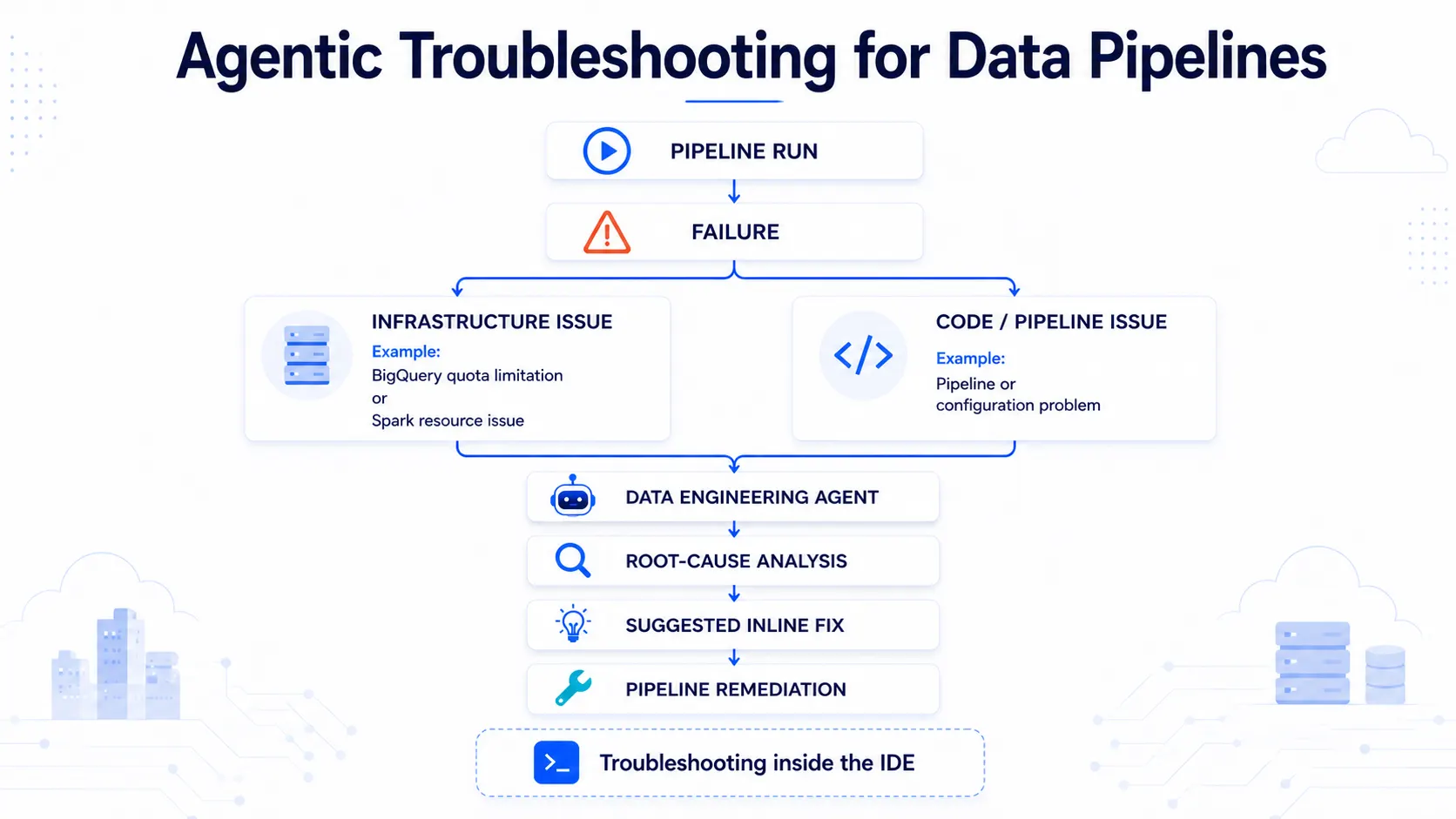
Pipeline failures can occur for different reasons.
Google Cloud gives examples including a Managed Spark cluster encountering an out-of-memory exception because of a seasonal data increase, or a BigQuery quota being reached.
The Data Agent Kit provides an agentic troubleshooting workflow for these situations.
When a pipeline fails, users can select Troubleshoot within the IDE.
The Data Engineering Agent analyzes the available failure context.
Google Cloud says the agent can distinguish between infrastructure quota issues and code-level problems and provide a root-cause summary.
It can also suggest an inline fix, such as scaling up a compute template.
The announcement presents this as part of the broader goal of bringing development, deployment, monitoring and troubleshooting into one agent-assisted workflow.
What Changes for Data Engineering Teams?
The Google Cloud announcement focuses on reducing the amount of manual orchestration work required to build the demonstrated workflow.
Traditionally, an MLOps architecture can involve multiple layers, including:
Data extraction
Data transformation
Compute provisioning
Model training
Model registration
Batch inference
Evaluation
Drift detection
Conditional retraining
Deployment
Monitoring
Troubleshooting
The Data Agent Kit brings these activities into an agent-assisted development workflow.
Instead of manually building every orchestration component from scratch, users can describe the intended workflow and have the agent generate the required artifacts.
The use of declarative YAML also separates the high-level orchestration definition from the underlying compute execution.
Google Cloud says the example demonstrates how this can move the workflow from weeks of platform engineering work to a matter of minutes.
That statement refers specifically to the demonstrated example and should not be interpreted as a universal deployment time for every production pipeline.
Natural Language Does Not Remove the Need for Validation
Google Cloud also provides an important qualification in its announcement.
The company notes that responses from frontier models can vary based on factors such as:
Model version
Workspace context
Token depth
As a result, a generated workflow may occasionally omit a parameter, dataset path or dependency.
Google Cloud recommends providing a short follow-up prompt when this happens.
The company also describes the showcased pipeline as a simplified example designed to demonstrate Orchestration Pipelines capabilities.
Production MLOps architectures will vary according to individual use cases and operational requirements.
That distinction is important.
The Data Agent Kit can assist with authoring and troubleshooting, but the source does not state that human validation, testing or production engineering requirements have been eliminated.
A Broader Shift Toward Agentic Data Engineering
The announcement reflects a broader movement toward using AI agents as interfaces for technical workflows.
In the demonstrated architecture, the agent is not simply generating isolated code.
It works across multiple stages of a data and ML workflow, including pipeline authoring, configuration, deployment and troubleshooting.
The result is an approach where natural language becomes an interface for describing orchestration requirements, while YAML and underlying cloud services provide the execution structure.
For data teams, this could make complex orchestration workflows easier to approach for professionals who may not specialize in Airflow or Python-based pipeline development.
However, the practical impact will depend on factors such as workflow complexity, validation requirements, organizational controls and the reliability of generated configurations.
The Google Cloud announcement does not provide independent measurements establishing how much development time organizations will save across different production environments.
What the Example Connects
The MLOps demonstration brings several technologies together within one orchestration workflow.
Component | Role in the demonstrated workflow |
|---|---|
Data Agent Kit | Agent-assisted development, monitoring and troubleshooting |
Orchestration Pipelines | Declarative pipeline orchestration |
Apache Airflow | Pipeline execution framework |
BigQuery | Data extraction and storage |
Managed Service for Apache Spark | Data processing and model training |
Gemini Enterprise Agent Platform | Model registry and inference operations in the example |
dbt | Evaluation and transformation |
CI/CD workflows | Pipeline deployment |
IDE / CLI | Development and operational interface |
This combination is central to Google's demonstration of an agentic data engineering workflow.
Why This Announcement Matters
The most notable aspect of the announcement is not simply another pipeline authoring interface.
Google Cloud is positioning the Data Agent Kit around a broader development model in which an AI agent participates throughout the pipeline lifecycle.
The workflow begins with natural-language requirements.
It moves into pipeline generation and configuration.
The resulting workflow can then be deployed through CI/CD, monitored inside the IDE and investigated through agentic troubleshooting when failures occur.
That creates a more continuous relationship between data engineering and AI-assisted development.
The announcement highlights a broader industry shift toward making complex infrastructure workflows accessible through natural-language interfaces while retaining structured definitions underneath.
For enterprises, this could reduce some of the friction involved in creating and maintaining data workflows, particularly where repetitive orchestration code is involved.
At the same time, the source's own qualification around model variability and production architecture reinforces the need for validation and engineering oversight.
Conclusion
Google Cloud has introduced the Data Agent Kit as an open-source toolkit for bringing agentic data engineering into IDE and CLI environments.
The toolkit integrates with the company's Orchestration Pipelines framework and allows users to work with declarative YAML while using natural language to author, deploy and troubleshoot Apache Airflow-based workflows.
Google Cloud demonstrates the approach through a supply chain MLOps example that combines BigQuery, Managed Service for Apache Spark, Gemini Enterprise Agent Platform and dbt.
The demonstration uses three connected pipelines covering model training, daily inference and automated evaluation with conditional retraining.
The workflow can then be deployed through CI/CD and monitored from within the IDE. When failures occur, the Data Engineering Agent can analyze the failure context and suggest potential fixes.
The announcement represents a move toward more agent-assisted data engineering, where AI participates not only in writing individual pieces of code but also in orchestrating broader data and ML workflows.
Google Cloud says the demonstrated workflow can be authored and deployed in minutes rather than the weeks traditionally associated with building comparable orchestration logic. However, the company also makes clear that the example is simplified and that production MLOps implementations will vary by use case.
For now, the Data Agent Kit provides Google Cloud's latest example of how agentic development is moving deeper into the data engineering lifecycle.
Source: Google Cloud Blog
About the Author