
Click2Shell: WordPress Patches Theme Preview Flaw That Can Lead to Remote Code Execution
WordPress 7.1.1 fixes Click2Shell, a theme-preview flaw that can trigger unauthorised theme installation. Researchers at pwn.ai demonstrated how it could be chained with vulnerable theme code to achieve server-side PHP execution.
Xcademia Team
Xcademia Research Team
WordPress Click2Shell Flaw Turns a Crafted Theme Preview into a Potential Route to Server-Side Code Execution
WordPress has released a security fix for Click2Shell, a vulnerability in its theme-preview workflow that researchers at pwn.ai demonstrated could be chained with a separate theme flaw to execute attacker-controlled PHP code on a server.
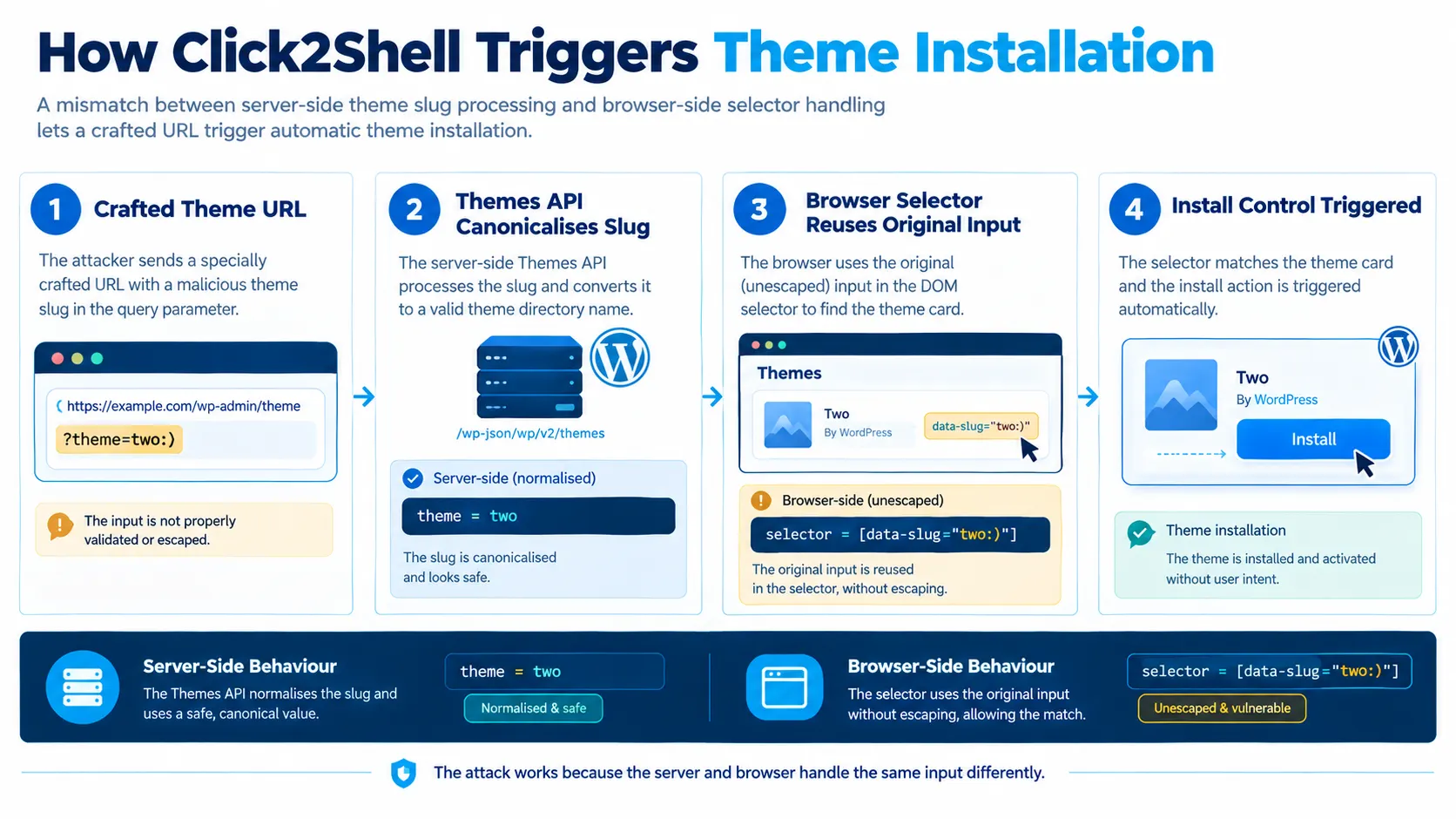
The issue centres on how WordPress processes a specially crafted theme-installation URL. According to pwn.ai, the WordPress.org Themes API interprets the supplied theme value as a conventional theme slug, while JavaScript in the administrator's browser uses the original value inside a jQuery selector. This difference allows the browser to select and automatically activate the Install control for a theme from the official WordPress.org catalogue.
The resulting behaviour can install a theme without the administrator explicitly clicking Install or Activate. The installed theme remains inactive, and the site's existing appearance does not change.
The researchers demonstrated that the installation behaviour could become more serious when combined with a separate vulnerability in the Mobile Repair Zone 2.5.4 theme. WordPress can load inactive theme PHP during a Customizer preview, creating an opportunity for vulnerable theme code to execute even though the theme is not the site's active theme.
WordPress released version 7.1.1 on September 17, 2026, including a fix for the crafted-URL issue. The official release credits Paulos Yibelo and pwn.ai for reporting it. The researchers published their detailed disclosure on September 18.
The vulnerability highlights an important security distinction for WordPress administrators: installing a theme is not merely a visual change. It introduces executable code into the application environment.
What Is Click2Shell?
Click2Shell is the name given by pwn.ai to a vulnerability chain involving WordPress Core's theme installer and a separate weakness in theme code.
The Core issue allows an attacker to construct a URL that causes a logged-in administrator's browser to initiate the installation of a selected theme from the official WordPress.org catalogue. The administrator does not need to click the theme's Install button.
On its own, this behaviour gives an attacker a way to trigger installation of an official catalogue theme. It does not directly provide arbitrary PHP execution.
The second stage depends on vulnerable code in the installed theme. In its demonstration, pwn.ai used Mobile Repair Zone version 2.5.4, whose plugin-installation handler lacked the nonce and capability checks described in the report.
The researchers found that WordPress could load the theme's PHP during a Customizer preview while the theme remained inactive. This made the vulnerable handler reachable and allowed the researchers to demonstrate a chain that fetched and loaded attacker-supplied PHP.
The distinction matters when interpreting the severity of the finding. The Core flaw provides a forced-installation primitive, while the complete code-execution scenario relies on an additional weakness in theme code and the conditions needed to reach it.
According to pwn.ai, the standalone forced-installation issue was assessed by the researchers as High, with a CVSS 3.1 score of 7.1. They assessed the demonstrated chain as Critical, with a CVSS 3.1 score of 9.3. WordPress had not published a final public severity assessment or CVE identifier in the supplied disclosure.
How the WordPress Theme Preview Flaw Works
WordPress supports theme installation and preview through an administrative route that accepts a theme value in the URL.
The research describes a problem in how this value is handled across two components:
The server-side Themes API processes the supplied value and canonicalises it into a conventional theme slug.
The browser-side JavaScript retains the original input and inserts it into a jQuery selector.
These components therefore interpret the same input differently.
The browser's selector is intended to identify the relevant theme card and trigger its normal click behaviour after the catalogue query succeeds. However, the selector was built by concatenating the supplied value directly into CSS selector syntax.
By inserting specially chosen punctuation into the URL parameter, researchers could alter the selector's structure. Instead of matching only the intended theme card, the resulting selector could reach an action control inside that card.
WordPress then triggered the selected control programmatically.
The security issue was not that the WordPress.org catalogue supplied a malicious theme package. The forced installation could involve a genuine theme from the official catalogue. The problem was that the browser-side code allowed the URL value to influence which interface element received the click.
Why the administrator's session matters
The installation request takes place within the administrator's authenticated WordPress session.
As described by pwn.ai, the attacker does not need to obtain the installation nonce directly or possess the administrator's theme-installation capability. Instead, the victim's own authenticated administration page supplies the context in which WordPress's JavaScript invokes the installation control.
This makes the vulnerability a case of abusing trusted functionality through an attacker-controlled input, rather than directly bypassing the server's authentication system.
The attacker still needs a logged-in administrator to visit the crafted link. The Core issue should therefore not be interpreted as an unauthenticated attacker being able to install a theme on an arbitrary WordPress site without any user interaction.
The Second Stage: Why an Inactive Theme Can Still Matter
The forced installation was only the first part of the research.
Pwn.ai investigated whether WordPress could execute enough PHP from an installed but inactive theme to complete a more consequential attack chain.
The answer depended on WordPress's Customizer preview behaviour.
According to the disclosure, WordPress can load a theme's PHP while preparing a preview, even when another theme remains active in the site's database configuration. This means inactive does not necessarily mean that the theme's code is completely dormant.
The researchers identified a vulnerable AJAX handler in Mobile Repair Zone 2.5.4. The handler was registered when the theme's PHP loaded and accepted plugin package details from a request.
The reported implementation did not verify an action nonce or check whether the current user had permission to install plugins. It accepted an attacker-selected package URL, fetched the package, wrote it into the plugins directory, unpacked it, and loaded the selected plugin entry point.
That created a route from the theme-preview process to execution of PHP supplied through the vulnerable installer.
How the chain comes together
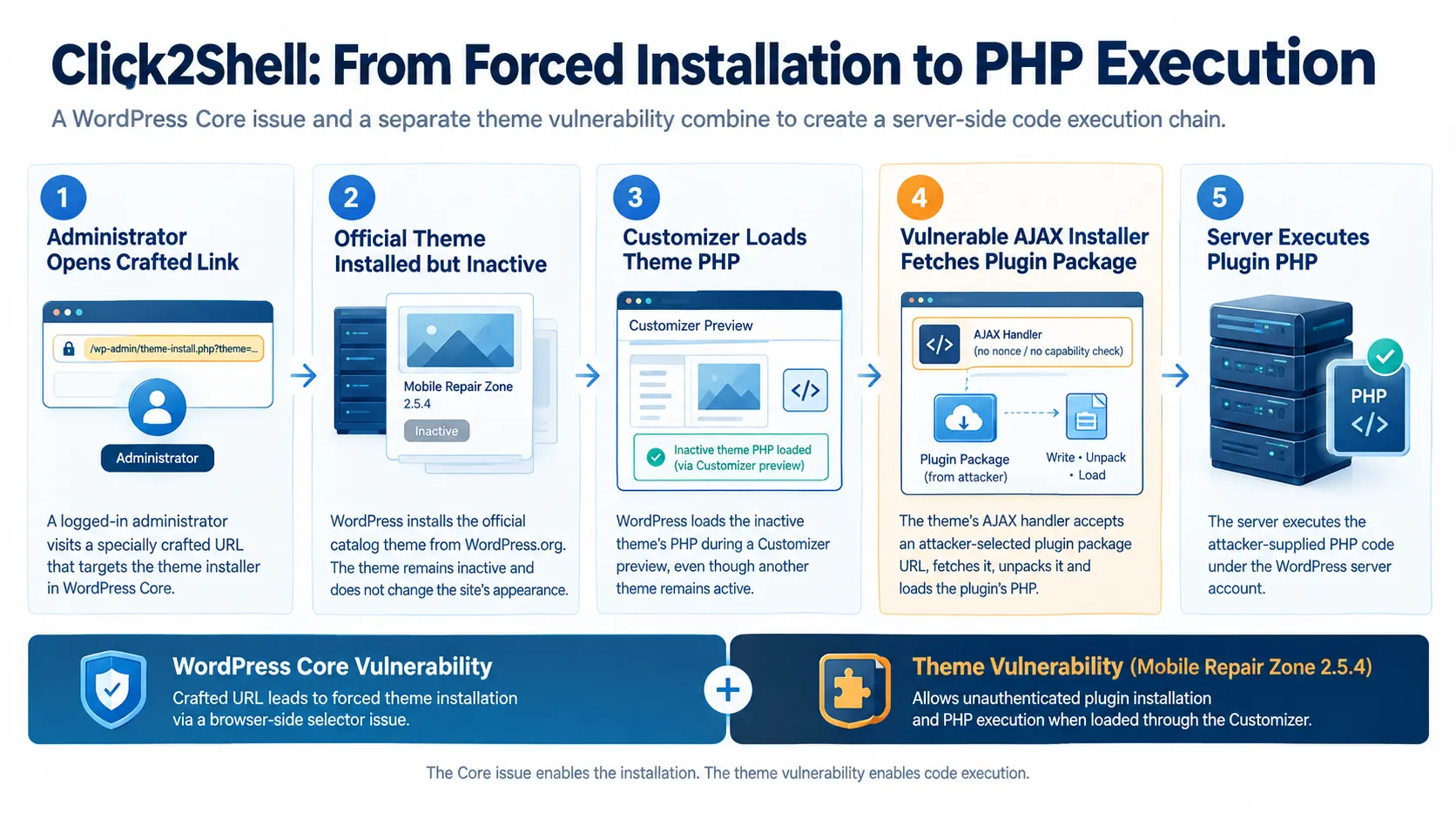
The demonstrated chain combined two distinct security problems:
WordPress Core's URL handling caused an official catalogue theme to be installed without a deliberate installation click.
The Customizer loaded the newly installed theme's PHP while the theme remained inactive.
The vulnerable theme registered an AJAX action without the checks described in the report.
The handler fetched and unpacked an attacker-selected plugin package.
The plugin's PHP entry point was loaded by the server.
The resulting code execution occurred under the WordPress server account.
This is an example of vulnerability chaining: a weakness that initially appears limited to a user-interface action becomes a route to a more serious outcome when combined with a second flaw in code that the application loads.
The complete chain is not equivalent to saying that every WordPress theme installation immediately results in remote code execution. The additional theme vulnerability and the required user-session conditions are central to the demonstrated scenario.
The Broader Security Implication: Installation Is Code Deployment
The Click2Shell research draws attention to a security boundary that WordPress administrators may overlook: themes are executable application components, not just presentation templates.
A theme can contain PHP that interacts with WordPress functionality and application data. If its code is loaded, the security consequences depend on what that code can access and which checks its handlers enforce.
Pwn.ai notes that theme code may be able to access sensitive application resources, including configuration files, database credentials, WordPress and WooCommerce data, and secrets available to the PHP worker. Depending on the code and server permissions, vulnerable or malicious theme functionality could also modify application files or user accounts.
These are potential consequences of code execution with relevant access, rather than evidence that every item was accessed during the Click2Shell demonstration.
For organisations operating WordPress for business websites, customer portals, publishing, or online commerce, the distinction between an active and inactive theme deserves attention. A theme that has been installed but not activated may still introduce code that WordPress can load through particular workflows.
The report also demonstrates why security reviews need to examine the interaction between Core functionality and third-party extensions. WordPress's own interface initiated the installation, but the more serious execution path depended on a weakness in the theme.
This does not establish that all third-party themes share the same flaw. Pwn.ai specifically identifies Mobile Repair Zone 2.5.4 and reports finding similar issues in more than 40 third-party themes hosted on WordPress. The disclosure does not provide a complete list of those themes in the supplied material.
What WordPress Changed in Version 7.1.1
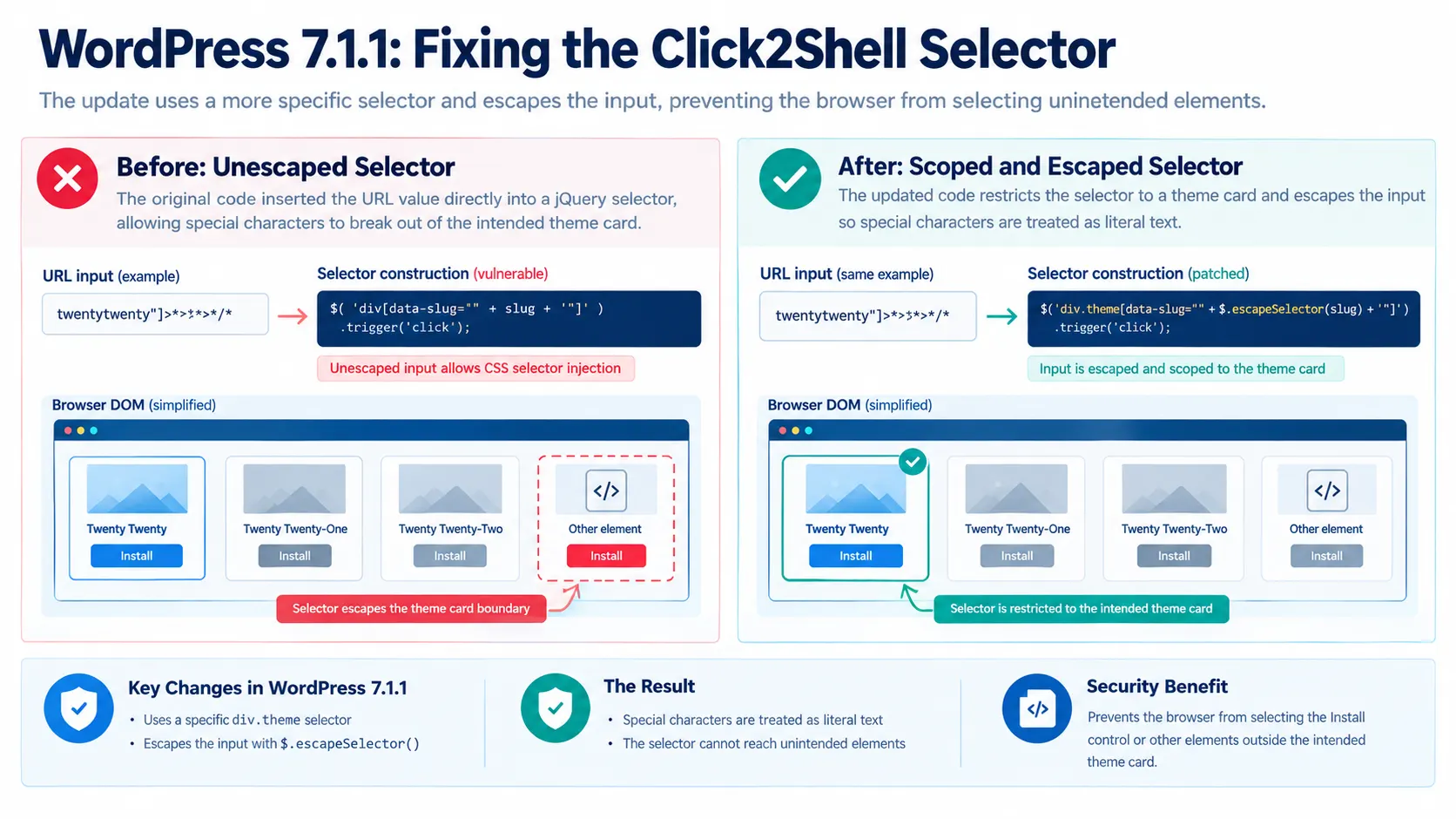
WordPress addressed the Core issue in changeset 63664, modifying the JavaScript selector used by the theme installer.
The previous code inserted the URL-derived slug directly into a selector targeting a theme card:
div[data-slug="..."]
The patched implementation uses a more specific theme-card selector and escapes the slug with jQuery's $.escapeSelector() before inserting it into the selector.
The two changes serve complementary purposes.
First, restricting the match to an actual div.theme element narrows the target to the intended theme card. Second, escaping the input prevents special characters from being interpreted as CSS selector structure.
As a result, punctuation supplied through the crafted URL is treated as literal input rather than being allowed to alter the selector and reach the Install control.
WordPress included the fix in version 7.1.1, released on September 17, 2026. The official announcement lists 11 security fixes and recommends that site owners update immediately.
The release is a maintenance and security update, not a major-version announcement. WordPress also states that eligible older branches are receiving security backports, with the current backport range extending through version 4.7.
What WordPress Administrators Should Do
The immediate priority for site owners is to apply the security update appropriate to their WordPress installation.
WordPress 7.1.1 is available through the Dashboard's Updates section and from WordPress.org. The official release announcement recommends installing the update promptly because it contains security fixes.
Administrators should also consider the separate theme-level risk highlighted by the research.
Review installed themes. Check whether Mobile Repair Zone 2.5.4 or other themes identified by the vendor or researchers are present. The supplied disclosure does not include a full inventory of the more than 40 themes mentioned, so administrators should not assume that every theme is affected.
Review inactive themes as well as the active theme. An inactive theme can still contain executable PHP and may be loaded by preview functionality. Remove themes that are no longer required, following normal change-control and backup procedures.
Review theme and plugin provenance. Theme installation introduces code into the application. Organisations should limit who can install themes and plugins, and obtain packages from sources they trust.
Investigate unexpected installations. If a site has an unexplained theme installation, administrators should review available application and hosting logs, theme and plugin changes, and administrative activity. An unexpected installation alone does not prove that the complete Click2Shell chain was exploited.
Check the wider security posture. The Core patch addresses the selector-injection issue. It does not automatically remediate separate vulnerabilities in third-party themes. Those components require their own updates or mitigation.
The pwn.ai proof of concept is explicitly intended for isolated installations owned by, or used with authorisation from, the tester. Testing against production systems without permission can create operational and security risks.
Disclosure Timeline and Severity
Pwn.ai reports that it submitted the Core selector issue to WordPress on August 22, 2026, and that WordPress reproduced the behaviour on version 7.1.0 the same day.
The researchers say they supplied the complete pre-activation chain on September 1, using Mobile Repair Zone 2.5.4 and harmless PHP-execution evidence. WordPress subsequently paid its maximum reported bug bounty of $300 and prepared the security release.
WordPress 7.1.1 shipped on September 17, crediting Paulos Yibelo and pwn.ai. The full Click2Shell technical disclosure followed on September 18.
At the time of the disclosure, pwn.ai said WordPress was working on assigning a CVE identifier. The supplied report does not contain a final public CVE number or a WordPress-published severity score.
The researchers' own assessments distinguish the forced-installation flaw from the complete chained scenario. That distinction is important for defenders evaluating exposure: the Core issue and the vulnerable theme behaviour are related, but they are not the same vulnerability.
What Click2Shell Means for Enterprise WordPress Security
Click2Shell illustrates how a small input-handling error can become more consequential when it interacts with authenticated administrative workflows and executable extension code.
The Core vulnerability did not directly upload an arbitrary theme package. Instead, it caused WordPress's own browser-side logic to initiate installation of a catalogue theme. The more serious result depended on the way WordPress loaded the inactive theme and on a separate weakness in its AJAX installer.
For enterprise teams, the practical lesson is to treat theme and plugin management as a software-deployment function. Access controls, update processes, code provenance, and monitoring should account for components that are installed but not currently active.
The WordPress 7.1.1 fix closes the reported selector-injection route. Administrators should apply the appropriate security update and separately assess any potentially affected theme code.
Click2Shell is therefore not simply a story about a theme installing itself. It is a reminder that the security of a content-management platform depends on how its core features, browser-side behaviour, and third-party code interact.
Source: pwn.ai Research
About the Author