What Is WebSocket? A Beginner's Guide to Real-Time Communication
Discover how WebSocket enables instant, two-way communication between browsers and servers. Learn how it works, where it's used, and why it's essential for modern real-time applications in this beginner-friendly guide.
Introduction
Imagine chatting with a friend online. The moment they send a message, it instantly appears on your screen without refreshing the page.
Or think about watching live stock prices update every second, playing an online multiplayer game, or receiving instant notifications from social media.
How do websites achieve this?
The answer is WebSocket.
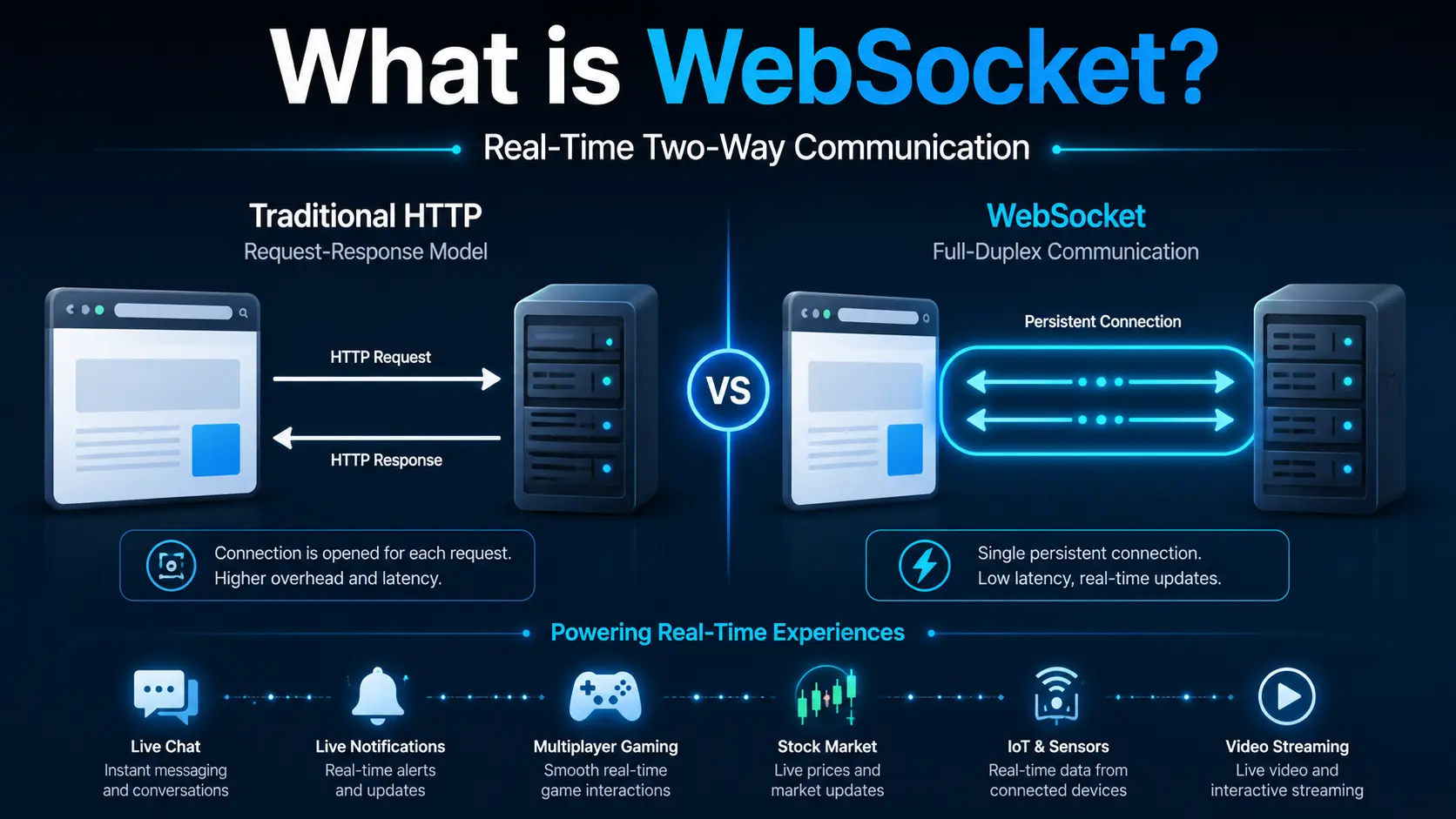
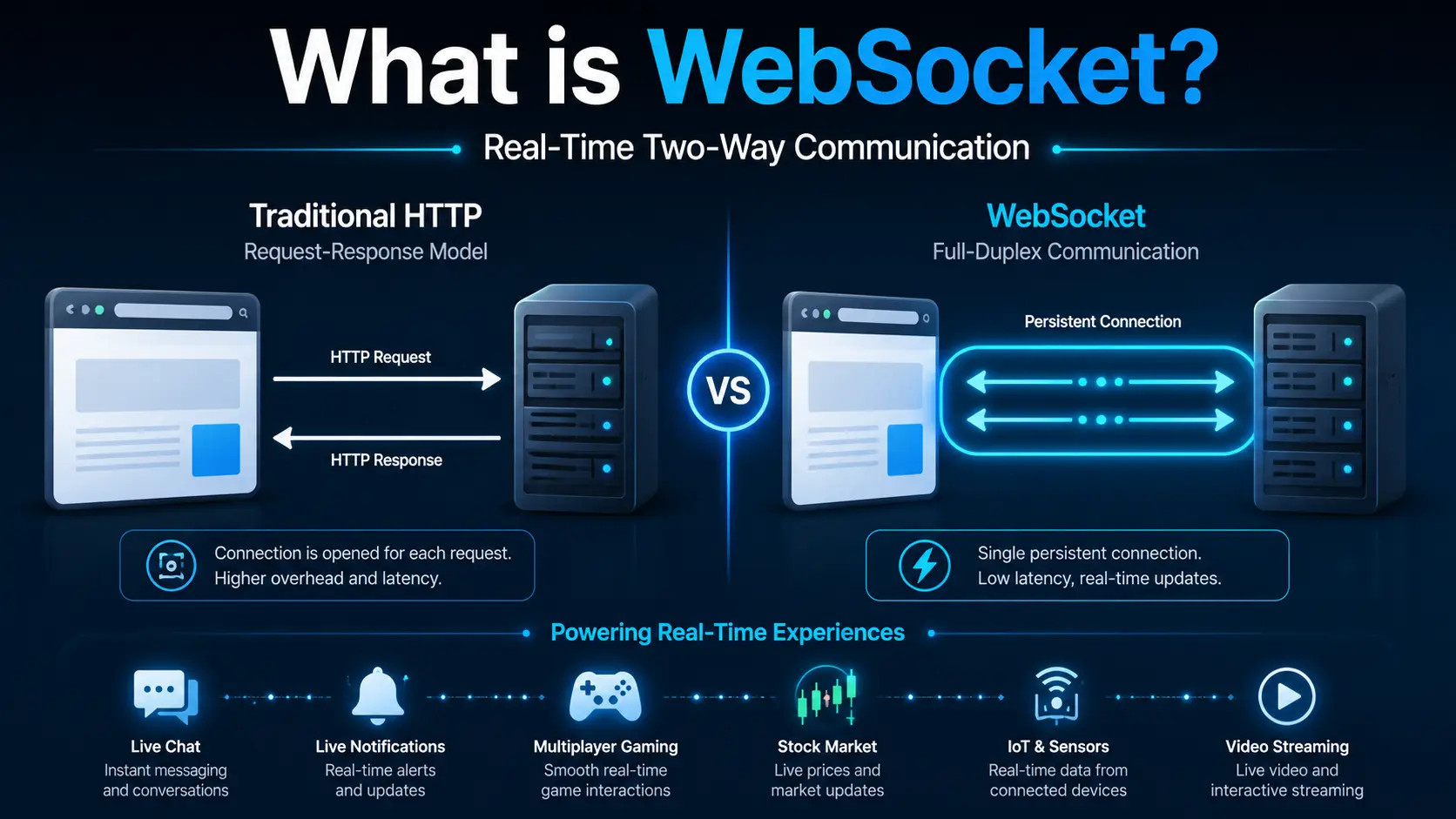
WebSocket is a communication protocol that allows a web browser and a server to maintain a continuous connection. Instead of sending a new request every time data is needed, both sides can exchange information instantly whenever something changes.
Why Traditional HTTP Isn't Enough
Most websites use HTTP.
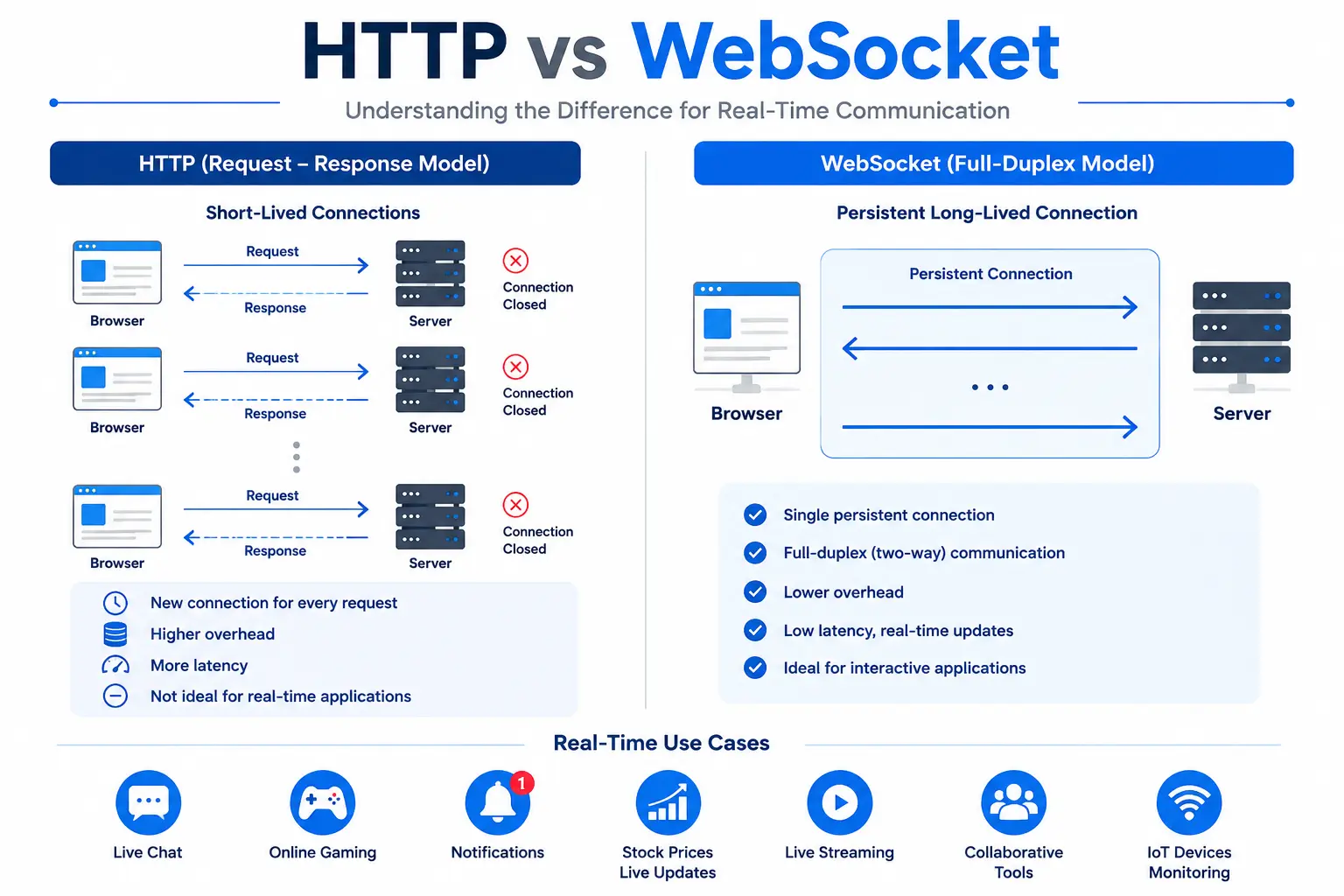
HTTP follows a simple pattern:
Browser sends a request.
Server processes it.
Server sends a response.
Connection ends.
Example:
Browser → Request

Server → Response

Connection Closed
This works perfectly for:
Reading articles
Shopping websites
Viewing profiles
Downloading images
However, it becomes inefficient when updates happen every second.
Imagine checking for new chat messages every second.
Request

Response

Request

Response

Request

Response
Thousands of unnecessary requests are sent even when nothing has changed.
This wastes:
Bandwidth
Server resources
Battery
Network traffic
A better solution was needed.
Enter WebSocket
WebSocket creates one persistent connection between the browser and server.
Instead of opening a new connection every time, both remain connected.
Now communication becomes:
Browser ⇄ ServerEither side can send data whenever needed.
No repeated requests.
No refreshing.
Just instant communication.
How WebSocket Works
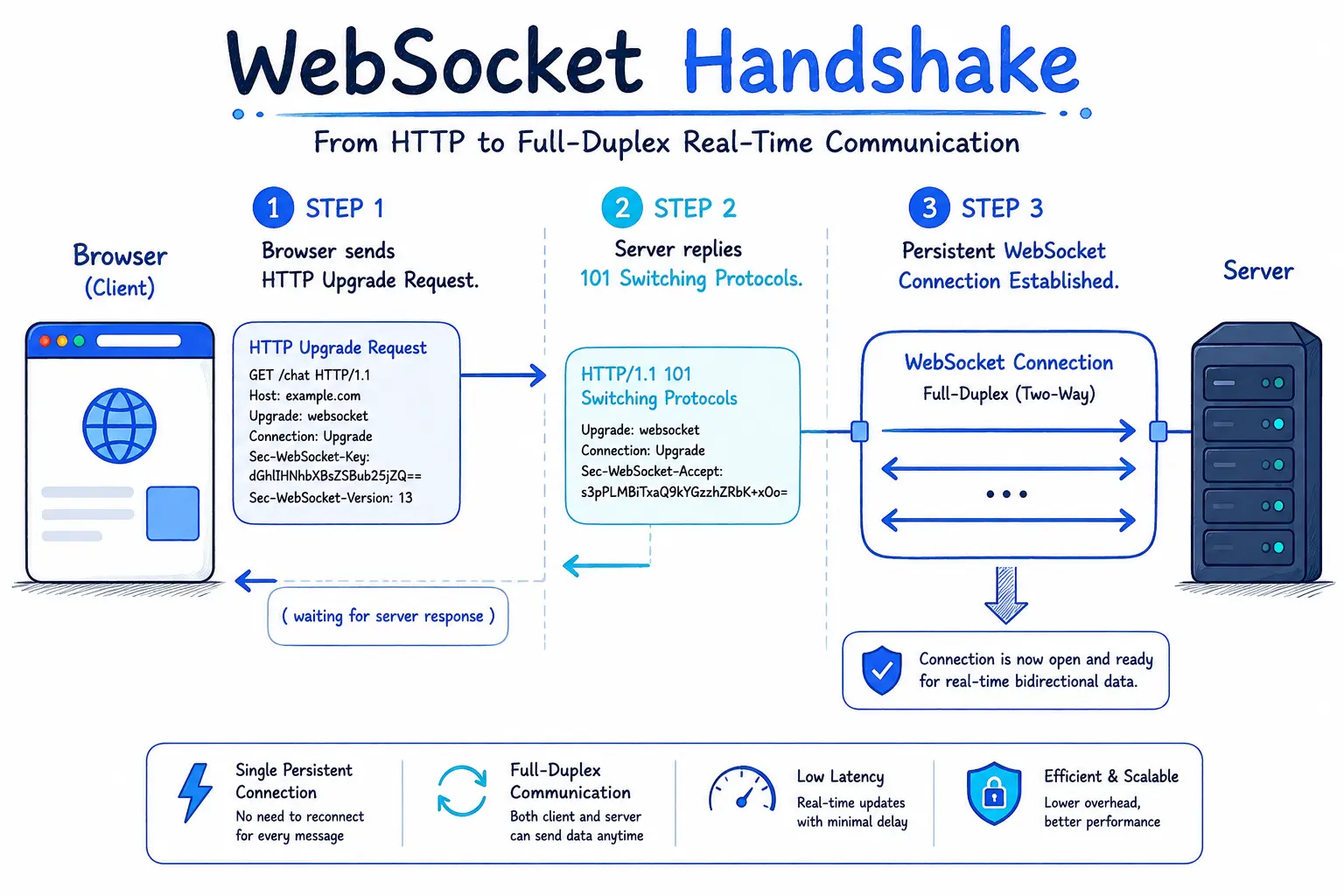
WebSocket begins as a normal HTTP request.
The browser asks the server:
Can we upgrade this connection to WebSocket?
If the server supports it, the connection is upgraded.
After that, HTTP is no longer used.
The browser and server communicate directly over the same connection.
This process is called the WebSocket Handshake.
WebSocket Handshake
The process looks like this:
Browser
↓
HTTP Upgrade Request
↓
Server
↓
101 Switching Protocols
↓
WebSocket Connection Established
After this point:
Browser ⇄ Server

Instant Communication
No more repeated HTTP requests.
Full-Duplex Communication
One of WebSocket's biggest advantages is full-duplex communication.
This means:
The browser can send data anytime.
The server can also send data anytime.
Neither has to wait.
Example:
Player moves
↓
Server updates game
↓
Other players receive update instantly
Everything happens in milliseconds.
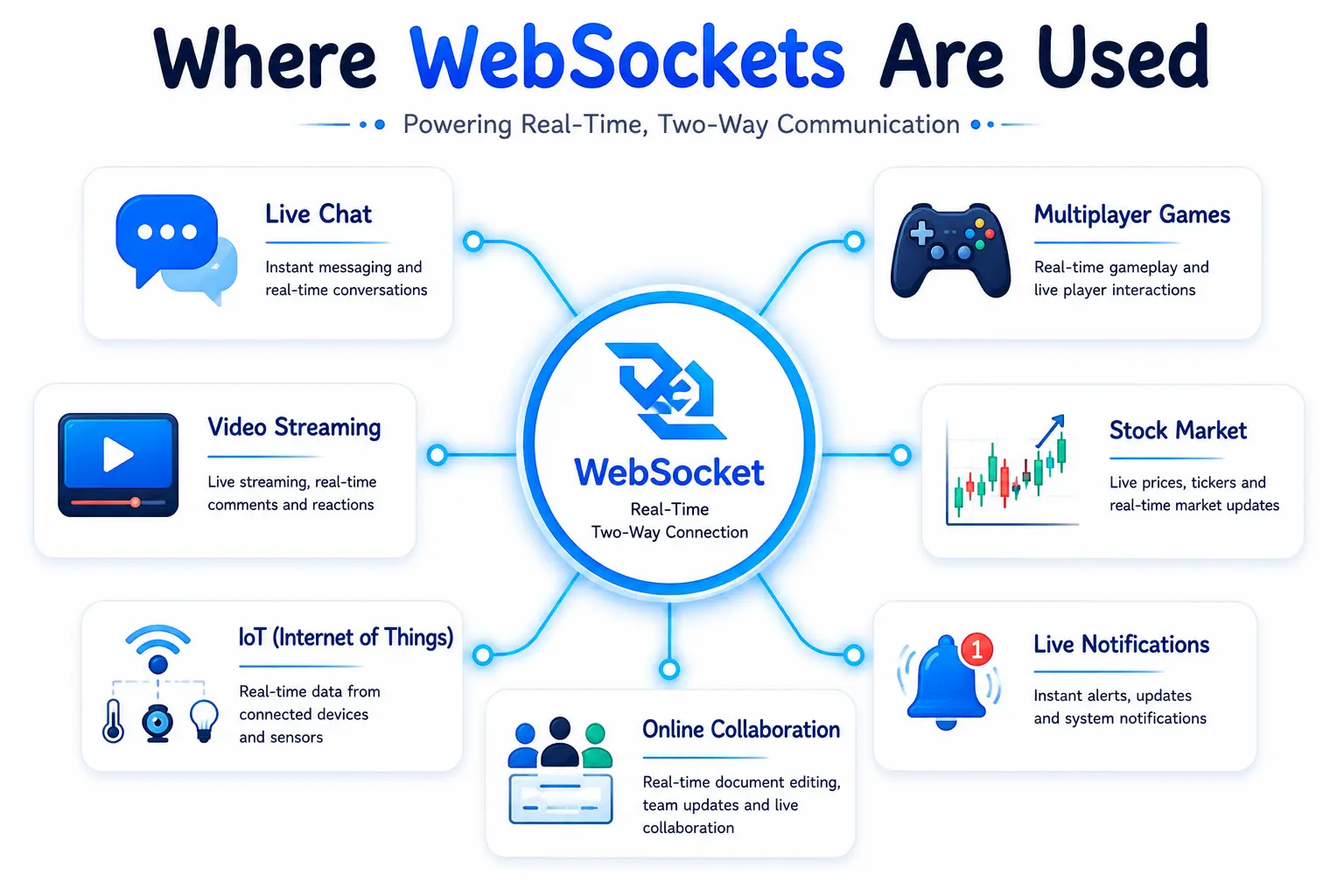
Real-World Use Cases
1. Live Chat
Apps like messaging platforms instantly deliver messages without refreshing.
2. Multiplayer Games
Player movements are synchronized in real time.
3. Stock Market
Prices update every second.
4. Sports Scores
Live scoreboards update automatically.
5. Notifications
Receive instant alerts for messages, likes, or comments.
6. Collaborative Editing
Multiple users can edit the same document simultaneously.
7. IoT Devices
Smart sensors continuously send live data.
WebSocket Lifecycle
A WebSocket connection typically follows these stages:
Create Connection
↓
Handshake
↓
Open
↓
Send Messages
↓
Receive Messages
↓
Close Connection
Applications can react to these stages using JavaScript events.
Basic JavaScript Example
const socket = new WebSocket("wss://example.com");

socket.onopen = () => {
  console.log("Connected!");
};

socket.onmessage = (event) => {
  console.log(event.data);
};

socket.send("Hello Server!");

socket.close();
This example:
Creates a connection
Waits until connected
Receives messages
Sends data
Closes the connection
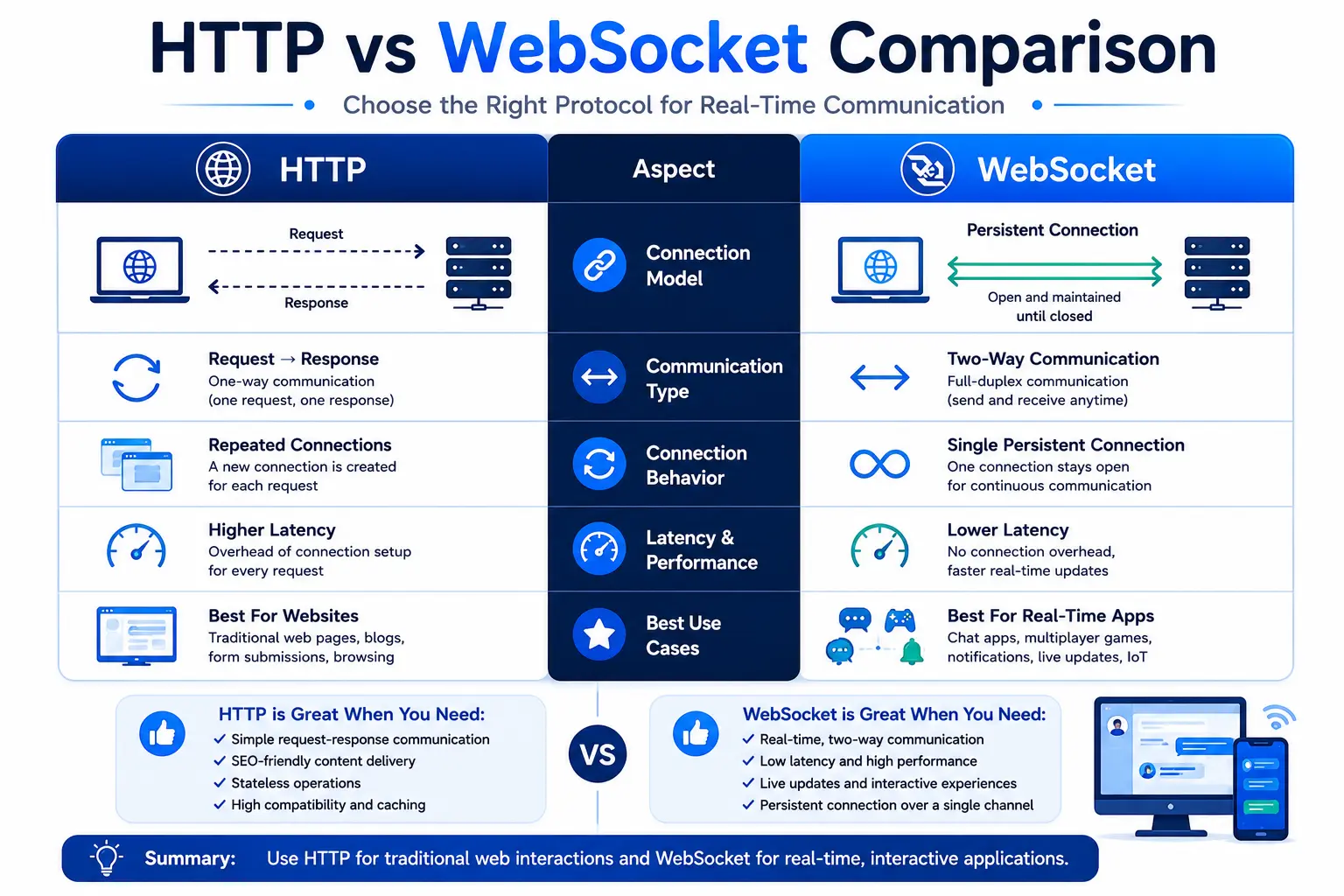
WebSocket vs HTTP
Feature | HTTP | WebSocket |
|---|---|---|
Connection | Short-lived | Persistent |
Communication | Request → Response | Two-way |
Real-time | No | Yes |
Latency | Higher | Lower |
Server Push | Limited | Native |
Best For | Websites | Live Apps |
When Should You Use WebSocket?
Choose WebSocket when your application needs instant updates, such as:
Chat applications
Live dashboards
Multiplayer games
Collaborative tools
Financial trading platforms
Monitoring systems
IoT solutions
If your application mostly displays static content or infrequent updates, traditional HTTP or other approaches may be simpler.
A Brief History of WebSocket
Before WebSocket became a standard, developers relied on techniques like Polling, Long Polling, and later Server-Sent Events (SSE) to simulate real-time communication. These methods worked but often generated unnecessary network traffic or only supported one-way updates.
The WebSocket protocol was standardized by the IETF in RFC 6455 and is now supported by all modern browsers. It solved many of the inefficiencies of earlier approaches by introducing a persistent, bidirectional communication channel between the client and server.
Timeline
Traditional HTTP → Request/Response only
Polling → Browser repeatedly checks for updates
Long Polling → Server waits before responding
Server-Sent Events (SSE) → Server can push updates
WebSocket → True two-way real-time communication
Polling vs Long Polling vs Server-Sent Events vs WebSocket
Understanding these technologies helps explain why WebSocket exists.
Technology | Two-Way | Persistent Connection | Best Use Case |
|---|---|---|---|
Polling | ❌ | ❌ | Simple applications |
Long Polling | Partial | Temporary | Older chat systems |
SSE | One-way | Yes | Live news, dashboards |
WebSocket | ✅ | ✅ | Chat, gaming, collaboration |
Polling
The browser sends a request every few seconds asking whether anything has changed. Even when there is no new data, requests continue, creating unnecessary network traffic.
Long Polling
The server keeps the request open until new information is available. This reduces unnecessary requests but still requires a new request after each response.
Server-Sent Events (SSE)
SSE allows the server to continuously send updates to the browser. However, communication is one-way; the browser cannot send data through the same connection.
WebSocket
Both the browser and server can send data at any time over a single persistent connection, making it the preferred choice for interactive applications.
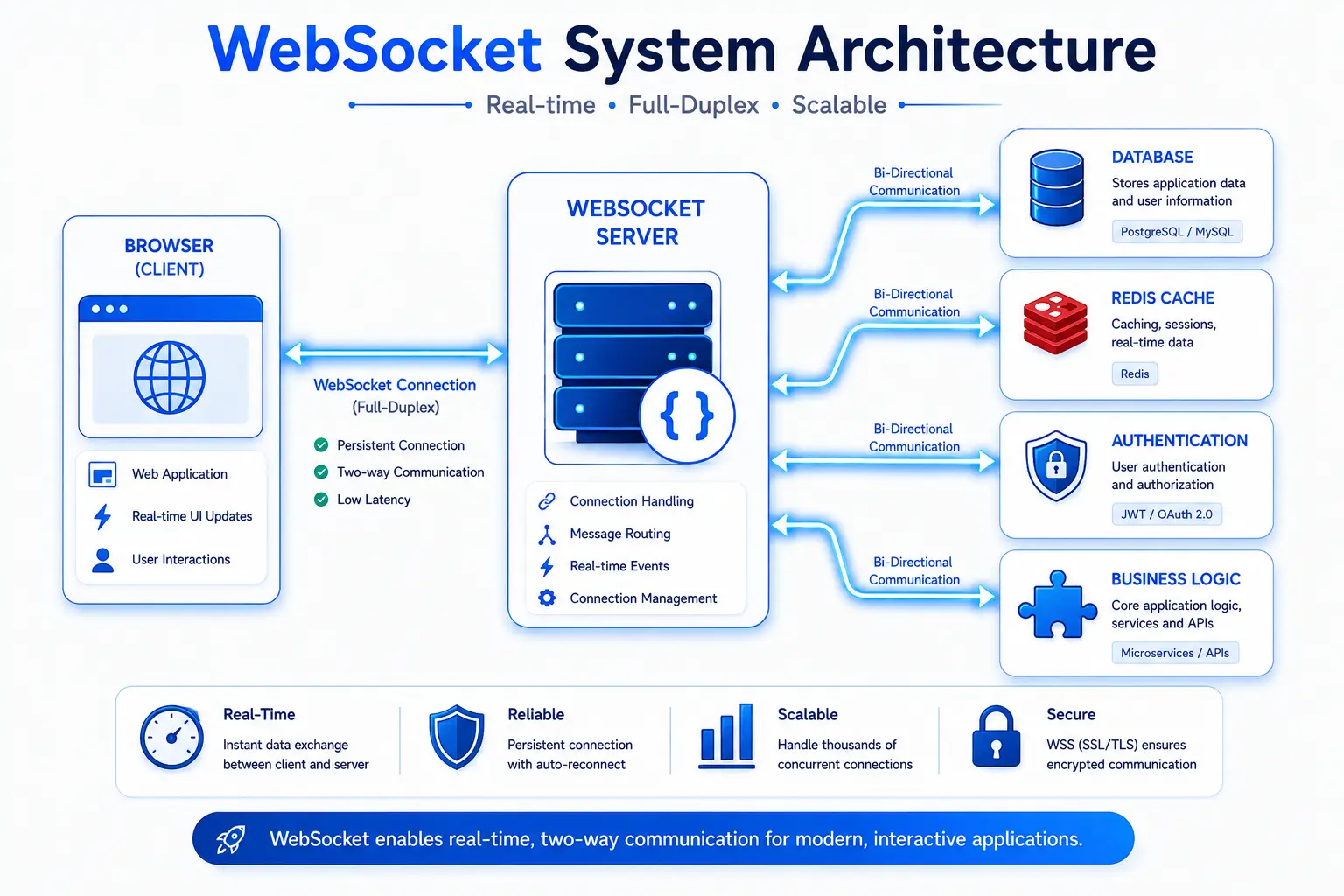
WebSocket Architecture
A WebSocket-based application typically consists of four main components:
Browser
      │
      │ WebSocket
      ▼
WebSocket Server
      │
      ├── Database
      ├── Cache (Redis)
      ├── Authentication Service
      └── Business Logic
Browser
Initiates the connection and exchanges messages.
WebSocket Server
Maintains active client connections, routes messages, and manages communication.
Database
Stores persistent information such as user profiles and chat history.
Cache
Technologies like Redis can help synchronize messages across multiple WebSocket servers in larger deployments.
WebSocket Message Flow
Once connected, communication follows a simple cycle:
Client opens a WebSocket connection.
Server accepts the handshake.
Client sends a message.
Server processes it.
Server broadcasts or responds.
Client receives the update instantly.
Example for a chat application:
Alice sends "Hello"
↓
Server receives message
↓
Server saves message
↓
Server sends message to Bob
↓
Bob instantly sees "Hello"
This flow can happen thousands of times without reopening the connection.
WebSocket Events Explained
The browser provides several events to manage a WebSocket connection.
onopen
Triggered when the connection is established.
Connection ReadyDevelopers often use this event to send an initial message or update the UI.
onmessage
Triggered whenever the server sends data.
Typical uses include:
Receiving chat messages
Updating live dashboards
Displaying notifications
onerror
Called when an error occurs during communication.
Applications commonly use it to log errors or notify users.
onclose
Runs when the connection is closed.
Many applications automatically attempt to reconnect after this event.
WebSocket URL Format
Unlike HTTP, WebSocket uses different URL schemes.
Protocol | Example |
|---|---|
ws:// | ws://example.com/socket |
wss:// | wss://example.com/socket |
ws://
Used mainly in local development.
wss://
Encrypted using TLS and recommended for production environments.
If your website uses HTTPS, your WebSocket endpoint should generally use WSS to avoid mixed-content issues and protect data in transit.
Common WebSocket Libraries
Popular libraries and frameworks make it easier to build WebSocket applications.
JavaScript
Native WebSocket API
Socket.IO (adds features like automatic reconnection and fallbacks)
ws (Node.js)
Python
websockets
FastAPI WebSocket support
Java
Spring Boot WebSocket
Go
Gorilla WebSocket
.NET
ASP.NET Core SignalR (built on WebSocket when available)
Common Mistakes Beginners Make
Many developers encounter similar issues when first using WebSockets.
Using HTTP instead of WebSocket
Trying to use fetch() or REST endpoints for real-time communication instead of establishing a WebSocket connection.
Forgetting reconnection logic
Network interruptions happen. Production applications should attempt to reconnect gracefully.
Not validating messages
Always validate message format and content on the server to avoid unexpected behavior or security issues.
Keeping unused connections open
Close connections when users leave a page or log out to free server resources.
Sending too much data
Send only the information needed instead of repeatedly transmitting large payloads.
Advantages of WebSocket
WebSocket has become the preferred technology for many real-time applications because it offers several benefits over traditional HTTP communication.
1. Real-Time Communication
The biggest advantage of WebSocket is instant communication. As soon as data changes, the server can immediately send updates to connected clients without waiting for a new request.
2. Lower Latency
Unlike HTTP, WebSocket doesn't repeatedly establish new connections. This reduces the time needed to exchange data, making applications feel much faster and more responsive.
3. Persistent Connection
A single connection remains open for the entire session. This minimizes connection overhead and improves performance, especially for applications that exchange data frequently.
4. Full-Duplex Communication
Both the client and server can send messages independently at any time. This is essential for interactive applications such as multiplayer games and live chat.
5. Reduced Network Overhead
Since headers are not repeatedly sent with every request, WebSocket uses less bandwidth than constantly polling a server.
6. Better User Experience
Users receive updates instantly without refreshing the page, resulting in smoother and more engaging applications.
Limitations of WebSocket
Although WebSocket is powerful, it isn't always the right solution.
1. Higher Server Resource Usage
Because each client keeps a connection open, servers must manage many simultaneous connections, which consumes memory and processing power.
2. More Complex Infrastructure
Scaling WebSocket applications often requires load balancers, message brokers such as Redis, and additional connection management.
3. Not Suitable for Every Website
If your website mostly serves static content or infrequent updates, traditional HTTP is usually simpler and more cost-effective.
4. Reconnection Handling
Internet connections can drop unexpectedly. Developers need to implement automatic reconnection and graceful error handling.
5. Firewall and Proxy Considerations
Some corporate firewalls or proxies may restrict or inspect WebSocket traffic, so applications should handle connection failures gracefully.
Conclusion
WebSocket has transformed how modern web applications deliver real-time experiences. Instead of repeatedly opening new HTTP connections, it creates a single persistent connection that allows the browser and server to exchange data instantly in both directions.
From live chat applications and multiplayer games to financial dashboards, IoT devices, and collaborative editing tools, WebSocket enables fast, interactive, and efficient communication with minimal latency.
While it isn't necessary for every website, it's an excellent choice whenever users need instant updates and continuous communication. Understanding how WebSocket works, when to use it, and how to implement it securely will help you build modern, responsive web applications that provide a better user experience.
If you're learning web development, mastering WebSocket is a valuable step toward building real-time applications used by millions of people every day.
Frequently Asked Questions (FAQ)
1. What is WebSocket?
WebSocket is a communication protocol that creates a persistent, two-way connection between a client (such as a web browser) and a server, enabling real-time data exchange.
2. How is WebSocket different from HTTP?
HTTP follows a request-response model where each request creates a new connection. WebSocket establishes a single persistent connection that both the client and server can use to send messages at any time.
3. Does WebSocket replace HTTP?
No. WebSocket complements HTTP rather than replacing it. Websites still use HTTP to load pages, images, CSS, JavaScript, and REST APIs, while WebSocket is used when real-time communication is required.
4. What is the difference between ws:// and wss://?
ws:// — Unencrypted WebSocket connection, mainly used during local development.
wss:// — Secure WebSocket connection encrypted with TLS, recommended for production.
5. Is WebSocket secure?
Yes, when implemented correctly. Using WSS, authenticating users, validating messages, and applying authorization checks make WebSocket communication secure.
6. Can WebSocket send JSON?
Yes. JSON is one of the most common formats for sending structured data between clients and servers over a WebSocket connection.
Example:
{
  "type": "message",
  "user": "Alice",
  "text": "Hello!"
}
7. Does WebSocket work in all modern browsers?
Yes. All major modern browsers, including Chrome, Firefox, Edge, Safari, and Opera, support the WebSocket API.
8. When should I use WebSocket?
Use WebSocket when your application requires instant updates, such as:
Live chat
Online gaming
Stock market dashboards
Live notifications
Sports scoreboards
Collaborative editing
IoT monitoring
9. Can WebSocket transfer binary data?
Yes. WebSocket supports both text and binary data, making it suitable for images, files, audio, and other binary formats.
10. What are some popular WebSocket libraries?
Popular libraries include:
JavaScript: Native WebSocket API, Socket.IO, ws
Python: websockets, FastAPI
Java: Spring Boot WebSocket
Go: Gorilla WebSocket
.NET: SignalR
Ready to go deeper?
Professional Training
Hands-on, mentor-led training aligned with industry certifications.
About the Author
Sharper every day
Daily tutorials, analysis, and career playbooks across all 12 Xcademia disciplines, straight to your inbox. No spam.