What is REST API? A Beginner's Guide with Real-World Examples (2026)
Discover what REST APIs are and how they power modern websites, mobile apps, and cloud services. This beginner-friendly guide explains HTTP methods, JSON, authentication, status codes, and real-world examples in simple terms.
Introduction
Imagine you're using a food delivery app to order dinner. You select your meal, tap "Place Order," and within seconds the restaurant receives your request, confirms it, and sends updates back to your phone. Although this process feels instant, there's a powerful technology working behind the scenes to make it happen - an API.
APIs (Application Programming Interfaces) enable different software applications to communicate with one another. Whether you're signing in with your Google account, checking the weather, booking a flight, or making an online payment, APIs are responsible for securely exchanging information between systems.
Among the many types of APIs available today, REST APIs have become the industry standard. Companies like Google, Amazon, Microsoft, GitHub, Stripe, and countless startups rely on REST APIs because they are simple, fast, scalable, and easy to integrate. They allow websites, mobile apps, and cloud services to share data efficiently over the internet using standard HTTP methods.
If you're beginning your journey into web development or backend programming, understanding REST APIs is an essential skill. They form the foundation of modern web applications and are widely used in software engineering, cloud computing, and mobile development.
In this guide, you'll learn what an API is, how REST APIs work, the role of HTTP methods, JSON, authentication, status codes, and real-world examples - all explained in a beginner-friendly way with practical illustrations.
What is an API?
API stands for Application Programming Interface. Simply put, an API is a bridge that allows two software applications to communicate and exchange information without needing to understand each other's internal code.
A simple way to understand this is by thinking about a restaurant. When you order food, you don't walk into the kitchen to prepare it yourself. Instead, you tell the waiter what you want. The waiter delivers your request to the kitchen, and once the food is ready, they bring it back to your table.
An API works in much the same way. Your application sends a request, the API forwards it to the server, the server processes the request, and the API returns the response.
For example, when you log into a website using your Google account, the website communicates with Google's servers through an API to verify your identity. This happens in seconds, allowing you to sign in securely without creating a new account.
An API acts as a messenger that enables applications to share data and services efficiently.
What is a REST API?
REST stands for Representational State Transfer. It is an architectural style for designing APIs that communicate over the web using the HTTP protocol. Rather than being a programming language or framework, REST is a set of principles that developers follow to create APIs that are simple, scalable, and easy to maintain.
In a REST API, everything is treated as a resource. A resource can be a user, a product, an article, a course, or even an online order. Each resource is identified by a unique URL, often called an endpoint.
For example:
GET /users
GET /products
GET /orders
When a client (such as a web browser or mobile app) sends a request to one of these endpoints, the REST API processes the request and returns the requested information, usually in JSON (JavaScript Object Notation) format.
One of the biggest advantages of REST APIs is that they are stateless. This means every request contains all the information the server needs to process it. The server doesn't need to remember previous requests, making REST APIs faster, more reliable, and easier to scale.
Because REST uses standard HTTP methods like GET, POST, PUT, PATCH, and DELETE, developers can quickly understand and integrate APIs across different platforms and programming languages.
Today, REST APIs power everything from e-commerce websites and banking applications to social media platforms and AI-powered cloud services, making them one of the most important technologies in modern software development.
A REST API provides a standard, efficient, and scalable way for applications to communicate over the internet.
How REST API Works
Every time you interact with a modern website or mobile application, a REST API is often working behind the scenes. It acts as the communication bridge between the user interface and the server where the data is stored.
Let's understand the process with a simple example.
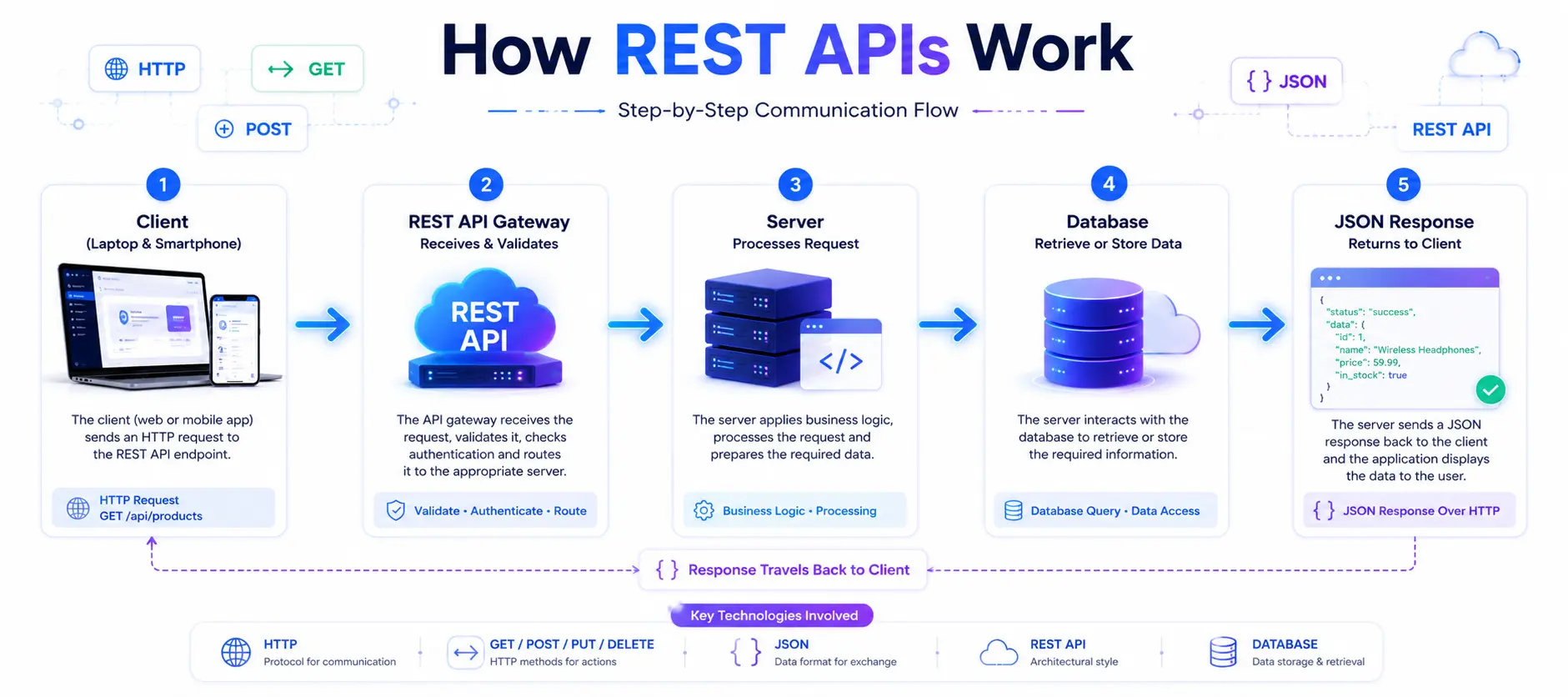
Imagine you're shopping online and click "View Product." Your browser doesn't already have all the product information stored locally. Instead, it sends a request to the server asking for the details of that specific product.
Here's what happens:
The Client Sends a Request
Your browser or mobile app sends an HTTP request to the REST API endpoint.The REST API Receives the Request
The API checks the request, validates it, and determines what data is needed.The Server Accesses the Database
The server retrieves the requested information from the database or another service.The API Returns a Response
The server sends the data back to the client, usually in JSON format.The Application Displays the Data
Your browser or app reads the JSON response and displays the product details on your screen.
This entire process typically takes only a fraction of a second, providing users with a fast and seamless experience.
Simple Flow
User
   ↓
Web Browser / Mobile App
   ↓
HTTP Request
   ↓
REST API
   ↓
Server
   ↓
Database
   ↓
JSON Response
   ↓
Application Displays Data
A REST API receives requests, processes them through the server, retrieves the required data, and sends it back to the client in a structured format like JSON.
REST API Architecture
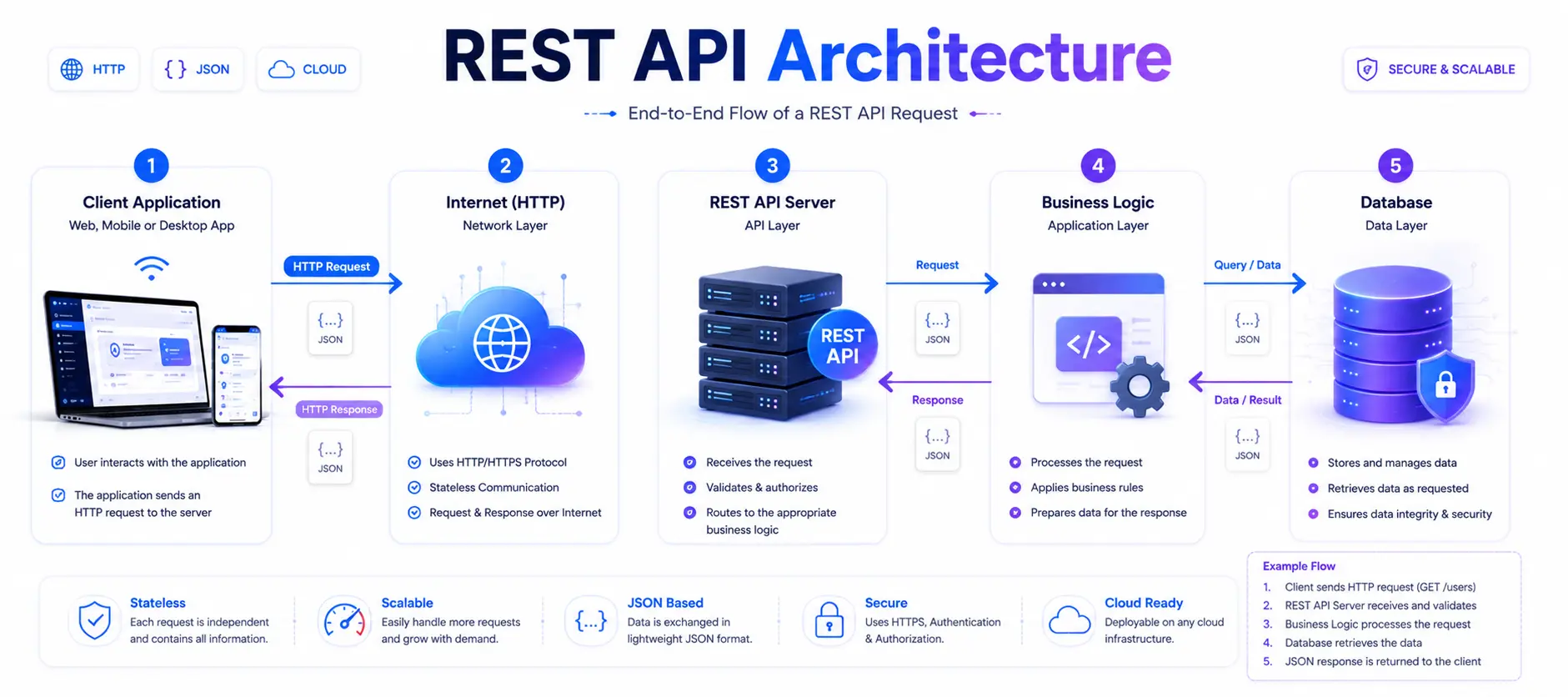
REST API architecture defines how different components of an application communicate with each other. Instead of combining everything into one system, REST separates responsibilities into layers, making applications easier to build, maintain, and scale.
At the highest level, a REST API follows a client-server architecture. The client (such as a web browser or mobile app) sends an HTTP request to the server. The server processes the request, applies business logic, retrieves or updates data in the database, and returns a response - usually in JSON format.
A typical REST API architecture consists of five layers:
1. Client Application
The client is the user-facing application, such as a website, mobile app, or desktop application. It sends API requests and displays the returned data.
2. Internet (HTTP)
HTTP acts as the communication protocol that carries requests and responses between the client and the server.
3. REST API Server
The API server receives requests, validates them, handles authentication, and routes them to the appropriate service.
4. Business Logic
This layer contains the application's core functionality. It processes requests, applies rules, performs calculations, and determines how data should be handled.
5. Database
The database stores application data such as users, products, orders, and transactions. The API interacts with the database to retrieve, create, update, or delete information.
By separating these layers, REST APIs become more secure, scalable, and easier to maintain, allowing developers to update one part of the system without affecting the others.
REST API architecture separates the client, server, business logic, and database into independent layers, creating applications that are scalable, maintainable, and efficient.
HTTP Methods in REST APIs
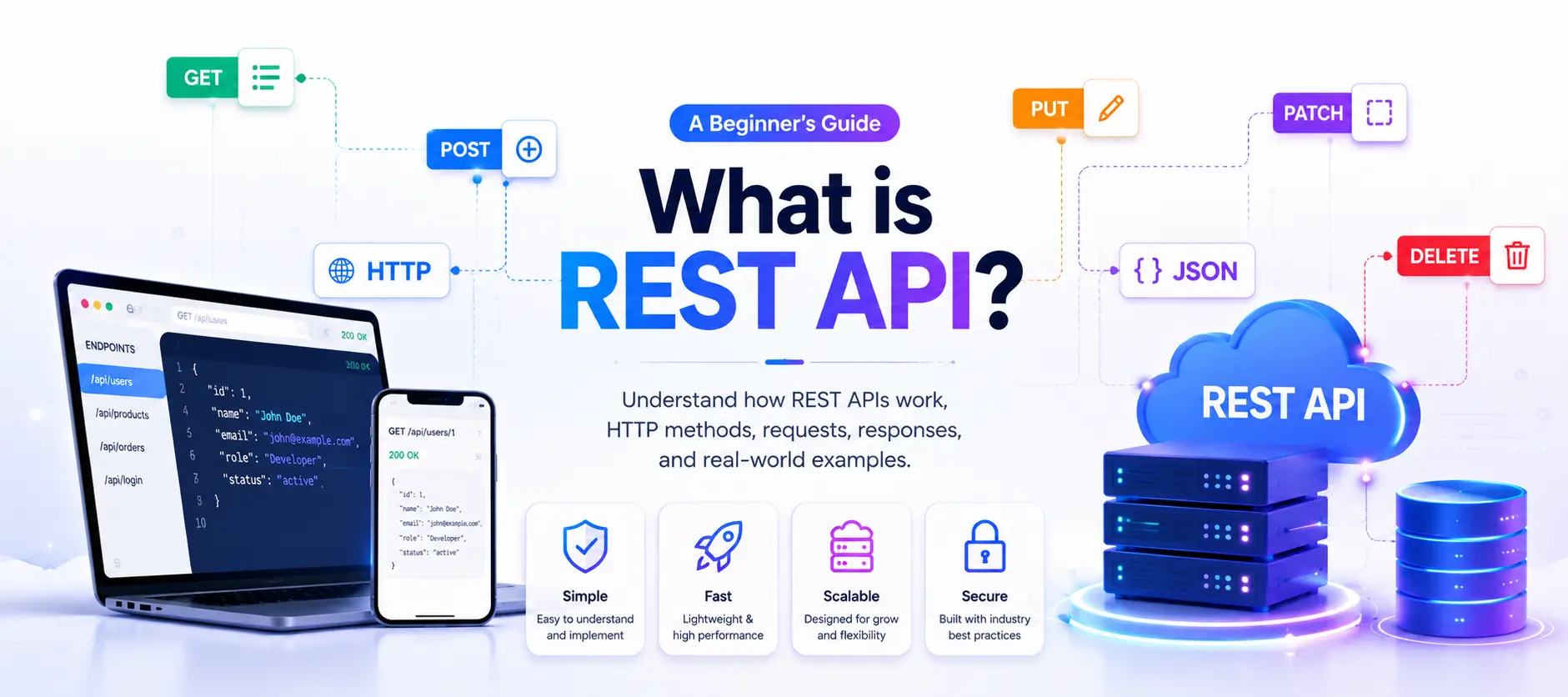
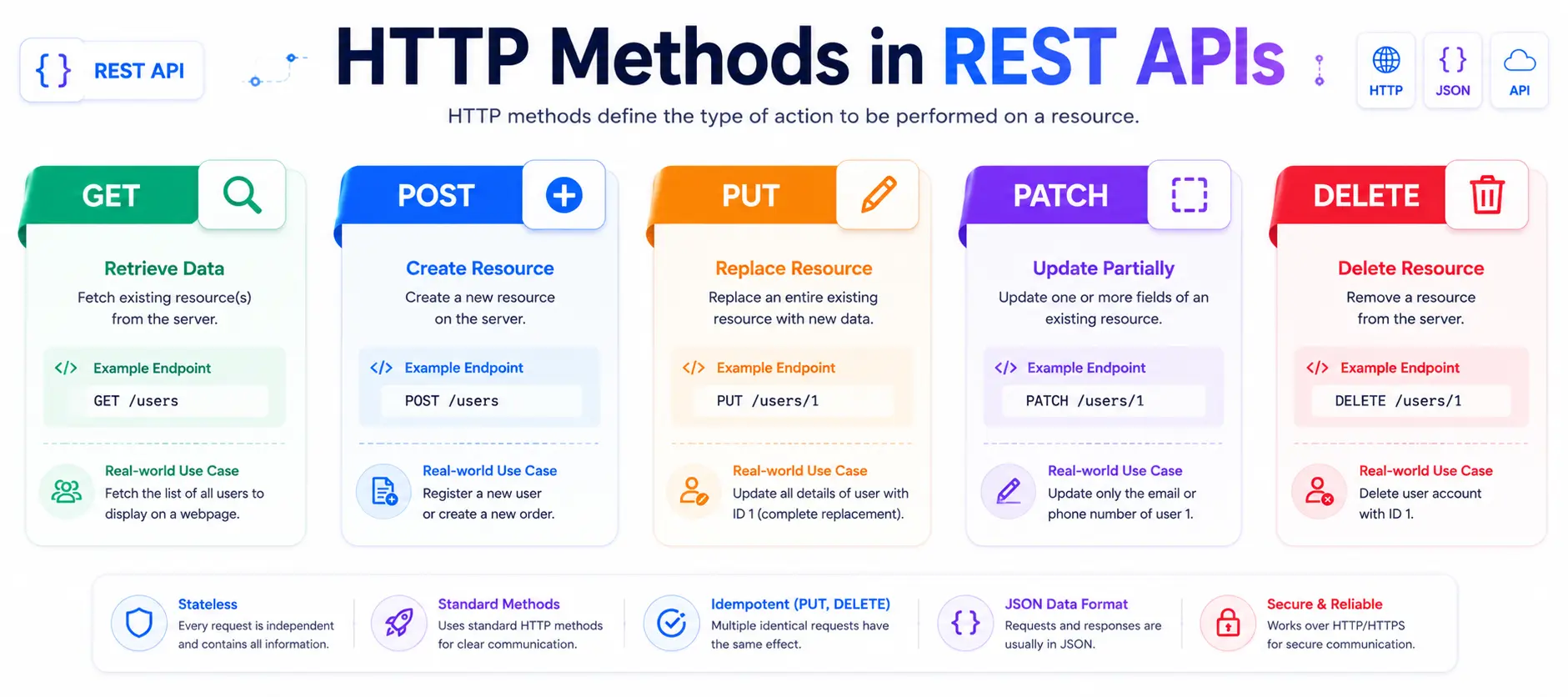
HTTP methods define the type of action a client wants to perform on a resource. Think of them as commands that tell the server whether you want to retrieve, create, update, or delete data. REST APIs use standard HTTP methods, making them easy for developers to understand and implement.
For example, imagine you're using an online shopping application. When you browse products, the app sends a GET request. When you create a new account, it sends a POST request. If you update your delivery address, the app uses PUT or PATCH, and when you delete an item from your wishlist, it sends a DELETE request.
Using these standard methods makes APIs consistent across different applications and programming languages.
HTTP Methods Comparison
HTTP Method | Purpose | Example Endpoint | Example Use Case |
|---|---|---|---|
GET | Retrieve existing data |
| View all products |
POST | Create a new resource |
| Register a new user |
PUT | Replace an existing resource |
| Update an entire user profile |
PATCH | Update part of a resource |
| Change only the email address |
DELETE | Remove a resource |
| Delete a user account |
Quick Example
GET /productsReturns all available products.
POST /productsCreates a new product.
PUT /products/15Updates all information about product 15.
PATCH /products/15Updates only selected fields, such as price or stock.
DELETE /products/15Deletes product 15 from the database.
HTTP methods provide a standard way to interact with resources in a REST API, making communication predictable and easy to understand.
REST Request & Response (JSON)
Every interaction with a REST API consists of two parts: a request sent by the client and a response returned by the server. This exchange allows applications to communicate and share information efficiently.
1. What is a Request?
A request contains the information the server needs to process an action. It typically includes:
Endpoint (URL): Specifies the resource being accessed.
HTTP Method: Defines the action (GET, POST, PUT, PATCH, DELETE).
Headers: Provide additional information such as content type or authentication.
Body: Contains data sent to the server, usually in JSON format.
Example
POST /users
Content-Type: application/json

{
  "name": "John Doe",
  "email": "john@example.com"
}
2. What is a Response?
After processing the request, the server returns a response containing a status code and, in most cases, data formatted as JSON (JavaScript Object Notation).
Example
{
  "id": 101,
  "name": "John Doe",
  "email": "john@example.com",
  "message": "User created successfully"
}
JSON is lightweight, human-readable, and supported by nearly every programming language, making it the preferred data format for REST APIs.
A client sends a request to the server, and the server responds with data - typically in JSON - allowing applications to exchange information seamlessly.
Common HTTP Status Codes
Whenever a REST API processes a request, it returns an HTTP status code indicating whether the request was successful or if an error occurred. These codes help developers quickly understand the outcome of an API call.
The most common status codes include:
Status Code | Meaning | Example |
|---|---|---|
200 OK | Request completed successfully | Fetching products |
201 Created | New resource created | Creating a new account |
204 No Content | Success with no response body | Successfully deleting a record |
400 Bad Request | Invalid request from the client | Missing required fields |
401 Unauthorized | Authentication required | Missing or invalid token |
403 Forbidden | Access denied | User lacks permission |
404 Not Found | Resource doesn't exist | Invalid endpoint or ID |
500 Internal Server Error | Unexpected server issue | Database or application error |
For example, if you request /users/500 and that user doesn't exist, the server may return 404 Not Found. If you successfully create a new user, the API usually responds with 201 Created.
Understanding these codes makes debugging faster and helps developers build more reliable applications.
HTTP status codes clearly indicate whether an API request succeeded or failed, making troubleshooting much easier.
Authentication in REST APIs
Many APIs provide access to sensitive information, such as user profiles, payment details, or business data. To protect this information, REST APIs use authentication, which verifies the identity of the client before granting access.
Without authentication, anyone could access or modify protected data, making applications vulnerable to security threats.
The most common authentication methods are:
1. API Keys
An API key is a unique identifier assigned to an application. The client includes this key with every request.
x-api-key: YOUR_API_KEYAPI keys are simple to use and are commonly used for public services like weather or map APIs.
2. Bearer Tokens
After a user logs in, the server issues a secure access token. Future requests include this token in the request header.
Authorization: Bearer eyJhbGciOi...Bearer tokens are widely used because they provide better security than API keys.
3. OAuth 2.0
OAuth allows users to log in using existing accounts from providers such as Google, GitHub, or Microsoft without sharing their passwords with third-party applications.
For example, when you click "Continue with Google," OAuth securely verifies your identity.
4. JWT (JSON Web Token)
JWT is a compact, digitally signed token that securely stores user information. After successful login, the server generates a JWT, which the client sends with future requests until it expires.
JWTs are commonly used in modern web and mobile applications because they are secure, lightweight, and easy to validate.
Authentication ensures that only authorised users or applications can access protected API resources, helping keep data secure.
Real-World Examples of REST APIs
REST APIs power almost every digital service we use today. Whether you're browsing an online store, using a banking app, or logging into a website, REST APIs enable seamless communication between applications and servers.
🌤️ Weather Applications
When you open a weather app, it sends a GET request to a weather API. The server responds with the latest temperature, humidity, wind speed, and weather forecast in JSON format.
🛒 E-commerce Websites
Online shopping platforms like Amazon use REST APIs to display product listings, manage shopping carts, process payments, and track orders. Every action - searching for a product or placing an order - communicates with the server through API requests.
💳 Online Banking
Banking apps rely on secure REST APIs to retrieve account balances, transaction history, transfer money, and pay bills. Authentication ensures only authorised users can access sensitive financial information.
📱 Social Media Platforms
When you refresh your Instagram or X (formerly Twitter) feed, your app sends a request to fetch the latest posts, comments, and notifications. The server returns updated data almost instantly.
🎬 Streaming Services
Platforms like Netflix and Spotify use REST APIs to load movies, TV shows, playlists, recommendations, and user preferences. Every search or play request communicates with backend servers through APIs.
These examples demonstrate that REST APIs are the invisible bridge connecting user interfaces with cloud servers and databases, making modern digital experiences fast, secure, and interactive.
From weather apps to online banking, REST APIs are the backbone of nearly every modern web and mobile application.
REST vs SOAP
REST and SOAP are two popular approaches for building web services, but they differ significantly in design and usage.
REST is lightweight and primarily uses JSON for data exchange, making it faster and easier to integrate with modern web and mobile applications. SOAP, on the other hand, is a protocol that mainly uses XML and follows strict standards for messaging and security.
REST is ideal for public APIs, cloud services, mobile apps, and microservices because it is simple, scalable, and offers better performance. SOAP is commonly used in enterprise environments where advanced security, transactional reliability, and strict standards are required, such as banking and legacy business systems.
REST vs SOAP Comparison
Feature | REST | SOAP |
|---|---|---|
Type | Architectural Style | Protocol |
Data Format | JSON (Mostly) | XML |
Performance | Faster | Slower |
Learning Curve | Easy | Moderate to Difficult |
Flexibility | High | Strict Standards |
Best For | Web, Mobile, Cloud APIs | Enterprise & Legacy Systems |
For beginners, REST is the preferred choice because it is easier to learn, widely adopted, and supported by almost every programming language and framework.
REST is lightweight and developer-friendly, while SOAP focuses on enterprise-level security and standardisation.
REST API Best Practices
Following best practices helps developers build REST APIs that are secure, consistent, and easy to maintain.
Use Clear Resource Names
Use nouns instead of verbs in endpoints.
✅ /users
✅ /products
❌ /getUsers
Use Correct HTTP Methods
GET → Read
POST → Create
PUT/PATCH → Update
DELETE → Remove
Return Proper Status Codes
Always return meaningful HTTP status codes such as 200, 201, 404, or 500 to help clients understand the result of each request.
Secure Your API
Always use HTTPS to encrypt communication and protect sensitive information. Implement authentication using API Keys, OAuth, or JWT.
Keep Responses Consistent
Return data in a standard JSON structure with clear field names and meaningful error messages.
Version Your APIs
Include version numbers in endpoints, such as:
/api/v1/usersThis prevents breaking existing applications when new features are introduced.
Validate User Input
Never trust incoming data. Validate all requests before processing them to prevent errors and security vulnerabilities.
Well-designed REST APIs are consistent, secure, scalable, and easy for developers to understand and integrate.
Conclusion
REST APIs have become the foundation of modern software development, enabling websites, mobile applications, and cloud services to communicate efficiently over the internet. By following a simple set of principles and using standard HTTP methods, REST makes it easy for developers to create scalable, secure, and high-performance applications.
In this guide, you learned what APIs are, how REST APIs work, the purpose of HTTP methods, how requests and responses are exchanged using JSON, the meaning of common status codes, and why authentication is essential. You also explored real-world examples, compared REST with SOAP, and discovered best practices for designing reliable APIs.
As you continue your development journey, the best way to master REST APIs is through hands-on practice. Experiment with public APIs using tools like Postman, explore API documentation, and build your own projects. The more you practise, the more confident you'll become in working with one of the most essential technologies powering today's digital world.
Frequently Asked Questions (FAQ)
1. What does REST stand for?
REST stands for Representational State Transfer, an architectural style for designing web APIs.
2. What is the difference between REST and an API?
An API is a way for applications to communicate, while REST is one of the most popular architectural styles used to build APIs.
3. Which data format do REST APIs usually use?
Most REST APIs exchange data in JSON (JavaScript Object Notation) because it is lightweight and easy to read.
4. Is REST better than SOAP?
For most modern web and mobile applications, REST is preferred because it is faster, simpler, and easier to integrate. SOAP is still useful in enterprise systems that require strict security and standards.
5. Which tools can I use to test REST APIs?
Popular API testing tools include Postman, Insomnia, Swagger UI, and browser developer tools.
6. Can I build a REST API with Node.js?
Yes. Popular frameworks such as Express.js, NestJS, and Fastify are widely used to build REST APIs with Node.js.
Ready to go deeper?
Professional Training
Hands-on, mentor-led training aligned with industry certifications.
About the Author
Sharper every day
Daily tutorials, analysis, and career playbooks across all 12 Xcademia disciplines, straight to your inbox. No spam.